
Christmas photography lighting is a balance between atmosphere and clean faces. You want tree lights, candles, fireplaces, windows, and outdoor displays to feel warm and festive, but your subjects still need flattering light, sharp focus, and natural skin tones.
The simplest approach is to treat holiday lights as background mood and use a controlled light source for the person. That can be window light, flash or a continuous LED, with a reflector to redirect existing light. Once the subject is lit well, the holiday lights can glow behind them without carrying the whole exposure.
This guide covers practical setups for indoor portraits, mini sessions, fireplaces, tree lights, candles, flash, LEDs, mixed color temperatures, and outdoor Christmas lights.
Start With the Main Problem: Ambient Glow vs Subject Light
Holiday lights are beautiful, but they are rarely strong enough to light faces cleanly on their own. If you expose only for tree lights, the subject may be dark or soft. If you blast the scene with flash, the holiday glow can disappear.
Think in two layers:
- Subject light: the light that makes faces clean and flattering.
- Ambient light: tree lights, lamps, fireplace glow, candles, and outdoor displays.
Your job is to balance both layers.
Quick Starting Settings
These are starting points, not rules. Adjust for your camera, lens, subject movement, and light level.
- Indoor tree portrait: Wide aperture, moderate ISO, shutter fast enough for people. Keeps faces sharp while softening background lights.
- Static detail near lights: Wide aperture, lower shutter if handheld stability allows. Creates soft bokeh and captures glow.
- Flash plus tree lights: Expose ambient first, add flash at low power. Keeps background mood while lighting faces.
- Window light portrait: Subject angled toward window, reflector opposite side. Creates soft direction without losing holiday set.
- Outdoor lights: Raise ISO as needed, keep shutter safe for movement. Preserves display lights without motion blur.
Check the back of the camera for skin, not only the lights. A glowing background cannot save underlit faces.
Christmas Tree Light Portraits
Tree lights look best when they are behind or beside the subject, not pressed directly into the face. Create distance between the subject and the tree so the lights blur into soft circles.
Setup:
- Place the subject several feet in front of the tree when space allows.
- Use an aperture that keeps the important faces sharp; a wider aperture can soften background lights, but a group may need more depth of field.
- Add a window, softbox, bounced flash, or LED as the main face light.
- Keep the subject turned slightly toward the main light.
- Watch for ornaments reflecting bright spots into the face.
Common mistake: using the tree as the only light. It may look cozy in the room, but the camera often sees dim faces and uneven color.
Window Light With Holiday Decor
Window light is one of the easiest ways to create soft holiday portraits. It works especially well for families, children, couples, and lifestyle images.
Place the subject near the window and angle the holiday set behind or beside them. Let the window light shape the face, then use the decor as context.
Tips:
- Turn off overhead lights if they add strange color.
- Use a white reflector or pale wall to soften shadows.
- Keep faces angled toward the window.
- Avoid placing subjects with their backs fully to the window unless you want a silhouette.
- Use the tree, garland, or wrapped gifts as background layers.
Window light is beautiful, but it changes quickly. If you are running mini sessions all day, add controlled light so every client receives a consistent look.
Flash Plus Ambient Christmas Lights
Flash is useful when you want clean skin tones and consistent results. The key is to avoid overpowering the room.
Use this process:
- Turn on the tree lights, lamps, or background glow.
- Set your camera exposure for the ambient background.
- Add flash at low power.
- Soften or bounce the flash.
- Adjust flash power for faces, not the room.
With ordinary flash at or below your camera’s supported sync speed, a fixed manual flash output and the full flash pulse captured, changing shutter speed mainly changes ambient exposure. Aperture and ISO affect both ambient and flash exposure. TTL, Auto ISO and high-speed sync can change that relationship; check the camera and flash manuals. A long shutter may still record subject movement from ambient light, even when the flash-lit part is sharp.
Good flash options:
- Bounce flash off a neutral wall or ceiling.
- Softbox placed at a flattering angle.
- Umbrella for fast mini session setup.
- Small fill flash to lift shadows without flattening the scene.
A Real Setup and Finished Portrait
These photographs are David Tejada’s published workshop example, not a shoot or before-and-after test performed by SendPhoto. Nikon’s account of the setup records a D850, 185 mm focal length, f/2.8, 1/20 second and ISO 100 in manual exposure. Twinkle lights supplied the background glow; separate Speedlights lit the subject and background.
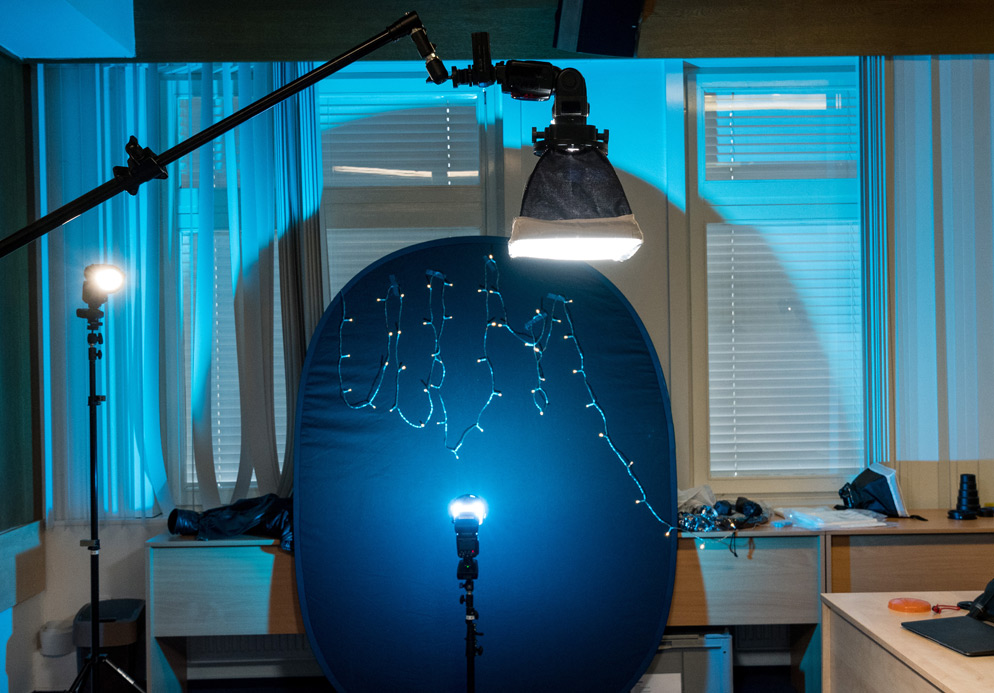
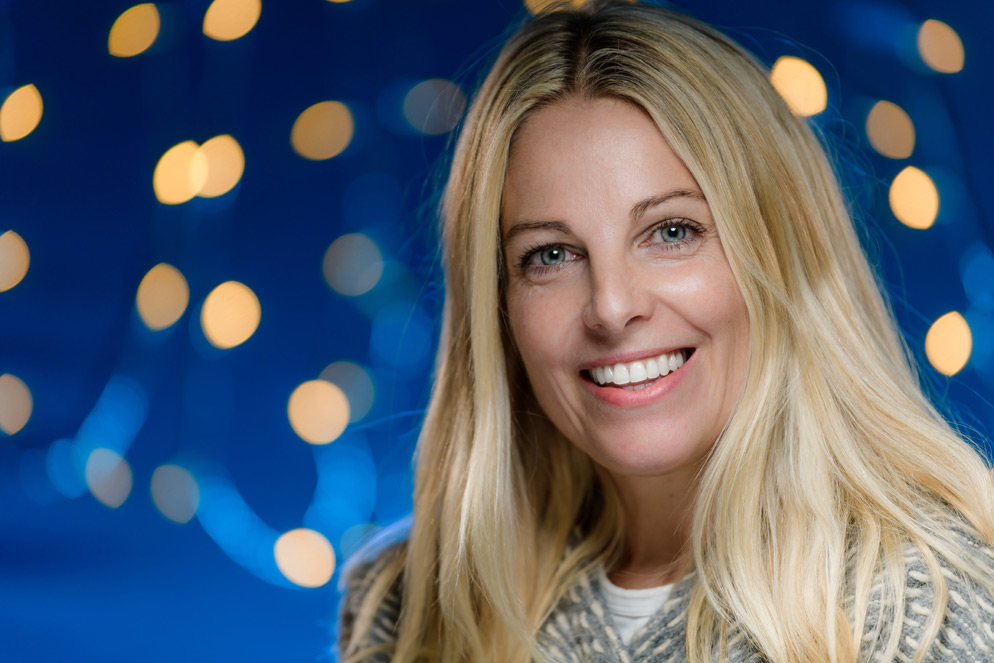
The useful distinction is visible: the face has its own illumination while the small background lights become soft shapes. This controlled multi-light portrait is not a starting recipe for moving children. The 1/20-second exposure can allow motion blur or ambient ghosting in a different scene; select shutter speed for your subject, then rebuild the light balance.
Continuous LED Lighting
Continuous LED lights are helpful because you can see the light before taking the photo. They work well for families, children, and hybrid photo/video sessions.
Use LEDs when:
- You want a stable setup for mini sessions.
- You need the subject to see the light direction.
- You are capturing short video clips alongside photos.
- You want to avoid flash distractions.
Watch for:
- Color mismatch with tree lights or lamps.
- Lights placed too low, which can create unnatural shadows.
- Harsh shadows from small LED panels, and flicker or bands at some shutter settings. Test your actual lights and camera.
- Reflections in ornaments, glasses, or shiny gift wrap.
Soften continuous lights with a modifier when possible. A source that appears larger from the subject’s position generally produces softer shadow edges. The modifier and its distance both matter.
Fireplace Light
Fireplace light adds a warm story element, but it is uneven and can shift quickly. Treat it as atmosphere, not your only portrait light.
Practical setup, following the fireplace manufacturer’s clearance requirements:
- Keep people, light stands, cables and props outside the required clearance area; do not move a child closer to heat for the photograph.
- Use a soft side light or window as the main face light.
- Let the fireplace glow appear in the background or side of the frame.
- Watch for orange color casts on skin.
- Keep children and props at a safe distance.
If the fireplace is decorative or electric, test how it photographs. Some displays look realistic to the eye but flicker or band on camera.
Candle and Lantern Lighting
Candles and lanterns create mood, but they need care. For family and child sessions, use flameless candles with secured battery compartments and keep loose batteries out of reach.
Use candle-style light for:
- Detail shots.
- Cozy close-ups.
- Background atmosphere.
- Table scenes.
- Storytelling images with hands, books, or ornaments.
Avoid relying on small candles as the only face light. They can create deep shadows, strong color casts, and unsafe setups.
Outdoor Christmas Lights
Outdoor displays are darker than they look to the eye, so camera stability and subject light matter.
Outdoor approach:
- Arrive before the sky is completely black when possible.
- Place subjects where display lights create background interest.
- Add a small soft light for faces, or bounce flash only when a nearby neutral surface is available.
- Keep shutter speed high enough for people.
- Raise ISO as needed rather than letting faces blur.
If you want more winter location ideas, read outdoor winter Christmas photography.
Managing Mixed Color Temperatures
Christmas scenes often mix daylight, warm string lights, lamps, fireplaces, LEDs, and flash. Mixed color can be beautiful, but it can also make skin hard to edit.
Ways to manage it:
- Turn off overhead lights that add green or yellow casts.
- Keep one main light source for faces.
- Set white balance for skin first.
- Let background lights stay warm.
- Avoid placing warm and cool lights equally across the face.
- Use gels if you need flash to blend with warm ambient light.
Do not chase perfect neutral color everywhere. Holiday images can be warm. Just protect skin tones.
Lighting Setups by Session Type
- Indoor mini sessions: Controlled soft key light with tree lights as background
- Lifestyle family session: Window light plus reflector or gentle fill
- Couple portrait near tree: Soft side light, subject separated from tree
- Fireplace portrait: Main light on faces, fireplace as warm background
- Outdoor display portrait: Ambient exposure for lights, soft added light for subjects
- Detail photos: Wide aperture, careful focus, holiday lights in background
Common Christmas Lighting Mistakes
- Letting tree lights become the only face light.
- Using overhead room lights that create poor color.
- Placing subjects too close to the background lights.
- Forgetting that children need a safer shutter speed.
- Overpowering the scene with flash.
- Allowing shiny props to reflect light into faces.
- Editing every session differently because lighting changed too much.
Delivery Note for Lighting-Heavy Galleries
Holiday lighting galleries often include different moods: bright family portraits, warm detail images, tree bokeh, fireplace scenes, and outdoor lights. Organize those images so clients can enjoy the variety.
SendPhoto's gallery delivery and password protection let you present the finished set and gate gallery access with a password. A shared password is not an identity check and can be forwarded; agree separately who may receive the link and whether any images may be published.
FAQ
How do you photograph people with Christmas lights?
Use the Christmas lights as background atmosphere and light the person with a window, softbox, bounced flash, or LED. Create distance between the subject and lights for softer bokeh.
What settings should I use for Christmas light photography?
Start with a wide aperture, a shutter speed safe for your subject, and ISO high enough to preserve the ambient glow. Adjust based on whether the subject is still, moving, indoors, or outdoors.
Should I use flash for Christmas portraits?
Flash is useful when you need clean faces and consistent results. Balance the ambient lights first, then add softened flash at a level that lights the subject without erasing the holiday mood.
How do I fix mixed lighting in Christmas photos?
Choose one main light for faces, set white balance for skin, and let background lights stay warm. Turn off overhead lights if they create unpleasant color casts.
Are Christmas tree lights enough for portraits?
Usually no. Tree lights create atmosphere, but they are rarely strong or even enough for flattering portraits. Add a controlled face light for better results.