Organization

Collections That MirrorHow Clients Think

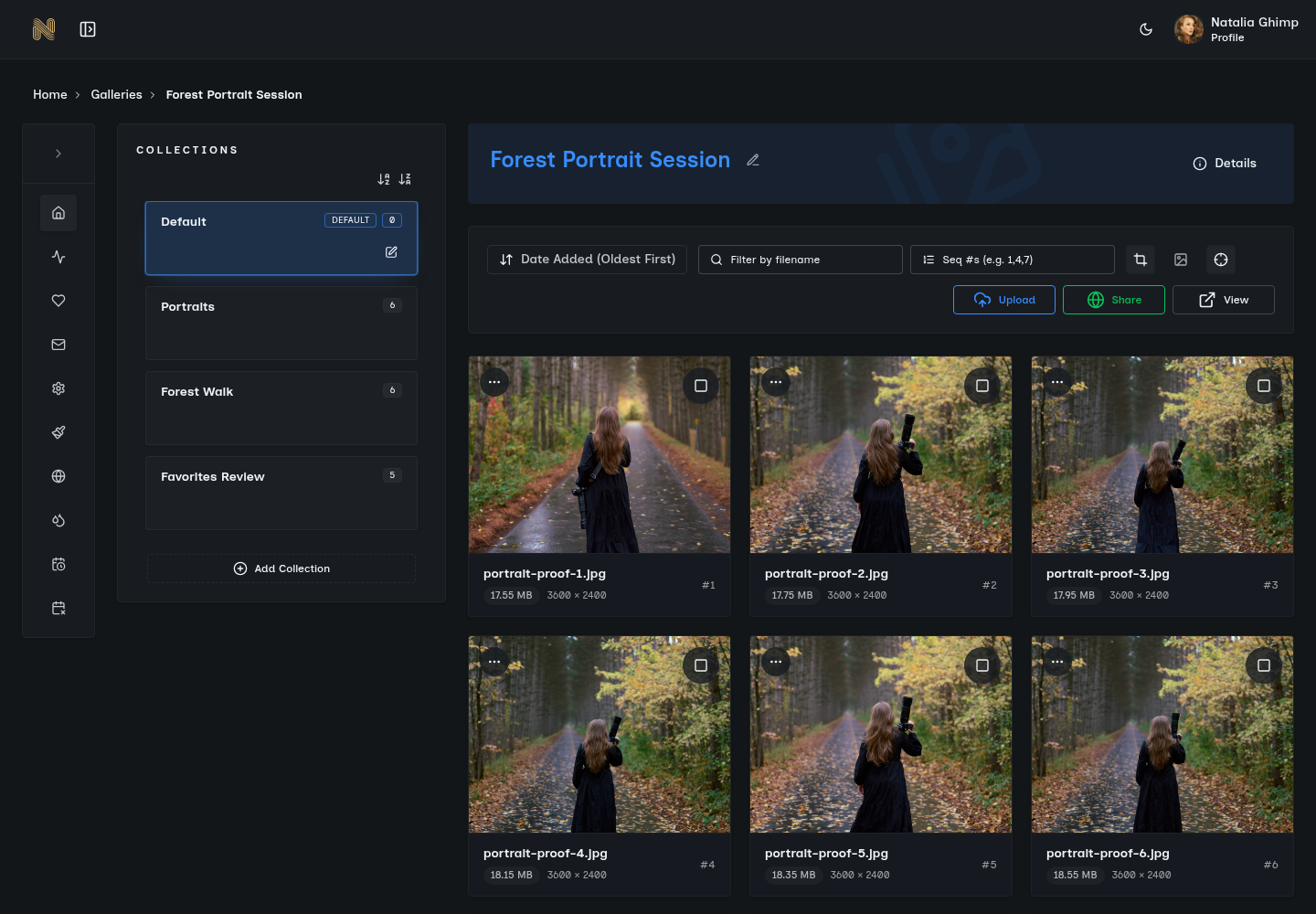
Stop dumping 500 photos into one overwhelming gallery. Organize by moments, styles, or phases—all within a single link. Your clients find what they need instantly without endless scrolling.

Unlimited collections per gallery
Drag-and-drop organization
One link, perfect organization
The Problem

The Gallery Organization Nightmare

The Overwhelming Dump

Dumping 500 photos into a single gallery creates decision paralysis. Clients want "those sunset portraits" but face endless scrolling. They give up, download nothing, and your carefully curated moments get lost in a sea of thumbnails.

The Multiple Gallery Mess

Creating separate galleries for ceremony, reception, and portraits means sending multiple links. Clients get confused about which link contains what. You waste time managing duplicate workflows. One gallery gets shared, the others forgotten.

Lost Context

Traditional folder structures make clients lose the narrative. They can't see how the morning prep flows into the ceremony, into the celebration. The story of their day becomes disconnected file collections. Context matters.

Manual Organization Hell

Platforms that require manual sorting after upload add hours to your workflow. You've already organized photos during editing. Why recreate that work in a clunky web interface? Your time is too valuable for duplicate effort.

The Hidden Cost

Poor organization doesn't just frustrate clients—it reduces engagement. Studies show galleries with clear organization see 67% more downloads and 3x more social sharing than unorganized dumps. When clients can't find what they want, they stop looking. And stopped looking means stopped sharing your work.

The Solution

Organization That Just Works

SendPhoto Collections organize photos the way humans actually think. Create collections for different shoot moments, event phases, or photo styles—all within a single gallery link.

Unlimited Collections

Create as many collections as you need. Morning prep, ceremony, cocktail hour, reception—organize your way.

Automatic From Upload

Upload folders become collections automatically. Your editing organization flows straight through.

Browse or View All

Clients choose: jump to specific collections or scroll through everything chronologically.

Drag-and-Drop Reordering

Change your mind about collection order? Drag and drop to reorganize. Want "Portraits" first instead of "Ceremony"? Move it. Your gallery, your story flow, your control.

Maintains Context Across Moments

Collections show clients the narrative of their day while letting them focus on specific moments. They see the full story but can jump to what matters most. Organization meets storytelling.

One Link Serves Everything

No multiple links to manage. Share one URL. Clients access perfectly organized collections without juggling separate galleries. Simplicity for everyone.

Collection-Specific Downloads

Clients download individual collections or the full gallery. Marketing manager needs just the keynote photos? They download that collection. Bride wants everything? One click. Flexible access that respects their needs.

See It In Action

Corporate Event Photography

How Marcus organizes a multi-phase event with one link

1

The Event

Marcus photographs TechCorp's annual conference: morning keynotes with the CEO, afternoon breakout sessions across multiple rooms, and evening networking reception. Three distinct phases, different lighting, different energy.

2

Organization During Editing

Marcus creates three folders while editing: "Morning Keynotes" (127 photos), "Breakout Sessions" (89 photos), and "Evening Reception" (156 photos). This is his natural workflow—organizing by event phase makes editing easier.

3

Upload to SendPhoto

Marcus drags all three folders into SendPhoto. The folders automatically become collections—zero manual reorganization. He adds custom cover photos for each collection and reorders them to match the event timeline.

4

The Client Experience

The marketing manager receives one gallery link. She shares it with the CEO, who browses straight to the keynote collection for LinkedIn posts. The PR team downloads just the reception photos for the press release. The HR director grabs everything for the internal newsletter.

The Outcome

One link. Three organized collections. Zero confusion. Everyone finds exactly what they need. No one asks Marcus "which gallery has the keynote photos?" because the organization is obvious and intuitive.

What Marcus Avoided:

  • Sending three separate gallery links (confusing for the client)
  • Dumping 372 photos into one unorganized gallery (overwhelming to navigate)
  • Manually recreating his folder structure in a web interface (wasted time)
  • Support questions about which photos are where (zero client confusion)

How Collections Work

Powerful features, zero complexity

Automatic Collection Creation

When you upload folders to SendPhoto, they become collections automatically. No manual sorting, no recreating your organization. Your editing structure flows directly into your client gallery. Upload structured, deliver structured.

Flexible Viewing Options

Clients can browse collection by collection or switch to "View All" to scroll through everything chronologically. The choice is theirs. Some want to jump to specific moments. Others prefer the full narrative. Your organization adapts to their preference.

Custom Cover Images

Each collection can have its own cover image. Choose the perfect representative shot for "Ceremony" or "Reception." Collections display with their cover, image count, and name. Visual navigation that feels intuitive.

Nested Organization Support

Need subcollections? Upload nested folders and SendPhoto preserves the hierarchy. "Wedding" can contain "Bride Prep" and "Groom Prep" subcollections. Organize as deeply as you need. Complex shoots, simple delivery.

Selective Downloads

Every collection has its own download button. Clients can download individual collections as ZIP files or grab the entire gallery. Marketing teams download just what they need. Families download everything. Flexible access for different needs.

Organization Shouldn't Be Overhead

You already organized photos during editing. SendPhoto preserves that work so clients get perfect organization without you recreating it. Smart organization, zero duplicate effort.

Unlimited collections
Automatic organization
One link per gallery
built by phothor team