A small headshot delivery and a full wedding gallery need different handoffs. Email, transfer links, cloud folders and galleries can each work when they fit the task.
Make the file set, access period and next action clear, and keep a separate backup of the finished work.
This guide covers how to send photos to clients, how to deliver high-resolution files without losing quality, when free methods are good enough, how proofing changes the workflow, and what wedding photographers should do differently from smaller portrait or event shoots.
Quick Answer: How Do Photographers Send Photos to Clients?
Use a transfer or cloud folder for straightforward file access; use a client gallery when visual browsing, collections and presentation help the recipient. There is no single best method for every job.
A repeatable workflow is: agree the deliverables, export the edited set, check the files, configure the chosen sharing method, and send clear instructions. Confirm receipt when it matters.
Best Ways to Deliver Photos to Clients
Different delivery methods work for different job sizes. Sending 10 edited headshots is not the same as delivering a 700-image wedding gallery.
Email attachments
Useful for a few files that fit the sender and recipient attachment limits. An attachment can retain its resolution, but check whether the mail app resizes it and whether the total message size is accepted.
Transfer links like WeTransfer
Useful for a one-off batch when the client mainly needs to save files. Check the chosen service and plan for transfer size, availability period and access options before sending.
Compare WeTransfer alternativesCloud folders like Dropbox or Google Drive
Useful for file access and collaboration, especially when the client already uses the service. Check recipient permissions and account requirements for the exact sharing mode, and give folders clear names.
Compare Google Drive alternativesPrivate client galleries
Useful when clients need visual browsing, collections and a branded presentation before downloading. Configure access and downloads deliberately; a gallery is not inherently private.
How to Send Photos to Clients for Free
Free delivery can work for small projects if the actual plan meets the file size, storage, access and availability requirements. Price alone does not determine privacy or reliability.
Free methods usually fall into three categories: transfer links for temporary delivery, cloud-storage folders for raw file access, and gallery or image-hosting plans with included storage or controls.
Check storage capacity, upload or transfer allowances, supported file types, link duration and access controls separately. A storage allowance is not necessarily a monthly upload allowance. Review current plan terms rather than assuming every free service has the same restrictions.
If you are actively comparing included options, start with best free photo hosting for photographers and the ImgBB alternative comparison.
How to Send High-Resolution and Edited Photos Without Losing Quality
Resolution depends on the exported file and any processing applied during delivery, not on whether the file travels as an attachment, a transfer or a gallery download.
Deliver edited photos, not export chaos
Final delivery should happen after culling and editing are complete. Clients should not have to decode filenames, wonder which files are finals, or sort through duplicate exports.
Check the actual downloaded file
Bulk downloads can make a large set easier to save, but ZIP packaging does not restore missing pixels or undo JPEG compression. Keep previews separate from the agreed final exports and inspect the delivered files, not just the browser preview.
Example export specification
For an illustrative portrait job, you might agree 20 final JPEGs in sRGB at 6000 by 4000 pixels, plus a separate 2048-pixel-long-edge web set. Those are example requirements, not universal settings or files we tested. Keep the two sets clearly named and confirm any print lab or commercial specification before export.
At 300 pixels per inch, a 6000 by 4000 pixel image corresponds to 20 by 13.3 inches before cropping. Changing only the PPI metadata does not add image detail. Check pixel dimensions, color profile, filenames and file count in the actual delivered set; do not assume the browser preview represents the original.
Use delivery controls, not manual workarounds
Set download availability and quality for the delivery stage. Record the promised access date and arrange to end sharing yourself unless you have verified an automatic expiry feature. Disabling access cannot recall files already saved.
How to Send Photo Proofs and Client Galleries
Proofing is different from final delivery. When clients still need to choose favorites or confirm selects, the gallery should make browsing easy while keeping final downloads under control.
- Upload the edited shortlist or proof set into a structured gallery.
- Group images into clear collections so clients can review by scene or moment.
- Use watermarks to label proof images if helpful; they do not prevent copying or screenshots.
- Ask the client to confirm selected filenames and the intended use. A like alone is not final approval; enable the agreed delivery settings after confirmation.
- When reusing a gallery for finals, label the new stage clearly and check that obsolete proofs or unintended downloads are no longer exposed.
A gallery can keep browsing and delivery together. Collections are organizational groups, not separate private compartments. If different recipients must not see the same images, use separately controlled galleries.
How to Deliver Wedding Photos to Clients
Wedding deliveries may include many images and several audiences. Agree what the couple receives, what may be shared with family or vendors, and when each set will be ready.
- Organize by event segment: Getting Ready, Ceremony, Portraits, Reception, Details.
- Agree any sneak-peek deadline: Offer an early highlight set only when it fits your contract and capacity; do not promise a universal 24-to-48-hour turnaround.
- Keep the final gallery simple: one gallery link, one password if needed, one obvious full-download path.
- Agree shared access: decide which recipients may see or download which images, rather than assuming the couple wants every file circulated.
- State the availability period: give the couple time to save the files and keep your own backup separately.
Use clearly named event collections and a delivery note that states the final file set and availability date. A transfer link can still work if it meets those agreed needs.
Step-by-Step: A Cleaner Delivery Workflow with SendPhoto
Step 1: Export the final edited set
Finish culling and edits first. Export the actual delivery set, not a working folder full of near-duplicates or draft versions.
Step 2: Organize by collection before upload
Build the gallery around how clients think, not how your hard drive is named. Separate portraits, ceremony, reception, or proofing rounds before the upload begins.
Step 3: Add the right controls
Enable passwords when privacy matters, set download rules where needed, and decide whether proofing or full delivery is the next client action.
Step 4: Review the gallery like a client
Check the gallery on desktop and mobile. Make sure the collections are obvious, the first screen looks polished, and the download path is easy to understand.
Step 5: Send one clear delivery email
Send the gallery link, password instructions through the agreed channel, the download option and the availability date. Ask the client to contact you if access or saving fails.
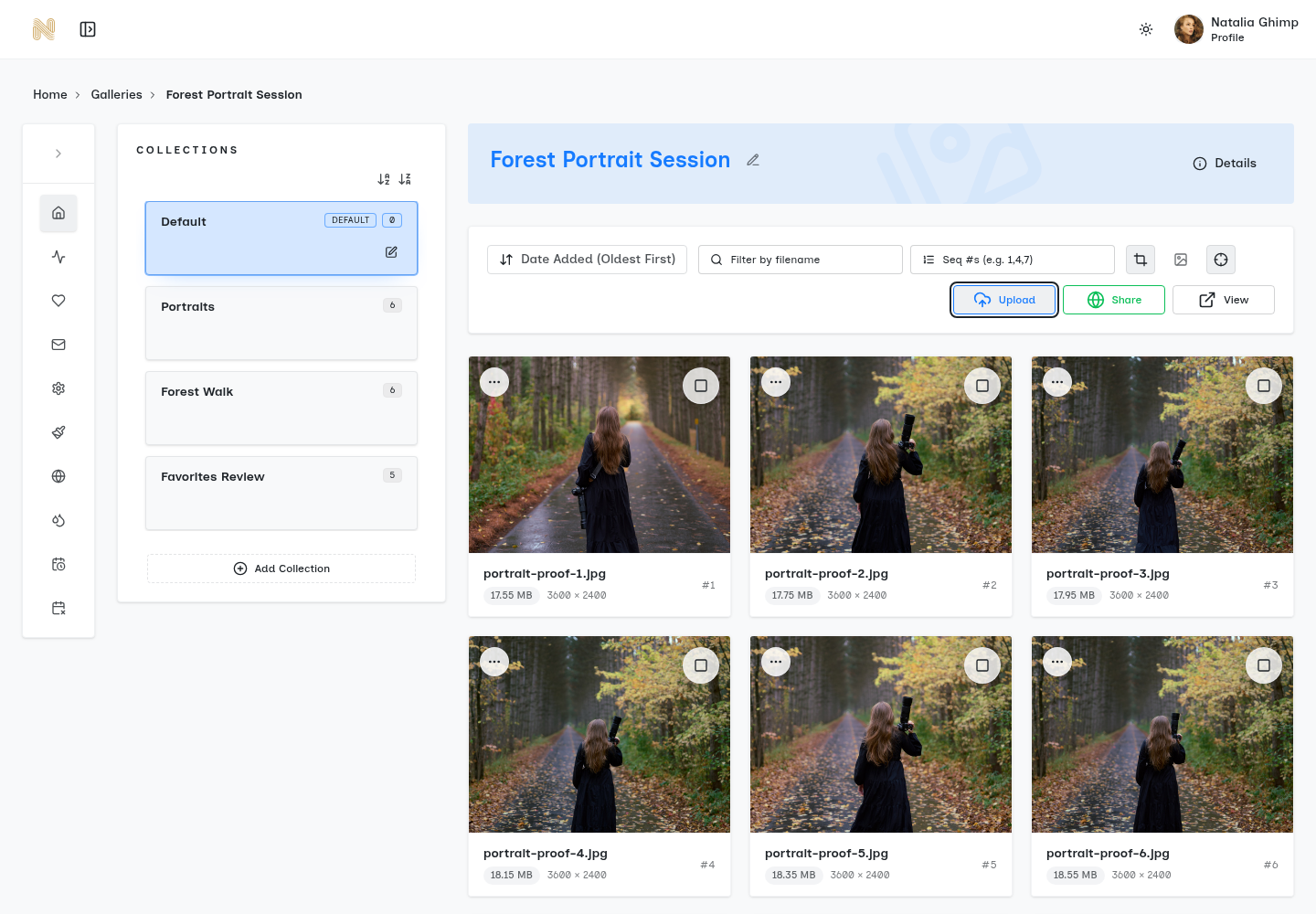
For the illustrative portrait job above, put the agreed files into clearly named collections, configure access and downloads, and confirm the client has the intended set. A password gates access but can be forwarded with the link. Download restrictions do not prevent screenshots or sharing of files already saved.
Delivery email principles
State whether these are proofs or finals, how to obtain the password, which downloads are enabled and how long access is promised. The sample below is wording to adapt, not a message sent by SendPhoto.
Subject: Your gallery is ready
Your final photos are ready at the gallery link in this message. I will share the password through our agreed channel. Downloads are enabled; please save the files before our agreed availability date. Let me know if you cannot open the gallery or save the files.
Common Photo Delivery Mistakes
Treating transfer tools like client galleries
Fast transfer links are useful, but they are not the same as a gallery workflow. Once delivery becomes repeatable, clients need browseable structure and stable access.
Sending high-resolution files one by one
This creates confusion, missed files, and unnecessary support. High-resolution delivery should happen through one organized handoff.
Mixing proofs and finals without clear rules
Proofing and final delivery are different states. If clients cannot tell which files are for review and which are final downloads, the workflow feels unfinished.
Making clients learn your storage setup
Clients should not need to understand your folders, naming rules, or storage platform. Delivery should feel obvious the first time they open the link.
Final Takeaway
Choose the method that fits the recipient and deliverables. A gallery helps when visual browsing and presentation matter; a transfer or folder can be enough for a simple file handoff.
Keep exports, access settings, approvals and availability promises explicit. A useful delivery workflow makes the next step clear without promising privacy or file completion that you have not verified.
Continue with gallery delivery, download controls, and pricing.
How to share photos with clients
A shorter guide to the simplest sharing flow.
Best client photo delivery platforms
A broader tools shortlist for photographers.
Best free photo hosting for photographers
A practical starting point for included hosting options.
ImgBB alternative
A focused comparison for lightweight image hosting.
Google Drive alternative
A focused comparison for cloud-folder delivery.
WeTransfer alternative
A focused comparison for temporary transfer links.
A better way to deliver client photos.
SendPhoto helps photographers turn finished work into private, branded galleries with passwords, watermarks, and download controls.
No credit card. Clients open the gallery without an account.