
Plan a Public Preview
Choose Instagram photography ideas that fit the work you can share: a short image sequence, details from a shoot, an explanation of your process or a preview of a finished gallery. Start with the purpose and publication permission, then select the photographs.
One session can supply portraits, details and context for several different posts. Reuse only what the client has agreed may be public, and keep the complete delivery separate. A public preview is a selection decision; it does not need to disclose the whole session.
This is an evergreen planning guide, not a ranking of currently popular formats or a report of measured engagement. The ideas are proposals to adapt to your work. The credited photographs illustrate scene and detail choices; they are not our client session or an Instagram performance test.
Six Visual Approaches to Adapt
1. Carousel Storytelling
An image sequence lets you show context and variation alongside a main photograph. Try this structure for a wedding, family session, brand shoot, travel set or creative portrait series. It is a storyboard, not a claim that a particular slide count increases reach.
Use these roles when choosing a sequence; combine or omit roles when the story does not need them:
| Slide | Purpose | Example |
|---|---|---|
| 1 | Introduce the subject | Strong portrait, bold detail, emotional moment |
| 2 | Set the scene | Wide frame of location or environment |
| 3 | Add context | Behind-the-scenes, detail, prop, outfit |
| 4 | Show variation | Different crop, pose, or expression |
| 5 | Add texture | Detail shot, movement, hands, light |
| Final | Leave a clear memory | Favorite frame, closing portrait, or simple call to view more |
Do not include every good frame. A carousel is a public edit, not the full client gallery.
A Scene-and-Detail Example
Here is a proposed two-frame order using existing published photographs. It demonstrates framing roles, not an actual posted carousel. Both photographs are credited to Dezerae Jobe in Adobe’s engagement photography article; we do not infer the shoot’s location, camera settings or client permissions.
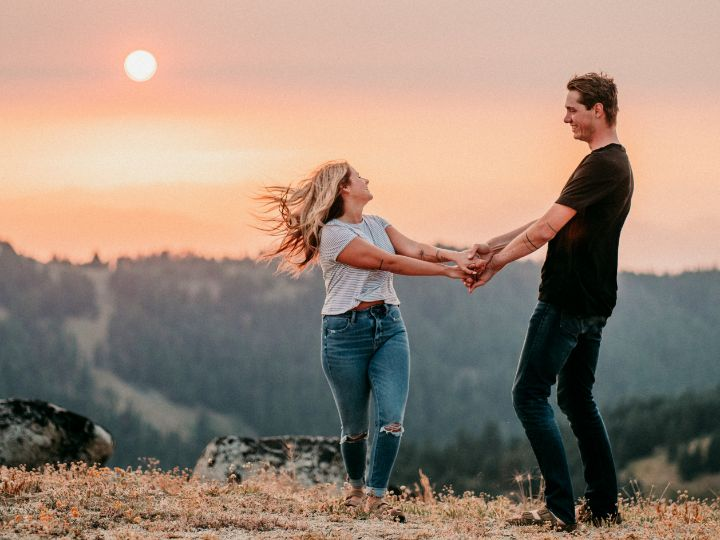
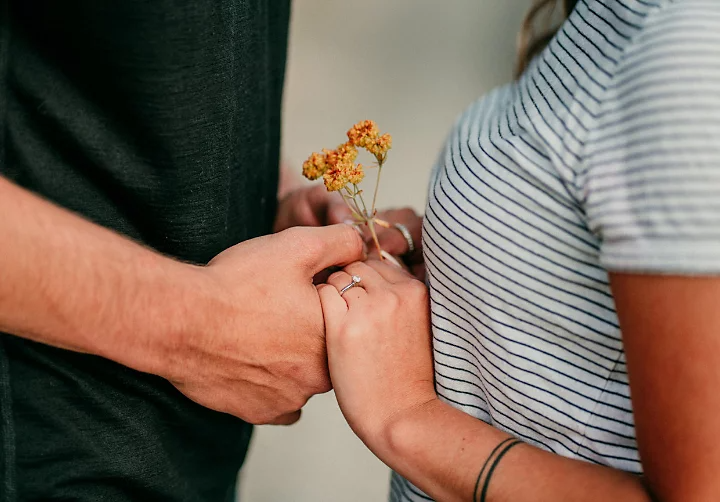
For your own set, ask whether each frame adds something the previous one did not. Use your publication-approved photographs and preview every crop in the posting tool before sharing.
2. Curated Photo Dumps
A loosely arranged selection can show the mood around a shoot alongside finished hero images. Curate it deliberately: include an image because it adds context, not because the label “photo dump” excuses publishing everything.
Useful photo dump ideas for photographers:
- A day-in-the-life sequence from prep to delivery.
- Behind-the-scenes frames from a brand shoot.
- Travel details from an elopement location.
- A month of favorite light, locations, and small moments.
- A client-safe preview from a family session.
- Studio textures: fabric, props, color tests, gear, contact sheets.
Keep the edit consistent enough to feel intentional. The images can be casual, but the selection should not feel random.
3. Social Crops Planned at the Shoot
Plan a few optional frames for the intended publishing surface while prioritizing the commissioned deliverables. Leave room to crop instead of assuming that every feed, profile, Story or Reel cover displays the same frame.
During a session, capture:
- Vertical portraits with enough space for the feed crop you choose.
- Taller frames for a Story or slideshow, leaving important details clear of interface overlays.
- Wide negative-space images for banners or text overlays.
- Detail frames that can break up a carousel.
- Short behind-the-scenes clips if the client has agreed.
These are capture-planning roles, not a complete list of current Instagram format limits. Check the selected surface and any scheduling tool before exporting. Adobe’s Instagram editing lesson demonstrates a square crop in Lightroom mobile as one option. Our Instagram photo-editing workflow covers a documented crop example and a proposed separate social export.
4. Behind-the-Scenes With a Purpose
Give a behind-the-scenes post a clear job: explain a lighting choice, show a location option or describe a posing prompt. A process image can make the explanation concrete; it does not by itself prove client satisfaction or increase trust.
Good behind-the-scenes ideas:
- A pullback showing the simple location behind a polished portrait.
- A before-and-after edit that stays honest and tasteful.
- A short sequence showing how you direct hands, movement, or posture.
- A packing list for a seasonal session.
- A quiet moment showing the transition from shoot to gallery delivery.
Check permission before publishing identifiable people, client names or unreleased work. A detail or setup frame can still reveal faces, locations, paperwork, product launches or children. Review the background and remove information you do not have permission to share; use your own test frames where appropriate.
5. Cinematic Mini-Sequences
Instead of posting one cinematic image, build a short sequence that feels like a scene. Start wide, move closer, show a detail, then end on a portrait or quiet moment.
Consider this sequence for:
- Engagement sessions.
- Editorial portraits.
- Elopements.
- Brand campaigns.
- Travel photography.
- Seasonal family sessions.
Use consistent color and pacing. A cinematic post does not need heavy filters. It needs a clear mood.
6. Editing That Fits the Subject
Choose a treatment that suits the commissioned work and the subject. Preserving texture and believable color is one option; a deliberate stylized grade may suit another project. This is an editing choice, not evidence that photographers as a group are moving toward one look.
That can mean:
- Softer contrast.
- Less aggressive skin smoothing.
- Film-inspired grain used sparingly.
- Natural greens and skin tones.
- Warmth that matches the actual light.
- Black-and-white frames mixed into a sequence.
Compare the treatment across the selected frames. Keep a consistent intention without forcing mixed lighting, different skin tones or product colors into one preset. Preserve your source files and the agreed client edit separately from social versions.
How to Turn One Client Session Into Instagram Content
The following are proposed repurposing plans, not accounts of client sessions we performed. Use only the items approved for public release, and avoid including a private gallery URL in a public caption.
Example: Family Session
- Carousel: a proposed six-image selection with different roles, shortened when fewer images tell the story.
- Story: behind-the-scenes location clip and one finished preview.
- Reel or slideshow: vertical sequence with movement and detail frames.
- Educational post: what to wear for a relaxed family session.
- Gallery link: send the complete set through the agreed restricted-access delivery channel.
Example: Brand Session
- Carousel: final campaign images in order of use case.
- Detail post: props, product textures, workspace, hands.
- Behind-the-scenes post: lighting setup or location scouting.
- Short slideshow: before, shoot, final gallery.
- Client handoff: branded gallery with organized collections.
Example: Wedding or Elopement
- Carousel: small preview with portraits, details, and one emotional moment.
- Story set: venue, florals, reception details, couple portrait.
- Slideshow: short highlight sequence from the day.
- Blog or gallery link: use a separate public page only when the complete story is approved for publication.
- Client delivery: configure the gallery’s access and download settings before sharing through the agreed channel.
Instagram Planning Checklist for Photographers
Before posting, use this prospective checklist:
- Confirm client permission for any public images.
- Choose the purpose: portfolio, education, story, teaser, or announcement.
- Select fewer images than you think you need.
- Put the strongest image first.
- Mix wide, medium, detail, and candid frames.
- Keep crop ratios consistent enough to feel clean.
- Write a caption that adds context without explaining every frame.
- Use an approved public portfolio or booking destination; send private delivery links only to the intended recipients.
After posting:
- Save the final social selects in a dedicated folder.
- Keep the full-resolution client files separate from social exports.
- Reuse the same session later from a different angle, such as wardrobe, location, or lighting.
- Record comparable posts, dates, audience responses and relevant inquiries if you evaluate results. Compare several posts and note differences in subject or timing rather than attributing one result to a format alone.
Caption Ideas That Fit Photography Posts
Captions should match the work. Some images need a story. Others need almost nothing.
Use short captions for:
- Photo dumps.
- Mood-led carousels.
- Travel sets.
- Personal work.
- Behind-the-scenes snippets.
Use longer captions for:
- Educational posts.
- Session planning advice.
- Client experience stories.
- Brand campaign context.
- Seasonal booking notes.
Example caption wording to adapt only where the description is true and approved for publication:
- "A few frames from a quiet morning session."
- "The full gallery had so many small in-between moments. These were the ones that stayed with me."
- "Three things that made this session work: soft light, simple styling, and enough time to slow down."
- "A small preview of the session. The complete set is for the client."
- "The final image is my favorite, but the details made the story."
Public Preview Versus Full Gallery
Use Instagram for an approved public selection and a separate delivery channel for the agreed client files. Publishing permission, recipient access and download settings are different decisions. A client’s ability to receive photographs does not mean every image should appear publicly.
Use public posts for:
- Portfolio highlights.
- Teasers.
- Behind-the-scenes moments.
- Education.
- Brand visibility.
- Seasonal inspiration.
Consider a gallery with deliberately restricted access for:
- Complete client delivery.
- Family or event images that are not approved for a public feed.
- The agreed downloadable files, with quality and watermark settings checked.
- Organized collections.
- Password-protected access.
- Photos and videos that should not live in a public feed.
SendPhoto includes collections, optional gallery passwords and gallery/applicable collection download controls. Collections organize one gallery; they do not create separate client passwords. Anyone given the link and password may forward them, and disabling downloads or adding a watermark does not prevent screenshots.
For photo downloads, Original with the watermark disabled for the collection uses the uploaded source; Original with the watermark applied can use a generated marked image. Scaled down also uses processed images. Supply the agreed final files and keep an independent archive. These controls do not create your Instagram crops or automatically obtain publication permission.
Helpful next reads:
- Browse more ideas in the SendPhoto blog.
- Build a polished client handoff with gallery delivery.
- Manage client access with download control.
- Keep private sessions protected with password protection.
- For a broader delivery workflow, see how to send photos to clients.
FAQ
What Instagram photography trends should photographers focus on?
Choose approaches that fit your actual work and publication permission: image sequences, curated selections, process explanations, planned crops, short slideshows and an agreed editing treatment. These are ideas to evaluate, not a measured ranking of current trends.
Should photographers post full client galleries on Instagram?
Only publish the set approved for public release. Use a separate delivery channel for the agreed client files, especially when family, event or unreleased brand images should not be public. A password limits access to those who have it; it does not prevent recipients from copying or forwarding material.
How many photos should be in an Instagram carousel?
Use the images needed to tell the story within the posting tool’s current limits. Start with the storyboard roles above and remove repeated frames. A proposed six-frame plan is a creative starting point, not a platform maximum or evidence that six images outperform another count.
How can photographers keep Instagram posts consistent?
Use a consistent editing approach, repeat a few crop styles, mix similar types of frames in each sequence, and avoid rebuilding your visual identity around every temporary trend.