
Plan Around Light, Access and Warmth
Outdoor winter Christmas photography can create the kind of holiday images clients remember: breath in cold air, snow reflecting soft light, warm coats, evergreen trees, and real seasonal atmosphere. The challenge is that winter sessions also leave less room for improvisation. Cold clients, gray snow, dead batteries, slippery paths, and short daylight windows can quickly turn a beautiful idea into a stressful shoot.
The best outdoor winter sessions are planned around comfort, light, safety, and delivery. Scout the location, prepare clients for the cold, expose carefully for snow, keep the posing active, and have a clear backup plan before anyone arrives.
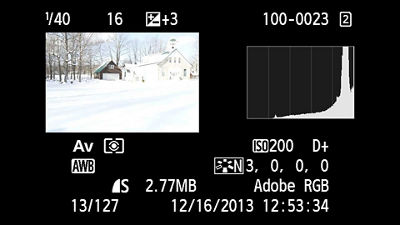
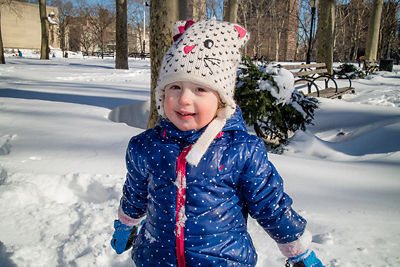
Use this workflow to plan an outdoor winter family or Christmas session, from scouting to delivery. The two examples are genuine Canon documentation images with source credits; they are not photographs or camera tests made for this guide.
Choose Locations That Work in Real Winter Conditions
A location that looks perfect in autumn may be difficult in snow. Scout with winter access in mind, not only visual appeal.
Good outdoor Christmas photo locations include:
- Tree farms with permission from the owner.
- Evergreen forests with clear paths.
- Snowy fields near safe parking.
- Historic downtown streets with holiday lights.
- Decorated front porches.
- Parks with reliable paths and restrooms nearby.
- Client homes with meaningful outdoor details.
Before confirming a location, check:
- Parking distance.
- Walking surface.
- Wind exposure.
- Restroom or warm-up options.
- Whether permits or fees are required.
- How busy the location gets during holiday season.
- Whether the setting still works without fresh snow.
For paid client work, get permission when using private farms, venues, storefronts, or managed properties.
Scout for Light Before You Scout for Backdrops
Winter light can be beautiful, but it changes quickly. The sun sits lower, shadows stretch farther, and some locations fall into shade earlier than expected.
Scout at the same time of day you plan to shoot. Take phone reference images from several directions and note where the sun will be during the session.
Look for:
- Open shade that keeps faces even.
- Backlight through bare trees or evergreens.
- Snow acting as a natural reflector.
- Buildings that block harsh wind.
- Backgrounds that stay clean after people walk through the area.
- Places where children can move safely.
If the session includes young children, avoid making the best light location the farthest point from the car. Comfort will matter more than a perfect backdrop.
Snow Exposure: Keep Snow White Without Losing Skin Detail
A snow-dominated frame can lead reflected-light metering to underexpose, but the result depends on the scene, focus point and metering mode. Inspect the first frame before applying a correction. A dark coat, a face and a field of white snow need not produce the same meter reading.
Use these conditional starting points, then reassess when the light or framing changes:
| Situation | Starting adjustment |
|---|---|
| Bright snow with overcast sky | If snow looks gray, try +1/3 to +1 stop, then check skin and highlight detail |
| Backlit snow portraits | Expose for skin, then check highlights |
| Full sun on snow | Watch clipping and protect faces |
| Dark coats against snow | Meter a consistent reference or use manual settings; do not assume a dark coat is a neutral reference |
| Falling snow | Use enough shutter speed for subject movement |
Check the histogram and highlight warnings rather than judging screen brightness alone. A bright snow scene can legitimately have much of its histogram toward the right; inspect important skin and snow detail when the graph reaches the edge. In Canon’s snow guide, the following camera display is explicitly an overexposure example.
Exposure compensation also depends on camera mode. The Nikon Z6 II/Z7 II manual explains that in manual mode it changes only the meter indication at fixed ISO; with Auto ISO, ISO can change instead. Consult your model’s manual. In full manual at fixed ISO, adjust shutter, aperture or ISO yourself while preserving the motion and depth of field you need.
A proposed practice exercise: in a safe location without waiting clients, keep a snow scene’s framing and metering unchanged and compare 0, +1/3 and +1 compensation in a supported auto-exposure mode. Record the resulting shutter, aperture and ISO, then compare snow texture and highlight warnings. Stop increasing exposure if important detail clips. This exercise has not been performed for this article.
For white balance, avoid making snow perfectly neutral in every frame. A slight cool tone can feel natural, especially in shade, as long as skin still looks healthy.
Cold Weather Gear Checklist
Cold affects both people and equipment. Bring enough practical gear that you are not solving basic problems while clients wait.
Photographer Gear
- Extra camera batteries kept in an inner pocket.
- Lens cloths and microfiber towels.
- Weather cover or plastic sleeve for snow.
- Gloves that allow camera control.
- Hand warmers.
- Backup memory cards.
- A small towel or blanket for kneeling shots.
- A simple reflector if snow is not providing enough fill.
Client Comfort Gear
- Hand warmers only where the product label permits the user’s age and intended placement, with adult supervision for children.
- A clean blanket for seated poses.
- Tissues for cold-weather noses.
- Extra mittens for kids between shots.
- A warm car or nearby indoor break point.
- Clear directions about footwear.
Nikon’s cold-weather guide recommends charged spares kept inside a coat and letting a bagged camera warm gradually when returning indoors. Follow your own camera and battery manuals for operating and charging temperatures. Do not promise that warming restores a particular runtime, use direct heat on batteries, or treat weather sealing as waterproofing.
For hand warmers, HotHands’ manufacturer FAQ cautions about direct skin contact and children’s heat sensitivity. Follow the product’s age restrictions, placement instructions and supervision requirements. Do not give them to a child to handle unsupervised or place them directly on skin. If the label does not permit that child’s use, leave them out. Warm clothing and an accessible indoor break remain the plan.
Wardrobe That Looks Good and Keeps Clients Warm
Outdoor winter styling should be practical first. A client who is freezing will tense up, rush the session, and show discomfort in every pose.
Recommend layers that photograph well:
- Thermal base layers under sweaters and coats.
- Wool coats, textured knits, scarves, and hats.
- Boots that can handle snow or wet ground.
- Coordinated colors rather than matching outfits.
- Gloves or mittens that work with the pose; keep them on when conditions or comfort require it.
Colors that usually work well outdoors in winter:
| Palette | Works well with |
|---|---|
| Cream, camel, brown | Evergreens, wood, neutral homes |
| Burgundy, forest green, navy | Snow, holiday decor, tree farms |
| Soft gray, denim, ivory | Overcast days and relaxed family sessions |
| Red accents | Christmas details when used sparingly |
These palettes are styling suggestions, not warmth ratings. All-white clothing can be intentional, but watch separation from snow. Avoid thin dress shoes if the location requires walking through snow or mud.
Posing Outdoors in Coats and Winter Layers
Winter clothing changes body shape and movement. Bulky coats can hide posture, so direct clients with simple prompts that create connection and shape.
Useful posing prompts:
- Walk slowly toward me and look at each other.
- Wrap the blanket around everyone and pull close.
- Hold hands and swing them gently.
- Stand shoulder to shoulder, then turn faces toward the light.
- Let the child lead the walk for a few steps.
- Bring noses close, then pause before laughing.
- Sit on the sled or blanket, then lean together.
For families, use brief prompts with safe footing and let the parent or guardian decide which activities suit the child. Walking, a blanket cuddle or an empty mug prop can give hands something to do. Movement is not protection against cold: schedule warm breaks and stop when anyone needs them. Use a sled only as a stable seated prop on level ground; skip it if footing or balance is uncertain.
Outdoor Christmas Props That Do Not Overwhelm the Session
Props should support the story, not become the story.
Good options:
- A plaid or neutral blanket.
- Battery lanterns.
- A small wreath.
- A stable sled used as a stationary seated prop on level ground, if appropriate for the clients.
- Empty mugs or a closed thermos as props; avoid hot liquid in a child’s pose.
- Simple evergreen branches brought with permission, rather than cut from the location.
- A small wrapped gift.
Avoid carrying too much. In winter, every extra prop becomes another thing to manage with gloves, wet ground, and cold clients.
Timing the Session
Winter sessions benefit from a clear timeline. The best light may be short, and client energy can drop quickly in cold weather.
Proposed order for a 35-minute booking, including time for warming breaks. This is a planning example, not a safe continuous outdoor duration. Shorten or stop it according to conditions and each participant’s needs:
| Time | Focus |
|---|---|
| 0 to 5 minutes | First portraits near the warm-up point; check clothing and comfort |
| 5 to 15 minutes | Main family portraits, with a warm break when needed |
| 15 to 25 minutes | Brief movement and smaller groupings, returning indoors between sets |
| 25 to 30 minutes | Optional details and props only if conditions remain suitable |
| 30 to 35 minutes | Optional final frame, or finish early |
Capture the must-have portrait first. Build warm breaks into the booking rather than waiting for discomfort, and leave optional props or extra groupings out when conditions change.
Backup Plans for Weather
Outdoor winter photography needs a backup plan before booking, not after the forecast changes.
Decide in advance:
- What temperature or wind conditions require rescheduling.
- Whether light snow is acceptable.
- Whether heavy snow, ice, or freezing rain cancels the session.
- Where clients can warm up.
- Whether there is a covered porch, greenhouse, barn, or indoor option nearby.
- How much notice clients will receive.
Check the local forecast, travel conditions and cold-weather advisories before leaving. The National Weather Service wind-chill guide explains that wind increases heat loss from exposed skin, that warning criteria are local, and that its chart requires extra caution for children and other vulnerable participants. Air temperature alone is not a universal safe-session threshold, and a chart does not guarantee anyone a safe outdoor duration.
Choose a conservative cancellation policy for the particular clients, clothing, location and warm-up access. Light snowfall can be workable only when travel, footing and comfort are suitable. Reschedule for unsafe roads, ice, severe conditions or inadequate shelter; obtain permission for any indoor fallback rather than promising access to a nearby building.
Editing Outdoor Winter Christmas Photos
Winter files often need careful color and exposure work.
Editing priorities:
- Keep skin tones natural.
- Lift exposure enough for clean snow.
- Preserve snow texture where possible.
- Remove blue or green casts from faces.
- Let shadows stay slightly cool if it fits the scene.
- Warm highlights carefully for a holiday feel.
- Avoid over-saturating reds and greens.
If the agreed creative treatment includes a snow overlay, label it as an edited effect when describing the example or session. Match perspective and light, and do not present added snow as the weather you photographed. A subtle overlay still cannot restore clipped original detail.
Delivering Seasonal Galleries
Holiday clients often need images for cards, family sharing, gifts, and social posts. Make the delivery easy to browse and download.
Useful gallery organization:
- Favorites or photographer highlights.
- Full family portraits.
- Kids.
- Couples or parents.
- Details and candid moments.
- Social crops if included.
SendPhoto supports named collections, an optional gallery password and photo downloads or ZIP delivery subject to the gallery and collection download settings. A collection is organization, not a separate password boundary; a password can be forwarded. Favorites record preferences, not formal approval. Label final card or print exports with their actual dimensions and intended use rather than assuming “Original” guarantees print suitability or an unwatermarked file.
Keep independent unmarked masters and agree an access deadline before delivery. Share expiration turns sharing off; deletion is a separate setting and cannot recall copies a client already downloaded.
Helpful next reads:
- Plan indoor and outdoor lighting with Christmas photography lighting techniques.
- Package seasonal sessions with the Christmas mini sessions guide.
- Add styling ideas from Christmas photoshoot props and styling.
- Deliver finished sets with gallery delivery.
- Manage file access with download control.
Outdoor Winter Session Checklist
One week before:
- Confirm location permission.
- Send wardrobe guidance.
- Share parking and walking details.
- Watch the forecast.
- Confirm backup plan.
One day before:
- Charge all batteries.
- Verify existing card files are backed up before any planned formatting; use spare cards if the backup is uncertain.
- Pack hand warmers and towels.
- Confirm session time and meeting point.
- Review must-have shots.
At the session:
- Start with important portraits.
- Use brief safe prompts without treating movement as cold protection.
- Check comfort regularly with clients and guardians; do not wait for visible discomfort.
- Take planned warming breaks and additional breaks whenever anyone needs them.
- Protect clean snow areas for wide shots.
- Shorten or stop when conditions, comfort or warm-up access are unsuitable.
FAQ
How do you expose outdoor winter Christmas photos in snow?
Assess the first frame and your metering mode. If snow looks gray, try a small positive correction in a supported mode and reassess skin and highlight warnings. No fixed compensation fits every scene. At fixed ISO in full manual, adjust the actual exposure settings rather than just the meter indication.
What should clients wear for outdoor winter photos?
Clients should wear warm layers, textured outerwear, boots that handle the location, and coordinated colors such as cream, camel, navy, burgundy, forest green, or soft gray.
How long should an outdoor winter session be?
Plan brief outdoor sets with accessible warm breaks, and prioritize the key portrait. There is no universal safe duration: consider wind, weather, clothing, age and individual needs. The 35-minute schedule above is a proposed booking structure, not permission to remain outside for that whole period.
What is the best backup plan for winter photography?
Agree a reschedule policy, an accessible warm-up point and a permitted indoor fallback where available. Check forecasts, travel and footing before departure. Cancel or reschedule if those arrangements are unsuitable; a nearby porch alone does not guarantee a safe alternative.