
Plan the photograph around the building
Architectural photography is about making buildings, interiors, and designed spaces look intentional. The goal is not only to make a structure look impressive. It is to show scale, materials, light, layout, and the choices made by the architect, designer, builder, or property team.
For beginners, the biggest improvements come from three habits: keep vertical lines controlled, choose better light, and plan a shot list before you arrive. Once those are in place, lenses, editing, and delivery become much easier to manage.
Architectural Photography at a Glance
- Perspective: level the camera and leave room for any later correction.
- Exterior light: choose the time for the facade and brief; soft or directional light can both work.
- Interior exposure: hold the composition steady and check both windows and shadow detail.
- Composition: show scale, materials and the way spaces connect.
- Delivery: group the approved files so clients can find the views they need.
Start With the Purpose of the Shoot
Before you choose a lens or camera setting, ask what the images need to do.
An architect may need images that show design intent, materials, and spatial relationships. A real estate team may need clear room coverage and exterior appeal. A hotel may need warm, inviting images that help guests understand the property. A contractor may need proof of workmanship, finishes, and details.
That purpose affects every decision:
- Which rooms matter most?
- Does the client need wide coverage, detail images, or both?
- Are people part of the story?
- Should the images feel editorial, technical, commercial, or warm?
- What crops are needed for website, press, social, or listings?
Control Perspective First
Perspective control is one of the defining skills in architectural photography. If the camera tilts up or down, vertical lines can converge and make the building appear to lean.
Basic approach:
- Put the camera on a tripod.
- Level the camera side to side and avoid pointing it upward or downward when you want vertical building edges to stay parallel.
- For a straight-on elevation, also face the wall squarely. A corner view can keep verticals upright while horizontal edges naturally recede toward vanishing points.
- When access permits, move back or choose a higher camera position to include the building without a strong upward tilt.
- Leave extra space around the building for editing corrections.
A shift lens can change framing while the camera stays level. Its tilt movement has a different job: changing the plane of focus. Nikon explains this distinction in its perspective-control guide featuring photographers Adam Woodworth and Graham Hobart. Neither movement is required to learn good composition.
You do not always need perfectly straight lines. A dramatic upward angle can work for creative images. For most client deliverables, though, controlled verticals make the work look more polished.
A real perspective-correction example
Adobe's Lightroom Classic perspective tutorial supplies this genuine before/after pair and annotated interface image. Adobe lists Matthias Heiderich as the contributor. These are Adobe's examples, not photographs or edits made for this guide.
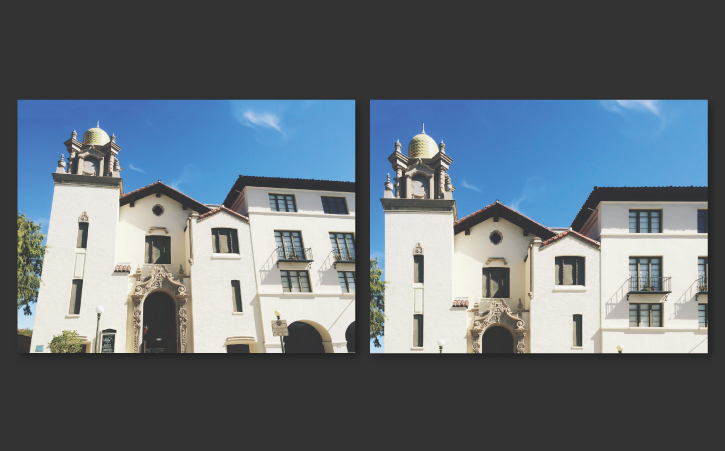
Open the comparison at full size. Correction changes the available framing as well as the lines; leave room around important edges when shooting.
Inspect the correction edges
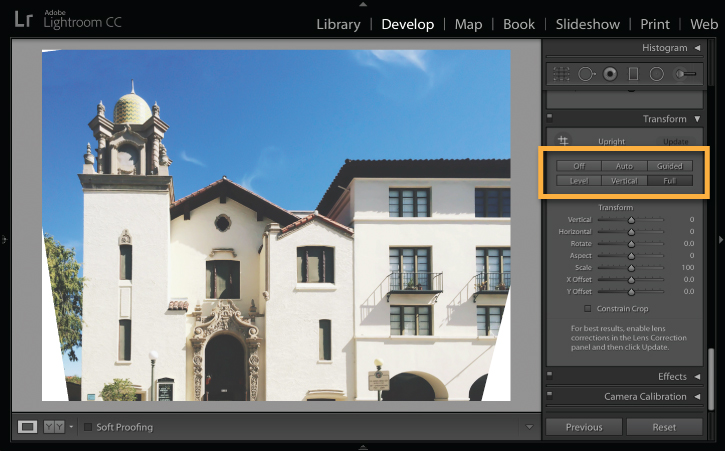
Inspect the Transform screenshot at full size. The blank wedges must be handled when framing the result. Cropping can remove wanted detail, so inspect the roof, ground and outer edges before accepting a correction.
Choose Light That Fits the Building
Architecture changes with light. A glass facade, brick wall, white kitchen, dark restaurant, and concrete lobby all respond differently.
Exterior light
Early and late light can add shape and warmth. Overcast light can reduce contrast and help with even documentation. Harsh midday light can work for bold shadows, but it can also create glare, blocked shadows, and blown highlights.
Scout the building if possible. Notice which side faces the sun, where reflections appear, and when parked cars or pedestrian traffic may become a problem.
Interior light
Interiors often mix window light, lamps, overhead fixtures, and dark corners. Turn on practical lights when they help the atmosphere, but watch for color conflicts. If a room has bright windows, use a tripod and consider bracketed exposures so highlights and shadows can be handled carefully in editing. Keep the framing, focus and aperture consistent between frames; vary exposure time and inspect for movement between exposures. A bracket is source material for a considered blend, not a promise that every window view should be as bright as the room.
Build a Useful Shot List
A good architectural shot list keeps the shoot focused and helps the client understand what will be delivered.
Exterior shot list
- Main facade from the strongest angle.
- Straight-on elevation if the design needs it.
- Corner angle showing depth.
- Approach or entry sequence.
- Exterior detail, such as signage, material, texture, or landscaping.
- Wider context showing the building in its surroundings.
Interior shot list
- Main room view from the cleanest corner.
- Reverse angle to show layout.
- Transitional spaces, such as stairs, hallways, and entries.
- Detail images of fixtures, materials, surfaces, and joinery.
- Views through doorways or frames.
- Human-scale image if people are part of the brief.
Delivery organization
For larger projects, organize final images into sections such as Exteriors, Interiors, Details, Amenities, Twilight, and Press Selects. Use SendPhoto's collections to group uploaded photos within a gallery. Keep image identifiers stable across review and final exports; for example, Project_Exterior_014_v02.jpg identifies both the view and revision.
Composition Techniques for Buildings
Architectural photography rewards patience. Small changes in camera position can clean up a frame.
Use these composition checks:
- Are vertical lines straight or intentionally angled?
- Is the camera centered when symmetry matters?
- Are furniture, trees, cars, or signs blocking important design elements?
- Is the corner of the room creating depth?
- Does the image show how people move through the space?
- Is there enough negative space for website or editorial crops?
If a frame feels cluttered, remove distractions before relying on editing. With the owner or site contact's agreement, move loose items, straighten chairs or adjust blinds. Wait for people or cars to pass when possible. Keep permanent fixtures and features that matter to the brief accurately represented.
Lenses and Gear
You can start with a camera, a sturdy tripod, and a wide lens. A wide lens helps show interiors, but working very close can exaggerate near-to-far size differences and stretch subjects near the frame edges. Lens distortion and perspective are different problems: changing viewpoint changes perspective, while a lens profile addresses optical distortion. Choose a camera position that represents the room honestly, then choose the focal length needed to frame it.
Helpful gear includes:
- Tripod for careful composition and longer exposures.
- Remote release or timer to reduce shake.
- Wide lens for interiors and tight spaces.
- Standard lens for details and more natural perspective.
- Polarizer for some reflections, used carefully.
- Level, grid display, or camera electronic level.
The shift function of a tilt-shift lens is useful when you need more of a facade in frame without tipping the camera back. Learn the leveling and framing habits first; the right lens depends on working distance, access and the views required.
Editing Architectural Photos
Editing should support clarity, not rewrite the building.
For a Lightroom Classic starting point, enable an appropriate lens profile, then compare the Transform panel's Auto and Vertical Upright options. Check the edges and proportions rather than accepting the strongest correction automatically. Adobe's Upright reference explains the automatic modes and crop controls.
Common editing steps:
- Correct vertical and horizontal alignment.
- Balance exposure across bright windows and darker interiors.
- Adjust color so materials feel believable.
- Remove small distractions when appropriate.
- Keep texture in surfaces such as wood, stone, brick, and fabric.
- Export crops needed for web, print, and social use.
Be careful with saturation and contrast. Architecture clients often care about accurate materials, finishes, and atmosphere.
Client Delivery and Privacy
Some architectural projects are public, while others involve private homes, unreleased hospitality spaces, or commercial work under review. Confirm who may receive the files, whether a public portfolio post is permitted and which spaces or details must be excluded. Access to photograph a property does not itself tell you the agreed publication scope.
For sensitive projects, use the gallery's password setting and give the link and password only to intended recipients. Configure download permissions and file quality for the delivery. A choice of which images to download is not the same as giving different viewers separate viewing permissions. Use separate galleries when recipient groups need different sets, and include only the files each group should see.
Passwords and download settings cannot prevent screenshots or onward copying of files already received. Keep originals backed up separately. The SendPhoto setup guide covers gallery creation, upload and sharing settings.
First Architectural Shoot Checklist
Before the shoot:
- Confirm the purpose of the images.
- Ask for priority spaces and must-have angles.
- Check sun direction and access timing.
- Prepare a tripod, batteries, cards, and lens cloth.
- Ask about privacy and sharing restrictions.
During the shoot:
- Level the camera.
- Shoot the strongest wide view first.
- Capture details after the main room views.
- Watch reflections, cords, bins, cars, and clutter.
- Leave room around edges for perspective correction.
After the shoot:
- Edit for straight lines and believable color.
- Group images by exterior, interior, details, and selects.
- Export versions for the client's intended use.
- Deliver the set in a way that is easy to review and download.
FAQ
What is architectural photography?
Architectural photography is the practice of photographing buildings, interiors, and designed spaces in a way that shows structure, light, materials, layout, and design intent.
How do I keep buildings from looking tilted?
Use a tripod, level the camera, keep vertical lines controlled, and avoid tilting up or down unless the angled perspective is intentional.
What lens is best for architectural photography?
A wide lens is useful for interiors and tight spaces, while a standard lens can make details and exterior views feel more natural. Avoid using an ultra-wide look when it distorts the room.
What should I deliver to an architecture client?
Deliver a complete set organized by the project needs, such as exteriors, interiors, details, amenities, twilight images, and final selects.
When the clean finals are approved, create a SendPhoto gallery organized around the client's brief, with clear file names and only the images intended for that audience.