
Introduction
Blurry photos are easiest to fix when you know what caused the blur. A slightly soft image can often be improved with careful sharpening, noise control, and local contrast. A photo with heavy motion blur, missed focus on the wrong subject, or severe compression usually cannot be turned into a truly sharp professional file.
Start by finding the cause, then compare a restrained edit against the original. This guide uses Adobe documentation and a credited Adobe example; it does not claim a controlled SendPhoto editing test. The goal is an acceptable image for its intended use, not a promise to recover missing detail.
First, Identify the Type of Blur
Before opening the sharpening panel, zoom to 100 percent and inspect the important detail: eyes in a portrait, text on a product label, texture in food, or edges in a real estate interior.
Camera shake
Camera shake can smear stationary details across the frame; trails need not all follow one straight direction. Edges may look smeared, especially in low light or when using a slow shutter speed handheld. It is common with long lenses, indoor events, and evening sessions.
Subject motion
Subject motion affects the moving part of the scene more than the background. A child running, a hand gesture, hair in wind, or a chef plating food can blur even when the camera was steady.
Missed focus
Missed focus means the sharpest plane is in the wrong place. The background, ear, shoulder, or foreground object may look sharper than the eyes or main subject.
Too much noise reduction
Noise reduction can make a photo look waxy or smeared. This often happens when a high ISO file is cleaned too aggressively before sharpening.
Low-resolution or compressed files
Small social downloads, screenshots, and heavily compressed images may look blurry because there is not enough detail left. Sharpening can improve edge contrast. AI tools may infer plausible texture, but inferred eyelashes, lettering, or other details are not proof of what the camera captured.
What Can and Cannot Be Fixed
| Problem | Can editing help? | Best response |
|---|---|---|
| Slight softness | Yes | Add restrained sharpening and texture |
| Mild camera shake | Sometimes | Try a reversible Smart Sharpen comparison; reject halos and false-looking edges |
| Subject motion | Sometimes | Sharpen unaffected areas and choose a better frame if available |
| Focus on wrong subject | Limited | Choose a better frame; assess smaller display only if the key subject still reads clearly |
| Heavy blur | No reliable fix | Reshoot or choose another frame |
| Over-compressed image | Limited | Use the original file if possible |
A Safe Editing Workflow for Soft Photos
1. Start with the original file
Use the RAW file or highest-quality export available. If a client sends back a small preview and asks for a clearer version, return to your original gallery or archive before editing.
2. Correct exposure and white balance first
Sharpening a poorly exposed file can exaggerate noise and color problems. Set exposure, white balance, highlights, and shadows before judging sharpness.
3. Reduce noise before sharpening
High ISO noise can trick your eye into thinking an image is sharper than it is. In Lightroom Classic, use the Detail panel’s Noise Reduction controls conservatively and compare texture as you adjust. Reducing grain too far can erase useful detail; sharpening then emphasizes the smoothed result rather than restoring that texture.
4. Sharpen the detail that matters
Use sharpening to support the subject, not the entire file. For portraits, protect skin and target eyes, lashes, hair, jewelry, and clothing edges. For food, sharpen the hero ingredient and texture, not the plate rim and background clutter.
5. Use masking
In Lightroom Classic’s Detail panel, Masking is an edge mask: zero applies sharpening everywhere; higher values increasingly restrict it to stronger edges. Hold Alt on Windows or Option on Mac while dragging to inspect the mask. This is different from drawing a subject mask, and it does not automatically recognize or protect every skin area. See Adobe’s sharpening and noise-reduction controls.
6. Check the intended output size
Compare at 100 percent to find halos and smeared texture, then inspect the actual exported file at its intended display size. Smaller display can hide flaws, but it does not repair focus. Reject the image if its important detail still fails the purpose, especially label text or the subject’s eyes.
Lightroom Classic: a reversible comparison
- Open Develop and inspect the priority detail at 100 percent.
- In Detail, raise Amount gradually; adjust Radius for edge width and Detail for fine texture. Stop when halos or gritty surfaces appear.
- Adjust Masking to limit sharpening on low-detail areas, then compare before and after at the same zoom.
- Export at the intended dimensions and inspect that file separately before delivery.
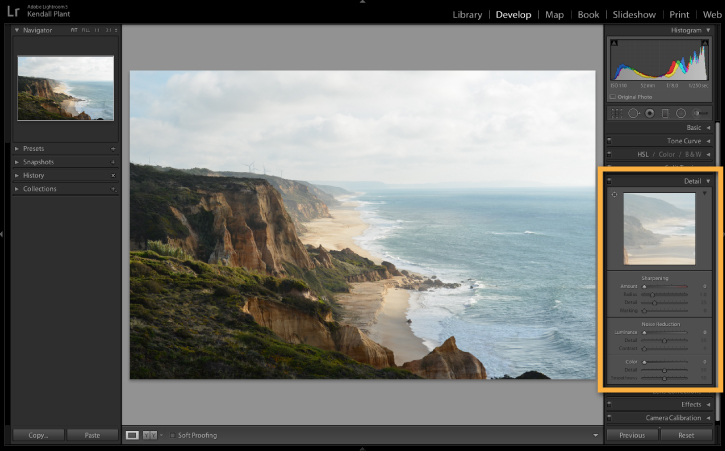
What the Adobe before/after example shows
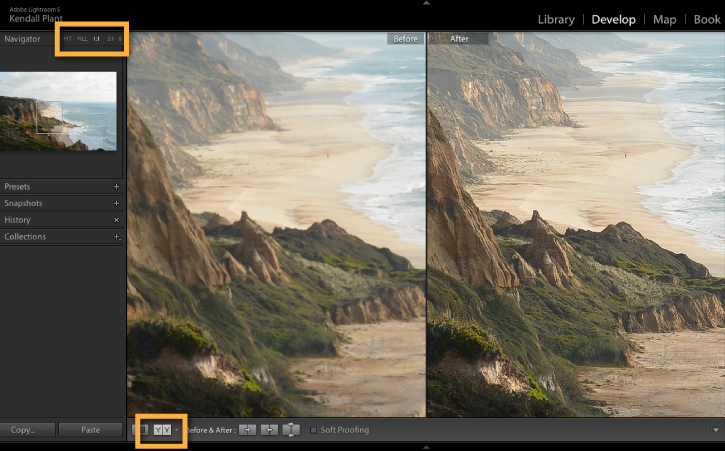
The comparison demonstrates Adobe’s sharpening example. It does not establish the original cause of softness, prove recovery of missing detail, or show our own exported output. For your file, compare the same crop at the same scale: look for a clearer edge without a bright outline, preserved texture rather than invented detail, and an acceptable result at delivery size. A severely smeared eye or unreadable label remains a reason to choose another frame or reshoot.
Photoshop: Smart Sharpen for mild blur
For a reversible trial, convert the image layer to a Smart Object, zoom to 100 percent, and open Filter > Sharpen > Smart Sharpen. Adjust Amount, Radius and Reduce Noise while comparing the preview. Under Remove, choose Lens Blur for edge-focused sharpening or Motion Blur when testing directional camera or subject movement. These options reduce blur; they do not guarantee faithful reconstruction. Follow Adobe’s current Smart Sharpen instructions.
Do not follow old tutorials telling you to use Filter > Sharpen > Shake Reduction in current Photoshop. Adobe removed Camera Shake Reduction in Photoshop 23.3; that retired filter is separate from Smart Sharpen.
Prevention: Camera Settings That Reduce Blur
Choose a shutter speed for the subject
For a mostly still handheld portrait, 1/125 second can be a trial setting, not a guarantee. Focal length, stabilization, camera handling and subject movement change what works. Review a magnified frame and shorten the exposure if edges trail. Children, pets, dancing and gestures can need substantially faster shutter speeds; raise ISO or add suitable light when needed rather than relying on sharpening later.
Use stable support when light is low
A tripod, monopod, wall brace, table support, or image stabilization can help with camera shake. It will not freeze a moving subject, so pair support with a shutter speed that matches the scene.
Focus on the exact priority point
For portraits, the near eye is usually the safest focus point. For product and food, choose the feature that sells the image: label text, texture, garnish, logo, or hero surface.
Shoot short bursts for motion
When a moment matters, capture a short burst. Motion blur varies frame by frame, and one image may be much sharper than the rest.
Review before the setup changes
Zoom into a few frames during the shoot, especially after changing lens, light, pose, or distance. It is better to catch focus drift while the client, product, or scene is still available.
Quality-Control Checklist Before Delivery
- Inspect key images at 100 percent.
- Confirm eyes, labels, food texture, or architectural edges are acceptably sharp.
- Compare similar frames before spending time rescuing one weak file.
- Export a test image at the final delivery size.
- Check for halos around high-contrast edges.
- Check skin, skies, and backgrounds for gritty over-sharpening.
- Keep rejected blurry frames out of client-facing galleries.
Delivering Sharp Final Images
Once the selects are clean, organize final files so clients do not confuse proofs, alternates, and finished images. A polished client gallery helps make that handoff feel intentional. SendPhoto’s gallery delivery presents finished images in branded galleries. Configure download permissions and quality for the intended handoff; those controls do not sharpen an image or recover lost detail.
For private portrait, event, or commercial work, consider gallery password protection and agree recipients with the client. Links and passwords can be forwarded, and download restrictions cannot prevent screenshots or copies already saved. If the client needs to understand file size or output quality, the photo resolution guide is a useful next read.
FAQ
Can you fully fix a blurry photo?
Slight softness may improve enough for the intended output. Heavy motion blur, missed focus or low resolution has no reliable editing fix that guarantees the original detail. AI can create plausible detail, which is different from verifying what was present. Compare against the original and choose another frame when accuracy matters.
Should I sharpen before or after resizing?
Do your main cleanup and detail work on the full-quality file, then check the resized export. Many images need a small final output-sharpening adjustment after resizing.
Why do my photos look sharp on my camera but blurry later?
Camera screens are small and forgiving. Zoom in during review and inspect the original and final export on a larger display at 100 percent and at delivery size. Display calibration matters for color judgment; it is not a prerequisite for checking focus.
What is the best way to avoid blurry client photos?
Use a shutter speed suited to the subject, focus on the most important detail, review sharpness during the shoot, and capture backup frames when the moment is difficult to repeat.