
Introduction
Flat lay photography looks simple because the camera points straight down. The hard part is making the arrangement feel intentional instead of scattered. A strong flat lay uses a clean surface, controlled light, thoughtful spacing, and a clear hero subject.
This guide covers product images, food scenes, wedding details, desk setups, and lifestyle content. Start with the purpose, build the surface, shape the light, then refine the frame before editing. The Nikon photograph below is a credited composition example; the styling sequence is a suggested exercise, not a report of our own shoot.
Start With the Purpose of the Flat Lay
Before choosing props, decide what the photo needs to do.
| Flat lay type | Main goal | Best visual priority |
|---|---|---|
| Product | Show shape, label, color, and scale | Clean edges and readable details |
| Food | Make the dish feel fresh and appetizing | Texture, garnish, and natural mess |
| Wedding details | Preserve sentimental items | Rings, stationery, fabric, florals |
| Lifestyle | Suggest a mood or routine | Props that feel used, not staged |
| Social content | Stop the scroll quickly | Bold shape, color contrast, negative space |
When every item has a reason to be in the frame, editing becomes easier and the final image feels more professional.
Choose the Right Surface
The surface sets the tone before the props do. Matte surfaces are easiest because they reduce glare. Painted boards, linen, stone, tile, paper backdrops, wood, and textured vinyl can all work if they support the subject.
Surface tips
- Use neutral surfaces for detailed products or busy food.
- Use texture when the subject is simple and needs depth.
- Avoid glossy surfaces unless reflections are part of the concept.
- Keep extra surface area around the setup so you can crop later.
- Clean dust, crumbs, lint, fingerprints, and loose threads before shooting.
Build Around One Hero Subject
Pick the item that should win the viewer's attention. It might be a bottle, dish, invitation suite, ring box, book, camera, or handmade product. Place that item first, then add supporting objects.
Common composition patterns
Grid
Use a grid when the objects are similar in size or need to feel organized. It works well for product sets, stationery, tools, and collections.
Diagonal path
A diagonal layout moves the eye through the frame. Use it for lifestyle scenes, ingredients, desk setups, or wedding details.
Center hero
Place the main object near the center when the image needs to feel direct and product-focused. Use negative space around it for captions, ads, or crop flexibility.
Controlled mess
For food and handmade products, a little imperfection can help. Crumbs, fabric folds, brush marks, and scattered ingredients should look deliberate, not accidental.
Read a real flat-lay composition
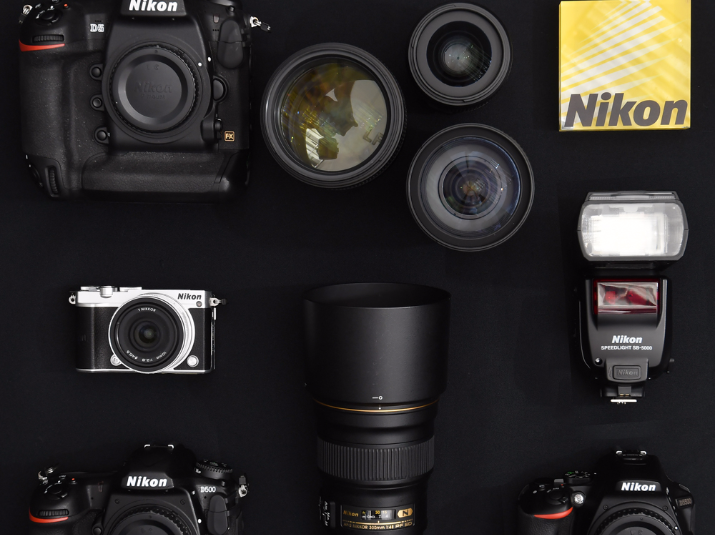
A simple styling exercise
Try one invitation, an empty ring box, and a ribbon on matte paper. Use this as a planning exercise; substitute objects appropriate to your brief.
- Choose the final crop first. Place the invitation where its lettering remains readable and reserve a clear area for any headline.
- Add the box with a visible gap around it. Keep the ribbon from crossing important text.
- Make a frame with just those items. Add one supporting object only if it improves the story; compare both versions.
- With the camera fixed, move a white card closer to the shadow side and make another frame. Compare label detail and shadow depth; keep the version that suits the brief.
- Check every planned crop before dismantling the scene. A useful object in the wide view may become distracting or cut off in the square version.
Light the Scene From One Clear Direction
Soft side light is the easiest starting point for flat lays. Place the setup near a window, then position the surface so the light comes from the side or slightly behind the subject. This reveals texture without flattening everything.
Use a white card to bounce light into dark shadows. Use black foam board for negative fill when the scene looks too flat. If you use artificial light, keep it large and diffused, and avoid mixing it with a different color temperature unless you want that look.
Camera Support and Alignment
For a directly overhead view, keep the camera’s sensor plane parallel to the surface and center the lens over the intended frame. Tilt introduces perspective: a rectangular card can look tapered and a circular plate can appear elliptical. Check the arrangement with the grid overlay and inspect the corners before styling fine details.
Setup checklist
- Use equipment designed for overhead camera support, with compatible head, plate and clamps; follow every component’s instructions and load limits.
- Level the camera and surface before styling.
- Use live view or tethering if available.
- Keep the strap, tripod legs, and hands out of the frame.
- Shoot a wider frame for crop options.
- Check focus after every major prop move.
An extended arm moves the load away from the tripod’s center. Use the manufacturer’s specified balancing method, lock the fittings, and confirm stability before mounting over the scene. Keep people out from under suspended equipment and secure cables away from foot traffic. The SLIK horizontal-arm documentation, for example, explains its opposite-end counterweight hook; that method is specific to its design, not permission to improvise a boom on any tripod. For phones, use a compatible overhead mount or place the scene low enough to photograph from the floor while standing normally. Avoid balancing on chairs or step stools to reach the shot.
Check focus and release the shutter
For a stationary arrangement on a secure support, use the camera’s timer or a compatible remote to avoid moving it during release. Focus on the priority lettering or texture, then inspect both near and raised objects. If a bottle top or folded fabric falls outside acceptable focus, adjust aperture or simplify the height differences and make another frame. A longer exposure works only while everything stays still; hands, steam and moving props need a shutter speed that handles their movement.
Editing Flat Lay Photos
Flat lay editing should make the image cleaner, not louder.
Start with white balance and exposure. Straighten the frame, then correct any perspective problems. Clean dust and small distractions. Adjust contrast carefully so whites stay detailed and dark props do not become blocked. If the image is for a client or shop, keep color realistic.
Crop versions for the actual use: website banner, square social post, vertical story, product thumbnail, or print detail. Leave negative space where text or design elements may go.
Client Delivery and File Organization
Flat lay shoots often create many near-duplicate variations. Separate selects by collection so clients can compare hero shots, detail crops, social crops, and final edits without hunting through one long folder.
SendPhoto’s gallery delivery offers a place to present finished images. Configure download permissions and quality for the files you intend to release; putting images in separate collections does not by itself make proofs inaccessible. For a confidential launch or wedding gallery, consider password protection and agree recipients with the client. Links and passwords can be forwarded, and download restrictions cannot prevent screenshots or copies already saved.
For export planning, see the photo resolution guide; for checking soft results, see blur diagnosis and sharpening limits. More technique guides are in the SendPhoto blog.
FAQ
What lens is best for flat lay photography?
Choose a lens that covers the arrangement from a workable camera height. A normal or short telephoto lens often gives more room to avoid the stretched edge appearance of close ultra-wide framing, but it requires more height or a smaller scene. Check straight lines and proportions across the frame; focal length alone does not guarantee undistorted products.
How do I make flat lays look less cluttered?
Remove one prop at a time until the hero subject becomes clear. Keep space between objects, repeat a few shapes or colors, and avoid props that do not support the story.
Should flat lay photos always be shot from directly overhead?
A strict flat lay is photographed directly overhead. An angled still-life view can be a better companion image for tall food, bottles, stacked products, or important side details. Deliver both when the brief needs the overhead arrangement and a view of the object’s height.