
Build a landscape photograph around what you want to show: a subject, the direction of light, a pattern or the relationship between nearby and distant features. Choose framing and exposure so the important parts of the scene remain readable.
Use these techniques as choices to compare, not rules that every scenery photograph must follow. The credited published examples below show framing decisions; they are not a trip, camera test or before-and-after edit performed for this guide.
Find the Subject First
Before setting up the camera, decide what the photo is about. It might be a mountain peak, a road, a lone tree, a waterfall, a person in the scene, a reflection, a cloud shape, or light hitting one part of the land.
When you want a clear focal point, choose one main subject and let the rest of the frame support it. A photograph of a repeating pattern or broad atmosphere may have a different purpose.
Useful subject questions:
- What caught your eye first?
- What part of the scene changes if you move a few steps?
- Is there a foreground element that leads toward the subject?
- Is the sky helping the photo or taking over?
- Would the image still work if cropped tighter?
Use Light as the Main Design Tool
Landscape light changes quickly, so build the photo around it.
Side light can reveal texture in rocks, grass, trees, and buildings. Backlight can create glowing edges, silhouettes, and atmosphere. Soft overcast light can work well for forests, waterfalls, and intimate landscape details. Harsh midday sun is harder, but it can still work for graphic shadows, desert scenes, high-contrast black-and-white images, or documentary travel work.
Compare light that separates the subject from the background with softer light that unifies the scene. You can work in either direction; a dramatic sunset is not required.
Build Depth With Foreground, Middle, and Background
A landscape can feel flat when everything is far away. Add depth by arranging the frame in layers.
| Layer | Example | Purpose |
|---|---|---|
| Foreground | Rocks, flowers, trail, grass, water edge | Pulls the viewer into the scene |
| Middle ground | Cabin, person, trees, river, road | Gives the image scale and direction |
| Background | Mountains, sky, clouds, distant shoreline | Adds context and atmosphere |
Layering is one way to suggest distance, not a requirement or evidence that two layers are always better. A silhouette, reflection or flat pattern may deliberately use a simpler arrangement.
Read the Layers in a Real Example
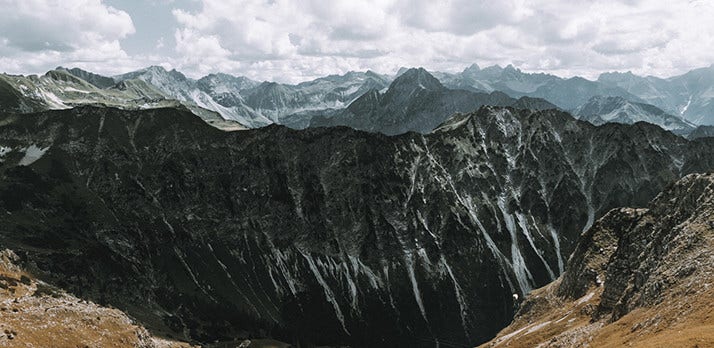
- Near: rocky slopes at the lower corners.
- Middle: the dark ridge across the frame.
- Far: pale peaks beneath the clouded sky.
The written notes describe visible framing, not focus distance or capture settings.
Compose With Lines and Shapes
Landscape photography often depends on natural lines. Trails, fences, rivers, shorelines, shadows, ridges, and roads can guide the viewer through the frame.
Try these composition moves:
- Place a path or river so it leads toward the subject.
- Use diagonal lines for energy.
- Use horizontal lines for calm scenes.
- Keep tree trunks and buildings from leaning unless the angle is intentional.
- Move the camera lower when foreground texture matters.
- Move higher when patterns, fields, roads, or shorelines matter.
Compare positions from a safe, permitted route before choosing the final frame. Stay behind barriers and away from traffic or unstable edges; a lower or higher angle is optional.
Balance Sky and Land
The sky should earn its space. If clouds, color, or weather are interesting, give the sky more room. If the sky is blank, reduce it and focus on land, water, texture, or foreground.
A simple rule: if the sky does not add mood, shape, or light, crop it down.
Check whether the horizon should be level, especially with water, coastlines and fields. A deliberate tilt is a creative choice; avoid an accidental one.
Decide What a Crop Would Remove
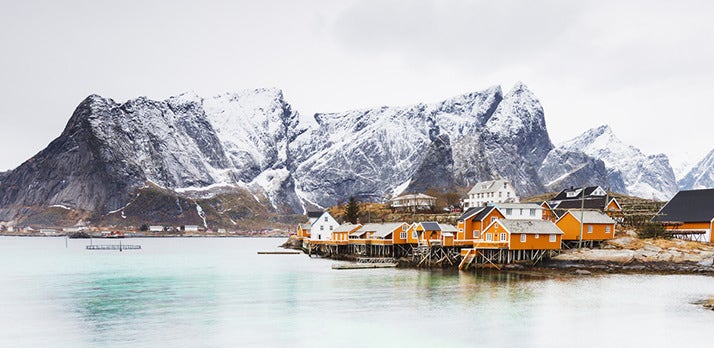
- Water: foreground space separates the viewer from the buildings.
- Buildings: yellow shapes contrast with the mountains.
- Sky: pale space outlines the peaks.
A proposed top crop would reduce sky space but must preserve the peaks. Compare your own versions; this is not a tested crop pair.
Control Exposure in High-Contrast Scenes
Landscape scenes often include bright skies and dark land. Protect important highlights first, then decide how much shadow detail you need.
Practical exposure workflow:
- Compose the frame.
- Check the brightest important area, usually clouds, snow, water, or sky.
- Lower exposure if highlights are losing detail.
- Take a second brighter frame if shadows are important.
- Review the image for clipped highlights, deep shadows, and distracting glare.
For waterfalls, rivers and waves, compare shutter speeds. A shorter exposure can retain moving detail; a longer one can blur motion. The result depends on speed, distance and conditions, so inspect the actual photograph.
Choose settings by the problem they solve. Adobe explains the exposure triangle; use these starting decisions rather than a universal numeric recipe:
| Control | Decision | Tradeoff to inspect |
|---|---|---|
| Aperture | Choose enough depth of field for the important near and far features. | Check both areas in the captured file; one aperture does not suit every distance or lens. |
| Shutter speed | Choose whether water, leaves or clouds should retain detail or show motion. | A steadier camera helps with camera shake, but cannot stop subject movement. |
| ISO | Use a setting that allows the aperture and shutter choices you need. | Compare noise and detail rather than forcing the lowest ISO at an unsuitable shutter speed. |
A tripod or stable support is useful for long exposures. Use it where permitted and follow your equipment’s instructions; these are general workflow choices, not tested gear recommendations.
When available, inspect a playback histogram and highlight warning as well as the photograph. The histogram runs from dark tones on the left to light tones on the right; a warning helps locate bright areas that need inspection. Judge whether lost detail matters for the subject instead of trying to center every graph. Use your camera manual for the controls.
If one exposure cannot retain the sky and land detail you need, consider a bracketed set of different exposures. Adobe’s HDR merge documentation describes combining them and checking movement artifacts. Keep the framing consistent and inspect moving foliage or water. See our HDR bracketing guide for the fuller workflow; a brighter second frame is an option, not automatically a successful merge.
Use Weather Instead of Avoiding It
Clear blue skies can be beautiful, but weather often gives landscapes more character.
Mist simplifies busy backgrounds. Rain deepens color on rocks, leaves, roads, and wood. Clouds add shape and direction to the sky. Wind can create movement in grass, trees, and water. Snow can remove clutter and create clean negative space.
Check the local forecast, access rules and site advisories before leaving, with a route back to shelter. In a thunderstorm, stop outdoor photography: the National Weather Service advises going into a safe building or vehicle; a tent or open picnic shelter is not protection. Weatherproof gear does not make an exposed location safe. Choose another time or viewpoint when conditions exceed your plan.
Shoot Details Alongside Wide Views
Wide scenery shots show the place. Detail shots show the feeling of being there.
Look for:
- Texture in rocks, bark, sand, ice, or leaves.
- Reflections in puddles, lakes, windows, or wet pavement.
- Small plants, footprints, fences, signs, and tools.
- Light hitting one part of the scene.
- Human scale, such as a hiker, car, cabin, or path.
These details also help when delivering a landscape set to a client, travel partner, tourism brand, venue, or editorial project.
Edit for Natural Impact
Landscape editing should strengthen what was already in the scene. Start with exposure, white balance, highlights, shadows, contrast, and crop. Then adjust color carefully.
Avoid common editing problems:
- Neon greens that make grass and trees look artificial.
- Oversaturated sunsets that lose believable color.
- Halos around mountains, trees, and buildings.
- Shadows opened so much that the photo loses mood.
- Heavy clarity that makes clouds, water, and foliage look rough.
Compare the edit with the source at a useful viewing size and inspect important edges at higher magnification. Preserve the original capture. A highlight slider cannot reliably restore detail missing from the saved file; changing brightness also cannot prove that a supplied landscape example was shot with particular settings. For detailed editing steps, see editing photos for beginners.
Deliver Landscape Images Clearly
For client or commercial landscape work, organize the final gallery by location, day, season, usage, or selection status. This helps clients find the right files without digging through a long mixed set.
Use SendPhoto gallery delivery to present the selected files, with collections for locations or days. Choose download settings for the intended delivery. The optional gallery password restricts entry to people with the link and password; collections do not have separate passwords. A viewer may still capture or forward an image.
A watermark can identify a preview but cannot prevent copying. Original downloads of unwatermarked photos use the uploaded source; marked or scaled photo downloads use generated images. Keep the source files and an independent backup. Agree public-use permission and licensing separately from access to a gallery.
Landscape Photography Checklist
- Main subject is clear.
- Light gives shape or mood.
- Foreground, middle ground, and background are considered.
- Horizon is straight.
- Sky earns its space.
- Edges of the frame are clean.
- Exposure protects important highlights.
- Weather supports the scene.
- Detail images are captured alongside wide shots.
- Final images are organized before sharing.
Compare Three Frames on Your Next Outing
This is a proposed exercise, not a performed field test. From a safe, permitted viewpoint, make a wide scene, a frame emphasizing one subject and a detail. Compare what each includes or excludes. For a still scene, take an alternative exposure if needed; retain both files and note your choices.
Record the light direction, framing, focus target, aperture, shutter speed and ISO when those controls are available. Review important highlight and shadow detail, near/far sharpness, motion and distracting edges. Select the versions that serve the intended use, then edit copies and compare them with the captures.
For more practical photography guides, visit the SendPhoto blog.