
Long exposure photography uses a slow shutter speed to show motion over time. It can turn moving water silky, stretch car lights into trails, soften clouds, blur crowds, or make a busy scene feel calm. The core workflow is simple: stabilize the camera, choose the motion you want to show, set focus, calculate exposure, and check the result before the light changes.
Use this guide for landscapes, city scenes, events, wedding details, product motion, and creative portraits where controlled blur adds to the image.
What Counts as a Long Exposure?
A long exposure is any shutter speed slow enough to record visible movement. That might be a fraction of a second for handheld motion blur, several seconds for traffic, or much longer for clouds and water.
The right shutter speed depends on the subject:
| Subject | Starting shutter range | Visual effect |
|---|---|---|
| Waterfall or stream | 1/4 second to several seconds | Soft flowing water |
| Ocean waves | 1/2 second to 10 seconds | Mist, streaks, or smooth water |
| Traffic at night | 5 to 30 seconds | Continuous light trails |
| Moving clouds | 15 seconds or longer | Stretched sky movement |
| Crowds | 1/2 second to several seconds | People blur while buildings stay sharp |
| Creative portrait motion | 1/4 second to 2 seconds | Intentional movement around a person |
These are starting points, not rules. Review the frame and adjust for the speed of the subject, viewing distance and the light available. You may need a different range to produce the effect you want.
Compare Real Stream Exposures
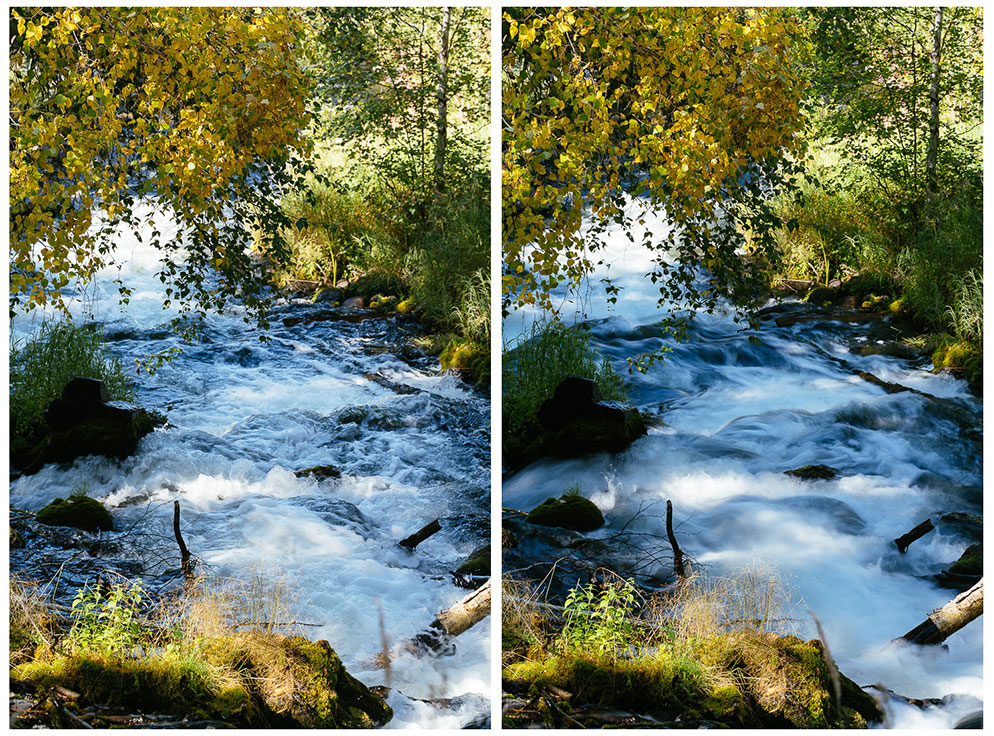
Compare the water around the rocks: the left retains more small-scale texture; the right shows smoother streaks. Inspect stationary edges separately from moving water. The stated settings belong to these photographs, not every stream.
Gear That Makes Long Exposures Easier
You can experiment with motion blur using minimal gear, but consistent long exposure photography usually needs:
- A tripod or stable surface.
- A remote release, timer, or app trigger to reduce shake.
- Neutral density filters for slow shutter speeds in daylight.
- A lens cloth for mist, rain, and sea spray.
- Extra battery power for long sessions.
- A small flashlight or phone light for working safely in the dark.
For client work, check the tripod plate, compatible trigger and battery before leaving. Bring a backup trigger or know how to use the camera’s self-timer.
Choose a Safe Position Before Setting Up
Check local access rules, forecast, closing times and a route back before it gets dark. Keep tripod legs out of walkways, exits and cycle lanes. Photograph traffic from a permitted pedestrian viewpoint without entering the road or distracting drivers. Avoid active rail tracks and restricted structures.
Near moving water, stay on designated trails and behind barriers rather than stepping onto wet rocks for a lower angle. The National Park Service’s swift-water guidance warns about slippery banks and advises against wading or crossing water flowing over a trail. Follow the specific site’s warnings and choose another viewpoint when conditions are unsuitable.
Step-by-Step Long Exposure Workflow
- Choose the motion. Decide whether you want smooth water, light trails, moving clouds, blurred people, or subject movement.
- Stabilize the camera. Use a tripod or permitted stable support. Do not place equipment on safety barriers or lean beyond them.
- Compose first. Check the edges and leave space for motion to move through the frame.
- Focus carefully. Focus before adding a dark ND filter if the camera struggles afterward. Then use manual or locked focus, following your camera’s instructions, so the trigger does not refocus unexpectedly.
- Set exposure. Establish a reference exposure, note shutter speed, aperture and ISO, then choose the time needed for the motion. If fitting an ND filter, use the calculation below while holding aperture and ISO fixed.
- Use a timer or remote. Reduce shake from pressing the shutter.
- Review sharp parts and moving parts separately. The blur should look intentional while static elements stay sharp.
After each frame, inspect static edges at higher magnification and compare the moving areas at the intended viewing size. Check important highlights as well as overall brightness. Adjust one choice at a time and record the settings so you can explain the difference.
How to Use ND Filters
Neutral density filters reduce the light entering the lens so you can use slower shutter speeds in bright conditions. They are especially useful for waterfalls, rivers, coastlines, architecture, and daytime cloud movement.
A practical ND workflow:
- Compose and focus without the darkest filter attached.
- Take an unfiltered reference exposure with the aperture and ISO you intend to keep. Record its shutter duration.
- Attach the ND filter carefully.
- Calculate a filtered starting duration from the filter’s stated stops. Take a frame and check it; changing light or filter transmission may require an adjustment.
- Check for color shifts, softness, reflections, and vignetting.
Calculate an ND Starting Exposure
With aperture, ISO and scene light unchanged, each stop of reduction halves incoming light, so double the shutter duration for each stop. Use the filter’s stop count; labels can use different numbering systems. For example, Hoya identifies ND64 as six stops.
Filtered duration = unfiltered duration × 2 raised to the number of stops. If an unfiltered frame uses 1/125 second, these are calculated starting times:
| Stated filter reduction | Duration multiplier | Calculated time from 1/125 second |
|---|---|---|
| 3 stops | 8 | 0.064 second, about 1/16 second |
| 6 stops | 64 | 0.512 second, about 1/2 second |
| 10 stops | 1024 | 8.192 seconds, about 8 seconds |
These are arithmetic examples, not measured filter tests. Choose the nearest available duration, inspect the file and adjust. If the light or either other setting changes, establish a new reference instead of treating the old calculation as exact.
If the image is too dark, lengthen the duration or reconsider the other settings. If it is too bright at the motion duration you want, a stronger filter may help without changing depth of field. Shortening the duration also changes motion blur; closing the aperture changes depth of field, and raising ISO does not let more light through the lens.
Common Long Exposure Settings
There is no universal setting, but these starting points help:
- Use low ISO when possible to keep files clean.
- Choose an aperture that gives the depth of field you need without pushing diffraction too far.
- Use manual focus or locked focus when the camera hunts.
- Turn off stabilization if your camera or lens behaves poorly on a tripod.
- Shoot a test frame before committing to a long sequence.
Choose settings for the desired motion and inspect important still parts for sharpness. Low ISO is useful when it allows the other choices; it is not a reason to use an unsuitable duration. Follow the camera or lens manual for tripod stabilization settings rather than applying one rule to all equipment.
If your intended duration exceeds the camera’s timed range, consult its manual for long-exposure controls. Nikon explains Bulb and Time modes: Bulb holds an exposure open while triggered; Time uses separate start and stop presses. Availability and controls vary. Use a compatible remote where appropriate, and allow for any processing delay before the next capture.
Long Exposure Ideas by Photography Type
Landscape: Smooth waterfalls, streaked clouds, soft waves, moving grass, and misty shorelines.
City and travel: Traffic trails, train movement, blurred crowds, reflections, and night architecture.
Wedding and event: Dance-floor movement, venue atmosphere, candlelight already arranged by the venue and departures photographed from a permitted pedestrian position. A sparkler exit is only an option when the venue and event organizer approve and manage it; do not arrange fire effects for this exercise. Moving guests will not remain sharp merely because the camera is on a tripod.
Product and brand: Pouring liquid, moving fabric, falling ingredients, rotating objects, and motion around a sharp hero product.
Portrait: A still person with moving lights, fabric, hair, shadows, or background activity.
Fix Common Problems
| Problem | Likely cause | Fix |
|---|---|---|
| Everything is blurry | Camera moved | Use a sturdier support and timer |
| Static objects are soft | Focus shifted or tripod vibrated | Refocus and reduce wind or floor movement |
| Image is too bright | Too much light for the shutter speed | Use stronger ND, shorter shutter, or lower ISO |
| Water looks lifeless | Shutter is too slow for the scene | Try a faster slow speed with more texture |
| Light trails are broken | Exposure may be too short, or lights were interrupted or obscured | Compare another duration or wait for a suitable passing vehicle from the same safe viewpoint |
| Color looks strange | Filter or mixed light shifted color | Correct white balance and compare to the reference frame |
Edit Long Exposure Photos Carefully
Long exposure images often need a clean edit, not a heavy one. Start with white balance, exposure, highlights, shadows, and contrast. Remove dust spots and distractions, especially in smooth skies and water. Watch for halos around buildings, trees, mountains, and bright light trails.
If the scene includes people, judge whether the blur serves the intended image. Avoid aggressive sharpening of blurred areas; inspect the parts that should be still. Editing cannot reliably turn camera-shaken edges into a genuinely sharp capture. Keep the source and work on a copy; see editing photos for beginners for a fuller workflow.
Delivering Long Exposure Work to Clients
Long exposure images can be dramatic hero files, but they often belong in a larger story. For a wedding, pair a sparkler exit with venue details and candid moments. For a tourism client, deliver wide scenes, details, and motion studies in organized collections. For brand work, separate polished finals from experiments.
Use SendPhoto gallery delivery and collections to organize selected photographs, then choose the intended download settings. An optional gallery password restricts entry to people with the link and password; collections do not have separate passwords. A viewer may still forward or capture an image.
A watermark can identify a preview but cannot prevent copying. Unwatermarked Original photo downloads use the uploaded source; marked or scaled photo downloads use generated images. Keep your source files and an independent backup. Agree publication permission and licensing separately from gallery access.
Long Exposure Checklist
- Camera is stable.
- Motion is intentional.
- Composition leaves room for movement.
- Focus is set before the final exposure.
- Exposure protects important highlights.
- Static areas are sharp.
- Moving areas have the blur style you wanted.
- ND filter issues are checked.
- Final images are organized before delivery.
Try a Controlled Motion Comparison
This is a proposed exercise, not a performed shoot. Choose moving water visible from a safe designated viewpoint, or moving fabric in a controlled indoor setup. Keep the camera position and focus target consistent. Make a shorter and a longer exposure, compensating with aperture, ISO or an appropriate ND filter as needed, and record every changed setting.
Compare motion texture, stationary-edge sharpness and important highlight detail. A comparison where aperture or light also changed does not isolate shutter duration alone. Retain both captures and select the effect that serves the photograph, rather than assuming the smoother version is better.
For more photography tutorials, browse the SendPhoto blog.