
A photo gallery comparison starts with the job you need to deliver: a known folder of exports, a wedding gallery to browse, portraits to select, or commercial files requiring explicit approval. Compare the recipient’s task as well as the photographer’s administration.
For a hypothetical wedding handoff, ask whether the couple needs a download, visual selections for an album, or both. A confusing folder structure or unexplained ZIP can create questions, but that does not mean every storage tool fails or every gallery resolves them.
This SendPhoto-published guide compares platform models and documented examples. SendPhoto is our product and is included as a delivery option. The criteria below are a buying framework, not a ranked benchmark or a report of trials across providers.
Table of Contents
- When a File Link Needs a Gallery
- The Four Pillars of a Great Photo Gallery Platform
- Client experience comes first
- Workflow efficiency decides whether a platform helps or hurts
- Branding and security affect trust
- Comparing Platform Types Delivery vs All-in-One vs Commerce
- Delivery-focused platforms
- All-in-one studio suites
- Commerce and proofing platforms
- Compare SendPhoto Against Your Delivery Needs
- Check the Actual Controls and File Handling
- Why a focused delivery workflow matters
- Matching the Right Platform to Your Photography Business
- Wedding and event photographers
- Portrait and family photographers
- Commercial and product photographers
- Understanding Pricing Models and Hidden Costs
- What monthly pricing often hides
- How to evaluate true cost
- Making Your Final Choice with Confidence
When a File Link Needs a Gallery
A file link can meet a professional agreement when recipients need clearly named exports and the sharing rules fit. A dedicated gallery may add visual browsing, favorites or a repeatable proof-to-final presentation. Decide which additions the job actually needs.
Dropbox is not inherently account-only or limited to filenames. Dropbox’s sharing guidance distinguishes direct invitations from view-only links, which allow previews without recipient login. Additional link settings depend on the plan, and existing direct permissions can differ from link permissions.
For a wedding, group ceremony, portraits and reception in a way the couple recognizes. Identify web-size versus final exports. A well-labeled folder may be enough; a gallery can help when choosing images is part of delivery.
| Delivery question | Evidence to compare |
|---|---|
| Presentation | Can recipients browse the set and recognize the job, in the actual folder or gallery view? |
| Phone use | Can the intended recipient find the relevant actions on their device? |
| Selections | Can preferences be recorded as stable filenames, through favorites or an agreed alternative? |
| Studio identity | Are the available branding options appropriate and included in the chosen plan? |
| Access rules | What authentication, download, watermark and access-closing controls actually apply? |
Choose a gallery for an additional delivery need, rather than assuming a file-sharing tool lacks controls.
For more about this particular trade-off, see the Dropbox alternative guide for photographers.
The Four Pillars of a Great Photo Gallery Platform
Use four criteria consistently: client experience, workflow efficiency, branding and access control. A feature list or promotional screenshot cannot establish performance or suitability for your job.
Client experience comes first
Identify what recipients must do: open the link, browse, select and obtain the permitted exports. Account creation may fit an authenticated collaboration job but be unsuitable for a broad guest audience. Neither choice establishes a universal abandonment rate.
Decision test: can the intended recipient find the correct set and understand the next step?
Check labels, account or password requirements and download instructions. A favorite is a preference; formal approval needs an explicit record of filenames and versions.
Workflow efficiency decides whether a platform helps or hurts
Consider the preparation and administration for a typical job, not just the gallery’s appearance.
- Bulk ingestion: confirm upload limits, processing, retry behavior and the connection the studio will use. Do not infer speed from the platform category.
- Organization: identify required collections, filename filtering or batch actions and verify each named control.
- Selections: check how preferences become an actionable filename list or approval record.
- File handling: check exact accepted RAW formats, preview generation, video conversion and downloadable versions.
Keep masters separately. RAW acceptance does not imply every camera format works or that a browser displays native RAW data. Compare the SendPhoto feature overview with the controls your job requires.
Branding and security affect trust
Branding identifies the studio and job. Compare actual cover, logo, domain and layout options, including plan requirements; branding alone does not establish client trust or repeat business.
Match access controls to the audience and sensitivity:
- Password control: a shared password can be forwarded and does not authenticate a particular person.
- Watermarks: identify whether they appear in previews, downloads or both; visible content can still be captured.
- Share expiry: distinguish ending access from deleting stored files or recalling recipient copies.
- Download permissions: inspect global and collection rules and the exact downloadable version.
Define who may enter, what they may obtain and how long the gallery should remain shared.
Evaluate all four criteria together. Use a separate retention decision and independent backups for required files.
Comparing Platform Types Delivery vs All-in-One vs Commerce
These categories describe priorities, not fixed product boundaries. A provider can offer delivery, management and commerce together. The table lists questions to resolve rather than claiming one category is faster or more usable.
| Criterion | Delivery-focused workflow | Studio-management workflow | Commerce/proofing workflow |
|---|---|---|---|
| Main priority | Present and deliver the agreed files | Coordinate bookings, contacts, contracts and billing alongside delivery | Record selections and sell or fulfill products |
| Client access | Check browsing and permitted downloads | Check gallery access separately from client-portal requirements | Check selection, checkout and download requirements separately |
| Upload workflow | Check formats, limits, processing and organization | Check the gallery module’s actual upload capabilities | Check proof-set and final-file upload capabilities |
| Potential fit | Jobs centered on visual handoff | Studios requiring connected administrative records | Jobs centered on print orders or structured review |
| Trade-off to examine | Which management or sales tools need another service? | Which functions and integrations are included in your plan? | Can recipients browse without purchasing, and how are final exports delivered? |
Documented Provider Examples
These examples illustrate overlapping capabilities. They are not exhaustive, tested performance comparisons or plan-price quotations. Confirm current limits and terms before purchasing.
| Provider | Documented example | Question for your shortlist |
|---|---|---|
| Dropbox | View-only links and preview access are documented; direct sharing differs from link access. | Does a named folder plus selection instructions meet the agreement? |
| SendPhoto | Named collections, favorites, optional gallery passwords and scoped downloads. | Do these controls meet the audience, output and retention requirements? |
| ShootProof | Studio-management documentation covers contacts, contracts, invoices and booking. | Are the required administrative functions included and connected to your delivery process? |
| Pixieset | Client Gallery documents photo favorites, notes and Store integration for selling prints and downloads. | Do the selection and sales processes match how you bill and deliver this job? |
Primary references: Dropbox sharing, ShootProof studio management, Pixieset favorites and Pixieset Client Gallery and Store integration. Pixieset’s documented favorite lists apply to photos, not videos. Documentation establishes listed functions, not a comparative speed or usability result.
Delivery-focused platforms
Consider a delivery-focused setup when visual presentation, selections and permitted downloads are the main tasks. Compare actual steps from prepared exports to a shareable job. A narrower feature set does not guarantee fewer steps or greater speed.
For larger sets, list formats, total bytes, largest file and required outputs. Upload acceptance, processing, previewing and downloading are separate questions. A provider’s supported RAW list is more useful than an unsourced survey percentage.
Inspect the whole path from upload to the recipient’s intended export, rather than judging only a cover page.
A focused gallery can sit alongside another tool for contracts, invoicing or production collaboration.
All-in-one studio suites
Consider a broader suite when connected contacts, booking, contracts or billing are required. Check each module and its plan terms rather than assuming the phrase “all-in-one” includes every function.
Consolidation can reduce duplicated records, but the gallery still needs suitable access and file handling. A separate gallery can also be appropriate if its handoff fits better. Compare the total procedure and cost of either setup.
Commerce and proofing platforms
Consider commerce tools when print orders, digital sales or fulfillment are part of the agreement. Consider proofing tools when clients need selections, comments or structured review. These are related but distinct requirements.
Inspect browsing separately from checkout. Check product availability, fulfillment region, taxes, fees and digital-file delivery before deciding. A commerce option need not force every visitor to buy.
- Prioritize delivery when browsing and obtaining agreed files are the main tasks.
- Prioritize studio management when administrative records need to connect.
- Prioritize commerce or proofing when selling, fulfillment or a specific review process is required.
For another use-case overview, see client photo delivery platforms.
Compare SendPhoto Against Your Delivery Needs
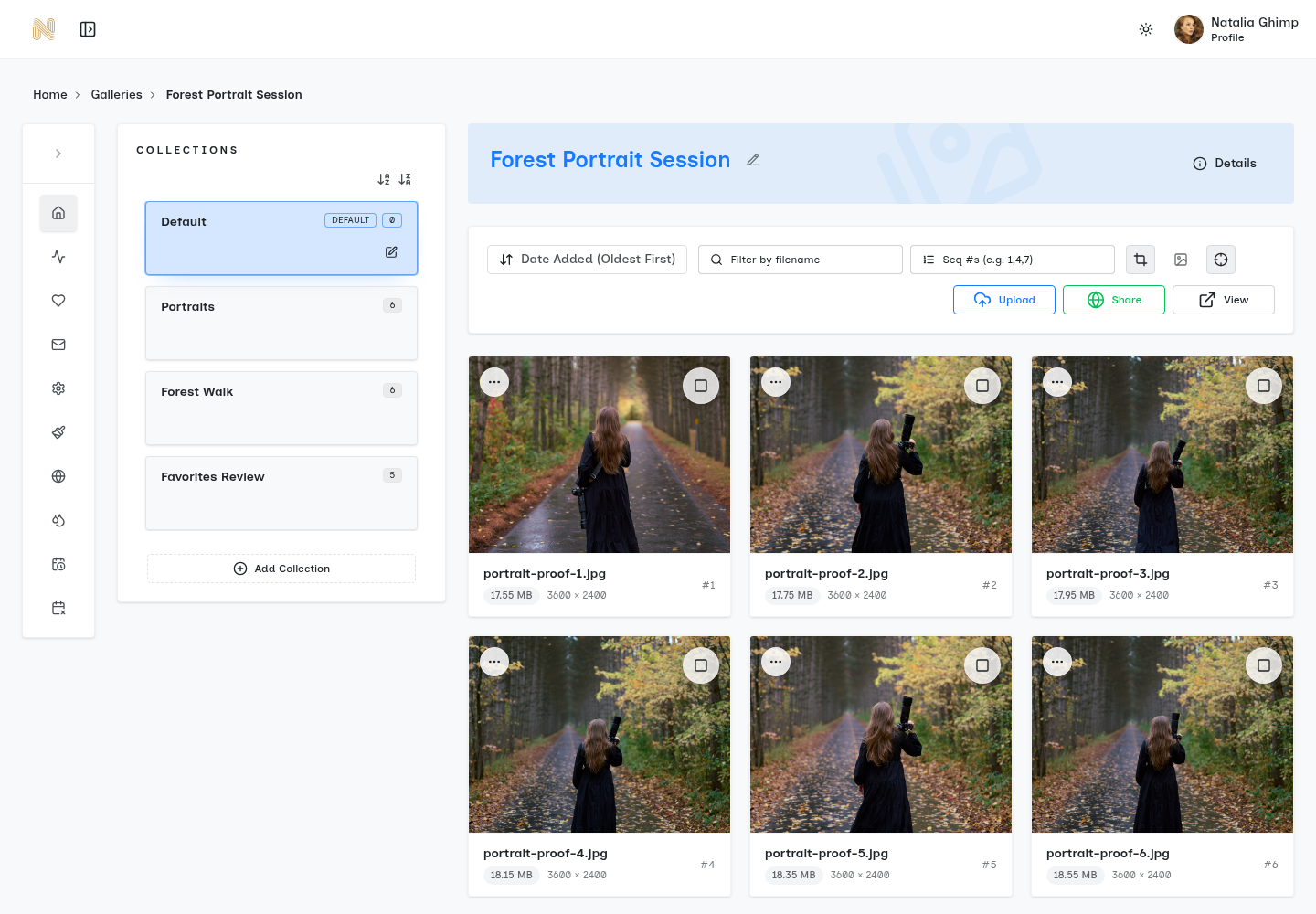
SendPhoto is one option for organizing a client handoff. Compare its actual controls with your brief rather than interpreting the screenshots below as a new trial, speed benchmark or proof that every job fits.
Check the Actual Controls and File Handling
Check the gap between the feature name and your requirement: how selections are recorded, how permitted collections download and whether sharing ends separately from retention.
SendPhoto supports named collections, a filename filter, favorites, optional gallery passwords, watermark and download settings, share expiry and a separate self-delete schedule. It does not have tags. Collection names organize content; they do not give different audiences separate passwords. Favorites are preferences, not payment, approval or publication permission.
Photo downloads use Original or Scaled down settings. Original with watermarking can use a generated marked image; ZIP downloads include permitted collections. Video processing can replace an upload with a stored optimized MP4. Keep independent masters when original bytes matter. Sharing expiry disables sharing, rather than deleting the gallery or recalling copies.
For a wedding, agree whether family and vendors may use the same shared gallery. Use separate galleries when their access needs differ.
Why a focused delivery workflow matters
A proposed sequence is to prepare exports, name the job, arrange useful collections, configure access and downloads, then send a clear invitation. State whether the recipient is viewing, selecting or downloading, with a deadline where relevant. Deliver a password through a separate agreed channel.
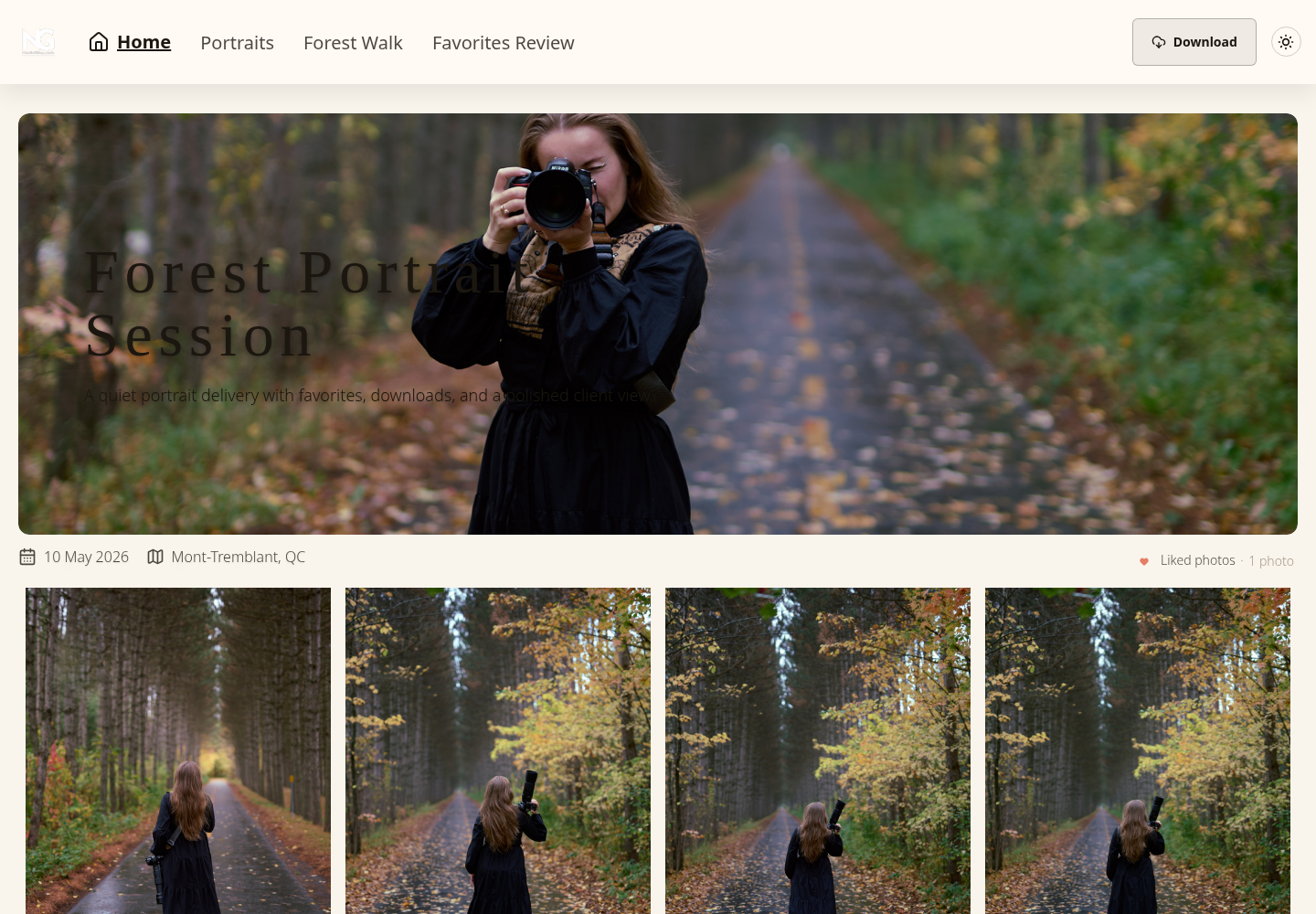
Account-free gallery entry can suit a shared audience, but a forwardable link or password does not establish identity. Disabled downloads cannot prevent capture of viewable content. For requirements beyond these controls, choose an appropriate authenticated workflow.
Matching the Right Platform to Your Photography Business
Apply the same criteria to different jobs, with different priorities. Start with the audience, required files, review method and access window. The amount of work you actually retain matters more than an industry-market forecast.
Wedding and event photographers
For weddings and events, distinguish full finals, highlights, web-size images and any video. Agree who may forward the gallery to relatives or vendors. Compare navigation, preferences and downloads alongside any required print sales.
- Delivery-focused option: consider when browsing, favorites and final downloads are central.
- Commerce/proofing option: consider when orders or structured selections are central.
Neither category guarantees upload capacity, speed or suitability for every guest device.
Portrait and family photographers
Clarify whether clients select proofs for retouching, receive an agreed final set, or purchase products. Compare the selection and sales steps you need, rather than assuming all portrait clients prefer fewer options.
Favorites can start a discussion. Record explicit selected filenames and versions before retouching or final approval, and agree publication separately.
Give the client a clear action: choose proofs, approve named exports or obtain finals.
Commercial and product photographers
Commercial work may require separate audiences, version records and explicit approval from a designated person. Establish whether shared-link access meets the project’s sensitivity and agreement.
- Consider delivery-focused for presentation and permitted exports.
- Consider studio management for connected contracts, invoices or client records.
- Consider proofing for the required review, comments and approval record.
A product feature called “favorites” does not establish formal sign-off. Keep approved filenames, versions and rights in the agreed record.
Understanding Pricing Models and Hidden Costs
Compare the total cost for the same workload and billing period. Check current plans; this guide does not quote provider prices or commissions. A headline subscription may be sufficient for some jobs and may exclude required services for others.
What monthly pricing often hides
Check these possible cost factors; do not assume every provider charges them:
- Storage tiers: which files count and how upgrades work.
- Feature inclusion: which branding, access, sales or administrative controls the plan includes.
- Sales costs: platform commissions, payment processing, fulfillment and shipping where applicable.
- Archive terms: how retained galleries count and what happens after a downgrade or cancellation.
How to evaluate true cost
Use the same questions for every candidate:
- How many galleries stay live? Model overlapping jobs and your agreed retention period.
- How large are uploads? Count actual exports and any required originals or video.
- Which features are essential? Include the plan and extra tools needed to satisfy the agreement.
- How does cost change? Check billing, renewal, upgrade, downgrade and exit terms.
As a hypothetical storage calculation, twenty retained galleries averaging 2 GB each total 40 GB; thirty total 60 GB. These are assumed decimal file totals, not provider allowances, measured jobs or a complete storage bill. Confirm whether generated assets and other account files also count.
For a hypothetical commission, 5% of $1,000 in sales is $50 before other costs. This is arithmetic, not a provider fee quote. Add any applicable payment, fulfillment and tax costs using current terms.
Making Your Final Choice with Confidence
Choose against a representative job and record any missing evidence. A useful comparison can end with a folder, a gallery, a broader suite or a combination.
- Define the primary need: delivery, studio management, commerce or a combination.
- Check recipient experience: required account, browsing, selection and download procedure.
- Check workflow fit: accepted files, processing, organization and review records.
- Check branding and access: actual available controls, audience and retention requirements.
- Price the complete workflow: current plan terms and required additional services.
Proposed comparison exercise: prepare the same non-sensitive sample exports and brief for each shortlisted service. Record the recipient task, file requirements, allowed downloads, approval method, access-closing date and retention decision. Treat unverified requirements as unanswered; a short trial cannot establish every device or future performance.
If collections, favorites, optional gallery passwords and scoped downloads fit your handoff, explore SendPhoto and its current plans. Compare the documented alternatives above against the same criteria. Keep independent masters and explicit approval records.