
A disorganized archive can turn a simple client request into a search across drives, exports and nearly identical filenames. Photo organization software can help, but a catalog, a team asset library and a delivery gallery solve different parts of that problem.
A hard drive fills up with folders named things like Smith Wedding Final, Smith Wedding Final 2, Smith Wedding Final Selects, and Smith Wedding Final Real Final. A client asks for one image from months ago. The photographer knows the photo exists, but finding it means opening old folders, checking exports, comparing duplicates, and hoping the delivered version wasn't buried in another drive. That kind of disorder doesn't just waste an afternoon. It makes the whole studio feel less reliable.
This guide compares three jobs: indexing your private archive, coordinating reusable assets across a team, and presenting finished files to clients. It includes documented examples of Lightroom Classic, Excire Foto, Bynder and SendPhoto. These are feature-based examples, not a speed benchmark or a claim that one product replaces every other tool.
Start with the repeated failure: cannot find a source file, cannot tell which export was approved, or cannot give the intended recipient a clear handoff. You may need a better archive, a better delivery process or both. A tidy gallery does not replace independent backups.
Table of Contents
- Beyond Messy Folders Why Photo Organization Matters
- What Is Photo Organization Software Really
- Core Features That Actually Save You Time
- Workflows for Different Types of Photographers
- How to Choose the Right Photo Organization Software
- How SendPhoto Solves Your Client Delivery Workflow
- Frequently Asked Questions About Photo Organization
Beyond Messy Folders Why Photo Organization Matters
Messy folders create a hidden tax on every job. The photographer pays it during import, during culling, during retouching, during client revisions, and again when it's time to deliver. The client pays it in slower responses, confusing file handoffs, and gallery experiences that feel patched together.
A consistent folder structure can remain useful at any library size. A catalog adds searchable metadata and reusable groups; a team asset manager can add assigned access and governance. Decide which extra layer solves an actual problem before migrating your archive.
The real problem isn't storage
Folders hold files, and filenames or sidecar records can carry useful information. A catalog makes richer filtering practical; an approval record identifies the agreed version; a delivery record identifies the shared gallery. Those records need to agree on filenames and versions.
Capabilities vary: catalog tools can index files, ratings and keywords; delivery tools can group exported files and collect preferences. Do not assume every product provides AI search, tags, editing, approvals or commerce.
Most workflow problems don't start in editing. They start in the gap between where a file lives and how fast someone can find, review, and send it.
Professionalism shows up in retrieval
Clients rarely see the catalog itself, but they feel its quality immediately. Fast proofing, clear selections, polished delivery pages, and controlled downloads all depend on organization upstream.
For working photographers, the goal isn't a prettier archive. The goal is fewer loose ends. A strong system reduces duplicate exports, missing selects, accidental oversharing, and those painful moments when a client asks for a file and the photographer has to go digging through old folders.
A good workflow also protects the business side of the studio. When every shoot follows a consistent path, handoffs become easier to delegate, backups become easier to verify, and repeat requests become easier to handle without starting from scratch.
What Is Photo Organization Software Really
Traditional folders are the digital version of a shoebox full of prints. Everything may technically be there, but finding the right image depends on memory, patience, and luck.
Photo organization software works more like a library catalog. The files still exist on drives or in the cloud, but the software adds structure around them so the photographer can search, sort, label, compare, and deliver with intent.
From shoeboxes to searchable libraries
For an archive, indexing connects file locations to metadata. Adobe documents Lightroom Classic keywords as searchable metadata, including nested keywords and export options. Review what will be exported when names or location details should stay private.
That changes the daily workflow in practical ways:
- Search becomes faster: A photographer can look for a person, event, keyword, or rating instead of remembering a folder path.
- Selection gets cleaner: Flags, stars, and labels separate rejects, maybes, edits, and finals without duplicating folders.
- Access improves: Work can move between desktop, laptop, tablet, and phone more smoothly when the software supports it.
Three categories that solve different jobs
Not all photo organization software is trying to do the same thing. That's where many buying guides get fuzzy.
| Category | What it does well | Common trade-off |
|---|---|---|
| Desktop catalog | Keeps local libraries organized, supports culling, metadata, and editing workflows | Check its separate sharing and client-review capabilities |
| Cloud DAM | Centralizes assets for access, search, distribution, and team use | Requires a defined taxonomy, access policy and team ownership |
| Client delivery platform | Groups exported work for client viewing, preferences and file handoff | Check catalog, editing, approval and archival needs separately |
Lightroom Classic and Excire Foto are private-library examples; Bynder is a team DAM example; SendPhoto is a delivery example. These categories overlap, so compare the specific version, plan and configuration rather than treating the label as a feature guarantee.
Practical rule: If the biggest headache starts after editing is done, the photographer probably doesn't need a better folder tree. The photographer needs a better delivery system.
A delivery failure can come from the wrong export, an unclear filename, an access mismatch or a confusing gallery. Fix the cause; buying a new platform will not automatically resolve upstream version mistakes.
Core Features That Actually Save You Time
Photographers don't need more features. They need fewer repeated actions.
The most useful photo organization software removes small delays that pile up across every project. Searching, tagging, comparing, selecting, and exporting aren't glamorous tasks, but they're where hours disappear.
Search beats scrolling
Excire Foto’s current product documentation describes AI-assisted text and people search, automatic keywording and duplicate search. Excire says its management and analysis run locally. That is a vendor description, not our privacy audit or accuracy test; cloud sharing and activation are separate considerations.
These capabilities can help locate candidate images. Check the actual results against your photographs: recognition may miss an image or group different frames together. Keep manual review for important selections, and do not delete files merely because software marks them as duplicates.
A strong search system helps most when the archive has one of these problems:
- Similar frames everywhere: Burst sequences, family group variations, and repeated poses make manual review slow.
- Inconsistent naming: Different cameras, editors, and export presets create filenames that don't help.
- Long retrieval windows: Clients often request files long after the shoot is delivered.
For a proposed search trial, use a permitted sample with known filenames and known subjects. Record which requested images were found and which were missed. Compare retrieval tasks, not just a vendor’s list of AI features.
Culling and consistency matter more than novelty
The flashiest AI feature isn't always the most valuable. Daily efficiency usually comes from simpler controls used well.
Consider the tools that change throughput:
- Ratings and flags: These create decision stages without moving files into new folders.
- Side-by-side comparison: Helpful when a shoot includes many tiny expression changes.
- Batch metadata and edits: Better for consistency than editing one file at a time.
- Structured delivery grouping: Collections help photographers separate ceremony, portraits, reception, or product sets before clients ever open the gallery. Platforms that support organized photo collections for gallery delivery can reduce confusion during review.
Several tools can be a sensible workflow if the handoffs are explicit. Keep one authoritative source archive, defined export destinations and an agreed way to record approved filenames. Duplicate folders with unclear ownership create more risk than the number of applications alone.
Give every handoff a clear filename, version and next action.
That doesn't mean every studio needs an all-in-one platform. It means each tool should remove a step, not create a new one.
Workflows for Different Types of Photographers
The right workflow depends less on genre labels and more on where the pressure shows up. Some photographers drown in volume. Others struggle with approvals. Others need tighter control over usage and delivery.
Wedding photographers need speed and controlled delivery
Wedding photographers usually face the most obvious organization problem. One job can generate a huge number of files across multiple cards, multiple cameras, and multiple moments that all look similar at first glance.
A proposed wedding sequence is ingest and back up, review similar frames, rate selected images, edit consistent groups, then publish the agreed exports through a gallery suited to the audience. Collections can separate ceremony, portraits and reception; they do not by themselves give each group a different password or audience.
Portrait photographers need client selection without friction
Portrait and family photographers may need both a source catalog and a simple selection gallery. Keep the originals and edits in the archive; present only the intended proof versions to the client.
That means galleries with clear organization, easy mobile viewing, favorites or selection tools, and branding that feels like part of the studio rather than a generic file transfer. A portrait client isn't usually evaluating the photographer's keyword taxonomy. The client is deciding which images to keep, print, share, or approve.
A simple pattern works well here:
- Separate by session segment: Outdoor set, studio set, outfit change, or location.
- Show only review-ready images: Avoid exposing test shots, alternates, or unfinished edits.
- Collect feedback in one place: Selections should happen inside the delivery workflow, not across scattered emails.
Commercial photographers need governance
Commercial jobs may require a named audience, recorded usage terms, version ownership and an approval trail. Bynder describes configurable taxonomy and role-based access for team assets. Confirm required permissions and modules in the actual proposal; software controls do not grant a usage license or prevent every copy of a viewed file.
For commercial studios, that means the archive can't just be organized. It has to be governed.
A commercial image library isn't finished when it's edited. It's finished when the right people can access the right files under the right conditions.
The strongest commercial setups usually define permissions, naming standards, and delivery rules before the shoot ever lands in the archive.
How to Choose the Right Photo Organization Software
Ask which task is failing: private-library retrieval, team asset governance or client delivery? A tool should earn its place by meeting the requirements of that task.
That one distinction filters out a lot of bad options quickly.
Documented Software Examples
Use these examples to narrow a shortlist, not as a ranking. Features were checked against official documentation; no trial timing, price comparison or migration was performed. Verify current OS support, camera formats, license terms and required modules before buying.
| Example and role | Documented organization | Decision boundary |
|---|---|---|
| Lightroom Classic: catalog | Regular and rule-based smart collections; searchable keywords. | Useful if catalog grouping is the need. Collections reference photos rather than creating extra disk copies; removing from a collection is distinct from deleting a source file. |
| Excire Foto: archive search | Vendor-documented AI text/people search, keywording and duplicate search. | Consider for retrieval and selection; verify format compatibility and results on a permitted sample. Duplicate detection is not authorization to delete. |
| Bynder: team DAM | Configurable taxonomy and role-based access controls. | Consider for shared assets and governed access. Confirm the exact plan/modules, export path and assigned administration. |
| SendPhoto: delivery | Named collections, favorites and gallery download controls. | Consider for the exported-file handoff. No catalog tags, AI subject search or integrated print-sales capability is claimed here; preserve a separate archive and approval record. |
Adobe’s catalog-backup guidance distinguishes catalog backups from photo and export backups. Back up both, and check that you can recover the files needed for a job.
Start with the real job
If the main pain is ingest, culling, and editing, a desktop catalog makes sense. If the main pain is long-term retrieval across a broad archive, a DAM may be more appropriate. If the main pain starts when files need to be shared, approved, branded, and controlled, then a delivery platform deserves far more attention than most comparison articles give it.
Keep catalog search and editing separate from delivery requirements such as audience, password entry, downloadable versions and review instructions. A delivery gallery can coexist with a desktop catalog; check the export handoff rather than expecting automatic metadata or approval synchronization.
A photographer comparing options can save time by reading a focused framework on how to choose a photo hosting platform before narrowing down brands.
A practical buying checklist
Different software categories overlap, but this checklist helps clarify what matters most.
- For editing-heavy shooters: Look at RAW handling, culling speed, metadata control, and export workflow.
- For archive-heavy studios: Focus on search logic, metadata flexibility, device access, and backup habits.
- For delivery-heavy businesses: Prioritize password-protected galleries, client review tools, branded presentation, link controls, and download permissions.
- For privacy-sensitive work: Check where files live, how AI features are applied, and whether the studio is comfortable putting client images in cloud-based systems.
- For teams and assistants: Review permissions, consistency of naming, and whether the tool reduces handoff errors.
What often doesn't hold up is choosing software based on the broadest feature list. Extra capability sounds attractive, but if the interface slows down culling or makes delivery awkward, the studio ends up paying for complexity it doesn't use.
The cleaner decision is to match the tool to the bottleneck. Archive problem, archive tool. Delivery problem, delivery tool.
Proposed Shortlist Exercise
This is a reader exercise, not a test we performed. Use non-sensitive or appropriately permitted files and keep a separate backup before importing a sample.
- Define the task: retrieve a known frame, distinguish a proof from a final, or deliver agreed exports to an audience.
- Prepare a known sample: include similar frames, a known keyword and two visibly different export versions. Record expected filenames.
- Compare outcomes: can you find the intended file and explain which version to use? Record misses, ambiguous results and manual corrections; do not infer correctness from speed alone.
- Check the handoff and exit: identify where source files, catalog data, metadata and delivered exports live, what can be exported, and which independent backups you need.
- Choose by evidence: keep the tool that meets the required task, or document why two complementary tools are needed. Confirm approval separately from favorites.
How SendPhoto Solves Your Client Delivery Workflow
SendPhoto publishes this guide and is one of the examples. Its role here is organizing exported work for a client handoff, rather than replacing a private RAW catalog, rights-management system or backup archive.
What changes when delivery is the organizing system
In SendPhoto, named collections organize files inside a gallery. Optional shared passwords and global or collection download settings affect the handoff. A shared password can be forwarded and does not establish a visitor’s identity; collection names are not separate audience boundaries. Use separate galleries or a suitable authenticated system when audiences need different access.
Keep proof and final versions recognizable, and tell the recipient which action to take. Favorites record preferences; separately confirm approved filenames and the agreed use. They are not payment, formal approval or publication permission.
SendPhoto supports collections, client favorites, branding, optional gallery passwords, sharing expiry, download settings, and supported photo and video delivery. It does not provide the catalog tags or AI subject search discussed above. Sharing expiry closes sharing separately from the self-delete schedule and cannot recall copies already obtained. See the client photo delivery guide for the complete handoff.
Download permissions apply globally and by collection. Original with watermarking can use a generated marked image; ZIP downloads include permitted collections. Video processing can replace an upload with a stored optimized MP4. Keep camera originals, video masters and required final exports independently.
What to look for in day-to-day use
The most useful delivery workflow isn't the one with the longest feature page. It's the one that removes extra back-and-forth after editing is done.
A practical setup should make these tasks easy:
- Upload in bulk: Full projects should move in without splitting the job into many separate transfers.
- Organize before sending: Sections, folders, or grouped collections should be simple to build.
- Control access: Passwords, link expiration, and download permissions should be built into the gallery.
- Support review: gather preferences in one place, then explicitly confirm approved filenames and versions.
The real screenshots below show collection organization and the client presentation. They are existing captures, not a video walkthrough or a newly performed upload, authentication or download test.
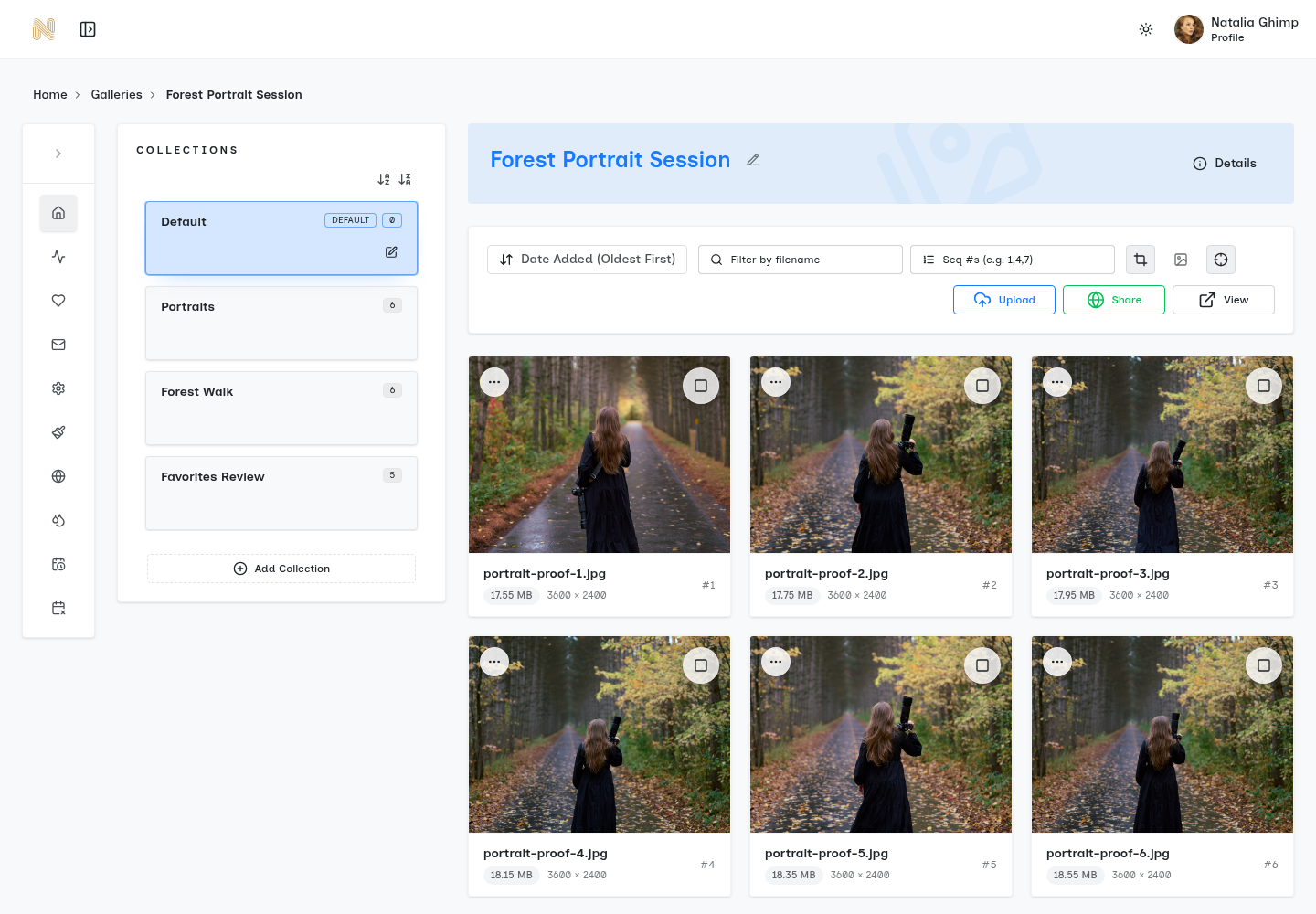
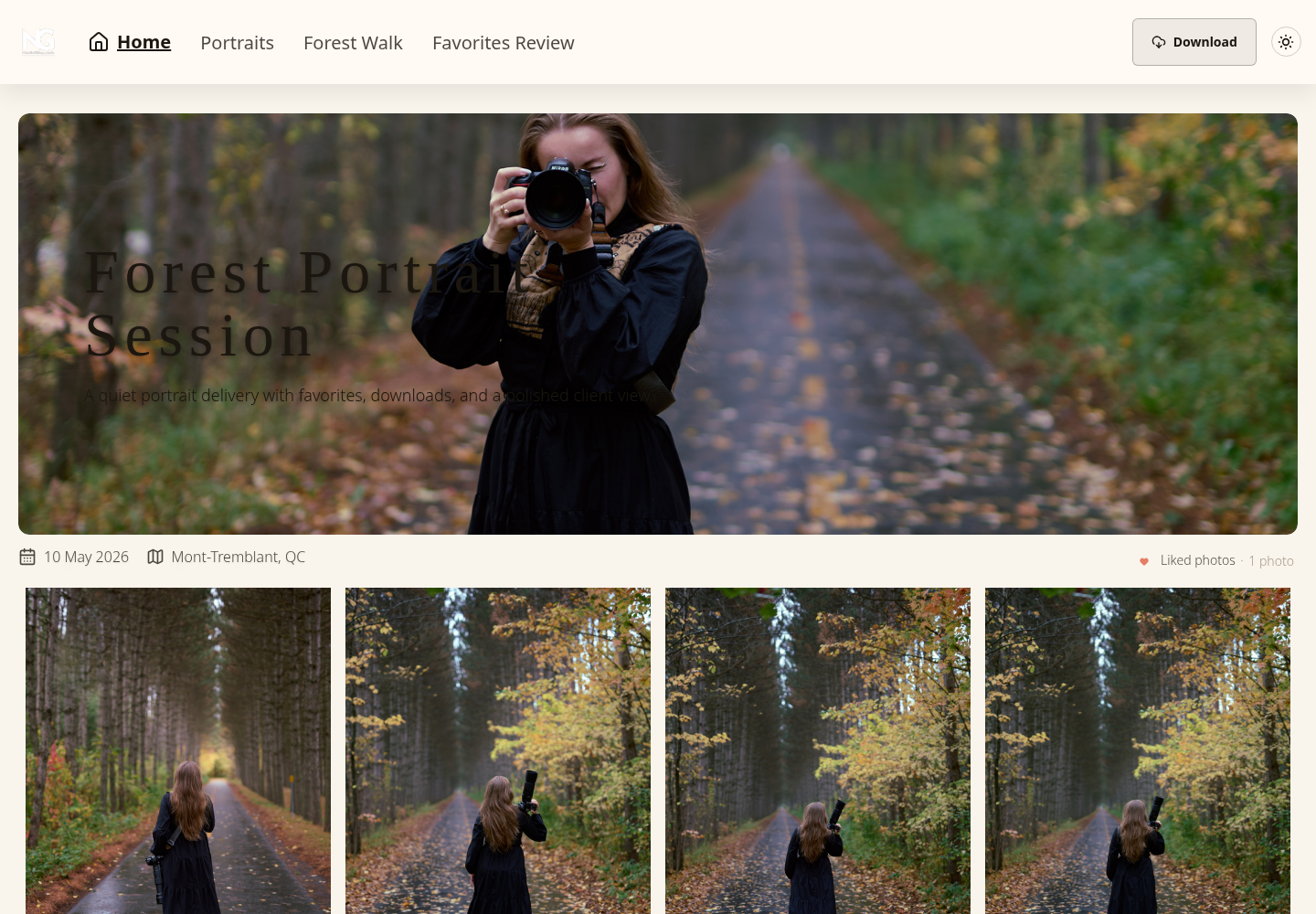
Choose the source archive and the delivery layer for their different jobs. Preserve approved filenames and export versions across the handoff so a later request can be traced back to the right source.
Frequently Asked Questions About Photo Organization
Is photo organization software only for large studios
No. Solo photographers benefit just as much when they need faster retrieval, cleaner culling, or a more professional delivery process. The value often shows up in reduced friction, not in studio size.
Should a photographer choose one tool for everything
Usually not. One tool can manage editing well, while another handles delivery better. The key is keeping the workflow intentional so each handoff is clear and unnecessary duplication stays out of the process.
Are AI features always worth it
Not always. AI search, keywording, and duplicate detection can help a lot in large libraries, but they aren't automatically the highest-value improvement for every business. If client review and file handoff are the primary pain points, a delivery platform may produce a more noticeable improvement than deeper metadata features.
What's the biggest mistake photographers make
One common mistake is losing track of the agreed version between archive and delivery. Check both retrieval and recipient instructions; neither a tidy catalog nor a polished gallery fixes a mislabeled export.
What's a good first upgrade from folders alone
Start with the part of the workflow that causes repeated delays. If finding files is the problem, move into a real catalog. If sending files is the problem, move into a delivery system with galleries, permissions, and selection tools.
Do casual photographers need the same setup as professionals
Usually no. Casual users may be fine with lighter tools. Working photographers need systems that support retrieval, consistency, review, and controlled delivery under deadline.
Photographers who are tired of messy transfer links and scattered client feedback can use SendPhoto to organize galleries for review and delivery with password protection, download controls, favorites, and branded presentation in one client-facing workflow.