
A profile picture should suit the person and the place it will appear, while keeping the intended face or subject readable at small size. This profile pictures guide shows how to choose light, background, crop, expression, editing, and delivery so the final image works on social media, work profiles, dating apps, creator pages, and personal websites.
Start with the intended crop and expression, then check the image as a small thumbnail. This guide focuses on avatar framing and file versions; the portrait photography masterclass covers broader session planning. The licensed portrait below is a reference for comparing crops, not a profile account we created or a client session we performed.
Decide What the Profile Picture Needs to Say
Profile pictures are small, but they carry context. A corporate headshot, artist portrait, wedding vendor profile, fitness coach avatar, dating app photo, and family social profile should not all look the same.
Before shooting, decide:
- Should the photo feel professional, friendly, creative, warm, confident, playful, or calm?
- Is the crop mainly for a circle, square, or banner preview?
- Does the background need to show a profession, place, or brand color?
- Will the same image be used across several platforms?
- Does the subject want a private gallery to choose from?
Ask the subject how they want to be represented, which positions are comfortable and whether they want a neutral expression, smile or another look. Agree viewing and publication permission separately. A personal profile may also have identity and content rules: LinkedIn’s profile-photo guidance requires the image to reflect the member’s likeness and excludes others’ likenesses, including stock imagery. The licensed example in this guide is for instruction; use your own photograph for your account.
Use Light That Makes the Face Clear
Indirect window light or even open shade can be manageable starting choices. Direct sun through a window and low outdoor sun can still make hard shadows or cause squinting. Inspect the actual light on the face rather than treating a time of day as a guarantee of softness or accurate skin color.
Good profile-picture light should:
- Brighten the eyes.
- Avoid deep shadows under the nose and chin.
- Keep skin texture natural.
- Separate the face from the background.
- Avoid bright spots that pull attention away from the subject.
If the eyes are too dark for the intended look, adjust light direction, the camera position or a reflector. Invite a small face turn only if comfortable. Expose for important facial detail while inspecting highlights; a brighter background is not automatically wrong if it suits the brief. For glasses, change light or camera angle to reduce unwanted reflections without asking someone to remove them by default.
Pick a Background That Supports the Subject
The background should not compete with the person. A plain wall, office corner, studio paper, textured exterior, clean workspace, garden, or brand-colored surface can all work.
Use this quick background check:
| Background Issue | Why It Hurts the Photo | Fix |
|---|---|---|
| Bright clutter | Pulls attention from the face | Move the subject or change angle |
| Poles or lines behind the head | Creates awkward shapes | Step sideways or raise/lower the camera |
| Strong color cast | Changes skin tone | Find neutral light or a simpler wall |
| Too much detail | Looks messy at small size | Increase subject-to-background distance, change the angle or simplify the crop; review the result |
| Background too close | Can add distracting shadows or detail | Try more separation if space and comfort allow; it does not guarantee blur |
Choose the background with the subject. A simple wall can suit a compact avatar; an environment can add meaning when it remains readable. Background blur depends on aperture, focal length, focus distance and camera format as well as separation; inspect the result instead of relying on distance alone. Check for private documents, location clues and other people before publishing.
Compose for Small Screens
Most profile pictures appear tiny in feeds, comments, search results, and message threads. A full-body photo may look great large but fail as an avatar.
Profile crop tips:
- Use eye placement that keeps the face readable in the intended mask; the upper-half rule is a starting option, not a requirement.
- Leave enough space around the head for circular crops.
- Avoid cutting through the chin, forehead, hands, or shoulders awkwardly.
- Make the face large enough to recognize at phone size.
- Capture both vertical and square-friendly versions.
Preview the same photograph as a square and through a circular mask at small size. If the face gets lost, try a different crop or simpler background; tightening an already close portrait can cut off more of the head. Keep the uncropped source.
Compare real square and circle thumbnails
The table displays one real photograph at 32 and 64 CSS pixels at normal browser zoom. The first row fits the complete portrait inside a square. The second uses a centered square crop; the third applies a circular mask to that same crop. These are local crop demonstrations, not screenshots of LinkedIn, X or another account.
| View | 32 px | 64 px | Compare |
|---|---|---|---|
| Complete portrait | 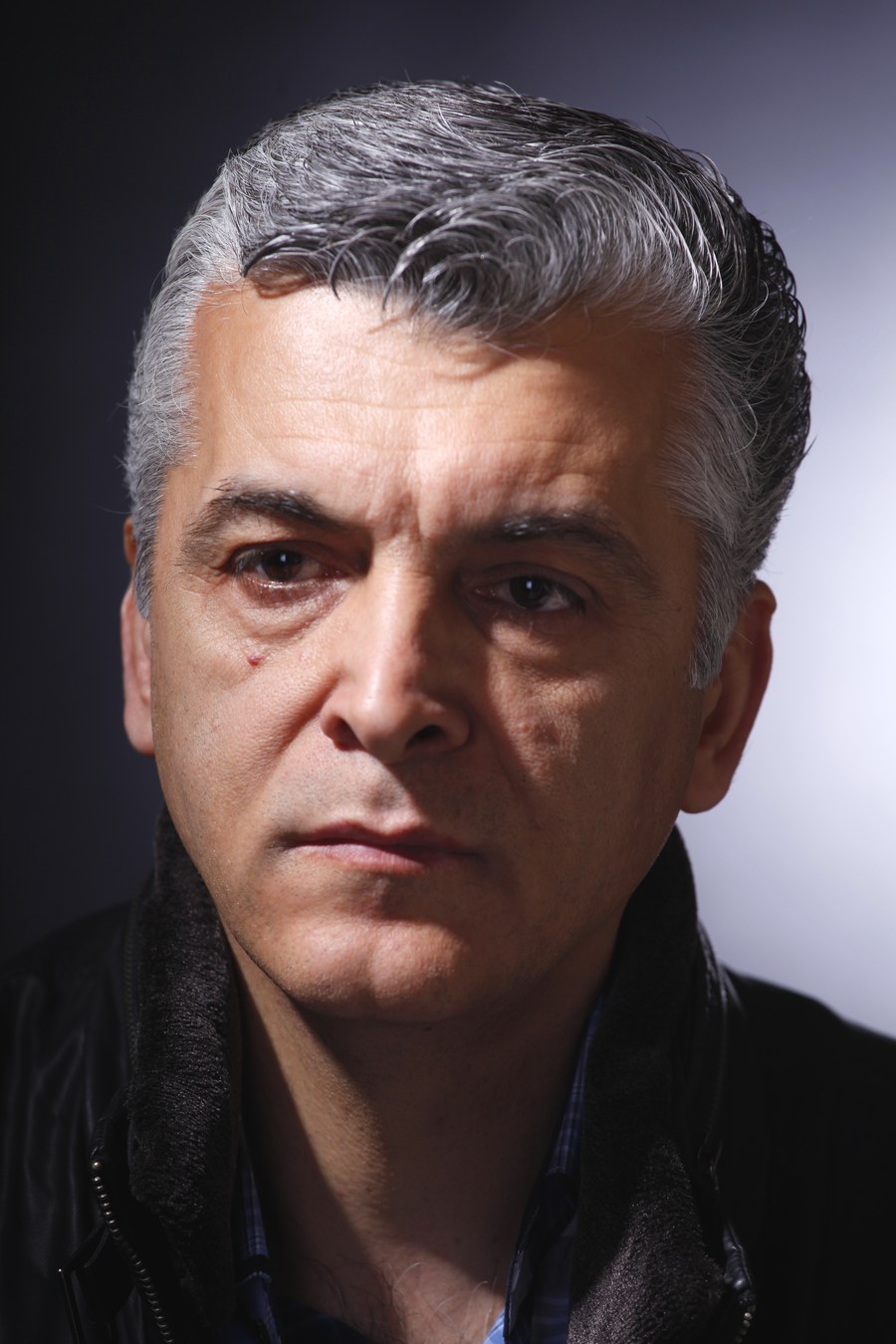 | | More of the photograph remains, but the face occupies less of the square. |
| Centered square crop | | | The face is larger; some upper hair is outside the crop. |
| Same crop with circle mask | | | The mask removes the square corners; check hair, ears and chin again. |

Compare what you can see at each size, not whether one crop is universally better. The source is already a close portrait: a circle cannot restore hair or background space outside it. If the desired mask cuts important features, use a roomier original or capture a wider frame. Keep essential features within the circle’s central area; a fixed margin or percentage does not guarantee a safe crop on every platform.
For a subject whose eyes or expression need a clearer rendition, change light or choose another frame rather than increasing sharpening until edges look harsh. Small-image recognizability is a viewer judgment, not a result certified by this example.
Pose for Comfort and Confidence
Offer small directions and let the subject choose what feels comfortable. A seated or supported position can work as well as standing. Do not promise that a particular body angle produces confidence or a universally flattering result.
Start with:
- Offer a slight body turn if wanted; a front-facing position may fit the brief.
- Invite a look toward or near the lens without requiring an uncomfortable neck turn.
- Relax shoulders.
- Use a stable, comfortable stance or supported seat; a weight shift is optional.
- Give hands something simple to do if they are visible.
- Ask which expression the subject wants, make a frame and allow a pause.
Good prompts for profile pictures:
- "Take a breath and let your shoulders drop."
- "Turn your chin a little toward the window."
- "Give me the version you would use for work."
- "Now give me the version a close friend would recognize."
- "Look just past the lens, then back to me."
For more portrait direction, see the portrait photography masterclass.
Choose Clothing and Details Carefully
Clothing should fit the purpose of the profile picture and not distract from the face.
Practical wardrobe tips:
- Choose colors that separate from the background.
- Avoid tiny patterns that can look busy on small screens.
- Check collars, layers and hair with the subject; ask before touching or adjusting anything.
- Bring one extra layer or top if the session matters.
- Choose clothing with the subject that fits the intended audience and their preferred presentation.
For personal branding, the right prop can help: camera, instrument, laptop, notebook, tool, product, or studio detail. Keep it secondary unless the profile picture is specifically about the work.
Edit Naturally
Editing should make the profile picture clean and polished without making the person look unlike themselves.
Basic editing order:
- Make the intended crop as a separate version while preserving the uncropped capture and edited master.
- Straighten if needed.
- Adjust exposure and contrast.
- Correct white balance.
- Lightly reduce distractions.
- Sharpen gently for screen viewing.
Avoid heavy smoothing, extreme eye brightening, harsh filters, or color shifts that make skin look unnatural. If you are editing several images for one client, keep the look consistent and agree any skin retouching. Brightening a shadow may reveal noise and cannot recover clipped detail. An avatar crop does not need to remove identifying features or change a person’s body to be useful.
For beginner editing help, read how to edit photos for beginners.
Make Different Versions for Different Uses
One profile photo may not fit every platform. A business bio may need a clean headshot. A creator page may need a more expressive image. A social avatar may need a tighter crop.
Useful export versions:
| Version | Best For | Notes |
|---|---|---|
| Square crop | Avatars and social profiles | Leave safe space for circular masks |
| Vertical portrait | Bio pages and about sections | Good for websites and speaker pages |
| Horizontal crop | Banners or media kits | Leave room for text if needed |
| High-resolution file | Press, print, or future reuse | Keep a clean edited master |
| Web-size file | Fast upload and sharing | Useful for quick profile updates |
Keep filenames clear, for example portrait-selected_square_web_v01.jpg and portrait-selected_vertical_master_v01.jpg. An exported image’s pixel dimensions and encoded bytes matter for upload; DPI metadata alone does not establish avatar quality.
Check current upload requirements
Platform guidance checked October 5, 2026:
- LinkedIn’s upload guidance accepts PNG or JPG with a maximum file size of 8 MB and profile dimensions between 400 × 400 and 7680 × 4320 px. It recommends avoiding a photo that needs much cropping.
- X’s profile-photo guidance recommends 400 × 400 px and supports JPEG, GIF or PNG under 2 MB. A header has separate requirements.
For an example still-avatar brief, export a 400 × 400 JPEG with an embedded sRGB profile, leaving the intended face clear in the destination’s crop preview. Check actual file size against the chosen platform, then inspect the displayed result. This is a proposed delivery choice, not proof of an upload or a guarantee of identical cropping, color or sharpness. Recheck the destination’s rules for a later delivery.
The 32 and 64 px examples above are viewing comparisons, not recommended upload resolutions. Supply a larger edited version when agreed for future use; specify print dimensions and profile separately rather than calling every large file print-ready.
Deliver Profile Pictures Clearly
Profile picture sessions often produce several strong options. Clients may want to compare expressions, crops, outfits, and backgrounds before choosing.
Instead of sending a messy folder of attachments, organize the images so selection is easy. Collections can separate work headshots, social options, vertical crops, and final exports.
Use SendPhoto gallery delivery to organize the agreed portraits into collections. A gallery password adds a shared-password gate, and download settings define the offered file options. The link and password can be forwarded; these controls do not stop screenshots or recall already saved copies.
Favorites communicate preferences, not final approval or permission to publish. Confirm the chosen filename, crop, retouching and platform version separately, and keep final exports and masters backed up independently of the gallery. A platform upload is the account owner’s next step, not something the gallery performs automatically.
Profile Picture Checklist
Before the session:
- Decide the main platform and mood.
- Choose clothing that fits the purpose.
- Pick a clean background.
- Check light direction.
- Clean glasses, lenses, and visible details.
During the session:
- Start with simple poses.
- Capture tight and wider versions.
- Leave room for circular crops.
- Review expression and focus.
- Check background distractions.
- Offer the requested neutral, smiling or other expressions without requiring one mood.
After the session:
- Select the strongest expressions.
- Edit naturally.
- Export square, vertical, and web-size versions when useful.
- Name files clearly.
- Deliver final images in an organized gallery.
Common Profile Picture Mistakes
Avoid:
- Using a group photo where the person is hard to identify.
- Cropping too far away for avatar use.
- Shooting in harsh midday light without shade.
- Leaving bright clutter behind the head.
- Over-editing skin or eyes.
- Sending only one crop when several platforms are involved.
The best profile pictures feel intentional but still human.
Related Guides
- Browse the SendPhoto photography blog
- Portrait photography masterclass
- How to edit photos for beginners
- Gallery delivery for photographers
- Password-protected client galleries
FAQ
What makes a good profile picture?
A useful profile picture suits the subject and destination, keeps the intended face or subject readable, and retains important features in the final mask. Check a small preview and the actual destination rather than assuming one pose or crop works everywhere.
Should a profile picture be close up?
Often a face-focused crop works for a small avatar, but leave room for the destination’s mask. Keep a wider original and compare square and circular previews; tightening an already close photograph can remove important features.
What background is best for profile pictures?
Use a clean background that matches the purpose of the image. Neutral walls, soft outdoor shade, simple workspaces, and brand-colored surfaces can all work when they do not distract from the subject.
How should photographers deliver profile picture options?
Deliver a small organized gallery with clear selects, final edits, and crop versions. Confirm the selected filenames and intended file versions separately. Favorites can help communicate choices, but they are not final approval, and the account owner should check the destination’s crop and upload rules.