
Plan the Pumpkin-Head Effect
A pumpkin-head portrait can be playful, spooky or surreal without putting a real pumpkin over anyone’s head. Plan either a portrait beside a pumpkin or a composite made from separate photographs of the person and the pumpkin. The composite gives the head-replacement effect while the person stays uncovered during the shoot.
This pumpkin head photoshoot tutorial covers prop preparation, location, light, poses, a suggested two-photo editing workflow and client delivery. The setup and settings below are proposals, not an original shoot or a tested wearable design.
Safety First: What to Plan Before the Shoot
Keep real pumpkins off people’s heads, including adults and children. A short fitting test, larger eye holes or an assistant does not establish that a heavy carved shell is suitable headwear. Use a pumpkin beside the person; for a hidden-face result, add it later in editing. Do not suspend a heavy pumpkin above the subject.
The CPSC’s Halloween guidance recommends adult carving, battery-operated lights, clear routes and costume visibility. These general precautions do not certify a wearable pumpkin. Health Canada’s Halloween advice also covers unobstructed vision, adult carving and secured battery compartments.
Plan these checks before the session:
- Agree whether the final image is a normal prop portrait or a disclosed composite.
- Keep the subject’s head uncovered during capture, with vision and breathing unobstructed.
- Put pumpkins on a stable surface away from feet and walkways.
- Choose a pumpkin the adult preparing it can manage; do not ask a child to lift a large one.
- Have an adult do any carving, away from the portrait area.
- Keep sharp tools, loose batteries and small supplies away from children and pets.
- Use flameless lighting with a secured battery compartment; follow its instructions.
- Keep cords and costume hems out of the walking route.
- Use a separate stable seat, not a pumpkin, when the pose needs one.
- Have a supervising adult close to a child and stop when anyone wants a break.
These are preparation choices, not a guarantee that a particular set is safe. Change or skip a prop when it makes the session harder to manage.
Choose the Right Pumpkin
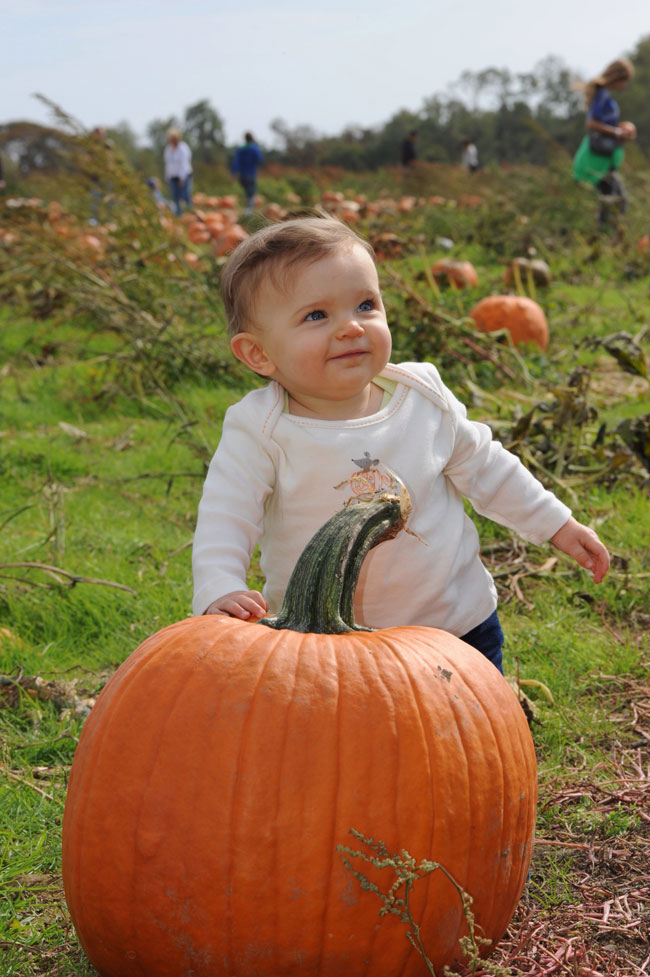
Choose for the picture and its support, not for fitting a person’s head. A small painted pumpkin is enough for many family portraits; a carved one can be photographed separately for a composite.
Look for:
- A shape that suits the wardrobe and intended frame.
- Enough texture and visible detail for the planned crop.
- A sound shell without soft or damaged areas.
- A stem that reads clearly without covering the carved expression.
- A size and weight the preparing adult can move and support comfortably.
Keep larger pumpkins stationary beside the person. For a couple composite, photograph two expressions separately; neither person needs to wear a pumpkin.
Carve the Pumpkin for Photos
Carving is optional. Painting or drawing a face can give a pumpkin character without cutouts. If an adult chooses to carve a stationary prop, prepare it separately before bringing in the portrait subject. Follow the carving tool’s instructions and work on a stable surface; this is not a helmet-building guide.
Step-by-Step Prep
- Decide whether the pumpkin will stay beside the person or be photographed as a separate composite element.
- Choose the supporting surface and check that the prop cannot roll into the posing area.
- Draw the expression; use paint or markers if carving is unnecessary.
- Have an adult handle cutting and tools away from children and the subject.
- Remove loose pulp and wipe the outside so it will not drip onto clothing or equipment.
- Check the camera-facing texture, stem and expression from the planned angle.
- If adding internal light, use an appropriate battery light with its compartment secured.
- Make a prop-only frame and inspect focus, bright cutouts and unwanted reflections.
- Clear tools and waste before the portrait starts; keep the pumpkin on its support.
Bring towels, wipes and a bag for waste. An opening is for preparing and lighting the stationary prop, never for fitting a person’s head.
Face Design Ideas
Choose a readable expression that works at the final viewing size. Try a classic grin, triangle eyes, round eyes with no mouth, one oversized expression, star or moon shapes, or a painted face. The design is for the camera, not the subject’s visibility through eye holes.
For a glow photograph, check the prop alone before the portrait. Bright internal light can lose detail; a separate dimmer exposure may preserve the carved edges.
Pick a Location That Supports the Mood
Choose a permitted, accessible setting with level footing and a stable place for the prop. Build the mood through the frame rather than asking the subject to enter a hazardous location.
| Mood | Location ideas |
|---|---|
| Cozy Halloween | Clear porch or backyard; a separate chair beside autumn leaves |
| Spooky | Accessible forest edge or a permitted studio with a dark backdrop |
| Editorial | Plain studio wall, stable chair and dramatic fabric kept out of the walkway |
| Playful | Permitted pumpkin patch or decorated yard with a clear posing area |
| Romantic | Level field edge, fall wardrobe and battery lanterns placed off the path |
Confirm photography and access rules for farms, venues, private property and organized events. Avoid roads, steep trails, abandoned buildings, slippery surfaces and low visibility. A school or child setting needs the organizer’s applicable participation and sharing arrangements; no location label makes it automatically suitable.
Lighting Setup Ideas
For a composite, plan the portrait and prop photograph with a similar camera height, viewing angle, light direction and light hardness. Matching these at capture is usually easier than trying to repair incompatible shadows later. Leave room around the head and shoulders for the replacement element.
Golden Hour
Low sun can give warm color and edge light; it is not necessarily soft. Check clothing, hands and important highlights rather than assuming a backlit frame will expose itself correctly. Photograph the separate pumpkin under similar light before the direction changes. Add fill if the shadow side needs detail.
Window Light
Try a portrait beside a window with the person uncovered, then photograph the supported pumpkin from a comparable angle. A large nearby window can give a softer transition; direct sun through the glass may produce a harder patch. Check the actual shadow edge.
Lantern or Practical Light
Use battery lanterns or suitable LED candles for background atmosphere. Keep compartments secured and props out of the walkway. A practical light may be too dim to illuminate a moving person sharply, so add a main light when needed.
Off-Camera Flash
Start with one light from the side, inspect the portrait, then keep its direction consistent for the prop frame. If using a gel, check the resulting costume and skin colors. Secure the stand and keep cables clear. Follow the camera and flash instructions for synchronization.
Internal Glow
Light only the stationary, unoccupied pumpkin with a suitable battery LED; keep the device and compartment accessible according to its instructions. Photograph its glow separately if necessary. No person’s head goes inside the illuminated prop, and no open flame is needed.
Camera Settings to Start With
The following values are illustrative starting points for uncovered portraits and stationary props, not tested presets. Check focus and exposure on the actual camera. Stop down when the hands, costume or multiple people need more depth of field; raise ISO or add light rather than accepting unintended motion blur.
| Situation | Starting settings and check |
|---|---|
| Golden hour portrait | Try f/2.8–f/4 and 1/250 s; set ISO for the available light and inspect hands and costume |
| Indoor window portrait | Try f/2.8 and 1/160 s for a still person; shorten the exposure if movement blurs |
| Flash portrait | Try f/4–f/5.6, a shutter at or below the normal flash-sync limit and an ISO suited to the light; set flash power from a test frame |
| Playful movement, with no head covering | Try 1/500 s or faster; inspect the moving detail and adjust for its speed |
| Stationary glowing pumpkin | Use a stable camera support and vary shutter speed for the glow; keep people out of a long-exposure prop frame |
Focus on the person’s visible eye for the portrait and on the carved face or texture for the prop frame. Magnify each saved frame to check the detail you need. A tripod reduces camera movement; it does not freeze a person. Keep perspective consistent, but refocus for each subject’s distance rather than assuming one focus setting covers both.
Posing When the Face Is Hidden
In the finished composite the pumpkin supplies the expression, so clothing, hands and shoulders carry the gesture. During capture the person’s own face remains uncovered. Explain the intended edit and let the subject choose comfortable poses.
Try these prompts:
- Hands on hips with a small, comfortable weight shift.
- Bring hands near the collar or shoulders, leaving space for the later pumpkin edge.
- Sit on a separate stable chair with elbows on knees.
- Stand still while adjusting the coat’s shape between frames.
- Take an uncovered walking portrait on a clear route, or use a stationary pose if the composite alignment is easier.
- Hold a manageable unlit mug, flowers or lightweight prop if wanted.
- Turn shoulders slightly while keeping the planned head angle clear.
- For consenting couples, try shoulder-to-shoulder or back-to-back positions; touching is optional.
Do not ask someone to balance or hold a heavy pumpkin at head height. Put the prop beside them or capture it separately. Leave breaks between setups and photograph a normal face-visible version as an alternative.
Pumpkin Head Photoshoot Ideas
Classic Autumn Portrait
Combine leaves, warm wardrobe and a simple background. Choose a portrait beside the pumpkin, or replace the head in a clearly described composite. Keep enough separation between the pumpkin outline and the background.
Spooky Forest Frame
Use a permitted, accessible location with clear footing, or a dark studio background. Add side light or a battery lantern; skip hazardous paths and abandoned structures. Create the darker mood in lighting and editing rather than reducing the subject’s ability to see.
Couple Pumpkin Heads
Photograph the couple uncovered and two supported pumpkins separately. Match each prop’s angle to the corresponding person, keep shoulder contact optional and agree whether the clients want both normal and surreal versions.
Formal Outfit Contrast
A suit, dress or editorial coat can contrast with the pumpkin expression. Check whether collars, hats or hands will overlap the replacement; capture their edges clearly so they can sit in front of the pumpkin layer.
Behind-the-Scenes Set
Include the stationary prop, cleared preparation area, portrait setup and finished edit in a carousel. If the result is composited, show or explain the separate captures rather than implying that the subject wore the pumpkin. Obtain permission before sharing recognizable people or private locations.
Studio Minimal
Use a plain backdrop, a separate chair and one light. Photograph the person, then the supported pumpkin under matching light. This keeps attention on shape and provides a simpler background for masking.
Editing the Final Images
Keep the original captures and work in a separate layered file. This suggested pumpkin workflow applies documented layer-mask techniques; it is not a demonstrated source/output pair or an automatic one-click effect.
- Choose compatible captures. Compare the portrait and prop for camera angle, sharpness and light direction. If they do not fit, choose another pair or reshoot the stationary prop.
- Place the pumpkin above the portrait. Keep each photograph on its own layer and size the pumpkin proportionally for the shoulders. A convincing edge needs room in the original portrait.
- Isolate the pumpkin. Select the prop on its layer, then use Layer > Layer Mask > Reveal Selection in Photoshop. Refine the mask so its unwanted background is hidden.
- Resolve overlap. Select the mask thumbnail before painting: black hides that layer’s areas and white reveals them. Keep the contour firm where the pumpkin is sharp; use gentler transitions only where the original edge is soft. Preserve a collar or foreground hand on a separate masked layer when it should cover the pumpkin.
- Match the join. Inspect the neck area, stray hair, remaining pieces of the original head, edge halos, scale and mismatched shadows. Adjust color and brightness for the prop’s placement; do not use a dark vignette to disguise an unfinished boundary.
- Save and inspect. Save the layered master separately, export a viewing copy and reopen that copy. Check both at normal viewing size and close enough to see the edge. Label the surreal edit as a composite when sharing its making-of story.
Adobe’s layer-mask documentation explains Reveal Selection. Its credited Seán Duggan composite lesson demonstrates selection-based edges and black/white mask painting with a canoe and room, not a pumpkin. Watch that publisher example for the masking technique; use your own photographs or assets with appropriate rights for published work. Adobe’s supplied practice assets have separate usage terms.
For either a normal portrait or a composite, keep these finishing priorities:
- Preserve visible pumpkin texture.
- Keep important clothing detail in shadows.
- Avoid accidental neon orange when aiming for natural color.
- Adjust carved openings without erasing their edges.
- Keep visible hands and arms consistent with the chosen look.
- Add grain only if it suits the intended style.
- Use a vignette only when it improves the composition.
A cool-shadow, warm-pumpkin grade is one possible spooky treatment; warm highlights and gentler contrast are another. Compare before and after and agree on the final style with the client.
Cleanup and Client Comfort
Separate prop preparation from the portrait so nobody waits beside exposed tools or wet waste. Bring towels, suitable wipes, waste bags, water, spare clothing if useful, and a place to set the prop. Keep hand sanitizer and small supplies out of children’s reach.
Wipe slippery surfaces, clear cables, put tools away and check the pose area between sessions. Adjust lights with the person out of the working area when necessary. They never need to wear the pumpkin while you work. Allow weather, warmth and comfort breaks, and stop when requested.
Delivering Halloween Mini-Session Galleries
Agree who may view the files and which images may be published. A hidden face in a composite does not automatically anonymize the person: clothing, companions, a home or a location can still identify them. Keep unedited face-visible captures separate from exports intended for a wider audience.
SendPhoto’s gallery delivery can present files in collections. Name ordinary portraits, composite alternatives and final exports clearly. Favorites record preferences, not formal approval; confirm the chosen versions and public sharing permission separately.
Password protection adds an access check, but a viewer can forward the link and password or copy an image they can see. Download control lets you enable or disable gallery downloads; it does not decide publication rights or recall copies already saved. Configure separate galleries if proofs, originals and final exports need different access. Keep editable masters and independent backups outside the delivery gallery.
Helpful next reads:
- Find broader seasonal concepts in Halloween photoshoot ideas.
- Review format and profile choices in PSD to JPEG export settings.
- Browse more planning guides in the SendPhoto blog.
FAQ
How do you make a pumpkin head for a photoshoot?
For a head-replacement effect, photograph the person uncovered and the pumpkin separately on a stable support. Match the angle and light, then combine your own photographs with layers and masks. For a simpler session, keep the pumpkin beside the person and leave the face visible.
Is a pumpkin head photoshoot safe?
No general tutorial can certify a particular setup. This guide keeps real pumpkins off people’s heads and uses stationary props or a composite instead. Adult preparation, clear routes, secured battery lighting and subject comfort still need attention. Supervision or short wear time is not proof that wearing a real pumpkin is suitable.
What lighting works best for pumpkin head photos?
Use light that shows the texture and intended mood. Window light, low sun or controlled flash are options; match the portrait and prop’s light direction for a composite. Photograph a stationary internal glow separately when its exposure differs from the portrait.
How should photographers deliver pumpkin head photos?
Use clearly named collections or separate galleries for review versions and approved exports. Agree who receives each gallery and which images may be public. A shared password and a hidden face are not privacy guarantees; describe composites accurately and preserve the editable masters separately.