
SEO for photographers is a routine for making your public services easier to find and understand: describe what you photograph and where you work, publish useful pages and permitted portfolio images, and measure whether search visitors become relevant inquiries. It cannot guarantee a ranking, an inquiry or a booking.
Start with one service page and a record of its current performance. Check whether Google can access the public page, whether it answers a prospective client's questions, and whether its photographs load at an appropriate size. Keep private client delivery separate from public marketing throughout the process.
The examples below are planning examples, not measured results from a photographer's website. Use the workflow to choose a specific improvement, record when you made it, and review the evidence before expanding to more pages.
Table of Contents
- Why Your Photos May Be Hard to Find on Google
- Finding Keywords That Attract Your Ideal Clients
- Optimizing Your Website Pages and Images
- Improving Your Local Presence with Google Business Profile
- Improving Your Website's Technical Health
- Building Authority with Content and Backlinks
- Measuring SEO Success and Staying Consistent
Why Your Photos May Be Hard to Find on Google
A strong portfolio does not automatically make a website discoverable. A public service page should explain the service, the area you actually serve, and how a visitor can inquire. A headline such as “timeless storytelling” can remain part of your branding, but it should not replace practical information about the business.
Start with evidence rather than diagnosing every low-traffic site as an image problem. Check whether the intended public page appears in Search Console, whether its service and location are clear, and whether visitors can reach it through the website's navigation. Low demand, competition, site access and the page's usefulness are different questions; changing filenames alone will not answer them.
What usually goes wrong
Review these possibilities on your chosen page:
- Overlapping pages: several pages offer nearly identical information without a clear purpose for each. Decide which page is the main service overview and which adds a genuinely different resource.
- Missing context: photographs appear without explaining the session type, service area, preparation or next step.
- Confusing navigation: prospective clients cannot readily find services, portfolio examples, pricing information or contact details.
- Unnecessarily heavy media: large downloads or autoplay elements make browsing harder. Measure the actual page before deciding what to change.
- Unclear publication boundaries: full client galleries are exposed, or permitted public examples are mixed into a delivery workflow that was meant to remain private.
A useful service page explains the offer as clearly as it shows the photographs. Search visibility and client privacy need separate decisions.
Assign each public page a reader job. A service page describes the offer; a selected portfolio shows its style; a preparation guide answers a planning question. Link these where they help a visitor decide. Our photo resolution guide can help with web exports, while your print and master files remain separate.
Four areas to check
| Area | What it helps you do | A problem to investigate |
|---|---|---|
| Keywords | Match a page to the client's service or planning question | Page language does not describe the actual offer |
| On-page content | Explain the topic, work and next step | Several thin pages repeat the same information |
| Local presence | Represent an eligible business and its real service area | Incorrect profile details or missing local context |
| Relevant content and mentions | Publish useful resources and earn independent references | Content adds little beyond a generic session recap |
Use these as a review order, not a promise that completing four tasks fixes every search problem.
Finding Keywords That Attract Your Ideal Clients
Build your list from the services you actually offer and the questions prospective clients ask. A term can be relevant without having proven search demand, and a high-volume term can be unhelpful if it describes a service or place you do not serve.
Start with the client, not the tool
Keep three groups separate:
- Booking questions: “newborn photographer in Tampa” or “branding photographer in Seattle,” when those accurately describe the business.
- Planning questions: what to wear for family photographs, how an in-home session works, or how to choose an engagement location.
- Brand and context: your studio name, real venue collaborations and session specialties.
These are examples of wording, not evidence of volume or ranking difficulty. A broad term such as “photographer” may be relevant in context; adding a service and place usually makes the intended offer clearer.
A simple way to build the list
Start with inquiry emails and conversations you are allowed to use for internal planning. Note recurring questions without copying client names or private details into public content. Search suggestions can supply additional ideas, but they do not establish demand or guarantee that your page should target a phrase.
Combine three elements when they are accurate:
- Service: family, wedding, branding, newborn or high-school senior portraits.
- Location: the city or area you actually serve; a venue only where it is relevant.
- Approach: documentary, in-home, outdoor or another description supported by your work.
Possible planning examples include documentary wedding photography in Chicago, in-home newborn sessions in Nashville, or outdoor family sessions in Orange County. Do not create a near-identical page for every nearby city merely by swapping the place name.
Keep the list small and useful
Leave with a working list tied to pages you can maintain:
- One main topic for each distinct service you offer; there is no required number of services or keywords.
- Local variations that genuinely help explain where and how you work.
- A few preparation or location questions that support a real client decision.
For each item, record the existing page, the reader's question and the missing answer. Create a new page only when it has a distinct purpose; otherwise improve the relevant existing one. Search Console can later show whether that page is appearing for relevant queries.
Optimizing Your Website Pages and Images
Choose a public page and make its title, heading, examples and contact route coherent. There is no need to repeat an exact phrase in every paragraph or photograph description. Do not change an established URL solely to fit an example below; a necessary URL change also requires redirect and internal-link planning.
What one optimized page looks like
For a hypothetical studio offering family beach sessions in San Diego, a service page could contain:
- Title: San Diego Family Beach Photographer | Studio Name.
- URL: a clear existing service URL, or
/san-diego-family-beach-photographerfor a suitable new page. - Heading: a natural description of the family beach service.
- Opening: who the session is for, the area served and what the experience includes.
- Internal links: relevant portfolio examples, preparation advice and the contact page.
- Images: selected photographs with publication permission, useful filenames and descriptions appropriate to what is visible.
Include the practical details a prospective client needs, such as how to inquire and where to find package information. This is a proposed structure, not an audited page or a demonstrated ranking improvement.
Image SEO is part of page SEO
Prepare web copies while preserving your original files. Check what your site builder actually serves instead of assuming an upload setting produces the right result.
- Filename: use a short descriptive name for a new export, such as
family-beach-session-01.jpg. A location belongs in the filename only when it is accurate and useful. - Description: write alt text that suits the image and its role on the page.
- Delivery: choose dimensions and compression that retain the quality needed at the displayed size. Check whether the platform serves responsive versions instead of a full-size file to every screen.
Google's image guidance recommends descriptive filenames, contextual alt text and balancing image quality with responsive delivery. It does not set a universal 200 KB limit for every portfolio image. Inspect the actual served file and page performance; a small thumbnail and a large hero photograph have different needs.
A better alt text standard
Describe what is visible and relevant. Do not add a city, venue, client identity or session type unless it is known and appropriate to publish. The examples below assume those facts are accurate and the image is informative:
| Weak alt text | Better alt text |
|---|---|
| family photographer san diego beach photo | Family of four walking together on a beach |
| wedding photographer asheville mountain elopement | Couple embracing beside a mountain overlook |
W3C guidance on decorative images explains when an image needs empty alt text rather than a keyword-filled description. Linked images also need to communicate the link's purpose. Review the image in its page context rather than applying one formula to every photograph.
Gallery presentation and the client journey
A visitor should be able to browse permitted examples, understand the service and find the inquiry route. An attractive or fast gallery does not by itself prove a ranking improvement or a booking gain.
Check image legibility, navigation and the transition to contact on the public website. Keep private delivery out of this discovery route. Our mobile gallery overview concerns the client viewing experience; it is not evidence that using a gallery product improves your service-page rankings.
Improving Your Local Presence with Google Business Profile
A Business Profile is relevant when your business is eligible and serves customers locally. Google's business guidelines distinguish a customer-facing location from a service-area business. If you travel to clients and do not receive them at your address, follow the service-area guidance and hide that address. Use the real business name, accurate categories and legitimate locations; do not add keywords to the name or create pretend offices for extra cities.
Google's local-ranking guidance describes relevance, distance and prominence. Complete and accurate information helps Google understand the business, but there is no way to request or pay Google for a better local ranking. Profile work does not guarantee a map position.
What photographers should optimize first
Review the profile against the actual business:
- Category: choose the available category that accurately represents the core service.
- Details: check the service area or eligible customer-facing address, website and contact information; follow the applicable hours guidance, including appointment-only arrangements.
- Photos: use representative work with the necessary publishing permissions.
- Reviews: give clients a straightforward way to leave honest feedback.
- Consistency: correct inaccurate public details without publishing a private home address merely to make every listing identical.
Assign someone to check material changes such as a new contact number, unavailable website link or changed operating arrangements. Posting frequency alone is not a substitute for accurate information.
Reviews and useful profile information
A prospective client may use the profile to check:
- Whether the photographer serves the right area.
- Whether the work matches the session they need.
- Whether the contact information is current.
- What previous clients say about their experience.
Google's review guidance supports asking for genuine reviews and replying helpfully. It prohibits incentives such as discounted services in exchange for reviews. Ask for the client's own experience rather than a scripted review containing target keywords, and keep private session details out of public replies.
An accurate profile and thoughtful responses can help a person assess the business. Do not treat weekly activity, review requests or a particular wording as guaranteed ranking factors.
When to prioritize local SEO
Prioritize local work when your actual clients need a photographer in a defined area and your profile or service information is incomplete. If you serve a broader commercial niche, the most useful starting page may instead describe that specific service and relevant work.
Link the profile to a suitable public website page, keep the offer consistent and make inquiries easy to direct to the right place. Check the resulting traffic and inquiry quality before deciding that profile changes are outperforming content work. Neither local-pack presence nor blog volume is a universal best starting point.
Improving Your Website's Technical Health
Separate indexing problems from performance and usability problems. A page Google cannot access needs a different fix from a page that is indexed but downloads oversized photographs.
Google's mobile-first guidance explains that Google uses the mobile version of the site's content for indexing and ranking. Keep important service information, headings and image descriptions available there. This does not mean every ranking decline is caused by the mobile layout.
Use PageSpeed Insights documentation to interpret the report: lab diagnostics simulate a visit, while field data reflects real-user experiences when enough data is available. Check whether field data describes the page or the wider origin. A lab score is not a booking count or a guarantee of real-user performance.
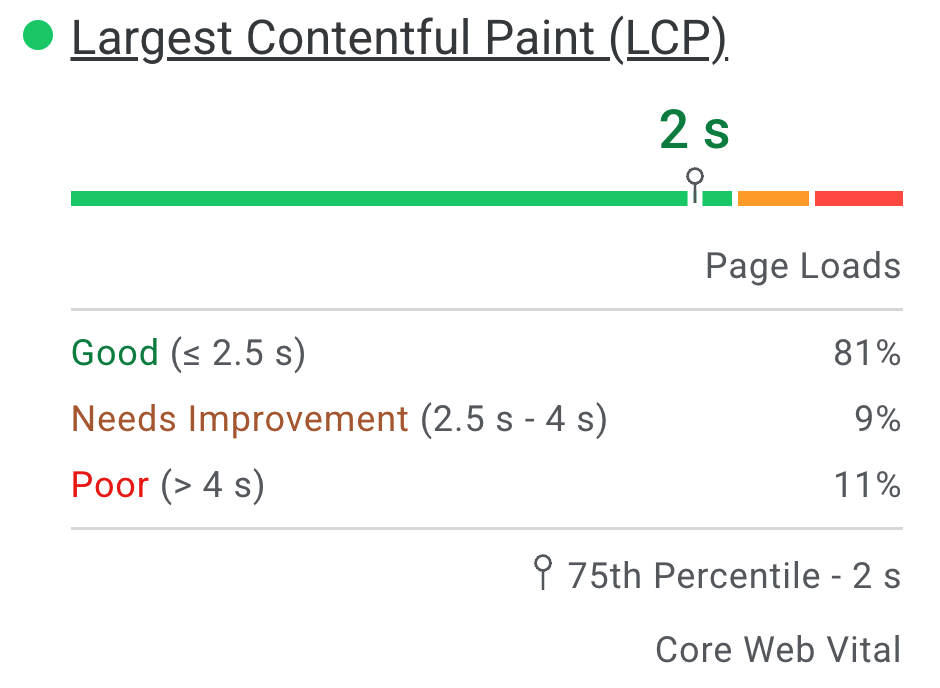
Google's published PageSpeed screenshot, from the documentation linked above, shows the distribution of Largest Contentful Paint (LCP) experiences and a 75th-percentile marker. Its numbers are Google's example, not measurements of SendPhoto or a photographer's website. Reproduced unchanged under CC BY 4.0.
Record the tested URL, device mode, date and whether the data is lab or field before comparing reports. Investigate the reported bottleneck rather than adopting a universal four-second load time or 5 MB page-size rule. LCP measures a specific rendering milestone, not the completion of every resource download.
Check the mobile content and inquiry journey
For your own public site, check the main client route:
- Homepage: can a visitor identify the service and area?
- Service page: are the offer, practical details and inquiry link available and readable?
- Portfolio: can a visitor browse permitted examples without unnecessarily large downloads?
- Contact: can a visitor understand what information to provide and how to submit an inquiry?
Keep essential content available without requiring an interaction that search crawlers cannot perform.
Three technical areas to check
| Technical area | What to check | Why it matters |
|---|---|---|
| Performance | Served image dimensions, loading behavior and diagnostic findings | Identify the actual browsing bottleneck |
| Mobile content and layout | Available service information, navigation and contact route | Support access to the content and the client journey |
| Crawlable structure | Public page access, headings and useful internal links | Help visitors and search engines discover the intended pages |
Choose a fix supported by the evidence. If an image is unnecessarily large, adjust that export or delivery setting and check the served result. If the service page is hard to reach, correct navigation and links. Keep a before-and-after record using comparable conditions; one changed score does not isolate the cause of a ranking change.
Structured clarity beats technical complexity
Use your site's existing tools to give each public page a clear title, heading, purpose and contact path. If a page is missing from Search Console, investigate its indexing status before spending time on cosmetic changes. Seek technical help when the problem is access, redirects or rendering rather than adding more keywords.
A custom domain for client galleries can align the delivery address with your branding. That is a delivery choice, not a guarantee that a separate public website inherits ranking benefits. Keep public marketing pages and private client access understandable as separate parts of the business.
Building Authority with Content and Backlinks
Publish resources that help a real prospective client make a decision. Relevant mentions may follow from useful work and genuine collaborations; neither a session recap nor a venue link automatically earns rankings.
Make session content useful to prospective clients
Keep the original purpose of showing your work, but add information that is useful beyond the featured session:
- Venue resources: what a prospective client should check, with accurate access and planning information.
- Preparation: clothing, session expectations and practical arrangements suited to the service.
- Local knowledge: permitted location options, seasonal considerations and a realistic weather backup.
- Experience: how the session works and what the client can expect, without invented testimonials or results.
Use firsthand information only when you actually have it; otherwise identify the source and verify mutable details. Our senior photo location guide is one example of a planning resource, rather than a reason to publish a student's full gallery.
Vendor relationships are part of SEO
For a genuine collaboration, a sensible publishing workflow is:
- Confirm which photographs and collaboration details you may publish.
- Create a useful page with accurate credits and relevant information.
- Share the public resource with the participating vendor when appropriate.
- Let the vendor decide whether a reference is useful to their audience.
Do not require a ranking link in exchange for photographs or make bulk reciprocal linking the purpose of the collaboration. Google's link-spam policies cover paid ranking links, excessive exchanges and low-quality directory links. Advertising or sponsorship links need the appropriate qualification. A social share and a website backlink are different things; neither should be counted as a confirmed booking.
Privacy-safe portfolio SEO
Make two publication decisions:
- Private delivery: the client set, selections and agreed downloads, with access settings appropriate to the handoff.
- Public discovery: selected photographs and text that you have permission to publish, on service, portfolio or preparation pages.
Permission to photograph or deliver is not automatically permission to publish. Review visible identifying details, captions and exported metadata as well as the photograph itself. Apply the relevant client agreement and any permissions required for minors.
Google's content-control guidance distinguishes password protection from noindex: noindex governs search appearance, while a person with a link may still visit the content. Keep confidential files behind appropriate access controls; an unlisted URL or indexing setting alone is not authorization. Do not make a private gallery public as an SEO experiment.
For the handoff, SendPhoto gallery delivery offers a client viewing workflow with configurable controls. Choose those settings deliberately; a password and link can be forwarded, and restricting downloads cannot prevent every saved copy. Keep your master files and backup copies separately.
Measuring SEO Success and Staying Consistent
Record a baseline before changing the selected page. Keep the website, Business Profile and inquiry records as separate sources rather than adding their counts together.
- Search visibility: Search Console's Performance report reports clicks, impressions, CTR and average position. Review the relevant page and query groups, using the same search type, country and device filters when comparing periods. Impressions are appearances, not unique clients; clicks are not bookings. Average position is an aggregate, not a fixed rank for everyone.
- Profile interactions: Business Profile performance shows applicable metrics for a verified profile. Call-button clicks are not necessarily answered calls; website clicks are not completed inquiries. Google notes that the report includes activity from organic results and Google Ads, so do not label the combined figure organic-only.
- Inquiry quality: keep an internal record of the requested service, fit, stated source and outcome. A client's recollection is useful context, not perfect attribution.
- Bookings: verify accepted bookings in your actual business records. Do not infer revenue from a change in search traffic or a profile action count.
Compare complete periods and note the filters and number of observations. For seasonal work, a prior-year period may add context to a month-to-month comparison. Treat a large percentage change based on a few clicks or inquiries cautiously. Record the date and scope of each edit; overlapping changes, demand and seasonality limit what a before-and-after comparison proves.
A simple monthly rhythm
Use this proposed cadence and adapt it to the studio:
- Weekly: check profile accuracy and review feedback; correct material errors.
- Monthly: review a completed reporting period and record changes on the selected service page.
- Monthly: improve or publish one useful resource where you have a specific missing answer.
- Quarterly: revisit navigation, older advice, permitted portfolio selections and image delivery.
Google Analytics campaign guidance explains using UTM parameters for referral or campaign links. If you use this tracking, adopt consistent source, medium and campaign names on public marketing links. Keep client names, passwords and private gallery tokens out of tracking labels, and respect the consent requirements for your analytics setup. UTM values describe a tagged referral; they do not prove the referral caused a booking.
Finish each review with one next action, an owner and a date to check it again. That gives the studio a manageable routine without turning every search fluctuation into a new website project.