
Smash file sharing can suit a photography handoff when the recipient needs to save files before a deadline. It also offers previews and branding options, so choosing it does not mean delivering an unbranded ZIP with no way to inspect the contents. A client gallery becomes useful when the work needs collection navigation, favorites and a place to revisit a selection.
Choose by the recipient's task, the transfer's availability period and the files you need to send. A paying client who wants one final download may be well served by a transfer; an editor who needs organized visual selections may prefer a gallery. Neither audience automatically determines the right tool.
This guide compares the current documented Smash offer with SendPhoto's gallery workflow. Prices and public terms were checked on October 5, 2026; the examples below are planning scenarios, not timed transfer tests.
Table of Contents
- Is Smash the Right Tool for Delivering Client Photos
- What Is Smash and How Does It Work
- Key Features and Pricing Tiers Explained
- Pros and Cons of Smash for Photographers
- Security and Privacy Considerations With Smash
- Smash vs Dedicated Photo Galleries Like SendPhoto
- Choosing the Right Tool for the Job
Is Smash the Right Tool for Delivering Client Photos
Start with what the recipient will do after opening the link. Do they need to download final JPEGs into their own archive, examine previews, choose images for retouching, or return to a collection over several weeks? Those are different jobs.
For a final download, a transfer can be enough. Name the files clearly, state the deadline and explain which output is intended for print or web. If the recipient needs a longer review process, decide where their selections will be recorded and who will keep the final list.
Practical rule: use a transfer for an agreed file handoff; use a gallery when browsing and collecting image preferences are part of the handoff.
A proposed wedding delivery might use a gallery for browsing and a separate transfer for a large archive requested by the couple. A commercial client might prefer the transfer alone because it already has an asset system. These are possible workflows, not evidence that either method improves approval speed or perceived value.
The client photo delivery platform guide covers more options if neither approach meets the brief.
What Is Smash and How Does It Work
Smash sends files through temporary transfer links. Its first-transfer instructions describe selecting files, choosing Email or Link mode and entering the corresponding addresses. Link mode still asks for the sender's email address; no account requirement is not the same as no information entry.
Smash's recipient account guide says recipients do not need a Smash account, whether the sender uses Free or a subscription. A configured password or requested email address can still be an additional step. Paid senders log in to their account.
The Core Model
Treat the transfer as a delivery window, not your only copy of the work. Keep the exported files and original masters independently. Tell the recipient which files to save and where to keep them after downloading.
Smash's availability guide says the default is seven days for Free and paid transfers; a completed transfer's period cannot be extended, and an expired transfer cannot be reactivated. It also states that files are deleted from Smash's servers when that period ends. This does not remove copies a recipient already downloaded.
If a client misses the deadline, prepare a new delivery from your retained files. Do not promise that an old link can be reopened. For work that must remain accessible across a long review cycle, account for repeat deliveries or choose a different access arrangement.
What a Typical Transfer Looks Like
Follow the current sending instructions and check the settings before starting:
- Prepare and select the files. Confirm the intended deliverables and names, then add them through the central file selector or drag-and-drop area.
- Choose Email or Link mode. Email mode needs sender and recipient addresses; Link mode needs the sender address and produces a link to share.
- Set the delivery conditions. Choose availability, any password and preview options before sending. Communicate the actual deadline rather than assuming the longest plan allowance applies automatically.
- Give the recipient a clear handoff. Explain what is included and how to save it. A preview can help inspect supported files; it is not a substitute for retaining the required originals or exports.
- Close the delivery loop. Agree how the recipient confirms the files were received. Keep your own copies after the transfer expires.
These are documented workflow steps. Upload speed, processing time and the recipient's device handling depend on the actual files and connection; the instructions do not establish a measured delivery time.
Key Features and Pricing Tiers Explained
A transfer's size allowance, processing priority, cumulative storage and availability period are separate limits. A headline about unlimited transfer size should not be read as unlimited stored files or permanent access.
The current Smash Pro description advertises unlimited transfer size and priority processing, while specifying 1 TB of cumulative storage. The Team description specifies 2 TB shared across members. Budget for the transfers that remain stored at the same time, not just the size of one export folder.
For example, a hypothetical 20 GB JPEG delivery exceeds the Free priority threshold. Sending it well ahead of the recipient's deadline may be acceptable; a time-sensitive handoff needs a plan that accounts for processing and network conditions. Priority processing does not guarantee an instant upload or download.
What the Plans Actually Mean in Practice
The following combines the current public pricing page with the linked plan descriptions and availability guide. The figures describe web transfers, not a separate developer API contract.
| Plan | Transfer size and priority | Availability to plan for | Practical fit |
|---|---|---|---|
| Free | 2 GB priority threshold; larger transfers enter a non-priority queue | Seven days shown on pricing; see the Free availability qualification below | Occasional delivery where waiting and a short deadline are acceptable |
| Pro | Advertised unlimited transfer size, priority processing; 1 TB cumulative storage | Seven-day default; up to 30 days when configured | One sender needing regular transfers and customization |
| Team | Advertised unlimited transfer size; 2 TB shared storage | Seven-day default; up to 30 days when configured | Multiple independent senders and member management |
| Enterprise | Unlimited size advertised; storage and commercial terms by agreement | Up to 30 days listed for transfers | Organizations needing contracted features such as a custom CNAME |
Free availability needs care: the pricing page lists seven days, while the help guide permits a maximum of 14 days on Free. Set and confirm the duration available in your sending interface before promising more than seven. Paid transfer availability is up to 30 days, not a year. A receiving/drop-off link has its own settings; its lifetime is not the lifetime of each delivered transfer.
For cost, Smash's subscription pricing guide lists Pro at $10 per month, $72 per year, or $115.20 for two years, excluding VAT. Team is $25 per month, $180 per year, or $288 for two years for the entry offer. The public page's current Team selector starts at ten accounts; obtain the price for the member count you need. Enterprise is quoted separately.
The equivalent monthly rates are $6 for Pro billed annually and $4.80 for Pro billed over two years; the entry Team equivalents are $15 and $12. Multiplying by 12 or 24 gives the stated term totals. Those equivalents are not monthly payment schedules. Confirm currency, applicable tax, promotions and the checkout total before subscribing.
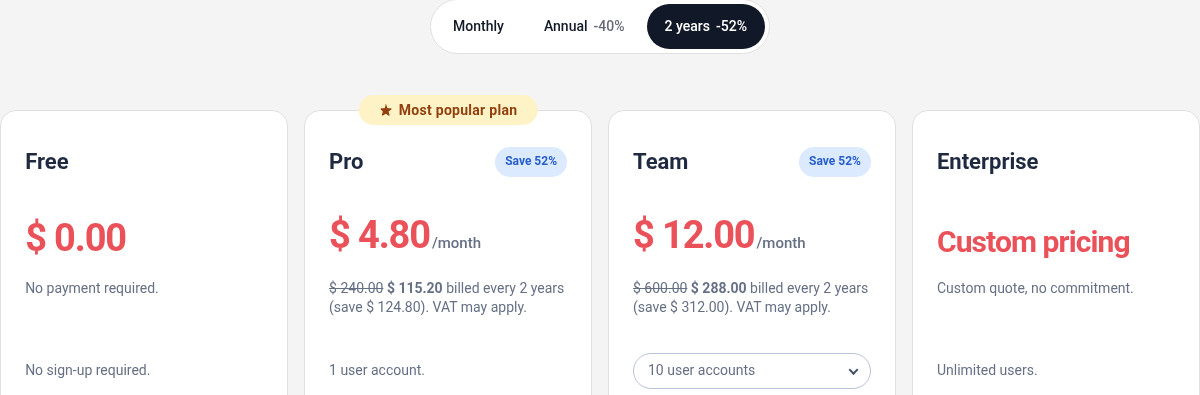
Actual Chrome capture of Smash's pricing page, October 5, 2026. The two-year option is selected: the visible totals are $115.20 for Pro and $288 for the ten-account Team offer. This is a public price view, not a transfer-speed or account-storage test.
Free use suits a short, occasional handoff; large transfers require attention to priority and capacity; paid tiers add controls and team features. None of those choices makes the transferred files your backup. Compare the complete workflow cost with SendPhoto's gallery plans, including any separate storage you retain.
Features That Matter to Working Photographers
Check these five areas against the job:
- Password protection: configure it when needed and share the password through the agreed channel. It is a barrier to opening the transfer, not proof of a person's identity or permission to publish the photographs.
- Link customization and branding: Smash's paid offer includes customization. Its branding guide explains adding a logo and background through the Design tab. A named Smash subdomain differs from using your own domain; the public offer places CNAME on Enterprise.
- Expiry controls: communicate the configured date and keep files available independently if the client needs a later delivery.
- Paid availability: choose a period that covers the actual review schedule. A higher tier does not turn a temporary transfer into a permanent archive.
- Previews: the public feature comparison lists image, video and audio previews. The Enterprise collaborator guide describes a preview toggle and optional email collection for link downloads. Check the chosen transfer's settings and supported files; a preview is not a recorded favorite or signed approval.
Remove ambiguity from the handoff itself: use clear filenames, identify the final set and separate alternative versions. A branded page cannot make unclear deliverables self-explanatory.
Pros and Cons of Smash for Photographers
The benefit is a temporary handoff with no recipient account requirement. The tradeoff is that the transfer still has an access deadline and the studio must provide any selection process beyond the supplied previews.
Assess the actual requirement rather than treating every final client delivery as a gallery job. The convenience of one download may outweigh collection navigation for a recipient who already organizes files elsewhere.
Where Smash Works Well
Four situations can fit a transfer workflow:
- Editor handoff: send the agreed source files and a brief, with a clear deadline and a separate place for the editor to return work.
- Video delivery: hand over approved exports when the recipient needs local files. Allow time for the actual payload and connection; mixed media does not imply a fastest delivery route.
- One-off commercial jobs: deliver named assets to a client that already has its own storage and review process.
- No-account recipient downloads: avoid requiring a new Smash account while still explaining any password or email step you configured.
For confidential source material, confirm that the recipient is intended to receive the originals. Sending a complete shoot folder is a scope decision, not a default requirement for all client deliveries.
Where the Client Experience Falls Short
Look for these four possible gaps:
- Collection navigation: a transfer preview is useful, but it does not establish the same organization as a photo gallery divided into client-facing collections.
- Selection records: decide how image preferences will be collected and reconciled. Do not assume that previewing a file records a favorite or an approval.
- Temporary access: a client who returns after expiry needs another delivery. State the date before they postpone saving the files.
- Branding expectations: check the customization available on the chosen tier. Smash can be branded; a logo, named subdomain and own-domain CNAME are different requirements with different plan implications.
If the recipient prefers a single archive, those gaps may not matter. If several people need to browse and communicate selections, establish one agreed review method so conflicting lists do not become an administrative problem.
Security and Privacy Considerations With Smash
Smash's security description states that stored files use AES-256 encryption and that application-to-server transfers use SSL/TLS. These are the provider's published controls. They are not evidence that only sender and recipient hold the decryption keys, nor a guarantee that any received file is safe.
Use the controls to match the sensitivity of the job. Limit who receives the link and password, and confirm that source files, contact information and publication rights are appropriate for the intended recipient. Neither encryption nor a paid plan substitutes for that decision.
Platform Security Is Only Part of the Story
A legitimate transfer service can carry a misleading message or an unwanted file. Treat unexpected delivery emails consistently across services: verify the sender and expected contents before opening unfamiliar material. A familiar service name alone does not authenticate the person sending it.
This is a general handoff precaution, not a claim that Smash was compromised. The choice between a transfer and a gallery also does not establish that one is universally safer. Consider who can access the link, what they can download and what copies will remain after access ends.
Keep independent masters and an agreed retention process. Access expiry cannot recall a downloaded copy. A watermark may identify an image, but it does not authenticate an email sender or prevent every misuse.
How Photographers Reduce Trust Friction
Use four communication habits:
- Give advance notice: tell the client when to expect the delivery and which channel will carry the link.
- Name the contents clearly: identify the session and whether the files are proofs, final exports or another agreed deliverable.
- Confirm through an established channel: when a message is unexpected, use a known contact method rather than replying to an unverified message.
- Separate delivery and payment instructions: clearly explain any invoice through the normal billing process; an unexplained request for payment should not be treated as part of downloading photographs.
An agreed process helps the recipient know what to expect. It does not guarantee that they will never encounter a fraudulent message.
Smash vs Dedicated Photo Galleries Like SendPhoto
A gallery can put the review structure beside the photographs: collections for navigation, favorites for image preferences and configured download choices. A transfer can provide previews and a branded page while keeping the main handoff centered on saving the files. Decide which combination the recipient actually needs.
SendPhoto supports client galleries, collections, favorites and sharing/download controls. Favorites record preferences rather than signed approval; collections organize a gallery rather than giving each collection an independent access boundary. Check the files and download settings you intend to deliver rather than assuming every source format or output is supported.
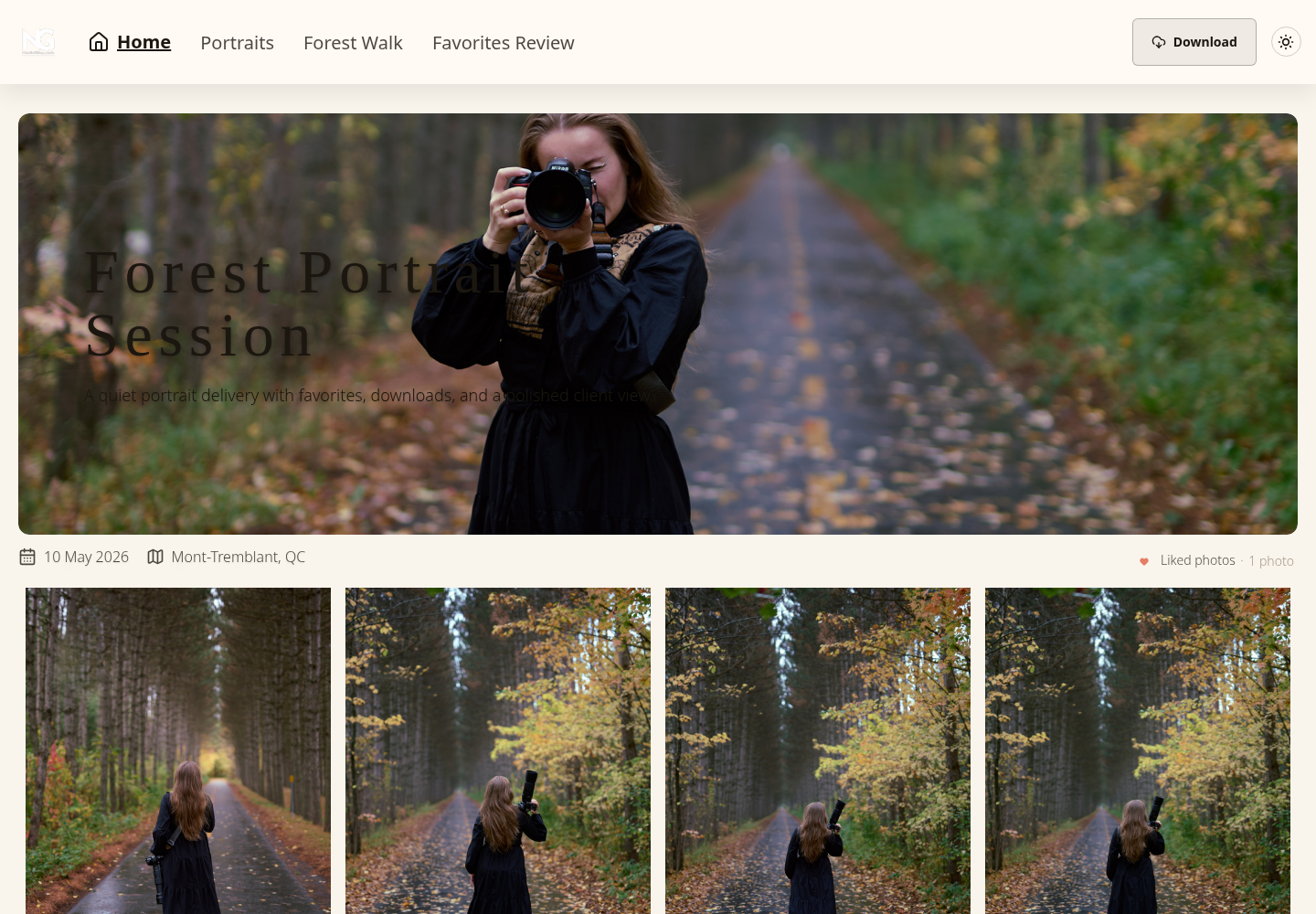
Existing genuine SendPhoto client-gallery screenshot. Home, Portraits, Forest Walk and Favorites Review navigation, a liked-photo count and a Download button are visible. This is a gallery view, not the marketing homepage or proof of a completed download or private-access configuration.
File Transfer Versus Gallery Delivery
Compare named tasks rather than broad claims about polish or speed:
| Need | Smash | SendPhoto |
|---|---|---|
| Core job | Temporary transfer of files | Gallery viewing with configurable file downloads |
| First interaction | Transfer page with supported previews when enabled | Photograph browsing within the gallery |
| Review and return | Inspect previews and save files before expiry; agree how to record selections | Use collections and favorites for preferences; agree how to confirm final selections |
| Brand presentation | Paid customization; own-domain CNAME listed on Enterprise | Gallery branding and custom-domain options; check current plan terms and configuration |
| Phone handoff | Explain preview, saving and any ZIP extraction needed | Browse before deciding what to download; explain saving and ZIP handling where applicable |
| Best fit | An agreed file package for a client, editor or vendor | A client review where navigation and image preferences are useful |
This is a capability comparison, not a measured mobile usability or transfer-speed ranking. Confirm the recipient can use the intended output and state how long access lasts with either approach.
For SendPhoto, sharing expiry disables sharing rather than deleting stored files. An Original image download can be a watermarked derivative when watermarking applies, with collection-level exceptions; image watermarking does not apply to videos. Keep independent masters and publication permissions separately from gallery access.
If a client needs both a browsable set and a large original-file handoff, using separate deliveries can be appropriate. Name which link is for which purpose so the recipient does not mistake proofs for final files or expect a temporary transfer to remain online indefinitely.
Choosing the Right Tool for the Job
Choose Smash when the agreed task is receiving a file package within a short access window. Account for Free processing priority, the selected duration, cumulative paid storage and the total subscription term. Previews and paid branding can make that delivery clearer without turning it into a permanent archive.
Choose a gallery when browsing collections and recording image preferences are part of the brief. Tell the client how those preferences become a final selection, which outputs they can obtain and when access ends. No delivery method automatically improves approval speed, security or the artistic value of the work.
For a gallery-based handoff, explore SendPhoto's gallery delivery features and current plans. For a simple file handoff, Smash may already cover the requirement. Retain your files independently and give the recipient a clear, accurate delivery description either way.