
Good sports photography is built around anticipation. You need safe positioning, fast enough shutter speeds for the action, autofocus that can stay with movement, and a delivery workflow that helps teams and families find the right images quickly. Gear matters, but timing, access, and editing discipline matter just as much.
This field workflow covers access, anticipation, exposure, focus, varied coverage and delivery. The credited photographs below are manufacturer-published references with their recorded settings, not our event coverage or a camera comparison. The suggested starting setups are exercises to adjust at your venue, not guarantees of sharp frames or professional results.
Start with access, rules, and safety
Before thinking about camera settings, find out where you are allowed to stand. Every sport has areas that are unsafe, restricted, distracting, or reserved for officials and athletes.
Ask or confirm:
- Where photographers can work from
- Whether flash is allowed
- Who authorizes access and who confirms the permitted uses, publication audience and timing
- Which areas are unsafe during play
- For minor athletes, the organizer’s photography policy, required permissions and opt-out handling; confirm any additional requirements for your assignment
- When warmups, breaks, awards, and team photos happen
Choose positions from the area the organizer actually allows. Keep clear of run-off space, officials, benches and emergency routes; carry equipment without leaving bags or supports in traffic. For a court, compare approved sideline positions for faces and rebounds. For a field, compare a permitted side position with a permitted end position for action coming toward you. These are framing options, not authorization to stand inside the playing area. Move only when permitted and keep watching the play.
Know the sport before you shoot it
The best sports photographers react early because they recognize what is about to happen. Watch a few minutes before raising the camera. Notice where plays develop, where athletes turn their faces, and where celebrations happen.
Examples:
| Sport or setting | Anticipate |
|---|---|
| Soccer | Runs into space, goalkeeper reactions, tackles, corner kicks |
| Basketball | Drives to the rim, rebounds, bench reactions, free throws |
| Volleyball | Serves, blocks, digs, setter hands, team celebrations |
| Running | Start line tension, mid-race rhythm, finish-line emotion |
| School events | Coaches, families, awards, team portraits, sideline details |
If you are new to a sport, choose one or two repeatable moments first. You do not need to photograph everything at once.
Use shutter speed as a creative decision
Faster shutter speeds freeze motion. Slower shutter speeds can show blur and energy. The right choice depends on the sport, light, distance, and whether you want a crisp action frame or a more expressive image.
Practical guidance:
- Use faster speeds for jumps, sprints, tackles, swings, and ball contact.
- Use moderate speeds for portraits, sidelines, huddles, and awards.
- Use intentional slower speeds only when you want motion blur, such as panning a runner or cyclist.
- Review sharpness at full size during breaks, not only on the back of the camera.
Avoid treating one setting as universal. Inspect the athlete’s face, hands and equipment separately: sharp eyes can coexist with a blurred stick or glove. If only moving parts blur, try a faster shutter; if the background is sharp but the face is not, also check where focus landed. Read the camera settings guide if exposure modes are unfamiliar.
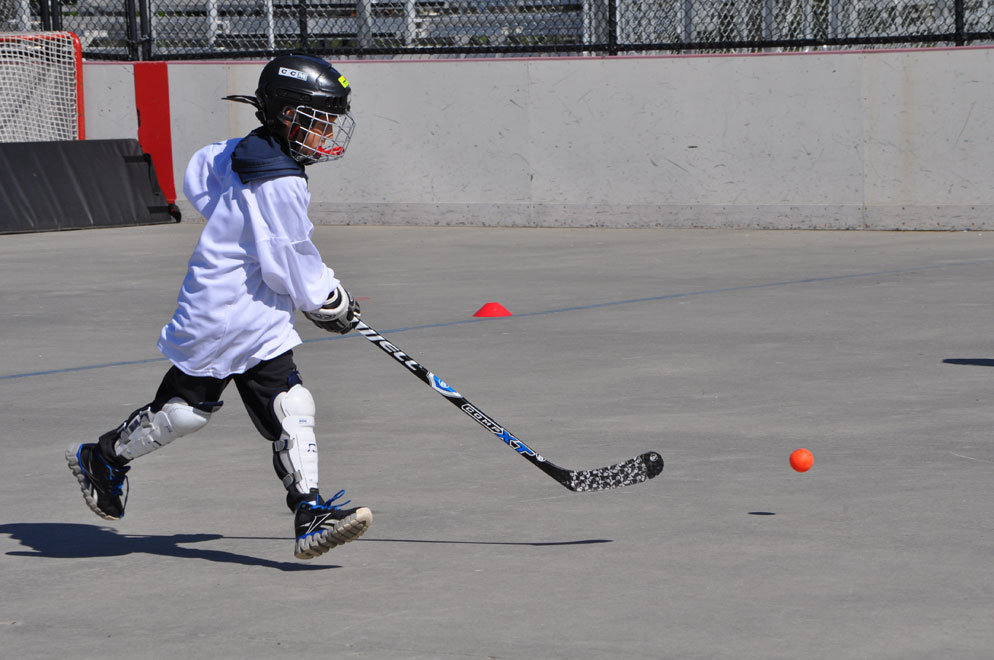
Suggested outdoor setup: for a repeatable hockey run in daylight, try 1/1000 second, f/5.6 if your lens permits, continuous AF and Auto ISO. Check exposure, moving equipment and the athlete’s face, then adjust. A telephoto zoom helps from a permitted distant position; a shorter lens suits an agreed nearby portrait or wider view. The required reach depends on distance and sensor format, so choose for your actual access rather than a universal focal length. This is a proposed exercise, not the settings or location used by Barbieri.
Set autofocus for movement
Sports photography usually needs continuous autofocus and an active focus area that matches the subject. The exact camera menu names vary, but the goal is simple: keep focus on the athlete while they move toward, away from, or across the frame.
Useful habits:
- Start tracking before the peak action.
- Keep the focus point on the face, torso, or predictable movement path.
- Use a wider focus area when movement is erratic.
- Use a smaller area when the background is busy.
- Practice following the subject smoothly through the frame.
AF-C or the camera’s equivalent continuous mode is a starting choice, not a promise that every frame stays focused. Check the manual for how the selected area and subject detection interact. If tracking jumps to another player, reacquire the intended athlete or try a more controlled area during the next repeatable play. Burst speed does not repair missed focus.
Use burst mode with discipline
Burst mode helps you catch peak action, but it also creates a culling problem. If every play becomes a long burst, you will spend more time deleting than editing.
Use short bursts when:
- An athlete is about to make contact with the ball
- A runner crosses the finish
- A player jumps, dives, or celebrates
- A coach or team reacts to a key moment
Stop shooting when the moment is over. Check how many frames your card and buffer sustain at the chosen RAW/JPEG settings before relying on a long burst. During culling, look for the frame where face, equipment, body shape and story work together; the highest frame rate is not always the most useful setting.
Compose for faces, ball, action, and story
Look for a readable relationship between the athlete, equipment, action and emotional context. A face helps recognition, but a silhouette, hands or equipment detail can serve a different role; there is no required two-element formula.
Try to capture:
- Peak movement with a clear body shape
- Eyes or facial expression when possible
- The ball, baton, racket, or gear when it explains the moment
- Opponents or teammates when they add context
- Wide frames that show the venue or crowd
- Quiet moments before and after the play
Do not fill the entire gallery with the same kind of frame. Parents, athletes, schools, and teams often value a mix of action, portraits, reactions, and atmosphere.
Handle low-light gyms and evening games
Low light forces tradeoffs. You may need a wider aperture, higher ISO, slower shutter speed, or a combination of all three. The priority is usually a sharp, expressive moment over a perfectly clean file.
Low-light checklist:
- Open the aperture if depth of field still works.
- Raise ISO enough to preserve shutter speed.
- Watch for mixed lighting and color shifts.
- Shoot a test frame before the game begins.
- Avoid underexposing too far, since recovery can make noise more obvious.
- Use quiet moments for cleaner portraits when action is too dark.
If light is uneven, work from approved positions that include useful light; do not trade access rules for a brighter frame. Check a short burst for bands or changing exposure as well as color. Nikon’s Z 9 flicker guidance explains that high-frequency LED lighting can produce banding and that saved photographs must be tested. Use the controls supported by your own camera and firmware; white balance alone does not remove brightness bands.
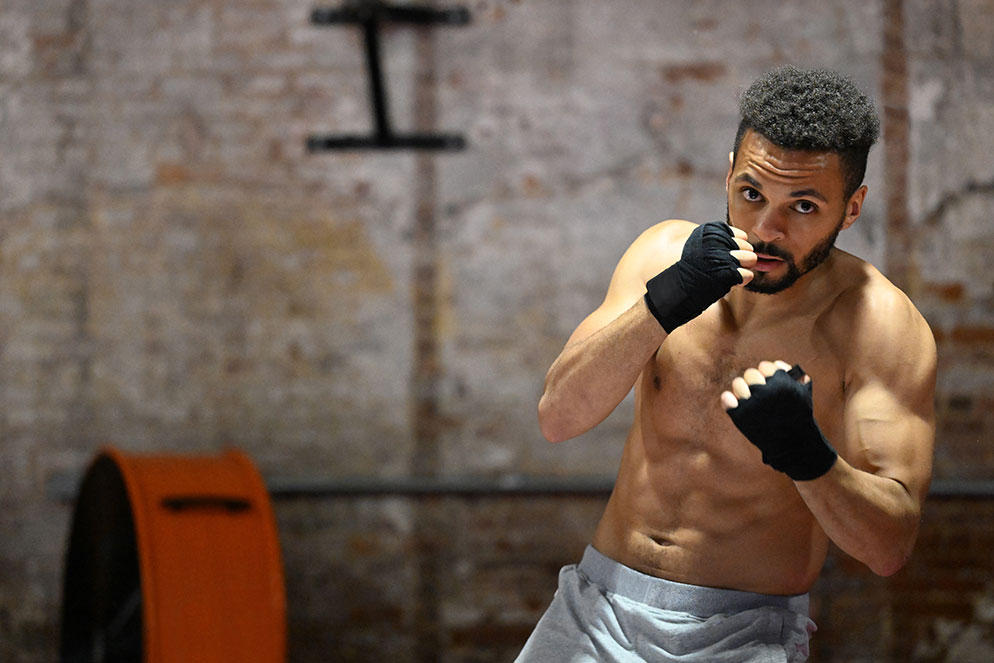
Suggested indoor setup: during an authorized boxing practice, try 1/1000 second, f/2.8 if available and continuous AF, with ISO set for the actual light. Inspect a brief sequence for eye focus as hands move and for clipped skin highlights. A wider aperture may help exposure but leaves less depth of field; choose for the needed faces and distances. Work from the agreed viewing position, away from the athlete’s path. Do not add flash without explicit event approval. This is a proposed starting exercise, not a recreation or measured test of Pottheiser’s session.
The two references demonstrate different recorded exposure choices and framing roles. They are separate photographers’ work. Neither establishes the photographer’s working position, rights for another event or a universal ISO limit. If your available light and equipment cannot produce the required action frame, agree a different deliverable such as a stationary portrait rather than promising to recover missing detail in editing.
Build a shot list for complete coverage
Even action-heavy assignments need variety. A simple shot list keeps the final gallery useful.
Capture:
- Venue or field establishing frames
- Warmups and pre-game rituals
- Individual athlete action
- Team interaction and huddles
- Coaches and sideline moments
- Fans or family when appropriate
- Awards, medals, final scoreboards, or ceremonies
- Team portraits or group photos if requested
For youth sports, agree which viewers receive which images and who confirms publication permission. Keep opt-out athletes and identifying details out of the relevant public or shared set according to the assignment’s requirements. Password protection adds an access check but does not establish consent or prevent a viewer forwarding the link and password. Separate the permission to photograph, the delivery audience and the permission to publish.
Cull for clients, not only for photographers
Your favorite frame may not be the one a parent, athlete, or school wants most. Cull for clean action, recognizable faces, usable expressions, and variety across players.
During the first pass, remove:
- Blinks or expressions that do not serve the brief; keep a meaningful reaction when appropriate
- Missed focus
- Repeated frames from the same burst
- Images where the main subject is blocked
- Photos that create privacy or permission concerns
During the second pass, group by game, event segment or agreed player labels, checking the roster rather than guessing identities. Use non-identifying labels where required. Review coverage across athletes and remove restricted frames before delivery. Grouping helps navigation; it does not establish permissions.
Deliver sports galleries in an organized way
Sports clients often need fast access to specific images. A coach may want team photos. Parents may want full-resolution downloads. A school may need images for announcements. An athlete may want a few social-ready files.
Use a gallery structure that reflects how people search:
- Game or event overview
- Team portraits
- Individual player action
- Sidelines and reactions
- Awards or ceremony
- Social selects
SendPhoto’s gallery delivery can present the chosen set in collections. Collections organize images; they do not give each player or family a separate access boundary. Use separately configured galleries when audiences need different access. Create any required social crops in your editor rather than assuming delivery makes them automatically.
Download control enables or disables gallery downloads. It does not grant publication permission, prevent every copy of a visible image or recall files already saved. Confirm final filenames and permitted uses separately from favorites, which record preferences rather than formal approval. Keep editable masters and independent backups outside the delivery gallery.
For more delivery planning, start from the SendPhoto blog, then connect your shooting workflow to the way clients will actually receive the images.
Game-day sports photography checklist
Before the event:
- Confirm access and restrictions.
- Charge batteries and check card capacity; verify existing files are backed up before formatting any card.
- Pack backup cards and needed lenses.
- Check time, location, weather, and schedule.
- Plan safe shooting positions.
During the event:
- Watch the play develop.
- Track faces and key movement.
- Use short bursts at peak moments.
- Vary action, reaction, and detail frames.
- Review focus, moving-part blur, highlight detail and lighting bands during breaks.
After the event:
- Make independent backups and verify the copies before reusing the cards.
- Cull repeated bursts quickly.
- Edit for consistency.
- Organize by team, player, or event section.
- Deliver a clear gallery with the right privacy and download settings.
Choose one repeatable moment for your next assignment. Confirm your working area, take a short setup burst, inspect focus and motion separately, then adjust one setting at a time. Deliver the agreed coverage to the agreed audience, with publication permission recorded separately.