
Choose a format that explains your work
Viral photography trends can give you a starting structure, not a promise of reach. A setup reveal can explain your lighting; a posing clip can show how you direct a session; a gallery walkthrough can answer what the client receives. Choose the question first, then the format.
This guide covers seven repeatable photography content ideas and a small test you can run with your own approved material. It is not a ranking of today's trending sounds or a report of measured campaign results. For shoot concepts and shot lists, use our photo ideas and creative briefs; for platform-specific publishing, see the TikTok guide for photographers.
What makes a photography trend worth using?
Use these four checks before you ask a client to spend session time on a clip.
| Test | Good sign | Red flag |
|---|---|---|
| It fits your work | The post demonstrates the kind of session you actually offer. | It advertises a style or service you do not deliver. |
| It teaches or reveals something | Viewers can name the choice that changed the picture. | A sound, transition or pose replaces the explanation. |
| It protects the client | The intended audience and specific photos, audio and screens are approved. | A public edit exposes someone who only agreed to a private delivery. |
| It leads somewhere useful | One relevant portfolio, booking or delivery page answers the next question. | A private gallery link becomes a public marketing destination. |
A widely shared post and a useful inquiry are different outcomes. Pick one question to evaluate: did someone understand the lighting decision, find the relevant portfolio, or ask about that kind of session? Do not interpret a large view count as a booking or a low count as proof that the work is poor.
1. Behind-the-scenes transformations
A simple structure to try is scene → decision → finished image. It lets you explain a choice without claiming that it is the most reliable route to engagement. Keep the client session on schedule; a clip is optional.
Four possible setups:
- Harsh parking-lot light → move to open shade in a safe, permitted area → show the resulting portrait. Do not film in moving traffic.
- Busy hotel room → isolate a small bridal-detail arrangement with permission → show the tighter frame without room numbers or personal belongings.
- Plain wall → choose light, framing and an expression the subject likes → show the brand portrait.
- Crowded beach → work from an allowed, stable position with a longer lens or tighter framing → show the couple image, excluding identifiable bystanders where possible.
Proposed storyboard, not a completed campaign: for an approved wall portrait, record a short wide view of the empty setup, show the subject's comfortable position, then display the matching final image. Add a caption explaining why you chose that light or crop. Keep the same session and frame in the comparison; if you show a different frame, label it.
Avoid making the subject or location the “bad before.” The lesson is a photographic decision, not an embarrassing transformation.
2. Edit reveals with one clear lesson
Show the source view, one decision and the result. Keep framing and display size comparable, and identify changes beyond the lesson, such as retouching or a different crop. A preset name alone does not explain your editing.
Adobe's film-noir Lightroom Classic tutorial provides a real reference pair: the same portrait is shown in color and then monochrome, with the Orange Filter selected. The useful content lesson is to explain the change in tonal separation, not to call monochrome universally better.
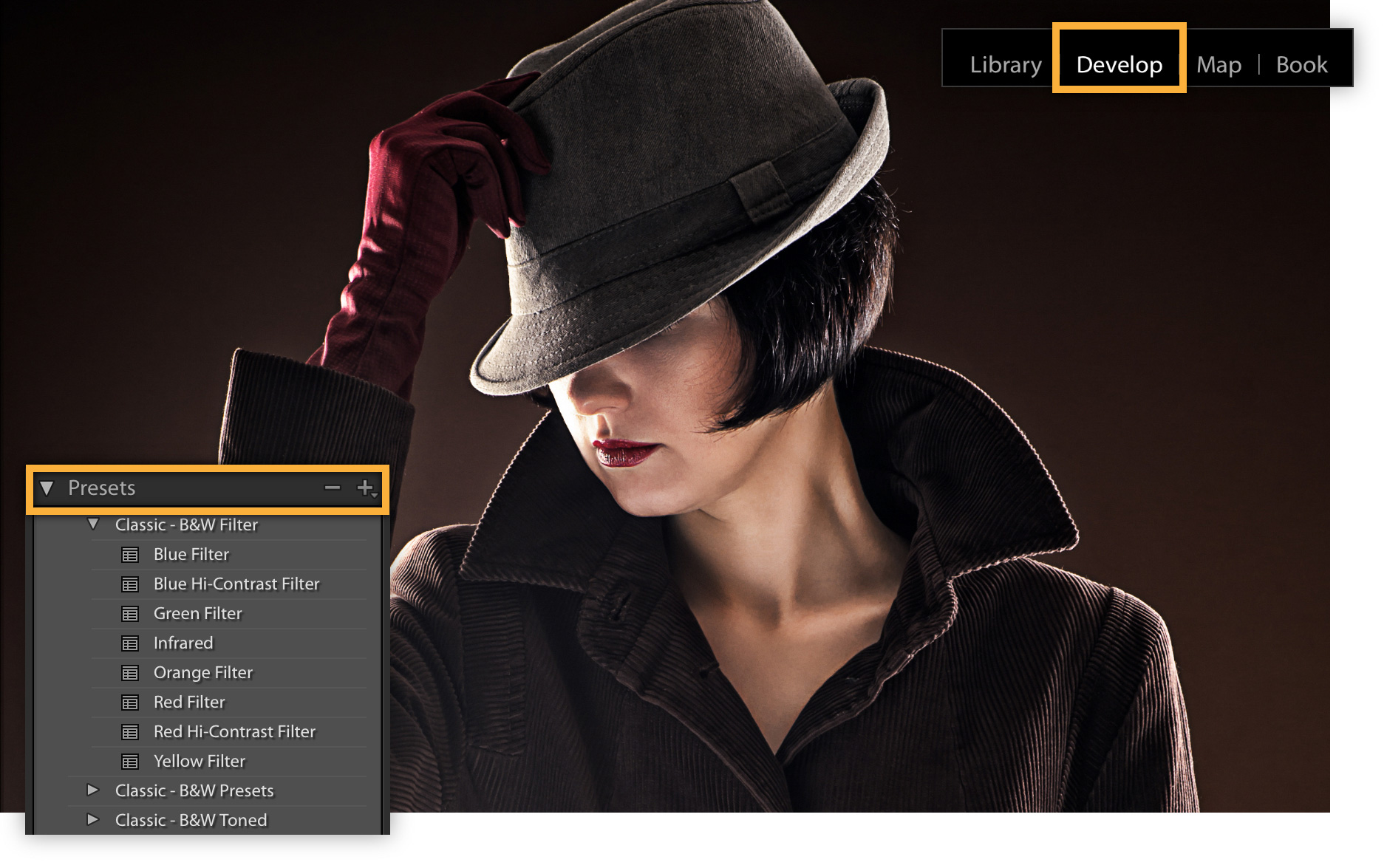
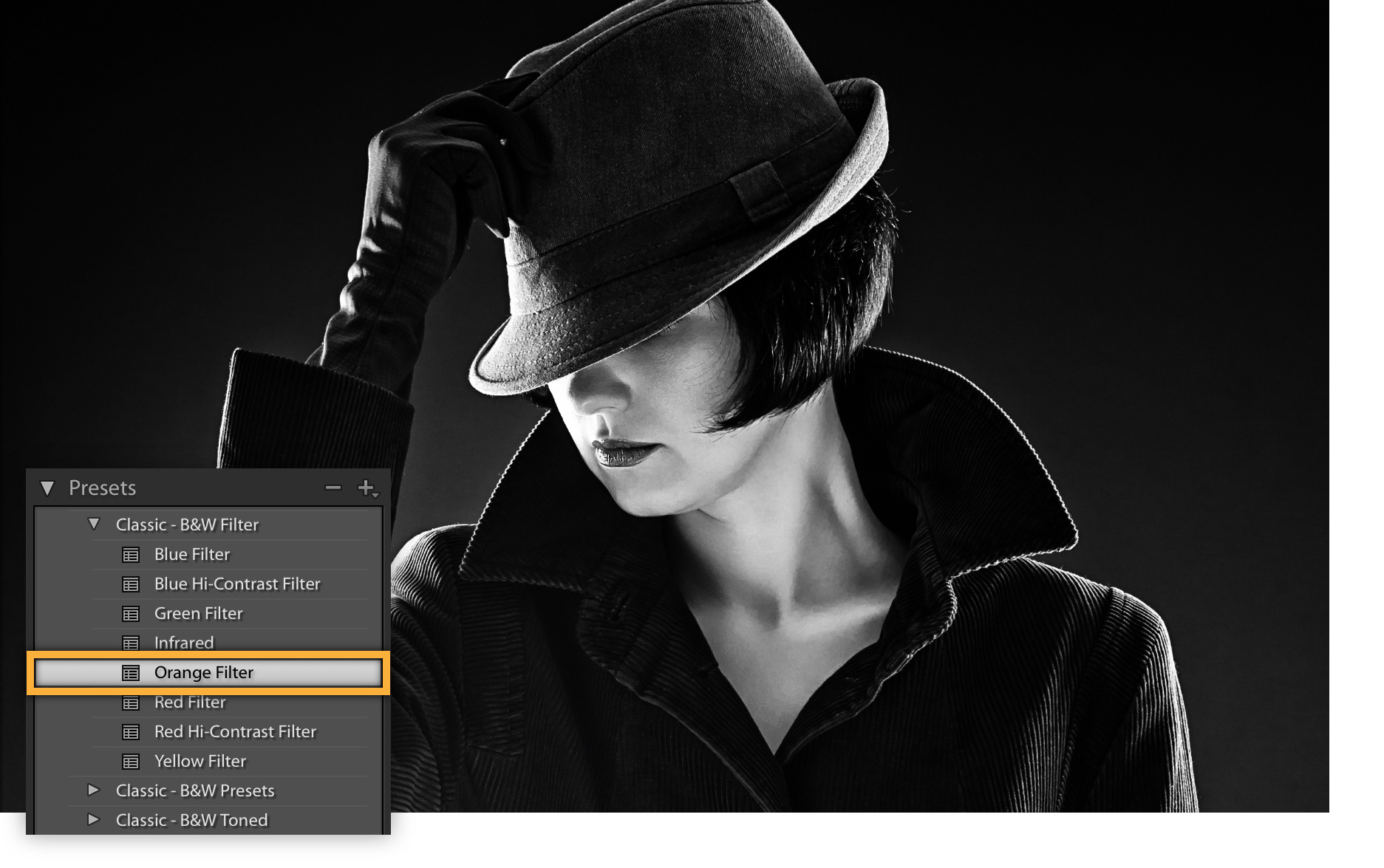
The tutorial uses Adobe Stock material. Its practice download is not blanket permission to repost the sample in your own marketing; check the stated license and use your own authorized photograph for a public edit reveal.
Four sample captions to adapt only if they describe your actual edit:
- “I kept the skin treatment restrained and warmed the background separately.”
- “This crop removes the distraction but keeps the expression.”
- “I chose black and white to draw attention to the gesture.”
- “I adjusted the label brightness while checking the product color against the approved reference.”
These are suggested words, not reports of our client work. For a fuller editing explanation, see making photos look cinematic.
3. Prompt-based posing clips
A prompt-and-result clip can show how you direct someone who is unsure what to do. Ask before recording the instruction and the response. Offer a stationary or seated option; movement and physical contact are never required.
Five prompts to adapt to the person's comfort:
- “Take a few slow steps on this clear, stable path; look toward each other if you want.”
- “Adjust your jacket, or rest a hand comfortably, while looking past the camera.”
- “Turn slightly toward one another; you can keep space between you.”
- “Lower the bouquet if comfortable, pause, then look toward the camera.”
- “Try a small shoulder turn while keeping your feet stable; stop if it feels awkward.”
Show the instruction and a representative result without presenting a nervous moment as comedy. For families, maternity sessions, couples or weddings, adapt to individual preferences rather than promising that one prompt works for everyone.
4. Photo-dump storytelling
A photo dump can show range without explaining every frame at length. Give it a beginning and an ending instead of treating it as a place for rejected photographs. This seven-frame order is a starting proposal, not a platform requirement:
- Opening image: the frame that introduces the subject or story.
- Wide environment: enough context to understand the setting.
- Detail: one meaningful object or texture.
- Human moment: an approved spontaneous expression, not a humiliating outtake.
- Behind the scenes: a permitted view of the making process.
- Close crop: a different scale without distorting an important detail.
- Closing favorite: a deliberate ending, not merely the last file exported.
Remove a frame if it repeats another job or exceeds the agreed publication scope. Check the full set, captions and location tags together. Private delivery of seven images does not authorize a public carousel. Our photo-dump sequencing guide goes deeper into ordering a set.
5. Gallery walkthroughs
A walkthrough answers a practical question: what does delivery look like after the shoot? Use an approved demonstration gallery rather than a client's private link, account or invitation.
Five things you can explain:
- Collections: show the actual navigation and how a client finds a group of images.
- Mobile browsing: if you demonstrate it, record the real device view rather than describing a desktop recording as mobile proof.
- Highlights: explain your selection; a favorite marker is not formal approval or permission to publish.
- Proofs and finals: use clear version names and the actual access/download settings; a collection name alone does not create an access boundary.
- Photos and video: when they are part of the agreed delivery, show representative permitted files rather than assuming every job includes both.
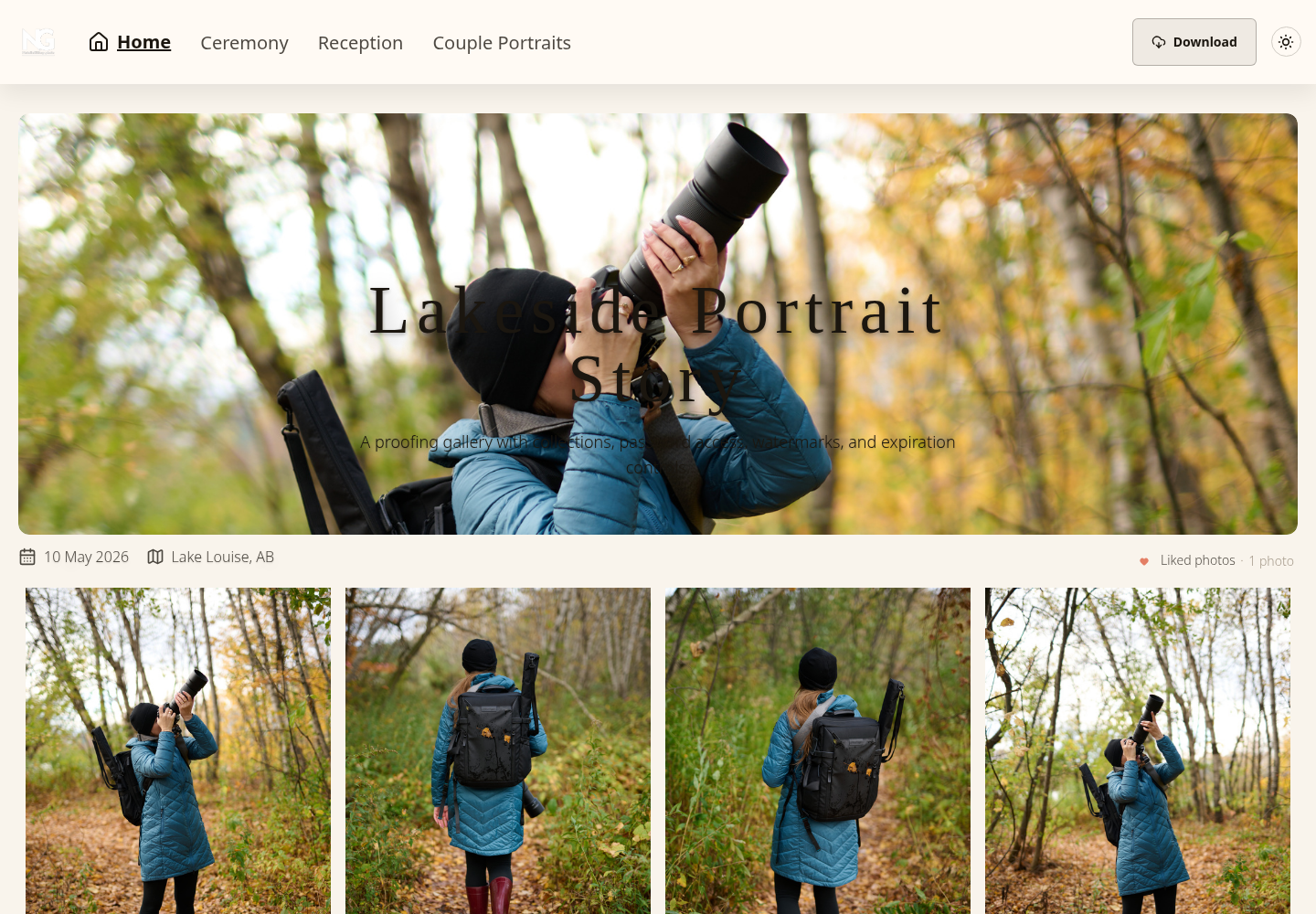
With SendPhoto gallery delivery, keep the walkthrough focused on the handoff rather than listing every feature. Choose the intended audience and verify the client-facing link, not just your manager preview. If the public gallery link is disabled, use the appropriate personal/invitation route; pasting a general URL may not grant entry. Email invitations require an active paid plan and a verified account email.
A shared password is a forwardable secret, not proof of who opened a gallery. Do not publish a private URL, password or invite token in a recording or caption. Use a portfolio or an approved public demo as the next step.
6. Mistake-and-fix content
Choose one visible problem and explain a respectful correction. Avoid making a client, another photographer or an identifiable guest the target.
Five examples to plan:
- Stiff hands: offer a comfortable action or resting position; do not force contact.
- Harsh eye shadows: try softer light or a small position change, then compare the actual frames.
- Cluttered background: try a different angle or distance and check what remains visible.
- Flat product image: change the light direction or background texture without hiding defects or altering an important product color.
- Confusing gallery: organize clearly named collections and explain where the agreed finals are; confirm their actual settings.
For the gallery example, download controls determine what is offered. Individual, collection or gallery downloads contain the files permitted by the applicable settings; a ZIP or favorites selection does not automatically classify files as approved finals. Agree the version names and delivery scope with the client.
If an Original-quality photo download is watermarked, it can be a generated watermarked variant rather than the byte-identical upload. Keep your camera files, editing project and master backup separately. A marketing walkthrough is not an archival or file-integrity test.
7. Privacy-first trend adaptation
Review the finished export, not just the crop you intended to make. Faces, voices, filenames, notifications, tabs, reflections, gallery titles, dates, locations, invitation tokens and background signs can disclose information. Muting a clip does not remove visible identifiers, and hiding a face does not guarantee anonymity.
Five alternatives when a client session should stay private:
- Hands, objects or an empty setup: use only permitted material and check distinctive jewelry, tattoos, documents and background details.
- Approved final images: confirm the specific files, audience, channel and context; approval for a private gallery is not approval for advertising.
- A tighter or redacted view: inspect every frame and the final audio, captions, filenames and visible URLs. Cropping names alone is not enough.
- A demonstration gallery: use material cleared for public demonstration, with no real private credentials. An “anonymized” screen can still contain identifying context.
- A reaction clip: ask before recording and publishing the actual reaction; if permission is absent or uncertain, leave it out.
For children, private events, boudoir and unreleased commercial work, establish the appropriate permissions and confidentiality conditions before preparing social content. Requirements depend on the people, agreements and jurisdiction; if those conditions are unclear, use another subject or do not publish.
SendPhoto password protection can separate private delivery from public promotion, but it cannot prevent an authorized viewer from copying or recording material. Privacy settings do not grant publication rights.
Music and promotion need their own check. For commercial TikTok content, TikTok directs businesses to its Commercial Music Library rather than the general music library. Do not assume a sound is licensed for another platform. TikTok also requires commercial-content disclosure when promoting a brand, product or service, including your own. Check the destination's current rules before posting.
A repeatable publishing routine
Keep the plan small: one format, one lesson and one useful destination. The client's agreed photographs come first.
Before the shoot
- Choose what can be recorded and what must stay private; agree the proposed audience and use.
- Ask about comfort, movement and recording permission; prepare a no-recording alternative.
- Write a short shot list with the setup, decision and matching result.
- Prepare one format and a relevant destination; check music rights and disclosure requirements.
During the shoot
- Film a permitted setup without interrupting the agreed session or exposing private details.
- Capture one comfortable prompt only if the subject wants to participate.
- If you film a camera screen, inspect it for identifiable thumbnails, filenames and overlays; skip it if unsuitable.
- Stop recording when it distracts from the client experience; finish the commissioned work first.
After the shoot
- Match the final image to the recorded setup; label a changed frame or extra editing.
- Write one accurate lesson, then inspect the complete export, audio and caption.
- Link to the relevant portfolio, inquiry page or approved public demo, not a private delivery credential.
- Retain unused clips only within the agreed use and storage arrangements; delete or stop using them when those arrangements require it.
A small test to try: make two approved posts that answer the same client question, such as “how do you help someone pose?” Try a prompt-and-result clip and a short image sequence. Keep the destination and offer comparable, and choose the observation window before publishing. This is a proposed comparison, not a measured experiment.
For each post, record the format, lesson, publication date, destination, editing effort and the platform's available reach/click measures. Separately note actual relevant inquiries, if any, and what question they asked. Use consistent metric definitions and respect the visitor's tracking choices. No inquiry, no claimed booking result. Different audiences and distribution mean this small comparison does not prove that the format alone caused a difference.
Keep a format when it explains the work well at a sustainable effort. Change it when viewers misunderstand the offer; stop when privacy, permissions or the client experience cannot be protected.
Content ideas by photography niche
These are proposed briefs, not documented viral campaigns.
| Niche | Useful format | Example and boundary |
|---|---|---|
| Wedding | Detail setup, delivery walkthrough or an approved timeline moment | Invitation detail to final flat lay; hide names, addresses and schedule information unless specifically cleared. |
| Portrait | Prompt and result | One comfortable movement or seated prompt and representative final frames; no embarrassing outtakes. |
| Family | Natural interaction | An agreed game or walking option; confirm appropriate recording/publication permission and offer a stationary alternative. |
| Branding | Use-case sequence | Headshot, workspace, product and placement crop; exclude confidential screens and unreleased work. |
| Product | Setup transformation | Tabletop setup to finished product frame; preserve relevant color and defects, and honor launch restrictions. |
| Architecture | Light and perspective comparison | Actual source and corrected interior image; identify geometry correction and confirm access/publication permission. |
FAQ
What are viral photography trends?
The phrase usually refers to photography ideas, edits, poses or publishing formats being widely adapted or shared. This page offers reusable formats, not evidence that a particular one is currently viral. For your business, the useful question is whether the format explains work you actually offer.
Can photographers rely on viral trends for bookings?
No format guarantees inquiries or bookings. Send interested viewers to a relevant portfolio or inquiry page, and distinguish views and clicks from an actual qualified inquiry. A popular post can still attract people outside your service area or desired client group.
What is the safest trend format for client work?
There is no universally safe format. A permitted empty setup or an approved final image may disclose less than a reaction or gallery recording, but review the whole export and the intended use. When permission or confidentiality is uncertain, choose a different example or do not publish.
How often should photographers use trend content?
Choose a sustainable pace after allowing time for client delivery, editing and permission checks. Reuse a format only when it adds a specific lesson; you do not need to film every session. If you want to demonstrate your delivery workflow, create a SendPhoto gallery with material cleared for the intended audience and keep the client masters in your own backup.