
The best wedding fonts give names personality while keeping dates, addresses and instructions easy to read. Start with one display face for the couple’s names and one quieter face for everything guests need to act on. A script is optional: two well-chosen fonts can carry an invitation suite without one.
For a no-cost starting point, try Playfair Display with Source Sans 3, or Cormorant Garamond with Source Sans 3. For decorative lettering, shortlist Bickham Script, Burgues Script, Bellissima Script or Bombshell Pro. Mrs Eaves is a premium serif option worth proofing alongside a script.
This guide combines foundry documentation with our own typeset examples using the actual open-source fonts. The two free pairings are shown below with fictional wedding details. The premium recommendations are design suggestions based on their published specimens, not a seven-font print test. No physical paper, foil or letterpress proof was made.
In this guide
- Compare the two free serifs
- Bickham Script
- Burgues Script
- Bellissima Script
- Bombshell Pro
- Mrs Eaves
- Playfair Display
- Cormorant Garamond
- Choose a pairing
- Check font licenses
- Proof print and screen output
- Use typography in photo delivery
Compare the same words at the same size
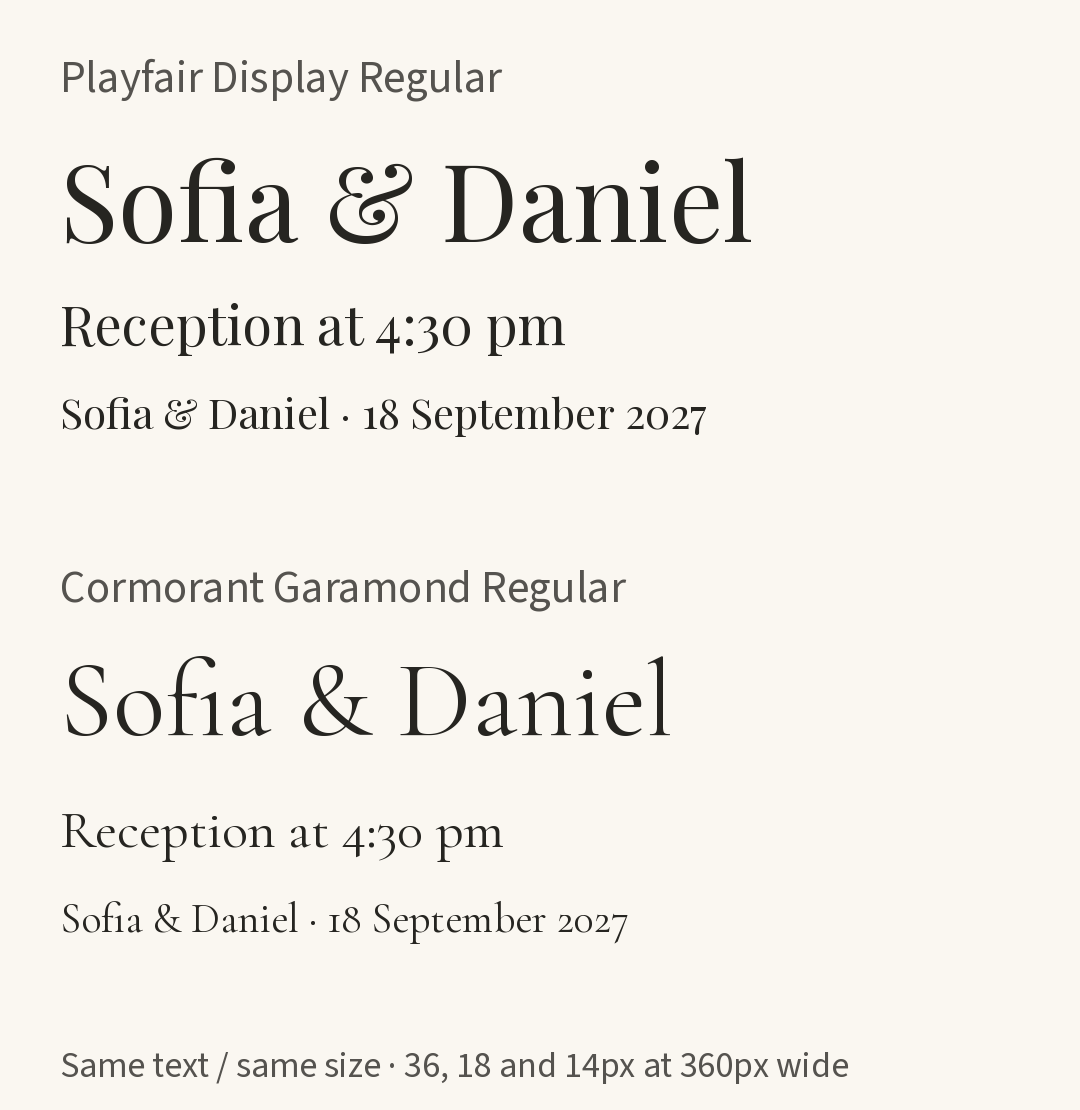
Actual font specimens typeset for this guide, using Regular weight 400 from Google Fonts. At an image width of 360 pixels, the three sample lines correspond to 36, 18 and 14 pixels. The article may display the image at a different width; these are screen sizes, not print points. Open the full-size comparison.
Playfair’s lower sample lines look more substantial in this example; Cormorant’s letters look smaller and lighter at the same nominal size. That is a useful reason to compare the actual names and date rather than choosing by point size alone. Neither sample proves that a delicate serif will work as tiny text on textured paper.
The smallest line is a comparison, not a recommended body-text size. In the pairings below, the information moves to a simpler sans serif instead.
1. Bickham Script: formal names and invitation titles
Bickham Script from Adobe Originals is Richard Lipton’s formal script, with alternate letterforms that can change how restrained or elaborate a line looks. Adobe describes it as intended primarily for display use.
Try it for: the couple’s names on a formal invitation, an album title or a short monogram. Keep the date, venue and RSVP instructions in a separate text face. A proposed companion is Mrs Eaves, provided its size and spacing remain clear in your proof.
Start with the plainest usable forms. Add a swash only when it improves the composition and does not collide with the next line. Avoid forcing long names into a fixed box by shrinking them until they are difficult to read.
Access: check the family’s availability in your Adobe Fonts account. Adobe’s licensing covers defined desktop and hosted-web uses; it does not mean that every embedding or font-sharing use is included. See the licensing checklist below before handing over editable files.
2. Burgues Script: a decorative focal point
Burgues Script from Sudtipos, designed by Alejandro Paul, offers extensive swashes, ligatures and alternate forms. Its foundry specimen is a useful place to judge how much ornament your names can carry.
Try it for: a statement invitation heading or a welcome-sign title with plenty of space around it. Pair it with a plain information font such as Source Sans 3. This is a proposed combination, not one of the locally typeset comparisons in this guide.
Use your design app’s OpenType controls to examine available alternate forms. Turning on every decorative feature rarely helps a time, address or seating instruction. Check the actual sign at the intended viewing distance before committing to production.
Access: Sudtipos lists separate license categories, including desktop and webfont. Select the category for your use rather than assuming a desktop purchase permits hosting font files on a website.
3. Bellissima Script: flowing calligraphy with alternate forms
Bellissima Script from Sudtipos is another Alejandro Paul design. The foundry distinguishes the fuller Pro version from Redux, which has a reduced glyph selection. Check that the edition you choose includes the characters and alternates your names need.
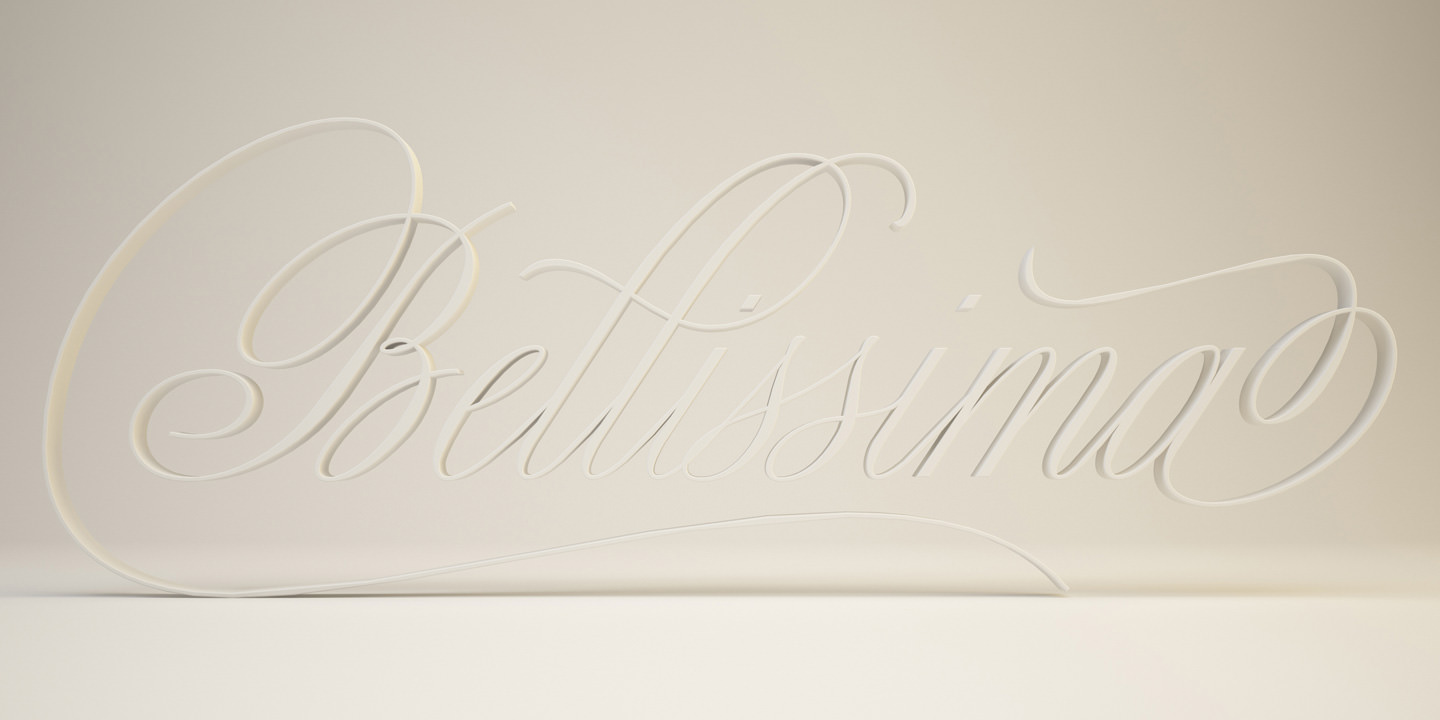
Official promotional artwork by Sudtipos, reproduced from its Bellissima Script specimen page. This shows the foundry’s decorative treatment, not our own print sample or a readability comparison. View the original-size specimen.
Try it for: a short thank-you heading, invitation names or an album-cover accent. The specimen shows why a large initial or ending flourish needs generous margins. Keep the practical details outside the script line.
Do not assume an ornate watermark will remain readable when a photograph is reduced to a small preview. Export a sample at the final image dimensions and check it over both light and dark areas. A watermark is also a design choice: it should not obscure the photograph.
Access: use the foundry’s current buying options and Sudtipos license terms. There is no useful universal price for “commercial wedding use”; the edition, users and medium matter.
4. Bombshell Pro: informal signature-style lettering
Bombshell Pro by Emily Lime has long connecting strokes and alternate letterforms. Its loose calligraphic appearance makes it a candidate for a relaxed garden invitation, a short thank-you graphic or a photographer’s signature mark.
Try it for: one expressive line paired with a quiet serif or sans serif. Give connectors room and inspect the spaces between the actual names. A flattering sample word does not guarantee that every combination will look balanced.
Avoid adding blanket letter spacing to a connected script as a quick fix: it can break joins. Adjust individual forms or change the layout instead. Fine strokes also deserve a physical proof when the paper or printing method is unfamiliar.
Access: the MyFonts listing separates desktop and webfont licensing. It also distinguishes a static image used online from embedding the font file as live website text. Read the selected license for your particular client, logo or template use.
5. Mrs Eaves: a quieter premium serif
Mrs Eaves from Emigre is a candidate for supporting copy, secondary headings and detail cards. The linked page is the CE offering; check its styles and character coverage rather than treating every Mrs Eaves package as interchangeable.
Try it for: a short invitation paragraph beneath an expressive script, or an elegant album heading. Treat that pairing as a starting point to proof, not a promise that it will work at any small size.
Compare line breaks, spacing and the size of lowercase letters. If a dense itinerary feels faint or crowded, increase the size, simplify the layout or choose a sturdier text face. Do not solve every fit problem by reducing the type.
Access: Emigre lists different usage licenses. Check its licensing overview and the exact purchase or activation route you plan to use. Availability through one service does not automatically cover another service’s font-upload requirements.
6. Playfair Display: a free title font with strong contrast
Playfair Display on Google Fonts is a useful starting point for names, dates used as a design feature and invitation headings. In our comparison, its shapes give the names a more substantial presence than Cormorant at the same size.
Try it for: a serif title with Source Sans 3 for the practical details. The actual pairing appears below. This keeps a clear distinction between the decorative line and the information people need to read quickly.
Use it selectively in long documents: liking a large title does not establish that the same font and weight are ideal for several pages of small text. Proof the smallest text separately.
Access: the Google Fonts distribution uses the SIL Open Font License for Playfair Display. It permits commercial use subject to its conditions; “free” does not mean that the font software has no license.
7. Cormorant Garamond: a lighter-looking free serif
Cormorant Garamond on Google Fonts offers another direction for invitation names, short headings and album-title artwork. In our Regular-weight sample, it looks more delicate than Playfair at the same nominal size.
Try it for: a prominent title with a simpler information face underneath. The second pairing uses the same wording, body font and layout as the first, so the title treatment is the main variable.
Be especially cautious with tiny captions or low-contrast text over a photograph. A larger size, a different weight or a plain background may help, but make the decision from the exported result. For essential instructions, the sans-serif companion is an easier starting point.
Access: the Google Fonts distribution uses the SIL Open Font License for Cormorant Garamond. Check the supplied license when sharing font files or modifying them.
Two free pairings to compare
Both examples below use the actual Regular fonts, with Source Sans 3 from Google Fonts for the details. The names, date and venue are fictional. These are typeset educational examples, not screenshots of a gallery application or completed client stationery.
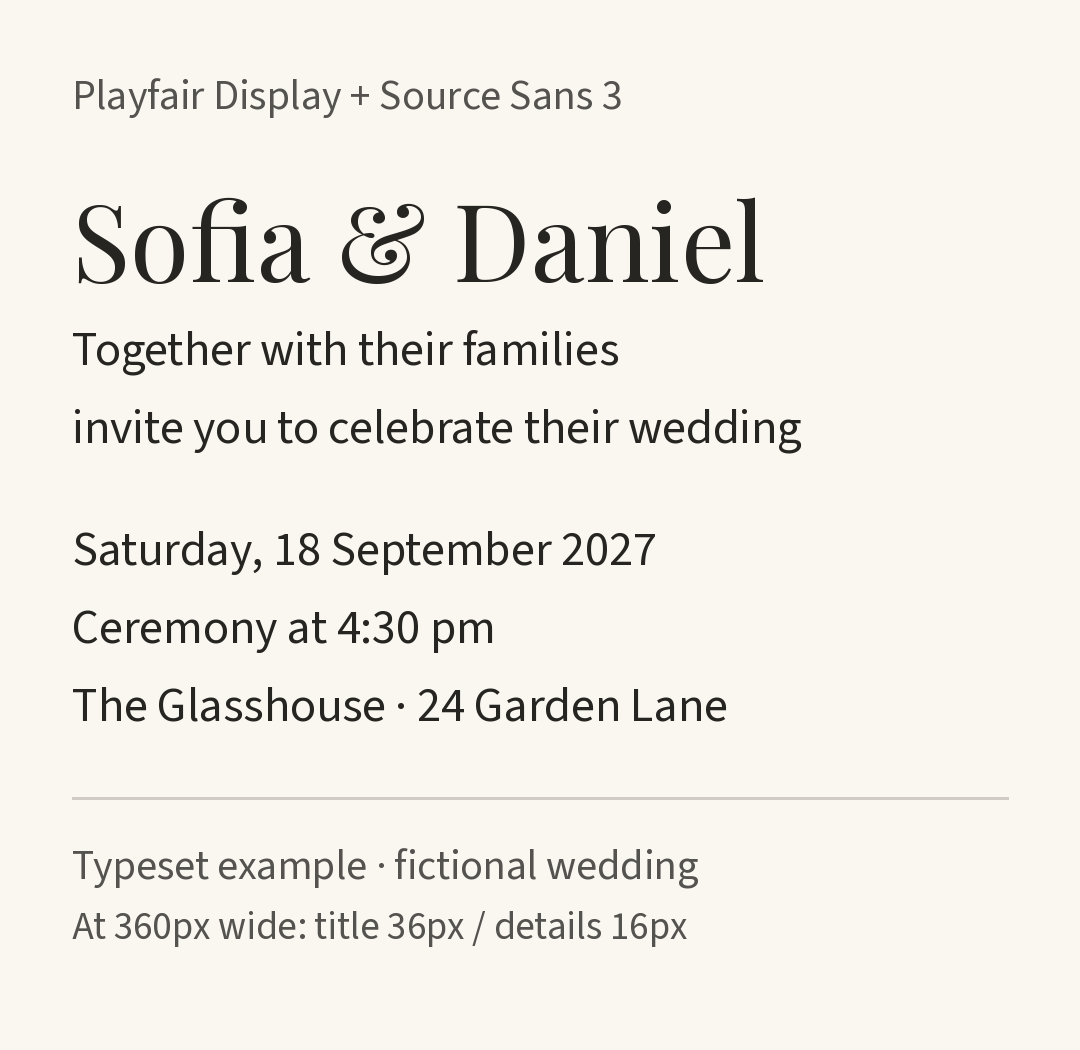
Playfair Display with Source Sans 3. At 360 pixels wide, the title corresponds to 36 pixels and the details to 16 pixels. Open the Playfair pairing.
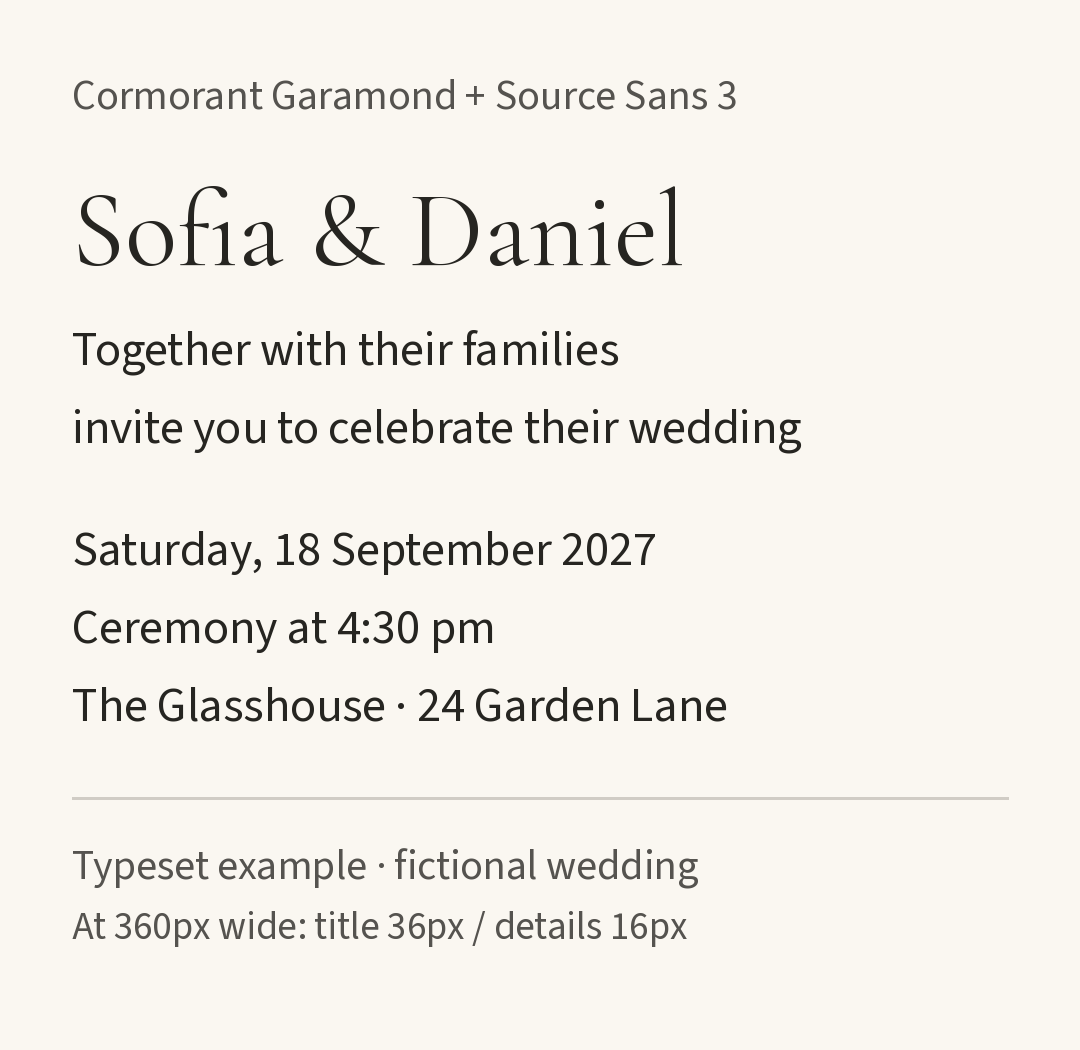
Cormorant Garamond with Source Sans 3, using the same sizes and spacing. Open the Cormorant pairing.
The stronger difference is in the names; the body remains consistent. Choose Playfair if you prefer that fuller title, or Cormorant if you prefer the more delicate treatment. Then replace every sample line with your real wording before judging fit.
For a script pairing, use the same division of roles: Bickham or Burgues for the names, a tested text face for the details. Bellissima and Bombshell are alternatives when their actual letterforms suit the names better. Avoid combining two decorative scripts simply to make the suite feel more elaborate.
Check the license for the output you will deliver
Licensing information was checked against the linked provider sources in September 2026. Terms can change; save the license supplied with your chosen font and purchase.
- Printed invitations and flattened graphics: check desktop/design permissions, including any relevant logo or resale conditions.
- Live website text: check webfont hosting and domain terms. A font inside a PNG is a different use from a browser loading the font file.
- Editable client files: confirm who needs access to the font and whether they need their own license. Do not bundle a commercial font with a project by default.
- Templates, apps or customer-editable products: check the specific terms for those uses rather than extrapolating from ordinary printed stationery.
Adobe’s licensing FAQ, for example, distinguishes finished graphics or properly embedded documents from a client needing the font to edit a design. It also prohibits packaging Adobe Fonts files for a printer. That example should not be treated as the license for every foundry.
The free families used in our examples are distributed under the SIL Open Font License. Commercial design use is permitted; redistribution of the font software carries conditions such as retaining the license and copyright notice. Source Sans 3’s supplied license is available alongside its files.
Proof the smallest output before choosing
- Use real wording. Include long surnames, accents, apostrophes, venue names and the actual time. Inspect for missing characters and awkward joins.
- For print, work in physical dimensions. As an initial layout exercise, try a 28–36-point title and 11–12-point details on an invitation, then adjust for the chosen font, wording and reader. Those are starting points, not tested minimum sizes. Print at 100% and request a production proof for fine strokes, foil or textured stock.
- For a phone, check the final display width. The examples give a reference at 360 pixels. Open your actual web page or exported graphic at its normal size, without zooming in to rescue the text. Keep essential instructions as selectable text where possible.
- For a gallery cover or watermark, check the crop and reduction. A large design canvas can hide problems that appear in a small thumbnail. Keep critical text away from crop edges and busy image areas.
- Ask someone unfamiliar with the design to read it. Have them find the time, venue and response instruction. If they hesitate, simplify the information typography before adding more decoration.
Carry the style into photo delivery
For photographers, consistent typography can live in your exported album-title artwork, thank-you image or delivery email. That does not require every gallery control to use the invitation font, and uploading finished artwork is different from installing a custom font in a gallery application.
Once the photographs are ready, our guide to the best way to share wedding photos covers the delivery arrangements. SendPhoto’s gallery delivery features provide a place to present and share the finished photographs. Choose the typography in your design tool, keep the practical instructions readable, and use the gallery’s documented controls for delivery.