
What Is a Client Gallery?
A client gallery is a web-based gallery built for sharing finished photography with a specific client or group of recipients. The client opens a link, browses the images, and downloads files based on the access you allow.
That makes it different from basic file transfer. A transfer link focuses on moving files from one place to another. A client gallery focuses on presentation, privacy, browsing, organization, and delivery.
For photographers, this matters because the client does not judge the work only by the shoot day. They also judge the final experience: how the gallery opens on mobile, whether the images are easy to navigate, whether downloads are clear, and whether the link feels professional enough to share with family, vendors, or a team.
When a Client Gallery Is Better Than a Folder Link
A folder link can work for a tiny delivery, especially when the recipient only needs a few files. A gallery may be more convenient when the client needs a visual browsing experience, collections and clearly presented download choices. Folder services can also support organized sharing; choose according to the actual job and access requirements.
Use a client gallery when:
- The client needs to browse before downloading.
- The gallery should look branded and polished.
- You need password protection or private access.
- Images are organized by collection, scene, product, team, or part of the day.
- Clients may download individual images or the full set.
- You want to control whether downloads are original size or scaled.
- You need watermarked previews before final delivery.
- The gallery may be shared with family, vendors, coworkers, or a larger group.
Choose a transfer or folder when straightforward file access is enough; choose a gallery when its presentation and navigation help the recipient.
Core Features That Matter
Most gallery tools market a long list of features. In practice, the important ones are the controls that reduce confusion for the client and reduce manual work for you.
- Mobile-friendly viewing: Clients often open galleries first on a phone.
- Collections: Keeps large jobs organized by moment, room, product, team, or session.
- Password protection: Adds a simple privacy layer for personal or unreleased work.
- Download controls: Configures download availability and photo quality; confirm the actual output for the delivery.
- Watermarks: Adds a visible mark to previews; it does not prevent copying or establish usage rights.
- Branded presentation: Makes the gallery feel connected to your studio.
- Custom domain: Keeps gallery links aligned with your own brand.
- Video support: Keeps mixed media delivery in one place.
You do not need every advanced feature on every job. Choose the defaults that fit the job, then confirm which features and limits your chosen plan includes.
A Simple Client Gallery Workflow
The workflow should be easy enough to repeat after every shoot.
- Cull and edit the final set.
- Export files in the sizes the client needs.
- Create the gallery and name it clearly.
- Organize images into collections if the job has sections.
- Set privacy, password, watermark, and download rules.
- Preview the gallery on desktop and mobile.
- Send the client one clear link with a short delivery note.
- Keep the gallery available for the promised access period.
Keep a separate backup of the finished files and record the access period you promised. A delivery gallery is not your only archive.
Example: Organizing a Portrait Delivery
The existing SendPhoto screenshot below shows a gallery with Portraits and Forest Walk collections. “Favorites Review” is a collection name chosen for this example, not a separate approval tool or private area. It illustrates organization, not a measured customer outcome.
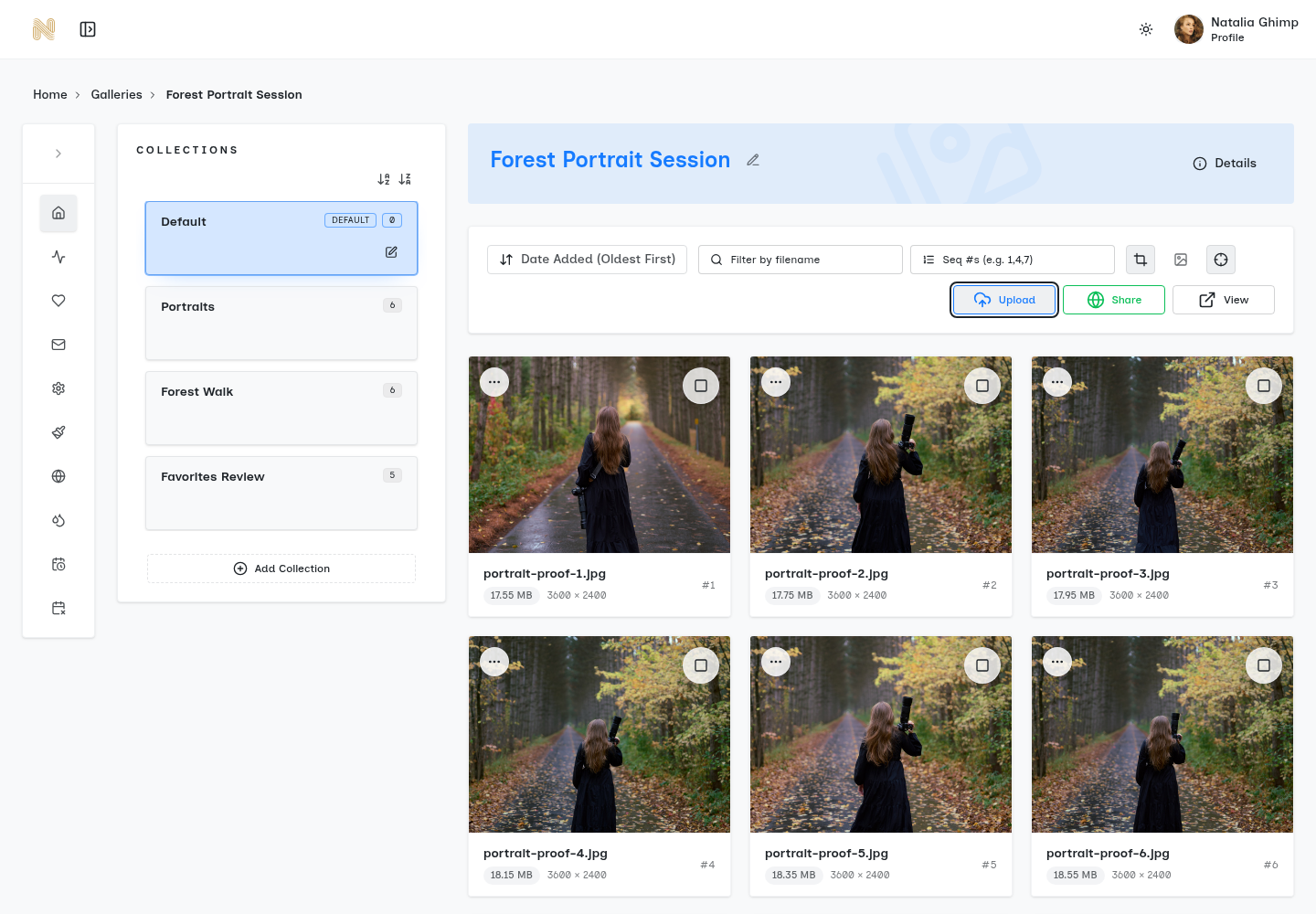
For a similar job, group the portraits and walk images by what the client will recognize. If you need a decision, ask the client to confirm filenames and the requested use. Label proofs and finals clearly, choose the download settings for that stage, and agree the availability date. If two audiences must not see the same work, use separately controlled galleries instead of relying on collection names.
Organize Galleries Around How Clients Think
Photographers often organize files by editing stage or camera workflow. Clients usually think in moments, people, products, rooms, teams, or parts of the event.
For weddings, collections might be:
- Getting ready.
- Ceremony.
- Couple portraits.
- Family portraits.
- Reception.
- Details.
For commercial work, collections might be:
- Hero images.
- Product details.
- Team portraits.
- Social crops.
- Behind the scenes.
- Approved final selects.
For sports or school work, collections might be:
- Team.
- Athlete.
- Game.
- Age group.
- Individual portraits.
- Action photos.
The goal is not to create a complicated structure. The goal is to make the gallery obvious when the client opens it.
Privacy and Access Controls
Client galleries often include personal, private, unreleased, or commercially sensitive images. A public link with no access controls may be too loose for many jobs.
At minimum, decide:
- Should the gallery require a password?
- Should the password be shared with all recipients or only one contact?
- Should downloads be available immediately?
- Should watermarked previews be shown before final approval?
- What access period have you promised, and how will you end sharing at that time?
- Do different audiences need separately controlled galleries?
Password protection gates gallery access, but a recipient can forward both the link and password. It does not verify identity or guarantee confidentiality. Collections organize images; do not treat them as private compartments. For proofing or previews, use watermarks as visible marks and configure downloads separately. Neither stops screenshots or later sharing of saved files.
Download Controls Are Part of the Client Experience
Downloads are where many delivery workflows become messy. Clients may not know whether they should download one image, the full gallery, web-size files, or original files.
Good download controls answer those questions before the client has to ask.
Useful settings include:
- Allow or block downloads.
- Offer individual image downloads.
- Offer full-gallery ZIP downloads.
- Choose original or scaled files.
- Use collection folders in ZIP delivery; an unchanged default collection can appear at the archive root, and folder names may be adjusted.
- Keep preview galleries view-only until payment, approval, or final licensing is complete.
Explain which photo quality the client will receive. Watermark and quality settings affect the selected photo output; video downloads use the original video rather than a scaled photo derivative. A view-only gallery can still be photographed or captured on screen.
If download behavior is a frequent support issue, review download control and write your delivery email around the exact option you selected.
Watermarks for Proofs and Previews
Watermarks are not needed for every final gallery. But they are useful when clients need to review images before final delivery, when commercial licensing is not complete, or when a photographer wants previews visibly identified as proofs. A watermark is a deterrent or label, not copy protection or a substitute for agreed usage rights.
A practical watermark workflow:
- Choose the watermark for proof or preview photos.
- Keep the watermark readable without ruining the viewing experience.
- Disable downloads during review if that is the agreed workflow.
- For final delivery, deliberately choose the watermark and download-quality settings, then inspect the resulting file.

Branded Galleries and Custom Domains
The gallery link should not feel disconnected from the rest of your business. If a client books you through a polished website and then receives a random-looking delivery link, the experience can feel less professional than the work deserves.
Branding helps the gallery feel like a continuation of the studio experience. A custom domain can help even more when clients forward links to family, vendors, agencies, or internal teams.
Use a branded gallery setup when:
- You deliver premium weddings or portraits.
- Commercial clients share galleries inside a company.
- Vendors may receive selected images.
- You want the link to look like part of your own website.
- The gallery is part of your referral experience.
For this workflow, see custom domains. Confirm plan availability and the required domain setup before promising a branded hostname. A custom domain changes the address, not the access rules.
Client Gallery Examples by Photography Type
Different photographers need different gallery defaults.
- Wedding: Collections by part of the day, password protection, full-gallery download.
- Family portrait: Simple private gallery, easy mobile viewing, individual downloads.
- Commercial: Collections by deliverable, controlled downloads, clear licensing notes.
- Product: Organized sets by SKU, angle, or campaign, with final selects separated.
- Sports: Collections by team, athlete, game, or event.
- Event: Collections by session, room, speaker, sponsor, or time block.
This is why the best gallery workflow is flexible. You should not have to use a wedding-style structure for a product shoot or a commercial proofing structure for a small family session.
What to Include in the Delivery Email
The delivery note should be short. Clients should not need a manual, but they do need the basics.
Include:
- The gallery link.
- How the client will receive the password, if required.
- What the gallery contains.
- Whether downloads are enabled.
- Whether files are final or proofs.
- How long the gallery will stay available.
- Who to contact if they need help.
Example wording to adapt before sending; this is not an email sent by SendPhoto:
Your portrait gallery is ready at the link in this message. I will send the password through our agreed channel. These are final images, and downloads are enabled. Please save your files before the availability date we agreed, and let me know if you need help.
Keep the message calm and specific. A polished gallery should make the email shorter, not longer.
Common Client Gallery Mistakes
Using One Big Unorganized Gallery
Large galleries need structure. Even a few simple collections can make a wedding, event, or product shoot easier to browse.
Forgetting Mobile Review
Many clients open the gallery on a phone first. Check the first impression on mobile before sending the link.
Leaving Download Rules Unclear
If clients can view but not download, say why. If downloads are available, make it obvious which files they receive.
Making Proofs Look Final
If the gallery is for review, use clear labels, watermarks, or messaging so clients know the files are not the final clean delivery.
Sending Too Many Links
One gallery link is easier than a folder link, a separate proof link, a video link, and a separate download link. Keep related delivery assets together when possible.
How SendPhoto Fits
SendPhoto is built around client gallery delivery for photographers. It supports branded galleries, collections, password protection, watermarks, download controls, custom domains, and photo or video delivery.
That makes it useful when your main need is not a complex store or studio suite, but a clean way to present and deliver finished work.
Start with gallery delivery if you want the core workflow, or compare broader options in best client photo delivery platforms.
Client Gallery Checklist
Before sending a gallery, check:
- The gallery title is clear.
- Collections match how the client will browse.
- Password settings are correct.
- Download settings match the delivery stage.
- Watermarks are on or off intentionally.
- The gallery works on mobile.
- The delivery note includes the link, password instructions and agreed availability period.
- Related supported photos or videos are included if needed.
- The gallery reflects your brand.
FAQ
What is a client gallery?
A client gallery is an online presentation of images for a client or audience. Whether it is publicly accessible depends on its sharing and access settings. Common features include browsing, collections and download options.
Is a client gallery better than Google Drive or Dropbox?
It depends on the task. A folder service may be enough for straightforward file access or collaboration. A client gallery is useful when visual presentation, collection browsing and client-facing delivery controls are priorities. Compare the specific service and plan instead of assuming one category is always more private.
Do client galleries need passwords?
Not always. Choose access controls appropriate to the audience and the agreement. A shared password may help gate a gallery, but it can be forwarded. For sensitive work, assess who must be able to access which images rather than assuming the presence of a password is sufficient.
Should final galleries have watermarks?
Final paid galleries often do not need watermarks, but proof or preview galleries may. A watermark can identify proofs, but download settings and the agreed delivery stage must also be checked. It does not prevent copying.
What should photographers look for in a client gallery platform?
Look for mobile-friendly viewing, simple organization, privacy controls, download settings, watermark support, branded presentation, and a workflow that is easy to repeat after every shoot.