
Use this short checklist before sharing a client gallery: define the audience, set a unique password, choose the offered downloads and agree when sharing ends. Password protection limits entry; it does not make every copy of a photograph private.
How Password-Protected Galleries Work
An unlisted gallery address reduces discovery, while a shared password adds an entry requirement. Anyone who receives both may be able to enter. A password does not identify each viewer, and a collection name is not a separate password boundary.
SendPhoto allows gallery entry without a client account. After a correct password, a cookie can remember entry in that browser while valid. That does not apply automatically to another device or private browser. Changing the gallery password affects subsequent authentication checks; it cannot erase images already loaded or saved.
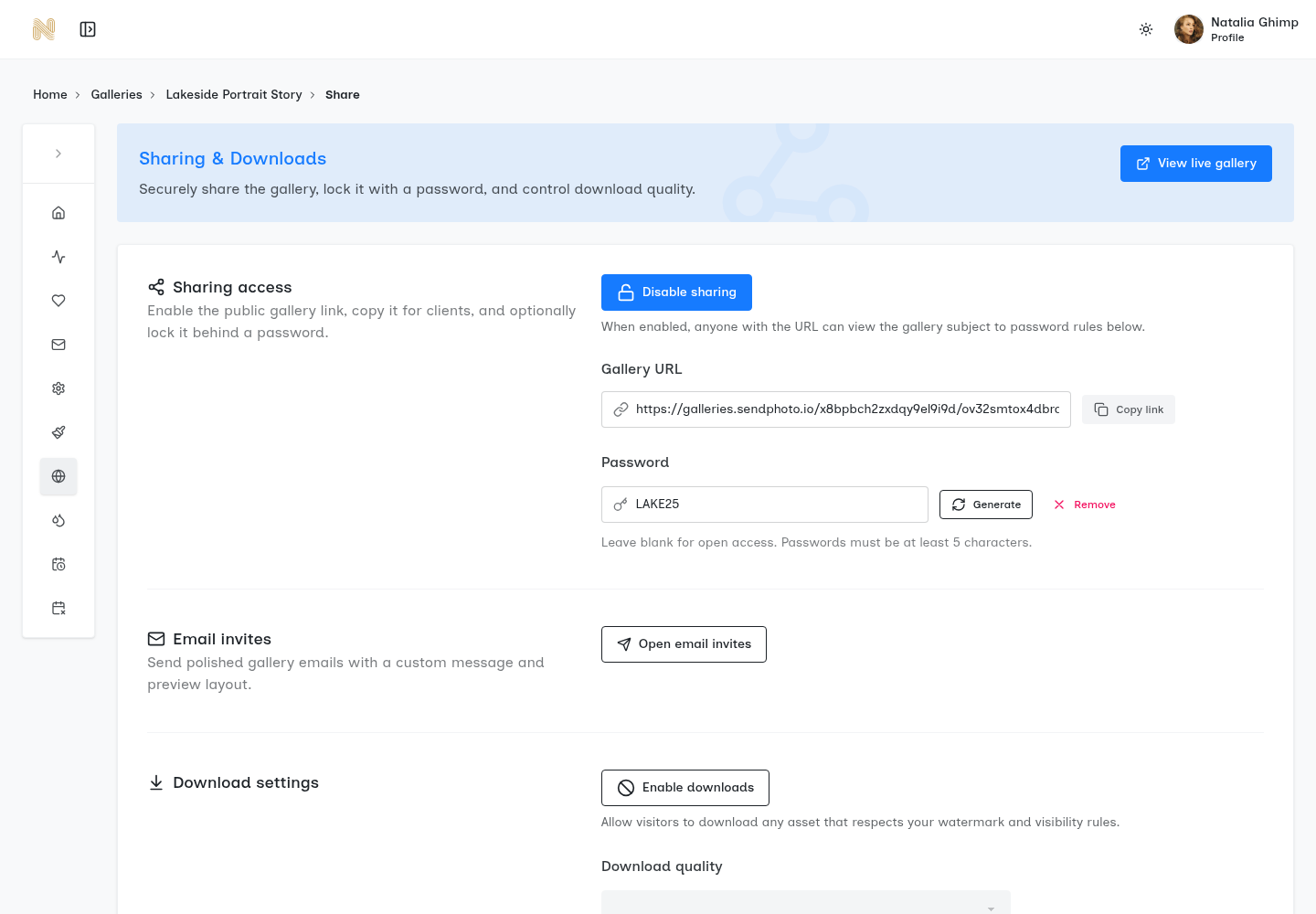
Essential Security Controls
- Unique password: Use an unpredictable credential for each gallery within the supported limits. Keep it separate from your studio login password; do not treat the minimum accepted length as a recommendation.
- Download permissions: Decide which photo downloads or ZIP collections are offered. SendPhoto has a gallery download switch, collection download controls, and Original or Scaled down photo quality settings. Disabling the download action does not prevent screen capture or every browser copy.
- Photo watermarks: Mark proofs when appropriate, and decide which files should be delivered unmarked. An Original download can be a generated watermarked file when photo watermark settings apply; keep independent unmarked masters. A watermark does not prevent copying or establish client approval.
- Sharing expiration: Use the agreed client access deadline. In SendPhoto, expiration turns sharing off; deletion is a different setting. Neither retrieves downloaded copies, and an expired gallery is not proof that every previously obtained asset URL has stopped working.
- Search visibility: SendPhoto’s gallery application emits noindex instructions and requests that crawlers avoid its pages. These are indexing and crawling measures, not a password or a user-controlled privacy switch. Do not promise that a gallery URL can never appear in search.
Google’s search-visibility documentation distinguishes noindex from access protection: a page can still be visited directly by someone with its address. Google also explains that a crawler blocked by robots.txt cannot read that page’s noindex instruction. Keep client entry controls separate from search visibility.
Secure Client Delivery Workflow
The following is a proposed checklist for your own handoff, not a workflow test performed for this article:
- Prepare the files and audience. Separate proofs from finals. If two groups should see different photographs, use separately controlled galleries rather than collection labels alone.
- Set the gallery password and deadline. Choose a unique credential and an access window that matches your agreement. There is no universal safe number of days.
- Configure the offered downloads. Match gallery and collection permissions, photo quality and watermark settings to the delivery stage. Label final exports with their actual intended use.
- Review the visitor handoff. Assess the intended viewer’s entry and download route separately from your signed-in management preview. Existing screenshots do not certify those settings for your gallery.
- Send clear instructions through agreed channels. Give the link, next action, offered files and deadline in the invitation; deliver the password through a separate agreed channel. Check the recipient first. Two channels reduce what one forwarded message contains but do not stop someone forwarding both.
- Close access and review retention. Turn sharing off or let the agreed expiry run. Decide separately how long to retain stored files, and keep independent source and final-file backups.
Limits and Common Mistakes
Do not reuse gallery passwords, leave old sharing enabled without an agreed reason, or release final downloads before the files and delivery stage are confirmed. Favorites show preferences, not payment or formal approval. Record approval and the final filenames in your agreed channel.
If an invitation reaches the wrong audience, confirm the situation with the client, turn sharing off when necessary and replace the exposed credential before reopening to the agreed viewers. Review any separate invitation or personal-link access too. A password change is not a recall of downloaded files or a deletion of cached previews.
For example, a proposed final check might record “Household only; finals confirmed by filename; permitted unmarked exports; sharing closes on the agreed date; masters retained independently.” Replace those choices with your actual agreement. This is a planning example, not a completed client delivery.
Configure Your Next Gallery
Review SendPhoto’s password-protection controls and download controls before your next handoff. For detailed audience and credential decisions, use the password-protected gallery workflow guide. Keep the audience, offered files and access deadline explicit when you share.