
Introduction
Gemini AI photo editing can help with fast visual experiments, background changes, object adjustments, concept mockups, and image variations. For professional client work, it should be treated as an assistant, not a replacement for judgment, consent, backup files, and careful retouching.
Checked October 4, 2026: Google's image-editing help describes Nano Banana 2, including editing uploaded or generated images. Personal-account image editing requires users to be 18 or over; availability depends on supported countries, languages and account access. Model choices and limits can change. This guide is based on documentation and a credited Google example, not our own account test.
What Gemini Can Be Useful For
Consider Gemini when you need to explore an idea quickly. It can help you test a different background direction, visualize a crop concept, create rough campaign variations, or remove a distraction for a mockup. It is less dependable when exact identity, product accuracy, brand compliance, or documentary truth matters.
Practical photographer use cases
| Use case | Editorial assessment | Notes |
|---|---|---|
| Moodboard variations | Yes | Useful before a shoot or campaign review |
| Background experiments | Yes, with review | Check edges, shadows, reflections, and realism |
| Social concept drafts | Often | Keep final usage rights and client approval in mind |
| Product edits | Use caution | Labels, proportions, colors, and materials must stay accurate |
| Portrait retouching | Use caution | Get consent and avoid changing identity or body shape unexpectedly |
| Wedding or event documentary edits | Limited | Preserve the truth of the moment |
A published example, not a client retouch
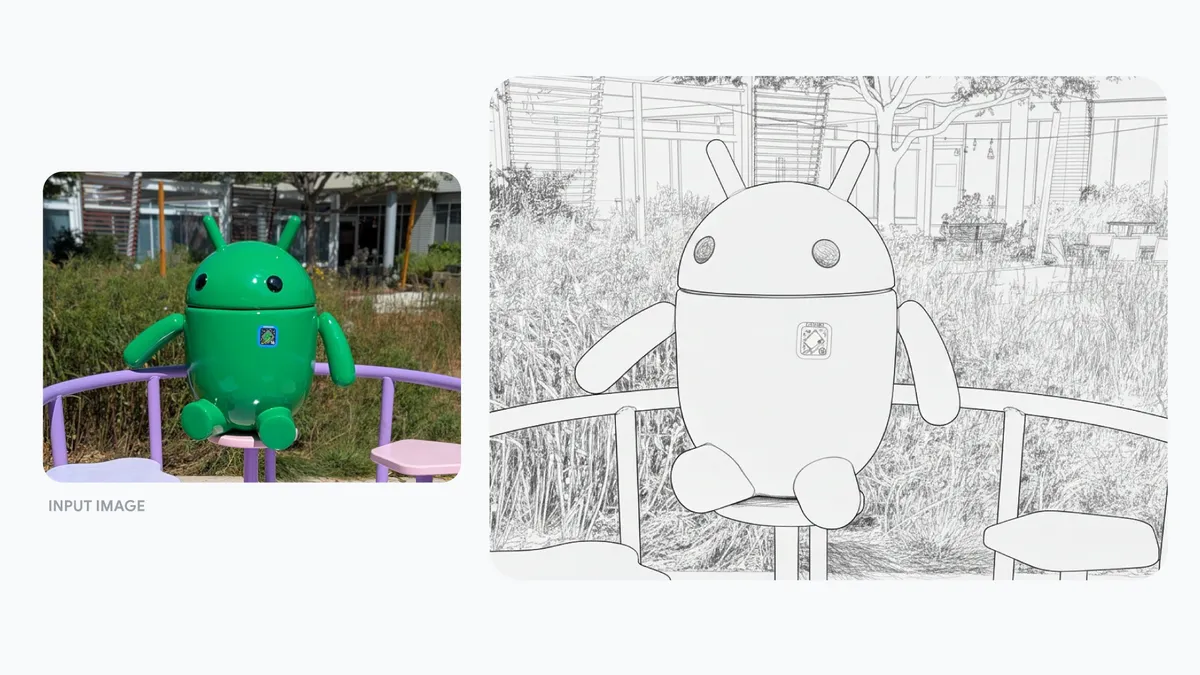
Google's supplied prompt is: “Turn this photo into a pencil drawing.” The result changes the medium and renders scene details as lines. The small badge also looks different between the two views. Treat the example as a stylistic transformation, not evidence of pixel-preserving cleanup, exact logo reproduction or predictable results on your photographs.
Decide whether the image can be uploaded
Permission to photograph or retouch someone does not automatically establish permission to send the file to an external AI service. Before uploading client portraits, images of minors, private events or unreleased products, check the agreed use, confidentiality requirements and the applicable account terms. If the upload is not authorized, use an approved editing workflow instead.
Google's Gemini Apps Privacy Hub, checked October 4, 2026, explains that uploaded images are processed under its privacy notice. With Keep Activity on, shared photos can be used to improve Google services with human reviewers. With it off and no feedback submitted, future chats are not used to improve AI models, but chats remain for 72 hours and human review can still help protect the service. Temporary chats are also retained for 72 hours; they are not used to train Google's AI models. Deleting activity does not delete copies already reviewed by humans, which may remain for up to three years.
For a work or school account, Google's Workspace account guidance says data handling depends on the license. Confirm the actual protections with your administrator; a work email alone is not proof of enterprise protections.
- Identify the exact account and service you will use.
- Confirm authority to upload the particular image, not just to edit it.
- Review current activity, connected-app and feedback settings before submission.
- Use a photograph you own and are authorized to upload for initial practice; avoid client material while resolving uncertainty.
A Gemini Editing Workflow
1. Keep the original files untouched
Save original RAW files and final manual edits before trying AI changes. Work from a separate copy you are authorized to upload. AI versions are derivatives, not replacements for your archive. Record the account, model shown, prompt and date so later review has context.
2. Define the edit in plain language
Write prompts that describe the exact change and what should stay the same. For a practice image you are authorized to upload, try: "Remove the small bag in the lower-left corner. Keep the people, lighting, background trees, skin tones and clothing unchanged." This is a suggested prompt, not a tested result. Preservation instructions express your intent; they do not guarantee that every other detail will remain unchanged.
In the current desktop help workflow, open Gemini, upload your permitted image or open an existing image from Library, then use Chat and submit the edit request. For an existing image, Google's help describes opening Library, selecting the image and choosing Chat. Follow the interface available to your account; these instructions do not establish that your account is eligible.
3. Make one major change at a time
Request one major change at a time so you can judge it. If you need cleanup, crop extension and color changes, save and compare each stage. If a required detail changes, reject the result or return to a manual tool; repeated prompting is not a guarantee of recovery.
4. Inspect details before approval
Zoom in on faces, hands, jewelry, logos, food texture, product labels, fabric, hair, shadows, and reflections. Compare the full image with the original as well as the requested area. Inspect for plausible-looking changes outside the edit: a label, expression or reflected object can change without being the focus of the request.
5. Compare against the client's expectations
Confirm whether AI changes are acceptable for the intended publication, then show the client what changed. Approval to upload and approval of the finished image are separate decisions. Download the full-size result using the available download control, inspect its actual dimensions and file quality, and export final deliverables to the destination requirements. Do not assume the output preserves the input resolution, metadata or editable layers.
Prompting Tips for Photo Editing
Tell Gemini what to preserve
Describe the subject, lighting direction, expression, product shape, color and composition you want preserved. Then compare those features in the output. A well-written constraint helps communicate the request; it is not a mask or a technical guarantee.
Avoid vague quality words
"Make this better" is too broad. Use concrete requests such as "brighten the background slightly," "remove the distracting cable," or "extend the plain wall on the right for a vertical crop."
Ask for realistic edits when needed
If the output should look like a real photograph, say so. Avoid asking for dramatic changes when the client expects a faithful image.
Save prompt notes for client review
For commercial work, keep a simple record of which images used AI editing and what changed. This helps with approvals and avoids confusion later.
When Manual Editing Is Better
Prefer tools with precise local adjustments and predictable export controls when the job requires color-critical product work, restrained skin retouching, documentary fidelity, complex composites or repeatable print preparation. Manual methods also need quality checks. Use masks and layers to constrain an edit where needed, and confirm whether any chosen feature sends images to a cloud service. An editor's name alone does not establish that every feature works locally.
If you are still building editing fundamentals, start with the photo editing guide for beginners. Understanding exposure, white balance, contrast, color, and sharpening makes AI-assisted editing easier to judge.
Client Delivery After AI-Assisted Edits
Keep experiments and approved final files clearly identified. SendPhoto's gallery delivery can present the finished set, with download controls for availability and quality. Use a delivery gallery containing only approved files when recipients must not see experiments: separate collection names organize a gallery but do not establish viewing restrictions.
For personal or unreleased images, agree on recipients and publication permissions, then configure sharing and optional password protection. A link and password can be forwarded, and visible images can still be captured or copied. These gallery settings do not govern the earlier processing of uploads by Gemini.
Quality-Control Checklist
- Original files are backed up, and the upload was authorized.
- AI-edited files are named separately, with the prompt, model and date recorded.
- Client consent is clear for identity, body, face, product, or documentary changes.
- Hands, eyes, teeth, jewelry, labels, and reflections are inspected closely.
- Shadows and perspective still match the scene.
- Skin tones and product colors remain believable.
- Downloaded output dimensions and quality are checked; final delivery contains the approved edits.
FAQ
Can Gemini edit my existing photos?
Yes, Google documents editing uploaded images in eligible Gemini Apps accounts. Check the linked current help page and your account access; personal-account image editing is restricted to adults.
Is Gemini AI photo editing safe for client work?
Suitability depends on upload authorization, account data protections, the publication brief and review of the result. A good-looking output alone does not establish confidentiality, faithful identity or product accuracy.
Should I tell clients when AI was used?
For professional work, disclosure is often the safest practice when AI materially changes the image. At minimum, make sure the client understands what changed and approves the final result.
Does AI editing replace Lightroom or Photoshop?
No. AI editing can speed up some creative experiments, but manual editing tools are still important for consistent color, retouching control, export quality, and final client delivery.