
Introduction
Golden ratio photography composition gives you two different guides: a grid for off-center placement and a spiral for comparing curved arrangements. Neither guarantees a stronger photograph. Start with the subject, light and intended use; keep an overlay only when it helps you make a specific framing decision.
This guide explains the number behind the grid, the difference between a golden spiral and a Fibonacci approximation, and a crop comparison you can try with your own image. The credited diagram below is a mathematical reference, not a photo-editing test or a client result.
What the Golden Ratio Means in Photography
The golden ratio is φ = (1 + √5) / 2 ≈ 1.618. Split a line into a longer part a and a shorter part b so that (a + b) / a = a / b = φ. A golden rectangle has a long side about 1.618 times its short side. See Eric Weisstein’s golden ratio definition at Wolfram MathWorld.
A photographic golden-ratio grid uses that division on each axis: lines at approximately 38.2% and 61.8% of the frame’s width and height. These positions come from 1/φ ≈ 0.618 and its complement ≈ 0.382. The inner band is about 23.6% wide, compared with 33.3% for a thirds grid. On a 1,000-pixel-wide preview, the vertical lines are approximately at x = 382 and x = 618. This is a placement guide; using it does not make a 3:2 or 4:5 crop a golden rectangle.
A golden spiral is logarithmic: its radius grows by a factor of φ for each quarter-turn. A Fibonacci spiral approximation joins quarter-circle arcs inside squares with side lengths 1, 1, 2, 3, 5, 8 and so on. The arcs are not one exact logarithmic curve. The Wolfram Demonstrations Fibonacci construction describes that approximation explicitly.
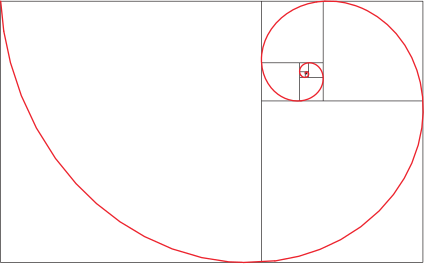
For composition, use the broad outer sweep to compare supporting shapes and the tight inner turn as a possible focal area. A shoreline, staircase, road, veil, arm, mountain ridge or table setting may suggest a curve; it does not have to trace every turn. A spiral is an optional model of the arrangement, not a measurement of how every viewer will look at the image.
Golden Ratio vs Rule of Thirds
| Composition tool | Placement guide | What to check |
|---|---|---|
| Rule of thirds | Lines at about 33.3% and 66.7% | Try an off-center subject or horizon without losing important context. |
| Golden ratio grid | Lines at about 38.2% and 61.8% | Compare the slightly more central placement with your thirds crop. |
| Spiral guide, including a Fibonacci approximation | A broad sweep narrowing toward a focal area | Check whether real curves or repeated objects support the main subject. |
| Center composition | Main subject on the middle axis | Try symmetry, a product view or a direct portrait. |
The grid and spiral answer different questions: where to place something, and how surrounding shapes relate to it. A centered crop may suit the brief best. Judge the visible result rather than treating “golden” as a quality rating.
When to Use the Golden Ratio
Portraits
Use the spiral to lead toward the face, eye, or gesture. Hair, shoulders, arms, fabric, flowers, or background lines can create the curve. This works well for bridal portraits, maternity sessions, fashion, and environmental portraits.
Landscapes
Look for natural curves: rivers, roads, dunes, coastlines, paths, clouds, or tree lines. Place the strongest focal point near the spiral's end, such as a person, cabin, sunlit peak, or break in the trees.
Product and food photography
Try the grid or spiral when you want to compare an off-center product arrangement. Packaging, props, utensils, ingredients, hands, or shadows can guide the eye toward the hero item. For food, use the curve to move from supporting ingredients to the finished dish.
Wedding and event details
Rings, stationery, florals, shoes, heirlooms, and tablescapes often have curved arrangements. The spiral can help you keep sentimental items connected without making the frame cluttered.
How to Compose With the Spiral in Camera
1. Find the visual path
Ask where the viewer's eye should enter the frame and where it should land. If there is no path, the golden ratio may not be the best tool.
2. Place the subject near the end point
The subject does not need to sit exactly on a mathematical point. Keep the intended focal detail clear; an exact diagram match is less useful if it hides an eye, label or gesture.
3. Use supporting shapes
Curves, diagonals, repeated objects, shadows, fabric, body posture, and leading lines can all support the spiral.
4. Leave breathing room
Do not pack every part of the frame with detail. Negative space helps the curve feel intentional.
5. Flip the spiral if needed
The spiral can work from left to right, right to left, top to bottom, or bottom to top. Rotate or flip the guide to match the scene; do not mirror the actual photograph just to fit it, especially when text or recognizable places are involved.
Cropping With the Golden Ratio
Try this comparison on an image you have permission to edit. It is a proposed exercise, not a reported test. Work from an untouched original and make separate versions so you can reverse the crop.
- Choose the output shape first. Use the requested print, editorial or social aspect ratio. A client’s 4:5 requirement matters more than forcing the whole frame to 1.618:1.
- Make a baseline. Save a simple centered or thirds crop. Note what it keeps: the face, gesture, product label and relevant background.
- Try the golden grid. Place the focal detail near a 38.2% or 61.8% intersection. Move the crop only as far as the subject and output shape allow.
- Try a spiral if the scene has a curve. Turn the guide until its inner area lies near the intended subject and its wider sweep roughly follows the supporting shapes. If matching it clips something important, keep the baseline.
- Compare with guides hidden. View both crops at the same displayed size. Ask which makes the subject clearer, removes distractions and preserves useful context. An overlay disappearing should not also remove the reason for the crop.
For example, with a portrait beside a curved staircase, compare the face near a grid intersection with a spiral whose broad sweep follows the railing. Keep the second version only if the face and gesture remain clear and the railing contributes to the portrait. This is a suggested scene, not an annotated before/after from our own shoot.
In Photoshop, select the Crop tool and set the required aspect ratio before moving the handles. Keep Delete Cropped Pixels off while comparing versions and retain an editable working file; an exported JPEG cannot restore discarded edges by itself. Adobe’s Crop tool options documentation explains the aspect presets and this setting. Use a composition overlay if your editor provides it, or compare the grid percentages directly; no particular overlay shortcut is required.
Before exporting, keep these five checks:
- Do not crop out important context just to fit the overlay.
- Check limbs, product edges and architecture for awkward clipping.
- Preserve enough pixels for the requested final size; cropping reduces the available area.
- Compare the golden-ratio version with the simpler baseline before deciding.
- View the result at the small size where the client will use it, as well as large enough to inspect detail.
For export and size decisions, see the photo resolution guide. For broader quality improvements, the photo quality guide pairs well with composition work.
Common Mistakes
Forcing the spiral onto every image
Some photographs are stronger with symmetry, centered framing, or clean negative space. The golden ratio is a tool, not a rule.
Ignoring the subject
A perfect overlay does not save a weak subject. Expression, light, timing, and meaning still matter more.
Making the crop too tight
If the image will be delivered in a client gallery, printed, or used in several formats, leave enough space for different crops.
Delivering Composition Variations
Agree on the versions the client actually needs: full frame for flexibility, an editorial crop for a layout, a social crop for its required aspect ratio, and a print crop for the ordered dimensions. Use descriptive filenames such as portrait-full, portrait-4x5 and portrait-print-8x10 rather than asking the client to choose between “better” and “worse” compositions.
SendPhoto’s gallery delivery lets you present the exported files. Its download control lets you enable or disable gallery downloads; it does not determine which crop the client has approved. Keep review alternatives and approved deliverables clearly named and, when needed, in separately configured galleries.
A gallery password adds a password check to access. It is not a guarantee against someone sharing the link and password or copying an image they can view. Get the relevant permission before sharing portraits, wedding images or confidential commercial work.
More composition and technique articles are available in the SendPhoto blog.
FAQ
Is the golden ratio better than the rule of thirds?
No general superiority follows from the ratio. Compare the crops for your subject and intended use. The golden grid puts its lines closer to the center than thirds; a spiral gives you a way to examine curved arrangements.
Do I need a golden ratio overlay?
No. An overlay can help while learning, but you can use the idea by looking for a visual path that leads toward the subject.
Can I use the golden ratio for portraits?
Yes. Use the curve to guide attention toward the face, eyes, hands, or gesture, especially when fabric, hair, flowers, or background lines support the shape.