
A photography platform should suit the work you need to do: deliver client files, publish a portfolio, or sell prints and digital downloads. Decide which job matters most before comparing feature lists. You may need one system for delivery and another for your public website.
How this comparison was prepared: official product, pricing and support pages were checked on October 4, 2026. SendPhoto feature statements also use its current product code and published plan terms. This is a documentation-based shortlist published by SendPhoto, one of the products included. It is not a paid-account trial, performance ranking, reliability test or measured sales comparison. Numbers below help navigation; they do not assign places.
For each platform, compare the documented product scope, plan-dependent limits and work you would need to configure. Specific fit recommendations are our interpretation of those features. Confirm your region, billing period, storage and sales charges before purchasing; temporary discounts are excluded here.
Table of Contents
1. SendPhoto
SendPhoto focuses on client gallery delivery. Consider it if you already have a public website and need to present a finished wedding, portrait, event or commercial selection rather than build a store or manage bookings.
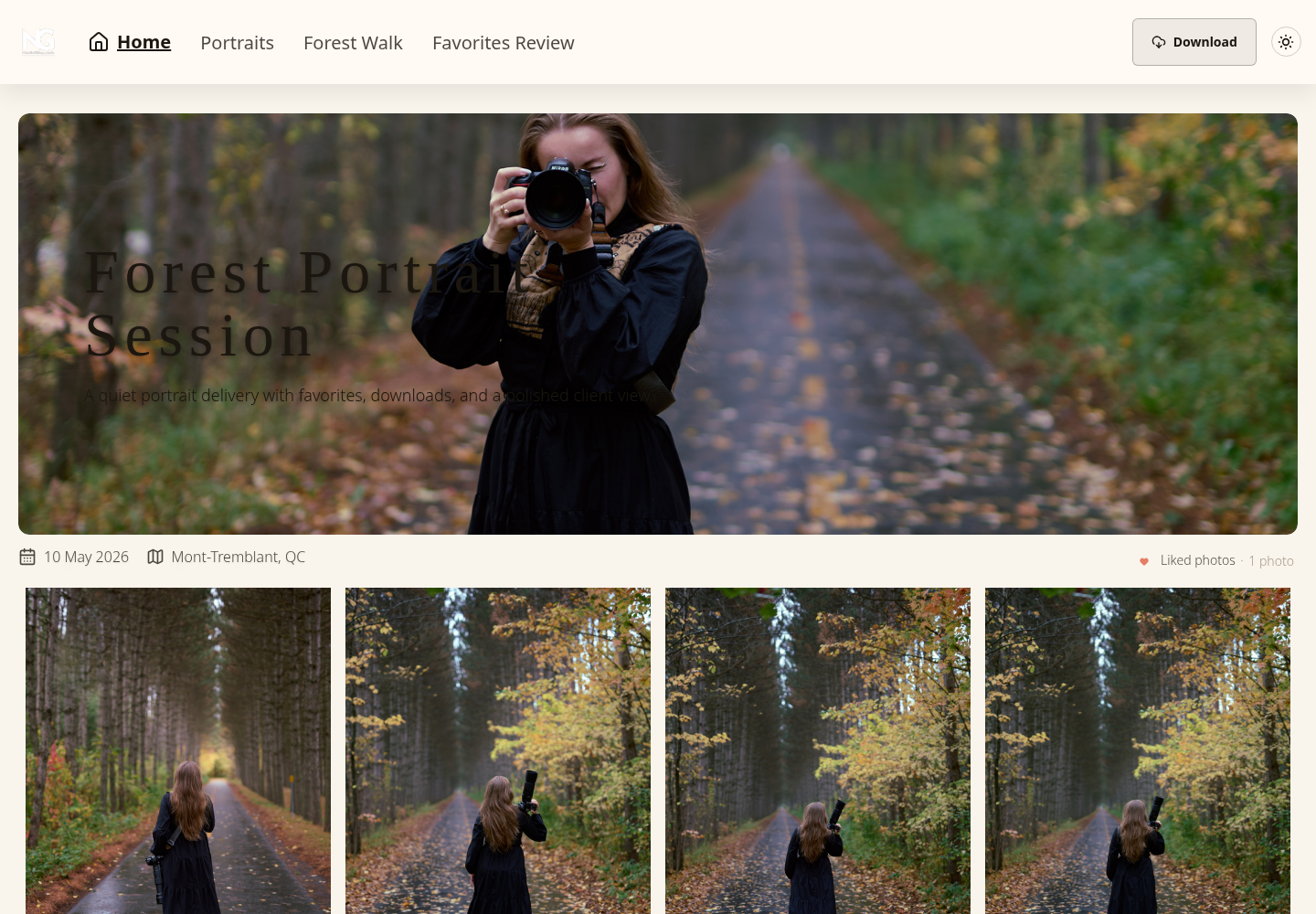
Existing SendPhoto product screenshot: the Forest Portrait Session client gallery shows collection navigation, a liked-photo count and a Download button. It illustrates this view, not upload speed, a new account test or any competitor’s interface.
Why it works for delivery-first photographers
Public client gallery links can be viewed without creating a SendPhoto account, subject to the gallery’s sharing and password settings. Collections, favorites, watermarks and download controls support presentation and review. A password adds an access check; it does not prevent an authorized viewer forwarding credentials or copying an image. Download permission is separate from approval of a particular edit.
These features are documented on the gallery delivery page and download controls page. Do not read them as guarantees of exclusive access, automatic deletion or expiring links. For RAW files or video, confirm the required formats, sizes and playback behavior before choosing any platform.
Where it fits and where it doesn't
The current SendPhoto pricing page lists Free with 5GB storage, one gallery and 10GB lifetime upload credits. Storage and upload credits are different limits: removing files does not make a lifetime allowance recur. Passwords, watermarks, collections, download controls and custom domain setup remain available on Free. Paid plans raise limits and remove SendPhoto branding from the public home page and gallery invite emails.
- Best use case: Presenting and delivering finished client files alongside an existing website.
- Big advantage: A visitor can view a shared client gallery without account creation when its access settings allow.
- Main limitation: This shortlist does not establish integrated print-lab checkout, website building or studio management as SendPhoto capabilities.
Use the photo hosting selection guide to distinguish delivery needs from archive and website needs.
2. Pixieset
Pixieset offers Client Gallery, Store, Website and Studio Manager products. That makes it a candidate when you want those jobs within one vendor, although the products and subscriptions still need comparing separately.
Best for photographers who want one vendor
Official Client Gallery pricing lists unlimited galleries, including on Free, but storage is limited by the plan. Free includes 3GB photo storage and a 15% store commission; upgraded gallery plans advertise commission-free sales. This excludes payment processing, print production and shipping costs, as explained in Pixieset’s commission policy.
Full-resolution downloads and custom domains appear on upgraded gallery plans. Video allowances and RAW support vary by tier; do not treat every plan as having the same media capacity.
- Good fit: Comparing galleries, a storefront and website products from one vendor.
- Less ideal: Paying for a broader bundle when you need only delivery.
- Standout trait: Separate gallery, website and studio products with suite options; compare the combination you actually need.
3. Pic-Time
Pic-Time is a candidate when print sales and follow-up offers are part of the gallery’s job. Its Client Delivery Suite comparison lists galleries, a print store, sales automations and search features, with availability varying by plan.
Best for sales-minded galleries
Budget time to configure products, fulfillment, offers and payment collection. Features alone do not establish how much a gallery will sell. Check the lab products and shipping available to your customers rather than assuming every location has the same choices.
Pic-Time’s commission documentation distinguishes Pic-Time collecting payments from collecting payments yourself. Commission-free sales require an eligible paid plan and the relevant store setup; Free and Beginner have exceptions. Processing and fulfillment costs still matter.
The pricing page says Free photo storage begins at 10GB and later reduces to 3GB, but its desktop and mobile text gives different reduction timing. Confirm the allowance and timing with Pic-Time before relying on Free for ongoing work. Search availability, video capacity and automation options also need checking for your chosen plan.
4. ShootProof
ShootProof combines galleries, proofing, digital sales and print fulfillment. Consider it for a studio that needs price lists and download permissions as well as delivery.
Best for proofing and controlled sales workflows
The current official FAQ describes GB-based storage, unlimited galleries and photo/video support. Its plan-change notice dates the move from photo-count plans to September 23, 2026. Do not budget from an older photo-count comparison.
The FAQ describes linked-contact and gallery/album download rules, price-sheet packages and lab orders. Those documented controls make it worth shortlisting for structured proofing and selling; they are not an approval of any particular studio setup.
ShootProof says it takes no sales commission. Its additional-fees page still lists payment processing, archiving, booking and music plans. Include the extras you need in your budget.
- Works best for: Investigating structured proofing, pricing and order workflows.
- Watch for: Storage requirements and optional services after the plan transition.
- Strong point: Documented commission-free sales, distinct from processing or fulfillment costs.
The client photo delivery guide covers handoff decisions that remain relevant whether or not you sell through a gallery.
5. SmugMug
SmugMug is a candidate for a hosted public photography site with galleries and selling options. Its current plans page advertises unlimited photo storage and shows how site and sales features differ across plans. This is not evidence of measured uptime or support response speed.
Hosting with built-in sales
Treat reliability as something to assess for your own requirements, rather than a result established by this article. Compare digital delivery, price lists, packages and order fulfillment on the specific plan you would purchase. A public portfolio and a private delivery gallery may require different access settings.
The same page identifies SmugMug Source as a separate RAW-storage service. It is not part of the ordinary unlimited-photo-storage claim; budget for it separately if you need RAW backup. Keep an independent backup and check export options before moving a large archive.
The photo organization software guide can help separate catalog organization from public hosting.
6. Zenfolio
Zenfolio combines photography websites, galleries and plan-dependent sales and business tools. Its official pricing comparison lists Basic, Professional and Advanced plans rather than one uniform all-in-one package.
Best for all-in-one studio operations
The comparison lists proofing, print/digital selling, AI gallery creation and tagging, Volume Wizard and QR-code workflows with tier-specific limits. This makes it worth investigating for school, sports or repeat event work, but check the required workflow against the actual plan. Do not assume unlimited volume-tool use across tiers.
Booking and Scheduling is shown as an add-on on lower plans and included on Advanced. Photo/video storage also varies by tier. The pricing FAQ lists a 7% commerce fee on the order subtotal after discounts, separate digital-download charges and payment processing costs. Subscription price alone is therefore insufficient for a sales budget.
A broader suite may reduce the number of vendors you use; the amount of setup or administration it saves is untested here.
7. CloudSpot
CloudSpot offers client galleries, a print store and Studio Manager. Consider it when you want to investigate gallery delivery and business tools together rather than assuming you need separate vendors.
Gallery sharing and studio tools
CloudSpot’s current pricing page compares storage, storefront and studio features across tiers. It lists contracts, questionnaires, project management, invoicing and scheduling, but notes that invoicing and online payments are available only in the United States. That regional limit matters if you expect it to replace an existing invoicing tool.
Store commissions vary by plan: the comparison includes 15% and commission-free tiers. Check processing fees, lab fulfillment and your chosen plan’s allowance alongside the subscription cost. Integration and print-preview features should be verified for your workflow rather than treated as a reason to promise faster setup or higher sales.
Top 7 Photography Sites Comparison
This table summarizes the documented scope and the decision to investigate next. It replaces subjective setup scores with checks you can verify. It does not rate speed, security, reliability or sales performance.
| Platform | Scope to compare | Plan or cost caveat | Decision to investigate |
|---|---|---|---|
| SendPhoto | Client gallery delivery | Free: 5GB, one gallery, 10GB lifetime upload credits | Do you need delivery alongside an existing public website? |
| Pixieset | Galleries, store, website and studio products | Free store commission; media and branding vary by tier | Does one vendor’s product combination suit your needs? |
| Pic-Time | Galleries, print store and sales automations | Store payment setup affects commission; confirm Free reduction timing | Will you use post-delivery store and offer tools? |
| ShootProof | Proofing, digital/print sales and delivery | GB plans; processing and optional service costs | Do you need documented download rules and price-sheet packages? |
| SmugMug | Hosted photography site, galleries and sales | Sales features vary; RAW Source is separate | Do you need public presentation and a large hosted photo library? |
| Zenfolio | Website, galleries and business/volume tools | Tier limits, commerce/download fees, booking add-ons | Do repeat or volume jobs require its broader workflow? |
| CloudSpot | Galleries, print store and Studio Manager | Tier-dependent commission; US-only invoicing/payments | Can the studio tools operate in your region? |
Delivery, portfolio and sales remain different priorities. SendPhoto’s gallery focus may fit an existing website; Pixieset and SmugMug are candidates when public presentation is also needed. Pic-Time, ShootProof and Zenfolio deserve closer examination for selling or structured workflows. CloudSpot spans delivery and studio tools, subject to its plan and regional limits. These are feature-based shortlist suggestions, not trial results.
How to Choose the Right Photography Site for You
Start with a written requirement rather than a platform name. For example: deliver an edited portrait session with client favorites; publish a portfolio with service and contact pages; or sell lab prints to customers in specific countries. Curation still matters: you need to judge the portfolio selection and review any automated culling.
- List the essential workflow. Specify access settings, favorites or proofing, download sizes, public pages, products and payment needs.
- Estimate storage and uploads separately. Include active galleries, retained jobs, video and RAW files if required. Check whether a limit is capacity, a recurring allowance or a lifetime credit.
- Calculate the full cost. Add the required plan, website/studio subscriptions, commissions, processing, production, shipping and optional services. Use a normal renewal price rather than a temporary promotion.
- Check the buyer’s location and devices. Confirm available labs, payments and regional features; review a public sample gallery and the vendor’s documentation. Before committing, evaluate your chosen plan with a permitted small trial if needed.
- Plan the exit. Keep your originals independently, confirm export options, and agree with clients how long you will provide gallery access. Do not equate access expiry with deletion or permanent backup.
A practical shortlist remains:
- Client delivery first: Investigate SendPhoto, Pixieset or CloudSpot against your access, selection and download requirements.
- Portfolio first: Compare Pixieset’s Website product and SmugMug’s site tools with the pages and customization you actually need.
- E-commerce first: Compare Pic-Time, ShootProof or Zenfolio for the products, order permissions and regional fulfillment you require.
Choose the system that meets your essential requirement at a cost you can maintain. The photo hosting selection guide provides a broader checklist; use SendPhoto pricing if gallery delivery is the job you are evaluating.