
A finished film still needs a clear handoff. To share video online, agree what the client should receive, export a compatible file, choose who can open and download it, and send instructions that match those settings. Keep an independent copy of the master and project files.
This guide separates a viewing copy from a production master and a private delivery from public publishing. The export example uses Adobe's published documentation; the SendPhoto illustration is an existing screenshot of sharing controls. The examples explain controls; they do not report a measured delivery.
Beyond the Send Button: Why Your Video Delivery Matters
The delivery should answer four questions: which film is final, who may see it, what they may download, and how long access lasts. Those decisions matter whether you deliver a wedding highlight, a portrait-session film or a commercial edit.
Common handoff problems include:
- An attachment that exceeds the recipient's limit. Email a delivery link when the file is too large; a link does not itself make the destination private.
- A generic folder with several versions. Label the approved edit and keep drafts separate so a client does not publish an obsolete cut.
- A public or forwardable viewing link. Use an access method that matches the agreement, especially for footage involving children, private events or confidential work.
- Permissions that do not match the email. A promise to download is unhelpful when downloads are disabled; a review-only instruction is misleading when a downloadable file is available.
Ask whether the client needs streaming-style viewing, a downloadable delivery file, production material for another editor, or more than one of these. A gallery viewing file is not automatically a camera original or an archival master.
Prepping Your Video File for Reliable Playback
No export guarantees flawless playback on every device. Start with the intended destination and the recipient's requirements, then make a delivery copy that balances compatibility, detail and file size.
Three terms help explain the choices:
- Container: the file wrapper, such as MP4 or MOV.
- Codec: how video or audio is encoded, such as H.264 video or AAC audio. The filename extension alone does not identify these.
- Bitrate: the amount of data used per second. More data can preserve detail, but creates a larger transfer and requires more bandwidth during playback.
Start with the Export Your Client Can Play
For a broadly compatible viewing copy, MP4 containing H.264 video and AAC audio is a useful starting point. MDN's video codec guide documents this combination for major browsers. That is a compatibility baseline, not a guarantee for every profile, device or delivery service.
Agree whether delivery should be 1080p or 4K. Preserve the intended aspect ratio and avoid calling an upscaled low-resolution source a new 4K master. A client's request for 4K does not mean the review link must use the same file as the final production delivery.
Documented Premiere example: Select the timeline or source clip, choose File > Export > Media, then in Export mode, set the file name and location, select H.264, and include the required video and audio. Adobe explains these controls in Export video and audio files. Save the result to a delivery folder distinct from project files and source footage.
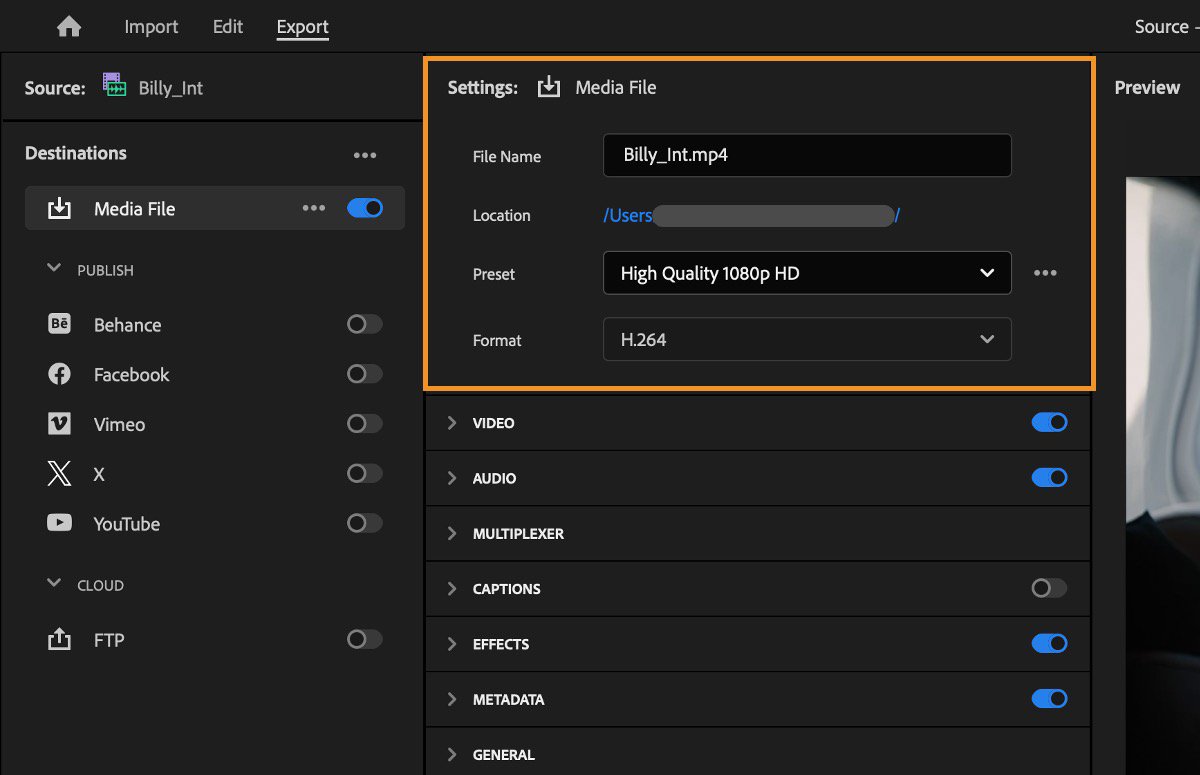
Genuine screenshot from Adobe's export documentation, reused unchanged. The pictured preset is High Quality 1080p HD. It illustrates Adobe export controls, not a SendPhoto player.
Choose the Codec Based on Compatibility First
Adobe's basic video settings documentation lists Match Source – Adaptive High Bitrate, Medium Bitrate and Low Bitrate presets. These adapt settings to the source. Check the resulting frame size, frame rate and bitrate rather than treating a preset name as a universal numerical setting. Adobe recommends progressive output for online content and explains that changing frame rate can affect motion.
Use a format accepted by the destination and the recipient's software. H.265/HEVC can be appropriate in an agreed workflow, but do not assume that every browser or client's editing software can use an arbitrary H.265 file. Keep a broadly compatible viewing version when necessary.
| Delivery situation | Practical starting point |
|---|---|
| Standard client viewing | H.264 video and AAC audio in MP4; 1080p when that matches the agreement and source |
| Agreed 4K final delivery | A compatible 4K export from suitable source footage; check the client's playback and transfer requirements |
| Recipient explicitly requests H.265/HEVC | Use the requested codec and container after confirming the destination's requirements |
| Compatibility is uncertain | Supply an H.264/MP4 viewing copy and agree separately on production material |
As an illustrative calculation, five minutes at 8 megabits per second is about 300 megabytes of video data: 8 × 300 ÷ 8. Audio and container overhead add to this. This is arithmetic, not a recommended SendPhoto bitrate, a measured export or a file-size guarantee.
Before export, check four details:
- Resolution and framing: the dimensions, aspect ratio and crop match the promised deliverable.
- File name: use a clear project name, film name and version, such as
Lakeside_Highlight_Final_v03.mp4. - Audio: the intended mix is included, with no accidental muted track or missing ending.
- Opening frame: the film begins intentionally. A service may generate its own poster frame, so do not assume the first frame becomes its cover.
Record the editor version, preset, output dimensions, frame rate, codecs and any changed settings with your delivery notes.
Test the File Before Anyone Else Sees It
Use this as a proposed preflight for your own delivery. Open the exported file, check its beginning and end, seek into the middle, and listen to the audio. Look for missing graphics, wrong versions, unintended crops and unexpected color changes.
Then check the delivery copy on the destination after processing is complete. Local playback and uploaded playback are different checks: a service can transcode the file or serve a different rendition. Confirm that the download offered to the client is the deliverable you agreed to provide.
If the picture looks soft, compare the exported file with the uploaded version before changing settings. Softness can come from the source, export, processing or the selected playback rendition. For more context, see SendPhoto video support.
Secure Delivery Options for Client Videos
Choose the method by the job, then check the actual service's controls. A category label such as “cloud storage” or “gallery” does not establish privacy, account requirements, supported formats or retention.
What Each Delivery Method Does Well
Cloud file sharing can suit a straightforward file handoff or production package. Check whether access is restricted to named recipients, whether a link can be forwarded, and whether downloading requires an account. Keep the delivery folder separate from working files.
An unlisted video page can be convenient for viewing when a forwardable link is acceptable. YouTube states that anyone with an unlisted link can view and reshare it; an unlisted video can also appear through a public playlist. Treat unlisted as a visibility choice, not confidential delivery to verified recipients.
A client gallery can organize a film alongside photographs and provide a coherent handoff. Check video support, processing status, access settings and downloads for the particular gallery. Do not infer video watermarking or archival preservation from photo features.
Permissions Matter More Than the Platform Name
Check these four failure cases before sending the link:
- The intended client cannot open it. The link, password, recipient-specific invitation, plan or sharing status may need attention.
- A different person can open it. A generic link or shared password may be forwardable; it is not proof of the viewer's identity.
- A review remains available longer than intended. Set a review deadline and choose the supported expiry or removal action. Changing future access does not recall downloaded files.
- Downloading contradicts the agreement. Enable or disable it deliberately and describe the available delivery file accurately.
In SendPhoto, valid shared-gallery access depends on sharing and access settings. A general viewing link does not require a SendPhoto account, but a password or recipient-specific access can change the steps. Do not promise every viewer an identical account-free journey or every action without an email prompt.
A Simple Comparison for Working Photographers
| Method | Useful when | Confirm before delivery |
|---|---|---|
| Cloud file link | The client needs files or a production package | Recipient permissions, download access, account requirements and retention |
| Unlisted video page | A forwardable viewing link is acceptable | Visibility, resharing consequences and how final files will be delivered |
| Client gallery | Photos and films belong in one organized handoff | Video processing, viewing access, available downloads and collection permissions |
| Self-hosted delivery | You can operate and maintain the delivery system | Authentication, storage, bandwidth, player compatibility and ongoing maintenance |
No row is an automatic winner. Use separate review and final-delivery locations when the requirements differ. Put confidential work behind appropriate access controls rather than relying on a difficult-to-guess URL.
Creating a Polished Client Viewing Experience
The client should recognize the project, identify the correct film and know what to do next. Clear naming and instructions are more useful than a decorative cover that hides the actual deliverable.
Presentation Changes the Value of the Handoff
Use a project title, a suitable cover when the service provides one, and a short explanation of what is included. Separate a highlight film, full ceremony and social edit rather than giving several files the same “final” name.
A mixed gallery can keep related photographs and films together. SendPhoto has video items and player controls alongside gallery items, but that does not establish playback on every device. Uploaded videos need processing; keep your original master elsewhere because processing can produce an optimized MP4 instead of preserving the upload byte for byte.
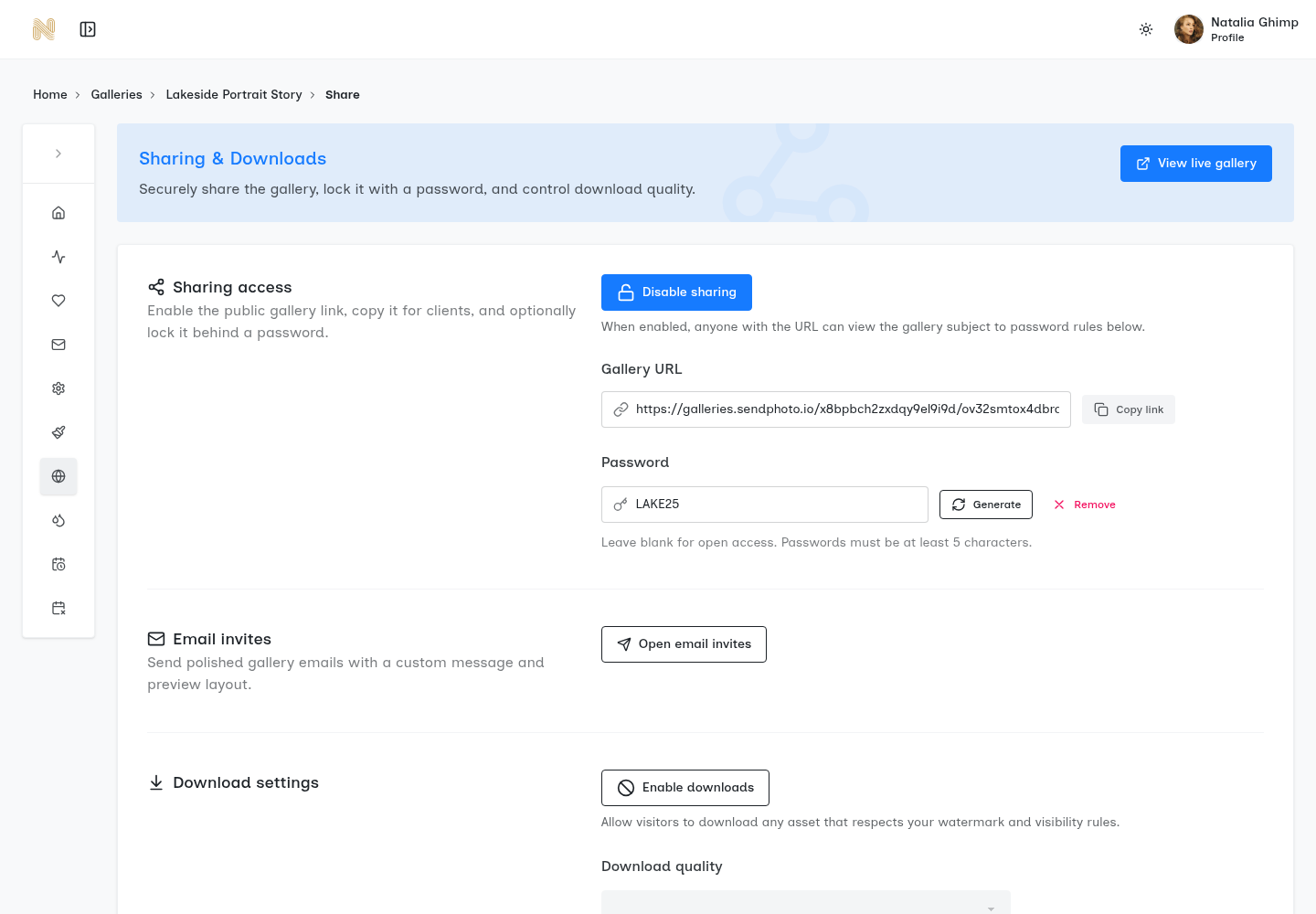
Existing real SendPhoto screenshot, reused unchanged. It shows access and download controls. The visible password belongs to the public demo; it is not a password recommendation. Quality options are outside this crop.
What Clients Actually Want When They Open a Gallery
Make these four tasks clear:
- Access: where to open the delivery and which password or invitation applies.
- Organization: which collection and film are the final deliverables.
- Playback: wait for processing, start the film and enable audio when needed. The current SendPhoto video player starts with audio muted; a silent start is not by itself evidence of a missing soundtrack.
- Completion: whether to send feedback, download a file or confirm receipt, and by what date.
Video downloads and photo actions are not interchangeable. SendPhoto's photo Save Images action excludes video items. Do not tell clients that it saves their films to a phone's photo library. Explain the available video download separately.
Organize a Branded Gallery or File Folder
A gallery can provide useful structure; a well-labeled file folder can also be the right choice. Use these five presentation decisions where the service supports them:
- Choose a cover that represents the project without exposing private footage unnecessarily.
- Use a recognizable project and client name.
- Separate collections or deliverables by purpose.
- Make downloading match the review or final-delivery agreement.
- Apply supported branding consistently; verify any custom-domain setup before putting that address in the email.
SendPhoto's photo download settings include Original and Scaled down, but video downloading follows a separate path. Do not promise a distinct print, web and video export mode, or that “Original” proves a video is the untouched uploaded master. Also do not assume a photo watermark is burned into a film. If the delivered film needs a visible mark, create the appropriate marked export and verify the resulting deliverable.
For the broader handoff, see how to share photos with clients. Keep the delivery promise explicit rather than asking the client to infer it from gallery buttons.
A Photographer's Video Sharing Workflow Checklist
Use the following proposed workflow for each job. Adapt the export and permissions to your agreement.
The Repeatable Handoff Process
- Agree the promise. Write down the films, resolution, intended use, access, download rights, review deadline and retention period.
- Finish the edit. Confirm the approved cut, music and footage permissions, titles and audio mix.
- Export the delivery copy. Choose the destination's supported format and record the actual settings.
- Upload and wait. Check applicable file and storage limits, then allow processing to finish. An upload's completion is not necessarily playback readiness.
- Organize the handoff. Label the films and collections; remove obsolete drafts from the final delivery location.
- Set access. Choose the appropriate link, password or invitation, download permissions and supported access deadline.
- Preflight the destination. Check viewing and the available download against the agreement.
- Send clear instructions. State where to open, what is included, how to download if enabled and how to send feedback.
- Archive independently. Keep the master, source footage, project files and delivery record according to your policy. Do not make the gallery your only archive.
Your delivery email should cover four practical points:
- Asset: the project, film names and final or review status.
- Access: the complete link and any separate password or recipient-specific instructions.
- Download: whether it is enabled and exactly what file the client receives.
- Reply: the feedback channel, deadline and retention terms.
Do not put an expiry promise in the email unless it matches the configured setting or an action you will carry out. A client saving a copy does not eliminate your agreed retention obligations.
Troubleshooting Common Delivery Problems
Use the symptom to narrow the cause rather than assuming every issue is an oversized file:
- Blurry or soft video: compare the local export with the processed version. Check output dimensions, the source's detail, any crop and the playback rendition before increasing bitrate.
- Stuttering, unavailable or silent playback: confirm processing is complete and audio is enabled. Check the browser, player, codec support, local export and connection. A file that works locally may still be incompatible with a destination's player.
- A request for source footage: distinguish the viewing file from camera originals, project files and masters. Agree the package, transfer method and rights separately; do not rename a processed MP4 “source footage.”
- An access or download failure: check that the link is current, sharing is active, the password or invitation matches and downloading is permitted for the intended collection. Investigate the actual error before weakening permissions.
A useful delivery has a clear file, appropriate access, accurate instructions and an independent archive. If you are delivering photographs and films together, use SendPhoto's video-support page to understand the workflow, then check the controls and limits shown in your account for the particular job.