
To share photos online professionally, prepare the agreed files, choose a delivery method your recipient can use, configure access and downloads, and send clear instructions. Keep your independent archive separate from the gallery's access deadline.
This guide follows that complete handoff. Its SendPhoto examples use current controls and existing real screenshots; its export instructions refer to Adobe documentation. The checklists are proposed reader actions, not results from a new upload, export, or recipient test.
Moving Beyond Basic File Sharing
A download link is useful only when the recipient knows what it contains. A retoucher may want a folder of source assets; a portrait client may want to browse finished photographs before downloading. Neither audience benefits from guessing which files are proofs, finals, or small social copies.
A professional handoff answers four questions:
- What is ready, and what remains a working file?
- Is the client reviewing, selecting, approving, or downloading?
- Who should have access, and until when?
- Where will the finished work be retained after access ends?
Choose a curated gallery when browsing and selection matter. Choose a transfer or shared working folder when the main task is receiving files for another production step. The method should match the job; presentation alone does not establish stronger security or a completed delivery.
For a broader job-specific checklist, see sharing photographs with clients. Here the emphasis is the complete online handoff, from export through retrieval later.
Preparing Images for Professional Delivery
Separate the working archive from the delivery set. Finish the agreed edits, exclude accidental duplicates and rejects, and identify the version the client should receive. A folder named “Final” is not enough if it also contains old revisions.
Export for Predictable Viewing
For ordinary online JPEG delivery, sRGB is a practical starting point. Adobe's Lightroom Classic color-management guide describes sRGB for online sharing. Use the printer's or designer's specified profile when another output requires it. An embedded profile helps color-managed software interpret a file; it does not make every screen display identical color.
Keep two purposes distinct:
- Browsing copies: appropriately sized previews for viewing online.
- Delivery files: exports with the dimensions, crop, and format agreed for printing, design, or archiving.
A gallery may generate browsing previews from your upload. Do not assume that a nice thumbnail proves the downloadable file is the right size.
For a documented Lightroom Classic export:
- Select the intended photographs and choose File → Export.
- Choose a separate destination under Export Location.
- In File Settings, select JPEG and the intended color space.
- In Image Sizing, apply the dimensions your delivery requires; avoid enlargement unless deliberate.
- Review metadata choices, export, and inspect the resulting files.
These controls are documented in Adobe's export settings reference. Choose JPEG quality by inspecting detailed areas and actual file sizes rather than treating one number as a universal preset. Keep an untouched master outside the delivery folder.
Pixel dimensions matter more than a reassuring “high resolution” label. As a hypothetical print calculation, an 8-by-10-inch image at 300 pixels per inch needs 2400 by 3000 pixels. A 6000-by-4000 image has a different aspect ratio, so that print shape also requires a crop or borders. This is arithmetic, not a measured sample export. The high-quality photo delivery guide covers that distinction in more detail.
Name Files Like a Working Professional
Use filenames the client can quote in a reply. Preserve a mapping to source files in your private job records when public exports are renamed.
A useful naming pattern has:
- A project identifier: a neutral job code or approved session title.
- A stable sequence: zero-padded numbers that keep files in order.
- An optional purpose label: proof, final, album, or social copy.
For example, J104_Final_0012.jpg and J104_Social_0012.jpg can identify two versions of the same frame. These are hypothetical names. A label is part of your filename convention, not a claim that SendPhoto provides a tagging system.
Avoid exposing a family's surname, home address, or private event location through filenames if it is unnecessary for the handoff. Clear naming helps file reference, but it is not an alternative to accessible image descriptions. If you publish work on a website, W3C's informative-image guidance explains how a text alternative conveys the image's relevant meaning.
Review and Remove Unnecessary Metadata Before Upload
A password protects a route into a gallery; it does not decide what information an exported file contains. Check these four categories before sharing:
- GPS information: coordinates that do not belong in the client's copy.
- Camera and device information: retain only what the delivery actually needs.
- Copyright and contact fields: preserve useful attribution while checking for private contact details.
- Internal notes and keywords: job labels, names, or instructions meant for your own workflow.
In Lightroom Classic's Export dialog, Metadata → Remove Location Info removes GPS metadata from supported exports; Adobe notes that this option is unavailable for DNG. The same export reference lists metadata inclusion choices, including copyright-only options.
Review the exported copy rather than assuming an editing preset covers every format. Keep the original privately. Removing GPS does not anonymize a photograph: faces, recognizable buildings, visible signs, filenames, and written captions can still reveal context.
Choosing the Right Photo Sharing Platform
Start with the recipient's task, not the tool category. A gallery, shared folder, social post, and one-time transfer can each be suitable in a different situation. Check the specific service and plan before assuming password, expiration, preview, or download controls are available.
Comparison of Online Photo Sharing Methods
The table compares tasks and questions to investigate, rather than ranking every service in a category. On a narrow screen, scroll the table sideways to read all five columns.
| Method | Best-fit task | Branding question | Access question | Recipient check |
|---|---|---|---|---|
| File transfer service | Deliver a defined batch to a collaborator | Can the handoff identify your studio and job? | Who can use the link, and when does it expire? | Can the recipient download the whole batch and use its file types? |
| General cloud storage | Maintain shared working files | Is the folder structure and naming clear? | Which users or link holders can view, edit, and download? | Are previews, permissions, and folder navigation suitable for this job? |
| Social sharing | Publish approved promotional work | How does platform presentation affect the image? | Is the intended audience public, restricted, or a group? | Is this publishing rather than delivery of the agreed files? |
| Dedicated gallery | Browse photographs, create a shortlist, and deliver finals | Which logo and presentation options are included? | Which password, expiration, and download controls exist on the chosen plan? | Can the client understand the selection and download process? |
The existence of a password feature does not make one category inherently safer. The configured audience, recipient behavior, and retained copies still matter.
What to Choose for Client Work
For a portrait or wedding handoff, a gallery is useful when the client needs to see images together and make choices. For a designer receiving source material, file compatibility and transfer scope may be more important than a cover image.
Evaluate these six traits:
- Previews: can the recipient browse the intended files clearly?
- Access requirements: is a link, password, email prompt, or account needed for each action?
- Feedback: are favorites and comments available, and how is final approval recorded?
- Downloads: can you enable the intended quality and collections?
- Branding: do available logo and presentation controls fit the job?
- Recipient devices: are navigation and downloads understandable on the devices the client uses?
For SendPhoto, distinguish viewing from saving a shortlist. A valid shared gallery link can be viewed without creating a SendPhoto account, subject to its sharing and password settings. A visitor may be asked for an email address to save liked photographs across devices. That is different from promising that every action needs no identification.
This guide documents those controls; it does not claim a new phone or browser test. The client delivery platform comparison can help you compare requirements for a particular job.
Implementing Essential Security and Access Controls
Configure the gallery before distributing its link. Decide whether the job is a proofing window or a final delivery and make the settings match the message.
Control Access Before the Link Leaves the Inbox
For a SendPhoto gallery, the current Sharing settings contain the access and download controls:
- Review the intended gallery contents and collections.
- Enable sharing when you are ready to make the gallery accessible.
- Set the optional Password, using Generate if appropriate, and confirm it saved.
- Decide whether downloads should be enabled. Review Download quality, whose choices are Original and Scaled down.
- Where multiple downloadable collections are available, check each collection's download permission.
- If access has a deadline, configure Share Expiration separately and communicate the date.
- Copy the intended link and prepare the delivery instructions for its audience.
This is a proposed setup sequence, not a report of changes made for this article. Invitation delivery is another supported path; gallery email notifications explains its prerequisites, password option, and expiration reminders.
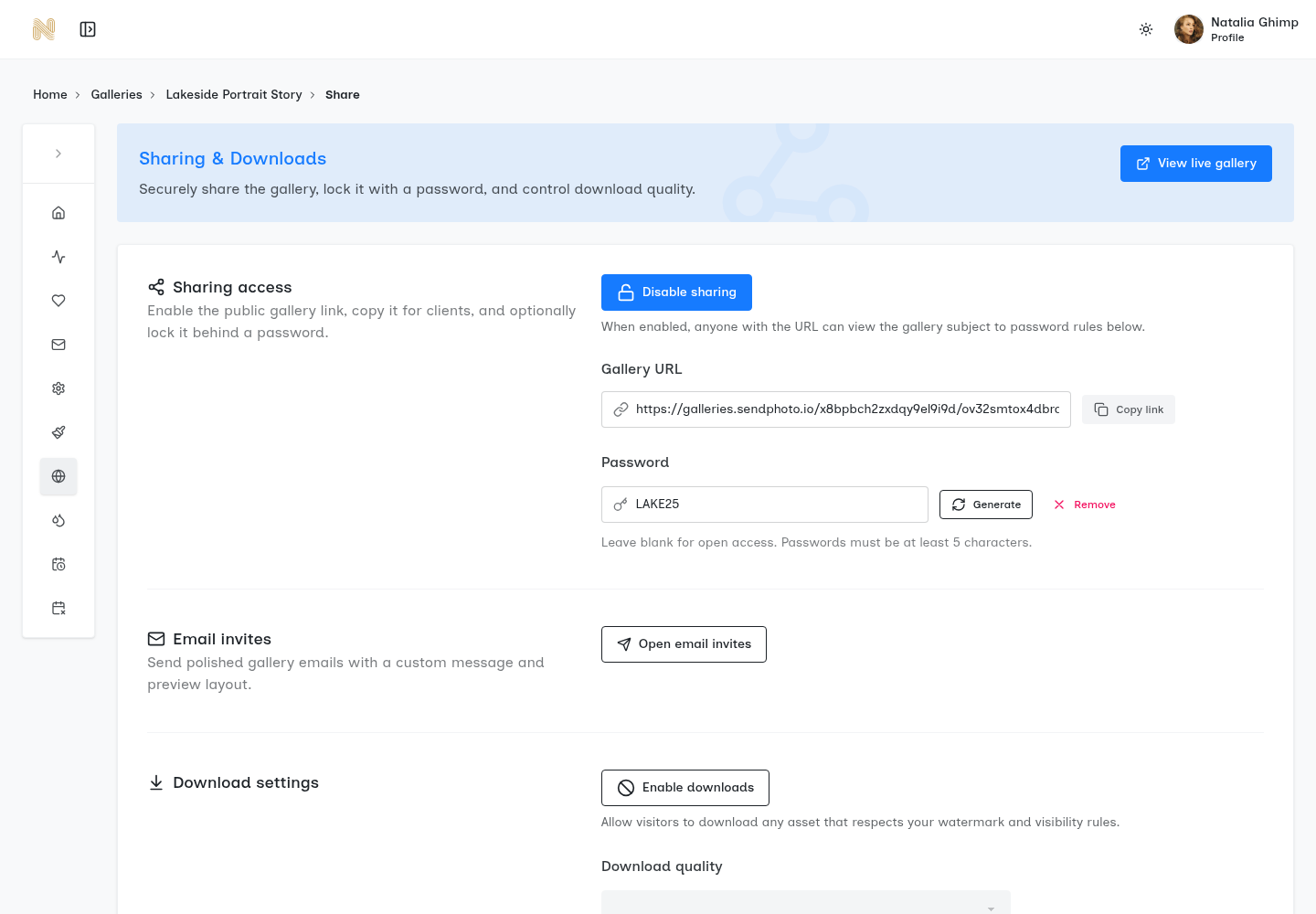
Existing SendPhoto interface screenshot. It shows a configured example gallery and public demonstration password, not a recommended password. The download-quality choices continue below the visible area. It is not evidence of a new recipient-access test.
Keep four controls distinct:
- Password: a shared secret that restricts access, not proof of a person's identity.
- Expiration: a limit on shared access, not deletion of every stored or downloaded copy.
- Download permissions: determine the downloads offered by the gallery; they do not prevent screenshots.
- Watermarked proofs: an optional presentation choice, not a guarantee against copying or an automatic substitute for final-file delivery.
SendPhoto has watermark settings, including uploaded PNG watermarks and collection controls. Check how your chosen watermark and download settings interact before promising an unwatermarked final. “Original” names a download mode; this guide does not claim that it guarantees byte-for-byte identity with an uploaded master.
Treat Privacy as Part of the Deliverable
Confirm the intended audience for private sessions. Permission to deliver photographs to a client does not by itself establish permission to publish them in your portfolio or on social media.
Inspect visible content as well as metadata. A password-protected image can still show an address, a child's school, or a private guest list. A forwarded email may carry both the gallery link and password if you included them together.
When separate password delivery is part of the agreement, use the agreed second communication channel. Explain that recipients should not forward access without permission. Neither a password nor an expiration date can recall photographs somebody already kept.
Crafting a Polished Client Viewing Experience
Organization should help the client perform the next task. Keep proofs and finished photographs distinguishable and avoid making the recipient infer which version is approved.
Organize the Gallery So Clients Don't Stall
Four useful grouping approaches are:
- Timeline: Getting Ready, Ceremony, Portraits, Reception.
- Subject: Team Photos, Speaker Candids, Venue Details.
- Purpose: Album Shortlist, Final Delivery, Social Copies.
- Stage: Proofs, Approved Finals, Retouched Finals.
These are suggested labels, not categories automatically generated from the photographs. Choose one main scheme for the job. If the client must select an album shortlist, explain how many images to choose and what counts as confirmation.
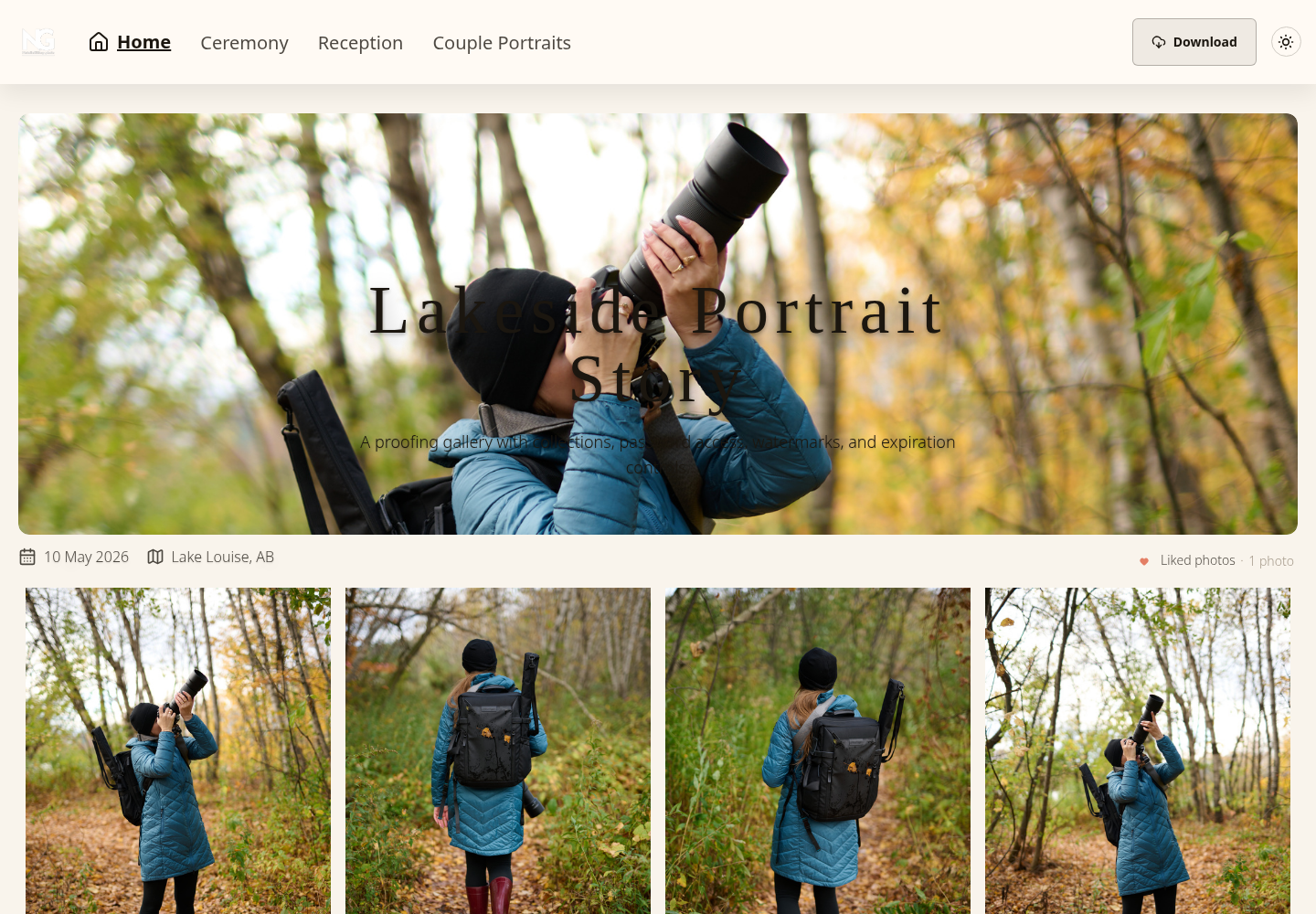
Existing real SendPhoto gallery screenshot. It illustrates navigation and viewing controls; its example labels and photographs are not a new client shoot or a measured approval workflow.
Lead with the intended cover and retain meaningful variation. Remove accidental duplicates from the delivery set without deleting your source archive. “J104_Final_0012” gives the client a specific reference; “the photo somewhere near the middle” does not.
Keep the Gallery Mobile First and Brand Consistent
Five editorial choices keep instructions clear across devices:
- Use the layout deliberately: check that the cover and ordering fit the gallery's purpose.
- Limit clutter: separate working assets from the files the client should receive.
- Keep branding readable: use your actual studio identity without burying the photographs.
- Explain actions: tell the client whether to browse, use the heart to shortlist, or download.
- Write short collection labels: make the stage or purpose obvious.
Do not turn those suggestions into a guarantee that every browser behaves identically. If a particular mobile action is essential to the job, check it on the recipient's intended setup. No new mobile visual review was performed for this article.
Finalizing Delivery and Archiving Your Work
Finish the handoff with a precise message and a retrievable record. A sent link, a gallery visit, and a confirmed final selection are separate events.
Write the Delivery Email Like a Handoff, Not a Courtesy Note
Include five things:
- Contents: proofs, final photographs, album shortlist, or social copies.
- Access: the intended link and any password instructions.
- Actions: what can be downloaded and how to communicate selection or feedback.
- Availability: the specific access deadline, if one applies.
- Next step: a reply, selection confirmation, or download acknowledgment.
For example:
Your final portrait photographs are ready in this gallery. Downloads are enabled for Final Delivery. Please keep your own copy before shared access ends on the date stated in our delivery agreement. Reply when you have received the files, or let me know if you need help before that deadline.
This is proposed wording. Replace every condition with the actual settings and agreement. If the gallery is for proofs, request a shortlist and an explicit final confirmation instead of announcing final downloads.
Set the Archive Policy Before the Gallery Expires
Document five separate responsibilities:
- Access window: how long the gallery remains shared.
- Handoff acknowledgment: what confirms the client received the intended files.
- Retained materials: which source, working, final, and job records your studio keeps.
- Independent backups: where recovery copies are stored and how you check retrieval.
- Access closure: what settings change when the review or delivery window ends.
State a retention period you can actually support rather than a universal rule. Gallery expiration, hosted-file deletion, and removal from your own archives are different actions. Communicate them separately where they apply.
Avoid treating online gallery storage as the only archive. Keep independent copies appropriate to the job and periodically check that a file can be restored and opened. That is a proposed recovery practice, not a restore performed for this guide.
Archive in a Way That Helps Future Retrieval
Keep four kinds of material distinct: source files, the edited catalog or session, final exports, and the written delivery record. Protect job records according to their sensitivity rather than putting contracts inside the public gallery.
A proposed private project folder could contain Source, Working, Final_Exports, and Delivery_Record. In the delivery record, note filenames or a manifest, version, recipient, date, access deadline, and any approval received. A future request for “the full gallery” can then be checked against what was actually delivered.
The photo organization guide covers naming and folder maps. Preserve the mapping between renamed client copies and your working files so later corrections do not depend on memory.
Frequently Asked Questions About Sharing Photos
What's the Best Way to Share RAW Files or Large Video Files?
Choose a transfer or working-file service that supports the required format, file size, audience, and retention period. Check those limits for the specific service and plan. Keep source assets separate from final JPEGs so the recipient does not mistake unedited material for a finished deliverable.
Do not assume that any gallery accepting image uploads can preview every camera RAW format or deliver every video codec. Agree whether the recipient needs original source files, editing sidecars, or rendered results before choosing the method.
How Can Clients Select Favorites for an Album?
In SendPhoto, clients can use the heart to mark liked photographs and review the Liked photos view. An email prompt can associate those choices with a visitor and keep them available across devices. Explain the intended shortlist size and ask for an explicit reply confirming that the choices are final.
A liked photograph is not automatically an album approval. If the job requires comments, page order, or another formal approval step, agree how those details will be communicated instead of assuming the heart records all of them.
Should Photographers Charge to Re-host an Expired Gallery?
That is a studio policy decision. Explain the original access window and any restoration terms before delivery, including whether you retain the files needed to fulfill a later request. Do not promise re-hosting solely because a link once existed.
If a fee applies, make the scope clear: locating retained files, preparing a new delivery, and renewed access may be separate work. Check the existing agreement before quoting a new service, and avoid assuming that expiration erased your archive or the client's downloaded copies.
Share the agreed files, explain the next action, and keep the delivery record. SendPhoto's gallery delivery tools provide browsing, sharing, and download controls; a clear handoff connects those controls to the client's actual job.