
Close-up photography makes small subjects prominent; life-size macro describes a specific reproduction ratio. At 1:1, a 10 mm subject forms a 10 mm image on the camera sensor. Filling the frame, cropping or enlarging a print does not establish that ratio. Nikon’s macro lens explanation distinguishes lens reproduction ratios from ordinary close focusing.
This tutorial covers the practical skills shared by macro and close-up work: steady support, deliberate focus, depth of field, light and background. You can practice them without claiming that every phone or close-focus image is 1:1 macro.
You do not need to start with a complicated setup. A window, a steady surface, a small reflector, and a flower, ring, shell, fabric detail, or product can teach the core skills.
What Makes Macro Photography Hard
Close-up work magnifies everything. Small camera movements look bigger. Depth of field gets thinner. Light can be blocked by the lens or your own hands. Background clutter becomes distracting because the subject is so close.
Most macro problems fall into four groups:
| Problem | What happens | Practical fix |
|---|---|---|
| Missed focus | The wrong part of the subject is sharp | Use manual focus or a small focus point |
| Camera movement | Fine details look soft | Use a tripod, stable surface, or faster shutter |
| Harsh light | Shiny surfaces blow out or texture looks rough | Try window light, open shade, bounce or a purpose-made compatible diffuser |
| Busy background | The subject gets lost | Increase subject-background distance and change angle |
Choose a Simple Macro Setup
Start with a setup you can control before chasing moving subjects outdoors.
Beginner-friendly subjects:
- Flowers, leaves, seed pods, and bark.
- Jewelry, watches, rings, and small accessories.
- Food textures, spices, fruit slices, and coffee beans.
- Fabric, lace, paper, ceramics, and handmade objects.
- Product details for small shops or personal portfolios.
Phone photographers can practice with a supported close-focus mode or compatible clip-on lens. Camera users can consider a macro lens, close-up filter or compatible extension tube. Check maximum reproduction ratio, mounting compatibility and supported focusing in the maker’s documentation; minimum focus distance alone does not tell you magnification. Start within the equipment you have, rather than assuming a label or accessory guarantees the result.
Minimum focus distance is measured from the sensor plane, while working distance is the space between the front of the lens and the subject. Leave enough room to light the subject without touching it or casting a lens shadow. For a first exercise, use an owned stationary object; leave wildlife and living plants undisturbed.
Control Depth of Field
At close distances, depth of field becomes shallow even when the aperture number looks moderate. That means only a thin slice of the subject may be sharp.
Use shallow depth of field when you want:
- A single petal, eye, texture, or edge to stand out.
- A soft background.
- A dreamy close-up style.
Use more depth of field when you need:
- Product details to be clearly readable.
- Several parts of a small object sharp.
- A flat subject, such as paper, fabric, or artwork, to stay even.
A smaller aperture can increase depth of field, but may require a longer exposure, more permitted light or a higher ISO. Inspect fine detail rather than assuming the highest f-number is best: diffraction can soften detail. Support helps camera movement during a longer exposure, while subject movement still needs attention.
Read a Published Detail Photo
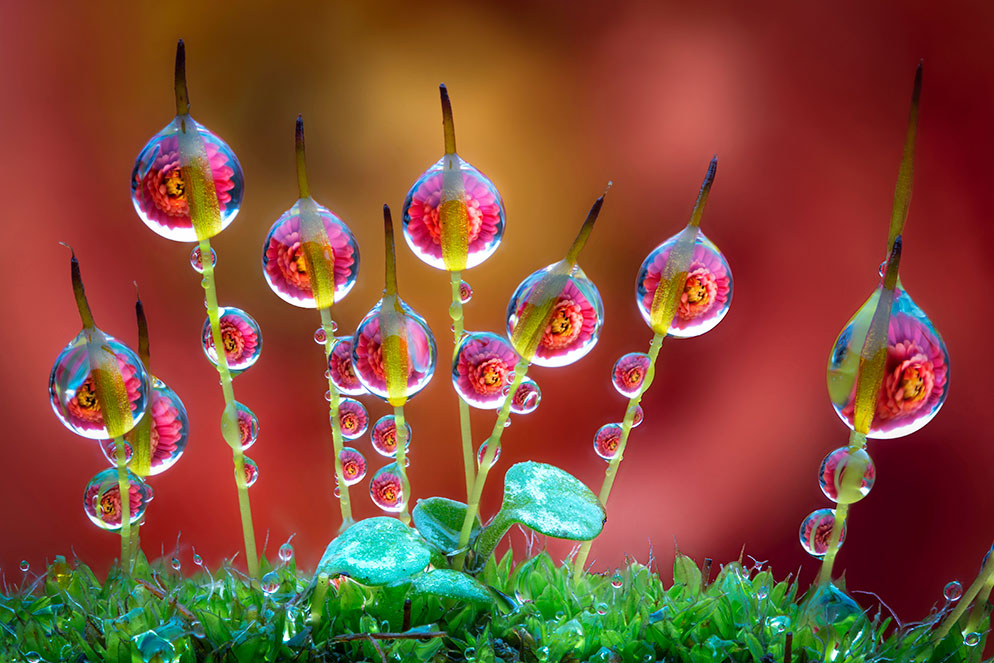
Look at the stems and droplet edges, then at the soft colored background. The reported four seconds illustrate why a still setup differs from a wind-blown subject. Use the photograph to identify important detail, rather than treating its settings as a universal recipe.
Focus With Intention
In macro photography, focus is the composition. A tiny change can move sharpness from an eye to a wing, from a ring stone to a prong, or from a flower edge to the background.
Use this focus workflow:
- Decide the most important detail before touching the shutter.
- Move the focus point to that detail or use manual focus.
- Keep the camera parallel to flat subjects when you need even sharpness.
- Take several frames with tiny focus adjustments.
- Review at full size, not just on the small screen.
For static subjects, manual focus can be useful. With a handheld setup, small forward or backward camera movements change the focused distance; inspect the intended detail in a magnified view where available. With a supported camera, keep framing steady and make small deliberate focus adjustments. Recheck after moving either camera or subject.
Stabilize Everything
Macro rewards patience. Even breathing, hand pressure, and table vibration can soften fine detail.
Stability checklist:
- Use a tripod when possible.
- If you do not have a tripod, brace your elbows or rest the camera on a stable surface.
- Use a timer or remote release for still subjects.
- Turn off ceiling fans near flowers, paper, or lightweight objects.
- Use a sheltered position or wait for calmer conditions outdoors; avoid touching insects, pinning plants or moving habitat for the photograph.
- Take multiple frames because tiny movement can change the result.
For handheld macro, use a shutter speed that protects against both hand movement and subject movement. Stabilization can help camera shake, but it cannot stop a flower moving in the wind.
Use Diffused Light
Shiny surfaces and fine texture make light direction easy to see. Hard light can emphasize texture; softer light can reduce abrupt shadows and reflections. Choose the effect you need and inspect important highlights for lost detail.
Simple diffusers:
- A sheer curtain in front of window light.
- A purpose-made diffuser compatible with your light, used according to its heat and spacing instructions.
- Open shade outdoors.
- A white card or foam board bouncing light into shadows.
- A small LED with its manufacturer-approved softening accessory.
Do not drape paper or fabric over a lamp or place it against a hot light. A white card near an ordinary window can serve as a reflector without modifying a light fixture.
Watch where the light is blocked. At close distances, your camera, lens, hand, or phone can cast a shadow on the subject. If that happens, move the light to the side or raise it slightly.
Clean Up the Background
A macro image can fail because of one bright line, leaf, crumb, dust mark, or color patch behind the subject.
Improve the background by:
- Moving the subject farther from the background.
- Changing camera angle by a few inches.
- Using a plain paper, fabric, wood, stone, or matte board surface.
- Removing dust, hair, fingerprints, and loose fibers before shooting.
- Keeping background colors quieter than the subject.
These cleanup choices apply to owned products and controlled sets. Check the item’s handling instructions before cleaning delicate jewelry or artwork. In nature, change your viewpoint rather than removing plants or manipulating animals to simplify a background.
Macro Practice Exercise
This is a proposed 20-minute exercise, not a shoot we performed. Use an owned stationary object and keep a record of camera or phone mode, aperture, shutter duration and ISO where available:
- Place one small object near a window.
- Put white paper opposite the window to bounce light back into shadows.
- Photograph the object from directly above, then from eye level.
- Move the background farther away and shoot again.
- Focus on the nearest detail, then the middle, then the farthest detail.
- Compare which frame best explains the subject.
Compare the intended detail at a useful display size and a magnified view. Record which variable changed and whether blur comes from movement, missed focus or limited depth of field. Keep these individual frames even if you later try a stack; a different focus position is not automatically a better photograph.
Editing Macro Photos
Editing should support detail without making texture look crunchy.
Basic macro editing workflow:
- Correct exposure and white balance.
- Remove dust spots or distracting tiny marks.
- Add contrast locally where it helps texture.
- Sharpen the important detail, not the whole noisy background.
- Reduce noise carefully in out-of-focus areas.
- Crop only when enough pixels remain for the final use.
Compare a Single Frame With a Focus Stack
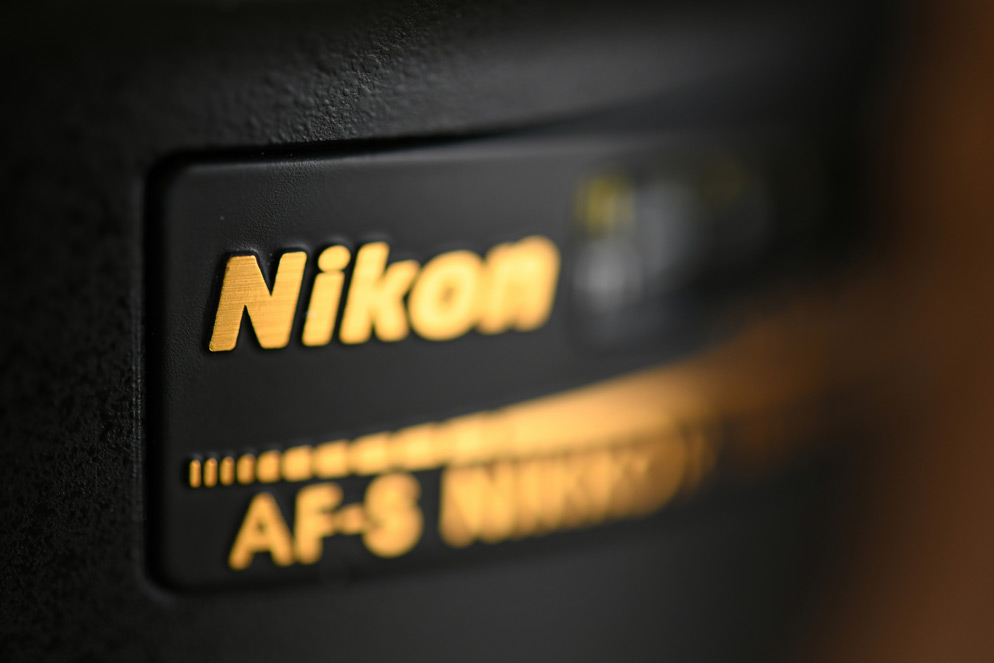
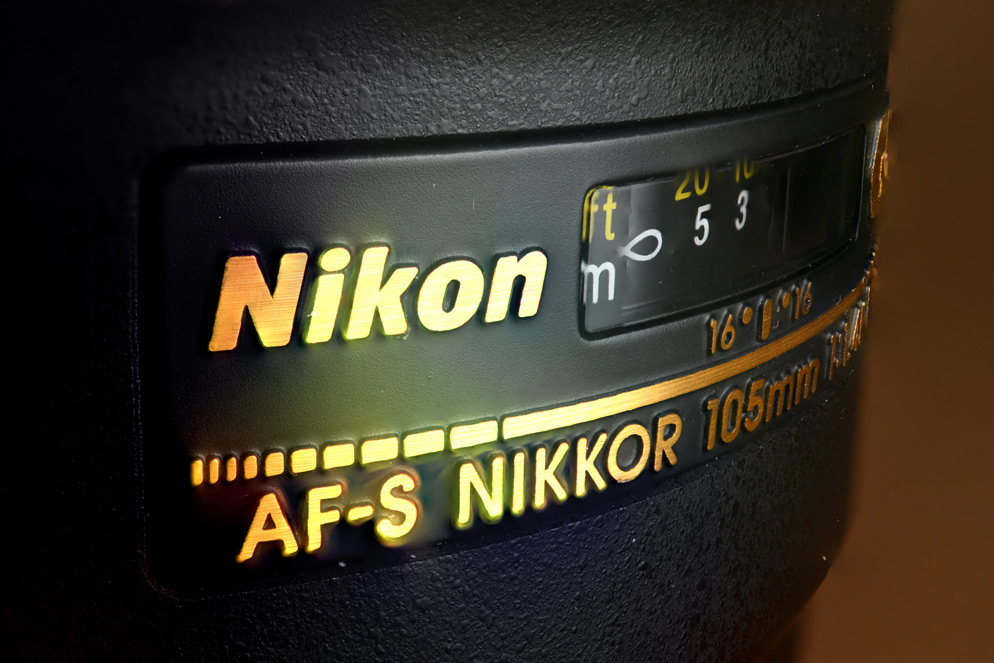
Compare the gold lettering and distance window: more is readable in the stacked result. Nikon explains that focus shift captures a series; separate software combines it. It is not automatic proof that every edge will merge cleanly.
A Documented Photoshop Stacking Route
If your owned, stationary subject needs more depth than a single frame supplies, capture overlapping focus positions with steady framing and consistent light. Keep the individual files. This is a suggested workflow based on documentation, not a merge performed for this article.
- Load the captures as layers in Photoshop; Adobe documents selecting them in Bridge and using Tools → Photoshop → Load Files into Photoshop Layers.
- Select the image layers and use Edit → Auto-Align Layers.
- Use Edit → Auto-Blend Layers, choose Stack Images, and confirm.
See Adobe’s extended-depth-of-field instructions. Inspect the result for soft gaps, halos, doubled edges and changed framing, particularly around fine fibers or translucent detail. Subject movement or missing focus coverage may require a new capture; retain the source frames and compare the composite with the best individual image.
For broader editing basics, read how to edit photos for beginners.
Presenting Macro Work
Macro images work well in small themed sets: textures, rings, handmade details, garden studies, product close-ups, or before-and-after craft images. When delivering work to a client, collections make the set easier to browse.
For delivery context, see SendPhoto gallery delivery. Organize selected files into collections and choose download settings for the handoff. An optional gallery password restricts entry to people with the link and password; collections do not have separate passwords, and viewers can still capture or forward images.
For photos, unwatermarked Original downloads use the uploaded source; marked or scaled downloads use generated files. Keep capture frames, layered edits and an independent backup separately. Gallery access does not establish permission to publish product designs, artwork or client images.
Macro Photography Checklist
- Start with a still subject and simple light.
- Choose the exact detail that should be sharp.
- Stabilize the camera and subject.
- Use diffused light to protect texture and color.
- Keep the background clean and distant.
- Review focus at full size.
- Take multiple frames with small changes.
- Edit for clarity without over-sharpening.
- Share finished sets in a way that clients can navigate.
Use a stationary practice subject to compare light, focus, distance and angle one variable at a time. Review the detail that matters for the intended use; a living or moving subject may need a different approach.