
Night photography works when you choose the technique for the subject. Use a tripod and slower shutter speed for still city scenes, architecture, light trails, and landscapes. Use faster shutter speed, better light, and higher ISO for people, events, and handheld street photos.
A skyline, a moving car and a portrait under a streetlight need different decisions. This tutorial concentrates on after-dark city scenes, people and trails. The credited publisher examples show real outcomes; the starting settings and practice sequence are suggestions for your own scene, not a shoot performed for this article.
Pick the Night Photo You Are Trying to Make
Start with the subject, then choose the settings.
| Night scene | Main challenge | Practical approach |
|---|---|---|
| City skyline | Camera shake and bright highlights | Use a tripod, low ISO, and careful exposure |
| Light trails | Need controlled blur | Use a tripod and a slow shutter |
| Street photography | People and camera movement | Use a faster shutter and raise ISO as needed |
| Night portrait | Focus and skin tone | Place the subject near a useful light source |
| Event or reception | Motion, mixed color, and missed moments | Use faster shutter, bounce flash where allowed, and review often |
| Stars or dark landscape | Focus and long exposure control | Use tripod, manual focus, and test frames |
If the scene is still, you can use time. If the subject is moving, you need speed or added light.
Gear That Helps at Night
You can practice night photography with a phone or basic camera, but a few tools make the work easier.
Helpful items:
- Tripod or stable support for slow shutter work.
- Remote release or self-timer to avoid shaking the camera.
- Lens cloth for condensation, fingerprints, and mist.
- Small flashlight or phone light for setup and safe movement.
- Extra battery because long exposures and cold conditions can drain power faster.
- Fast lens for portraits and handheld work when available.
- Small LED or flash for controlled portraits and details.
Use gear you can operate quickly in the dark. A familiar camera is better than a complicated setup you cannot adjust.
Tripod Night Photography Workflow
Tripod work is ideal for cityscapes, bridges, interiors, architecture, light trails, water, and quiet streets.
Use this sequence:
- Compose before it gets too dark if possible.
- Mount the camera securely.
- Choose firm, permitted ground away from traffic, unstable edges and vibration. Secure straps against wind; follow your camera and lens manuals for stabilization on a tripod.
- Use a low ISO when the subject is still.
- Choose aperture for depth of field.
- With aperture and ISO chosen, adjust shutter duration for exposure and desired motion. A longer exposure also changes cars, water, people and clouds.
- Use a timer or remote release.
- Check highlights, focus, and edges of the frame.
Do not judge the photo only by the rear screen. Zoom in to check sharpness and inspect bright signs, lamps and windows. Use the histogram and highlight warning when available: a small lamp core may clip, but a sign you need to read should retain its lettering.
A published city exposure
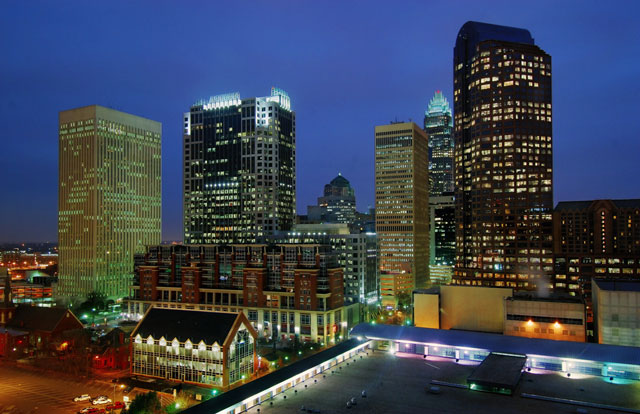
The buildings can remain sharp during a long exposure because they are stationary and the camera is supported. That does not make two seconds suitable for a walking person. Notice the blue sky and illuminated windows: arriving before full darkness can give you a balance between the skyline and artificial light.
Handheld Night Photography Workflow
Handheld night photography is better for street scenes, travel, events, portraits, and moments that change quickly.
Start with sharpness:
- Choose a shutter speed fast enough for your hands and the subject.
- Open the aperture if depth of field still fits the scene.
- Raise ISO when needed.
- Use existing light creatively, such as shop windows, streetlights, signs, or stage light.
- Take several frames because timing matters.
Image stabilization can help with camera shake, but it does not freeze a walking person or moving hands. If people look blurry, shutter speed is the first thing to check.
Camera starting points to adjust
The following are proposed first-frame settings for a camera with manual exposure controls, not measured results or universal recipes. Light level, focal length, subject speed and your required depth of field can all change them. Raise ISO if the chosen shutter and aperture leave the intended subject too dark; ISO does not admit more light through the lens.
| Intended image | Conditional first frame | What to inspect and change |
|---|---|---|
| Still building from a tripod | f/8, ISO 100, 2 seconds | Check signs and shadows; shorten exposure for lost highlight detail, lengthen only if the important areas need it. |
| Person pausing by a lit window | f/2.8, 1/125 second, ISO 1600 | Check the eye and subject movement. Use a faster shutter if needed and raise ISO or improve light; stop down if depth of field is insufficient. |
| Walking street subject | f/2.8, 1/250 second, ISO 3200 | Check moving hands and feet; faster movement may need a shorter exposure. These ISO values do not guarantee exposure or acceptable noise. |
As an exposure calculation, changing from 1/125 to 1/250 second halves the exposure duration. At the same aperture and light level, ISO 1600 to 3200 can compensate in nominal image brightness. It does not restore the light lost to the shorter shutter or guarantee the same noise and detail.
For a broader dark-scene workflow, read the low-light photography guide.
Focus at Night
Autofocus needs contrast. In the dark, it may hunt or lock onto the wrong object.
Practical focus tips:
- Focus on a bright edge, face, sign, window or lit detail at the same distance as your subject, then recheck if either moves.
- For portraits, place the focus point on the eye or face.
- For tripod scenes, use live view or magnified view when available.
- For very dark static scenes, switch to manual focus and take test frames.
- Review focus at full size before moving on.
If you are photographing a person, do not focus on the background lights and recompose too aggressively. At wide apertures, that can move the focus plane away from the face.
Stars need a separate decision
A tripod holds the camera still, but stars move across the frame as Earth rotates. A sharp foreground does not prove sharp stars. Check a magnified star after a test frame and shorten the exposure if it becomes an unwanted streak; the usable duration depends on focal length, framing and how closely the final image will be viewed.
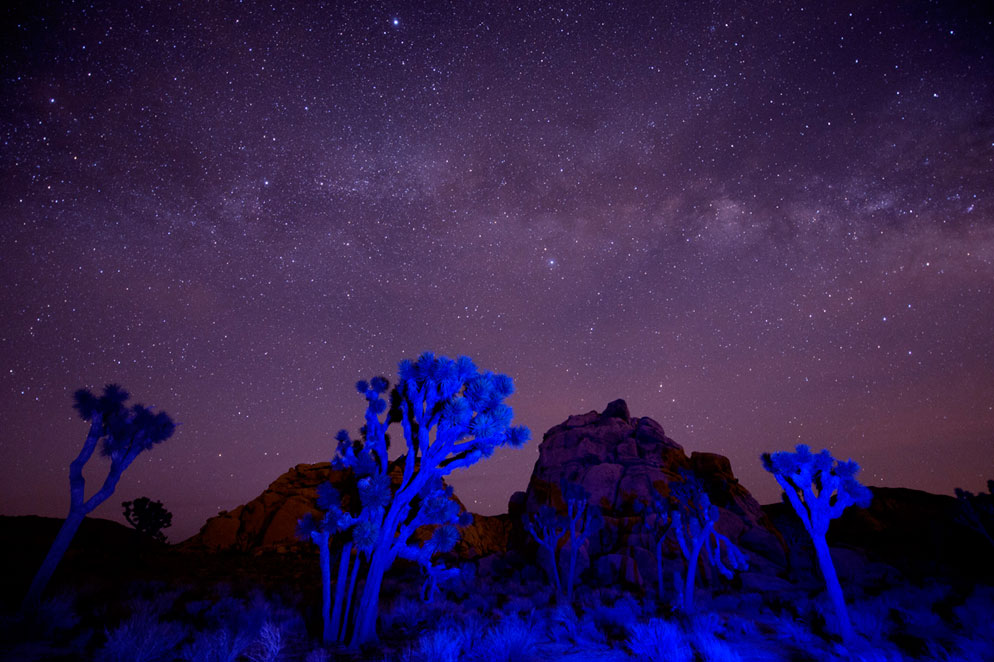
The blue foreground is added flash light; it was not recovered by simply lifting shadows. Nikon describes this technique as a single long exposure. Do not infer a repeatable result from these values: foreground lighting, sky brightness and focus still matter. This is an introduction to the distinction, not a complete astrophotography workflow. Follow local access, wildlife and lighting rules; use a safe permitted position.
Expose for Highlights and Mood
Night photos do not need to look like daytime. If you brighten everything, the scene can lose its atmosphere and reveal noisy shadows.
Protect important highlights:
- Neon signs.
- Street lamps.
- Phone screens.
- Stage lights.
- Windows.
- Reflections on wet pavement.
- Candles and practical lights.
Let some shadows stay dark. The goal is a readable subject and intentional mood, not maximum brightness everywhere.
Use Existing Light for Night Portraits
For a simple night portrait, find one useful light source and position the subject around it.
Good sources include:
- Storefront windows.
- Streetlights with flattering direction.
- Signs or marquee lights.
- Doorways.
- Lamps near restaurants, hotels, or venues.
Turn the subject toward the best light and watch the eyes. If the light is directly overhead, move the person slightly until shadows on the face improve, staying in a safe permitted position. Expose for the face while checking any background detail you need to retain. If the contrast exceeds what your capture can hold, change the angle, move to better light or accept a silhouette; raising shadows later cannot reliably recover clipped or missing detail.
A phone workflow for a still night scene
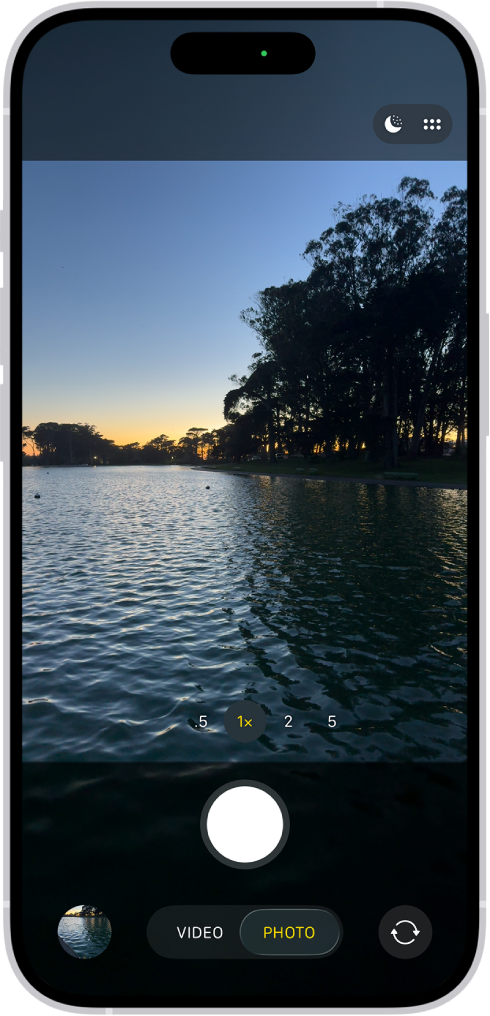
On a supported iPhone, open Camera in Photo mode. Night mode can turn on in low light; use its button to switch it on or off. Open Camera Controls, choose Night Mode and select an available exposure option. Hold still through the capture; a tripod can help. Apple’s available controls depend on model and software version. Ask a portrait subject to pause, but do not treat a longer capture as a way to freeze their movement.
Create Light Trails
Light trails need a stable camera and moving lights. Roads, bridges, amusement rides, bikes, and boats can all work.
Basic process:
- Use a tripod.
- Compose with space for the moving lights.
- Try a longer duration, such as 5 seconds, as a first experiment, then adjust for the amount of traffic and trail length. Choose aperture and ISO to suit exposure.
- Keep ISO low when possible.
- Take several test frames and adjust shutter speed for trail length.
- Watch for overexposed signs or headlights.
Do not stand in a traffic lane, cross a barrier or block a path for the shot. Use a safe permitted viewpoint, set up clear of pedestrians and check access before dark. If trails end too soon, a longer exposure may include more movement; if headlights or signs wash out, reduce exposure or change the framing. Keep the camera fixed if you want stationary buildings to remain sharp.
Edit Night Photos
Night editing should keep the feeling of the scene while cleaning up distractions.
Editing sequence:
- Correct white balance.
- Adjust exposure for the subject.
- Reduce harsh highlights.
- Keep shadows natural instead of forcing every detail open.
- Use noise reduction and restrained sharpening while checking detail at full size. Follow the workflow for your editor; manual smoothing can erase texture, and AI tools have format and processing limits.
- Use local adjustments for faces, signs, or important details.
- Crop for clean edges and strong lines.
Colored night light can be part of the image. Do not neutralize every color cast if it creates the mood.
Organize and Deliver Night Sets
Night images often work best in smaller groups: city details, portraits, dance floor, light trails, venue exteriors, street scenes, or final hero images. This helps clients or viewers understand the story instead of scrolling through mixed experiments.
For client work, use SendPhoto gallery delivery to organize exported photographs into clearly named collections, such as City, Portraits and Finals. A collection organizes the set; it does not create its own password boundary. Configure an optional gallery password and share it only with the intended audience, while remembering that recipients can forward credentials or save copies.
Use download controls to enable downloads for the intended collections and choose Original or Scaled down. If photo watermarking applies, even an Original download can be a generated marked file; keep an independent unwatermarked master. A watermark is not copy prevention, and download permission does not grant a usage licence or prove client approval. Export separate proof and final files when that distinction matters.
Night Photography Checklist
- Decide whether the subject is still or moving.
- Use a tripod for still scenes and slow shutter effects.
- Use faster shutter speed for people and handheld scenes.
- Focus on a bright, contrasty detail.
- Protect important highlights.
- Let shadows stay dark when they support the mood.
- Use existing light intentionally for portraits.
- Shoot RAW when color and exposure are difficult.
- Review sharpness at full size.
- Edit for atmosphere, not artificial brightness.
Practice one decision at a time
For your own practice, choose a safely accessible lit building and make a tripod frame. Record shutter, aperture and ISO; inspect focus and important highlights. Change only shutter duration and compare the sky, signs and any moving objects. Next, photograph a willing person near available light using a shutter chosen for movement, then compare eye detail. This is a proposed exercise, not a reported test or a promise of results within a time limit.
For more practical guides, browse the SendPhoto blog. Use the linked low-light guide for wider exposure and noise troubleshooting; this night tutorial emphasizes the balance between artificial light, dark surroundings and subject movement.