
Start low-light photography by diagnosing the saved image: camera shake, subject movement, missed focus, visible noise or mixed color. Each needs a different response. A faster shutter can reduce movement blur, while support helps camera shake. Collecting more light when the scene allows and careful editing can help with noise, but no setting guarantees a sharp, noise-free photograph.
The main mistake is treating every dark scene the same. A quiet night portrait, a wedding reception, a concert, and a dim restaurant all need different choices because the subject movement, light direction, and delivery needs are different.
Blur or Noise: Fix the Right Problem First
Before changing every setting, decide what went wrong.
| Problem | What it looks like | Likely cause | Best first fix |
|---|---|---|---|
| Camera shake | The whole frame looks smeared | Shutter speed too slow for handheld shooting | Use a faster shutter, brace the camera, or use a tripod |
| Subject motion | Background is sharp but people are soft | Subject moved during the exposure | Use a faster shutter speed or time the moment |
| Missed focus | The wrong area is sharp | Focus point landed on the background or foreground | Move the focus point to the subject and confirm focus |
| Noise | Grainy texture, especially in shadows | Limited captured light, camera processing or strongly lifted shadows | Improve exposure, add light, or reduce noise in editing |
| Mixed color | Strange skin tones or color casts | Different light sources in one scene | Choose one main light source or correct color locally |
When the intended image needs a sharp face or gesture, prioritize that detail over the lowest ISO. Noise reduction may help a usable capture, but it cannot guarantee recovered detail; intentional motion blur is a different creative goal.
Use Shutter Speed for the Subject, Not the Room
In low light, automatic exposure may select a slow shutter speed. That can suit still scenes, while people moving during the exposure may blur. Choose duration for the subject and the effect you want.
Use these starting points as a practical check, then review your images at full size:
| Scene | Shutter priority |
|---|---|
| Still life, architecture, tripod scenes | Slower shutter speeds can work if the camera is stable |
| Seated portrait | Moderate shutter speed, with attention to small head and hand movement |
| Reception, party, children, street | Faster shutter speed to protect gestures and expressions |
| Concert or performance | Faster shutter speed for hands, faces, and movement |
| Night landscape with tripod | Slow shutter is fine if the subject is still |
Image stabilization helps with camera shake, but it does not freeze a person walking, laughing, dancing, or speaking. For events and portraits, shutter speed still needs to match the subject.
A Published Still-Scene Exposure
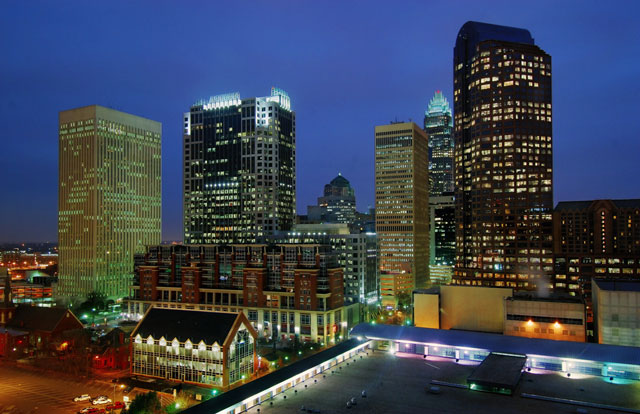
Stationary architecture gives a long exposure a different job from a moving portrait. The reported two seconds are an example for that scene, not a handheld or event recipe. Inspect important building edges and bright windows in your own file.
For a deeper settings foundation, see the camera settings for beginners guide.
Open the Aperture Carefully
A wider aperture lets in more light and can create a softer background. That helps in dark rooms, but it also reduces depth of field.
Use a wider aperture when:
- You are photographing one person or one detail.
- The subject is separated from the background.
- You want a natural low-light portrait look.
- You need more light without pushing ISO higher.
Stop down a little when:
- You are photographing a couple or group.
- People are moving toward or away from the camera.
- You need both eyes sharp at an angle.
- You are photographing details where front-to-back sharpness matters.
If a group photo keeps failing in low light, check which faces are sharp and whether people occupy different focus distances. Add light where permitted, change position or move the group near useful existing light so you can choose enough depth of field. Raising ISO alone cannot change focus or depth of field.
Raise ISO Without Panic
ISO helps you manage recorded brightness alongside shutter speed and aperture. Increasing it does not send more light through the lens. When shortening exposure to control movement, a higher ISO can keep the image bright enough, with image-quality tradeoffs to inspect.
Visible noise depends on captured light, the camera and processing as well as the chosen ISO. Decide whether important detail is usable at the intended viewing or print size. A higher ISO may be an appropriate compromise when a moment cannot be repeated; lowering it while keeping shutter and aperture fixed does not collect extra light.
Work Through One Exposure Tradeoff
Nikon’s ISO explanation describes exchanging a doubling of ISO for a halving of shutter duration at unchanged aperture. The following is a calculated example for unchanged scene light, not a tested starting setting or a noise comparison:
| Example choice | Settings | What to inspect |
|---|---|---|
| Reference | 1/125 second, f/2.8, ISO 1600 | Actual subject sharpness and brightness |
| Shorter duration | 1/250 second, f/2.8, ISO 3200 | Less movement blur may be possible; inspect noise and detail |
| Smaller aperture | 1/125 second, f/4, ISO 3200 | Roughly one aperture stop smaller; inspect needed depth of field and subject movement |
Choose a real reference for your scene first. These changes aim at similar brightness, not identical quality or guaranteed sharpness. A still subject, a moving child and a group need different compromises.
To keep ISO under control:
- Move the subject closer to useful existing light where permitted, without blocking access or entering a stage or road.
- Use a wider aperture only when depth of field still fits the shot.
- Avoid underexposing and then lifting shadows heavily.
- Use RAW when you expect difficult color or noise correction.
- Review important images at full size before leaving the scene.
For event work, pair this with a coverage plan from the event photography guide.
Stabilize the Camera
Camera movement is more visible during a longer exposure. Start with a secure position and permitted support, then check the actual capture.
Handheld stability checklist:
- Hold the camera with both hands.
- Keep elbows close to your body.
- Use permitted stable support without blocking a doorway, leaning over a barrier or touching fragile surfaces.
- Squeeze the shutter instead of tapping hard.
- Take short bursts for important moments.
- Use a strap with light tension for extra support.
A tripod can help with still night landscapes, interiors, products and long exposures. Keep its legs out of walkways and exits, follow access rules and your equipment’s stabilization instructions, and use a timer or compatible remote if pressing the shutter moves the camera. A tripod does not stop moving people, leaves or stars.
Focus in Dark Scenes
Autofocus can struggle when the subject lacks contrast. Give the camera something clear to lock onto.
For portraits, focus on the intended eye when possible. For events, choose a focus point over the face or a high-contrast edge at the subject’s distance, rather than a dark jacket or empty background. If autofocus hunts, a small temporary light may help when the subject and venue allow it; do not shine it toward drivers or performers. For static scenes, try manual focus using the available magnified view. Recheck if the subject or camera moves.
Do not rely only on the rear screen. Zoom in during review and check sharpness on the actual subject.
Add Light Without Ruining the Mood
Added light is an option when the subject and location allow it. Choose the look you want and compare how the face, background and practical lights appear together. At a concert or performance, follow the organizer’s lighting and flash rules.
Options that work well:
- Bounce flash from a ceiling or nearby wall when the venue allows it.
- Use a small LED for details, rings, food, products, or setup shots.
- Place the subject near a window, storefront, lamp, or existing practical light.
- Use a reflector or light wall to lift shadows.
- For portraits, turn the subject toward the best light instead of forcing the background angle.
Direct flash, bounce and off-camera light produce different looks. Try a permitted approach and inspect it rather than assuming a small diffuser will soften every setup. With flash, follow your camera/flash manual for compatible shutter and sync settings. Keep stands and cables out of access routes.
Shoot RAW When the Light Is Difficult
RAW files often give more editing flexibility for white balance and tone than a processed JPEG, provided your editor supports the camera’s files. This can help with mixed lighting, shadow detail, bright stage lights or colored LEDs, but cannot guarantee restored clipped highlights or missed focus.
Choose RAW when you need that flexibility and can support its storage and editing workflow; RAW plus JPEG may be useful when available. JPEG can also serve professional delivery when captured and processed for the job. Keep the capture files independently of the exported client set.
Low-Light Scenarios and Practical Choices
| Scenario | Main risk | Practical approach |
|---|---|---|
| Wedding reception | Motion blur and mixed color | Use a fast enough shutter, bounce flash where allowed, and organize images by key moments later |
| Concert | Fast movement and strong color casts | Expose for faces, protect highlights, and avoid relying on shadows for detail |
| Night portrait | Missed focus and muddy skin tones | Place the subject near one clear light source and check eye sharpness |
| Restaurant or party | Slow shutter and cluttered backgrounds | Move closer to useful light, simplify the frame, and shoot several frames |
| Night street scene | Camera shake and bright signs | Brace the camera, watch highlights, and wait for clean subject placement |
| Stars or night landscape | Camera shake and movement during exposure | Use stable support and careful focus; choose duration for whether star movement is intended |
For stars and sky work, read astrophotography for beginners. For scenes with bright windows, lamps, or interiors, HDR photography bracketing can help you understand when multiple exposures are useful.
Edit Low-Light Photos With Restraint
Editing cannot fully fix blur, but it can improve a sharp low-light file.
A simple low-light editing sequence for basic tone and manual noise adjustments:
- Correct white balance first.
- Set exposure without crushing important shadows.
- Reduce highlights if lamps, signs, or stage lights are too bright.
- Add contrast carefully so skin and dark clothing keep detail.
- Apply noise reduction before heavy sharpening.
- Sharpen the subject, not every noisy shadow.
- Export for the final use, such as web, print, or client download.
Avoid brightening solely to make every shadow visible. Compare the intended mood and important detail with the capture, at both a useful viewing size and higher magnification.
Compare Noise Reduction With Detail
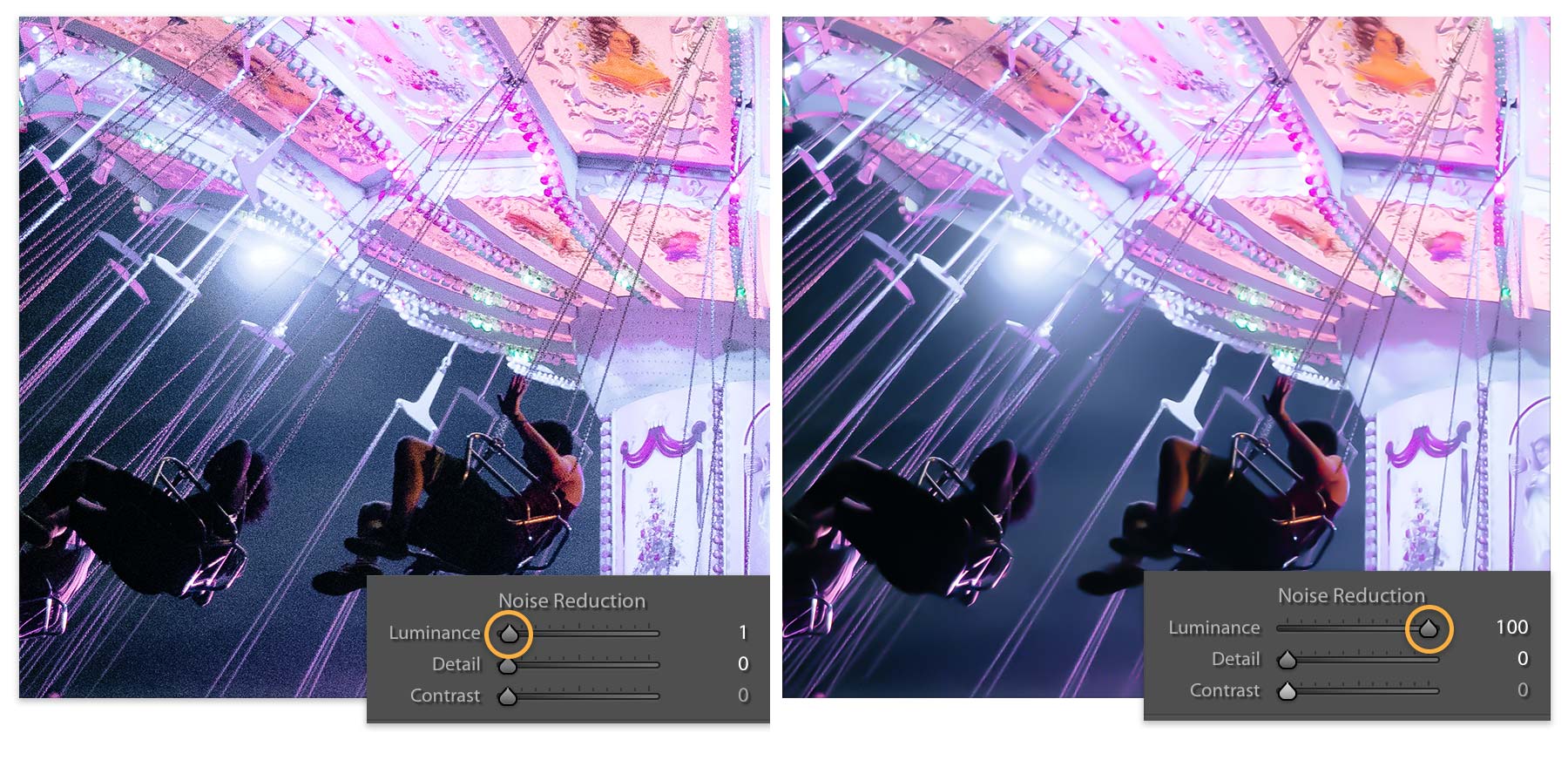
In Lightroom Classic’s Develop module, open Detail and adjust manual Luminance while inspecting texture and edges. Adobe shows that heavy smoothing can soften the image. Compare before and after rather than copying a value from a different photograph.
If using AI Denoise instead, Adobe’s current Enhance documentation places Denoise in the Detail panel with an intensity slider. Check its supported-format list; do not assume it works on every JPEG or RAW file. Adobe recommends this before AI masks and Remove because enhancement may change their results. Software versions and available controls can differ.
Deliver Low-Light Work Clearly
For client sessions, group low-light images in a way that matches how the client will use them. A wedding reception gallery might have collections for speeches, first dance, guests, decor, and late-night dance floor. An event gallery might separate speakers, networking, sponsors, and atmosphere.
A clear SendPhoto gallery delivery workflow helps clients find selected files in collections. Choose download settings for the intended handoff. The optional gallery password restricts entry to people with the link and password; collections do not have separate passwords, and viewers may still capture or forward images.
A watermark can identify a preview but cannot prevent copying. Unwatermarked Original photo downloads use the uploaded source; marked or scaled photo downloads use generated images. Keep capture files and an independent backup. Agree press, sharing and publication permission separately from gallery access.
Low-Light Photography Checklist
- Decide whether the problem is blur, focus, noise, or color.
- Choose shutter speed for subject movement.
- Use the widest aperture that still gives enough depth of field.
- Raise ISO when sharpness needs it.
- Stabilize the camera before lowering shutter speed.
- Focus on a clear, contrasty subject area.
- Add or shape light when the existing light is not enough.
- Shoot RAW for difficult color and exposure.
- Review important photos at full size before leaving.
- Edit for mood, not just brightness.
Try a Small Low-Light Comparison
This is a proposed exercise, not a performed shoot. Choose a permitted indoor setup with one existing light source and a stationary object. Record shutter, aperture, ISO and focus target. Compare a reference capture with a shorter-duration version, adjusting ISO to maintain useful brightness. Then compare one supported noise adjustment with the untreated version; keep the source.
Record every changed variable and inspect stationary edges, fine texture, important highlights and the intended display size. If you later use a willing portrait subject, re-evaluate movement and focus rather than assuming the still-object settings will work. Sort missed shots into blur, focus, noise and color to decide what to change next.