
The shoot is done. The edits are clean. Exports are ready. Then the weakest part of the workflow shows up at the exact moment the client expects the strongest impression.
A file-transfer link can be enough for a simple handoff. An online gallery adds a browsing and review interface, which may help when a client needs to compare images, record preferences or return to a named collection. Choose based on those tasks rather than the number of features on a sales page.
This is a buyer’s checklist for an online gallery for photographers, with existing SendPhoto interface screenshots and a worked planning example. It is not a ranked vendor comparison, price survey or timed performance test. A gallery can help organize delivery; it cannot guarantee referrals, protect every copied image or make approval automatic.
Table of Contents
- Why Your Photo Delivery Method Matters More Than Ever
- What an Online Gallery Is and What It Is Not
- Key Benefits for Your Photography Business
- Essential Features of a Professional Gallery
- How to Choose the Right Platform for Your Studio
- Your Gallery Launch Checklist and Best Practices
Why Your Photo Delivery Method Matters More Than Ever
Photographers spend hours on planning, shooting, culling, retouching, exporting, and backup. It makes no sense to treat delivery like an afterthought. Yet that's exactly what happens when the final handoff is just a pasted link in an email with no structure, no branding, and no control.
Start with the handoff you need to make. A wedding client may want to browse a story and share selected photographs with family. A commercial contact may need to identify a small final set while other reviewers only view proofs. Those are concrete buying requirements; market-size projections do not establish which tool fits them.
When a transfer link is not enough
A transfer tool emphasizes moving files; a gallery emphasizes browsing and review. Individual tools vary, so do not assume that every transfer service lacks previews or access controls. Check whether your client can identify finals, choose the intended download and understand when access ends.
That creates avoidable questions:
- Which files are final: Clients shouldn't have to decode folder names.
- Can these be shared: If permissions aren't obvious, misuse follows.
- Where are favorites or selects: Review becomes an email thread instead of a workflow.
- Is this the polished version: A plain folder can make finished work feel unfinished.
Practical rule: Make the delivery stage, next action and access deadline explicit.
For wedding and event work, decide which photographs each audience may see before sharing. If guests should receive a smaller set, prepare a separately controlled gallery rather than assuming every collection has its own password or audience boundary.
For the wider delivery process, use the photo delivery service guide. Here, evaluate the gallery against your actual review, download and access requirements.
What an Online Gallery Is and What It Is Not
A gallery is a presentation and delivery workspace. Keep your exported finals, source photographs and independent backup separate from the buying decision; a polished client view is not proof of backup durability.
An online gallery for photographers gives clients a place to browse photographs and, where supported and enabled, mark preferences and download files. The feature set varies by product and plan. Print sales, contracts, booking and invoicing are separate requirements, not defining features of every gallery.
That difference matters in day-to-day studio work. Clients should not have to decode folder names, ask which files are final, or wonder whether they are allowed to forward the link. A good gallery answers those questions through the interface itself.
What a gallery actually does
At its best, a gallery replaces a messy chain of emails, transfer links, and manual follow-up. It keeps delivery tasks in one place so the client can move from viewing to action without extra instructions.
In practical terms, the gallery should let clients:
- Review images on phone or desktop
- Mark favorites or selects
- Download the correct files in the correct size
- View the work in a branded, polished presentation
- Use password-protected access when the job requires privacy
Treat the gallery as one part of the handoff. Specify who reviews, what they must return, which files they can download and the deadline. A favorites list records a preference; it does not by itself constitute final approval or a licence.
What it is not
A gallery is also not the same thing as an all-in-one studio platform. Some systems bundle websites, contracts, scheduling, invoicing, CRM, print sales, and gallery delivery together. That setup can work. It can also slow down a simple handoff if the client has to click through features they never asked for.
The better choice depends on the business model. High-volume school, sports, and event studios may want deep sales tools and automation. A portrait or commercial photographer may care more about fast proofing, clean downloads, and controlled review.
Poor gallery setup usually creates one problem. The client has to learn your software before they can get their photos.
That is the line to watch. A professional gallery should reduce friction at delivery, give clients a clear next step, and keep the final stage of the job as organized as the shoot itself.
Key Benefits for Your Photography Business
Evaluate four areas: studio presentation, client review, access controls and the work required to maintain deliveries. These are potential benefits to assess, not guaranteed savings or measured outcomes.
Branding turns delivery into part of the studio
Before a gallery, many photographers send a folder link that looks like it came from someone else's system. After a gallery, the handoff can look consistent with the studio's site, logo, and overall presentation.
Check whether the available logo, cover and domain settings fit your studio. A custom domain also requires correct setup; branding is not evidence that access is private.
- Before: A plain download link with no identity and no visual hierarchy.
- After: A gallery that feels like part of the studio, not a borrowed utility.
Client experience improves when review is obvious
Give the client one short instruction, such as “mark the five portraits you want retouched.” Check the viewing, preference and download steps available in the product you choose. Do not assume every gallery uses the same account or password flow.
For shared family or wedding sets, keep the audience and permitted uses explicit. Good labels can reduce ambiguity; this article does not measure support-email reduction.
The best delivery systems reduce questions the client never should've had to ask.
Security is part of professionalism
Match access controls to the assignment. An optional password restricts entry to people who know it, but recipients can forward it. Watermarks identify previews; they do not prevent screenshots or reuse. In SendPhoto, share expiration stops sharing; it is distinct from deleting stored files and cannot remove copies already downloaded.
A gallery with weak permissions pushes photographers back into patching things manually. That usually means extra email, duplicate exports, and more room for mistakes.
Efficiency shows up in post-shoot hours
Assess the repeated work in your own studio: adding collections, uploading exported files, checking preferences and updating delivery settings. Multiple-file upload and reusable organization may help, but do not infer an upload speed or saved number of hours from a screenshot.
Essential Features of a Professional Gallery
A professional gallery earns its keep at handoff. The job is simple to define and surprisingly easy to get wrong. Deliver files clearly, let the client review without confusion, and keep control over what can be viewed, shared, or downloaded.
Use five questions: can the client find the intended set, record a preference, download the permitted version, enter with the intended access controls, and finish within the limits of the plan? Comments, side-by-side comparison and formal approval should be verified separately if your workflow needs them; they are not promised here as SendPhoto features.
Presentation has to support decisions
Good presentation is not decoration. It helps clients move through the gallery without hesitation.
That starts with clean layouts, predictable thumbnail behavior, sensible spacing, and mobile viewing that does not bury controls. Wedding clients often open the link on a phone while sharing it with family. Commercial teams may review on a laptop during a meeting. In both cases, the gallery should feel clear on first open, not like software they need to learn.
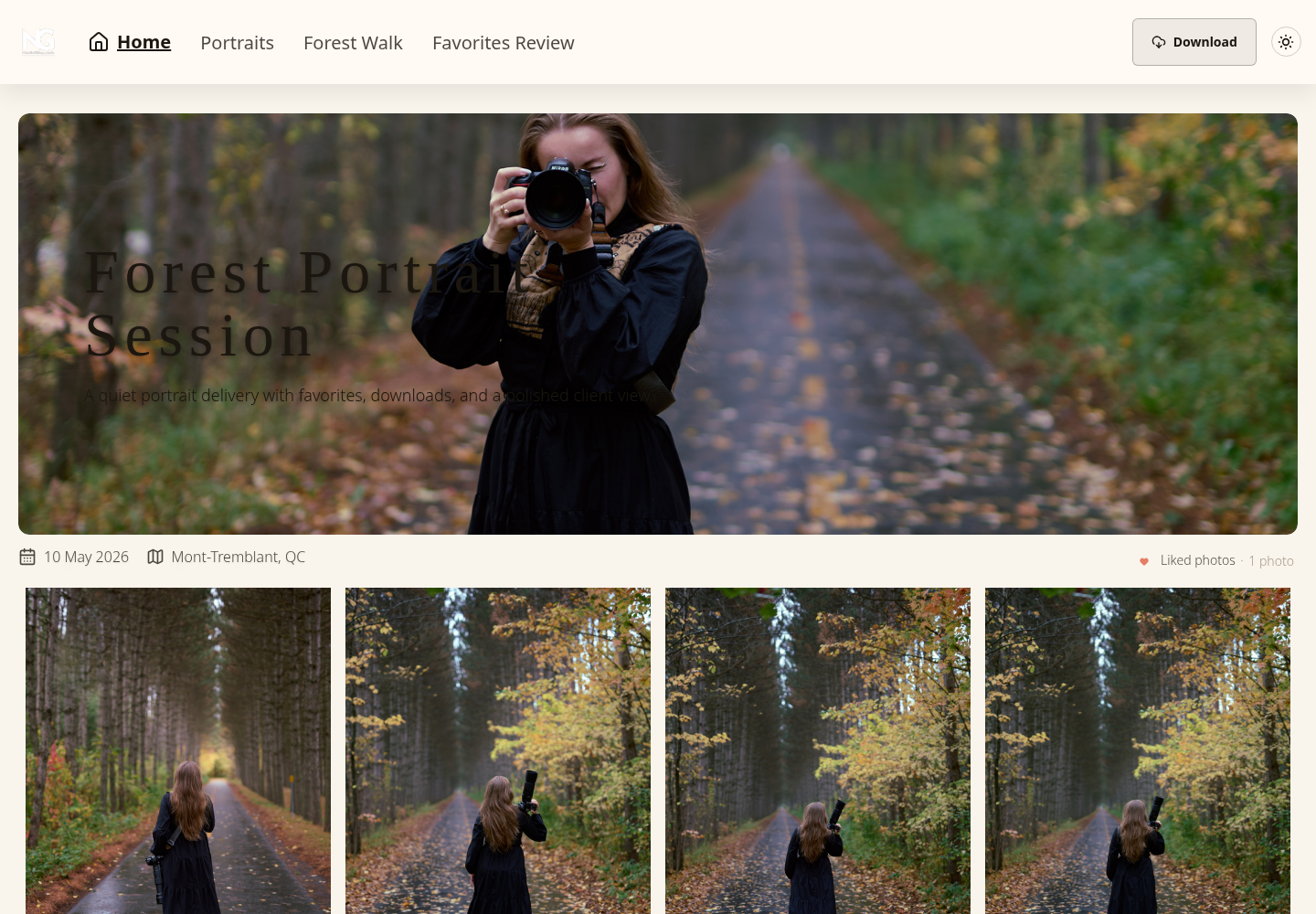
The gallery delivery overview explains SendPhoto’s delivery focus. The real client-view screenshot below shows named collection navigation, a Download button and the liked-photo indicator. It does not demonstrate every device, an active password, video processing or a completed download.
Delivery controls should fit the assignment
Define the files you owe the client before choosing delivery controls. “High resolution” alone does not specify dimensions, crop, format, colour space or usage permission.
Some jobs need all finished photographs; others need only approved finals. In SendPhoto, configure gallery downloads and the intended collections, then choose Original or Scaled down. If watermarking applies to a photo, even an Original download can be a generated marked file. Keep an independent unmarked master and export dedicated final files when necessary.
Keep review and release separate. Use favorites to collect preferences, then confirm filenames and approval in the agreed channel. Do not assume that a favorite, a download toggle or a collection name automatically releases files after payment.
Permissions have to match the stage of the job
A password is only one control. Decide who may view, which collections may be downloaded, whether previews carry a watermark and when sharing ends. Download permission is separate from licensing or payment status.
A proof gallery may allow viewing while downloads stay disabled. A final collection may enable downloads and remove its photo watermark. In SendPhoto, collection download and watermark settings do not establish separate collection passwords. Use separately controlled galleries when different audiences require different visible sets.
Clients notice presentation. Photographers deal with the consequences of weak permissions.
Organization matters after the third or fourth delivery
A gallery can look polished and still waste time behind the scenes. Folder structure, collections, batch actions, and reusable settings matter most when the volume increases or the studio repeats the same delivery pattern every week.
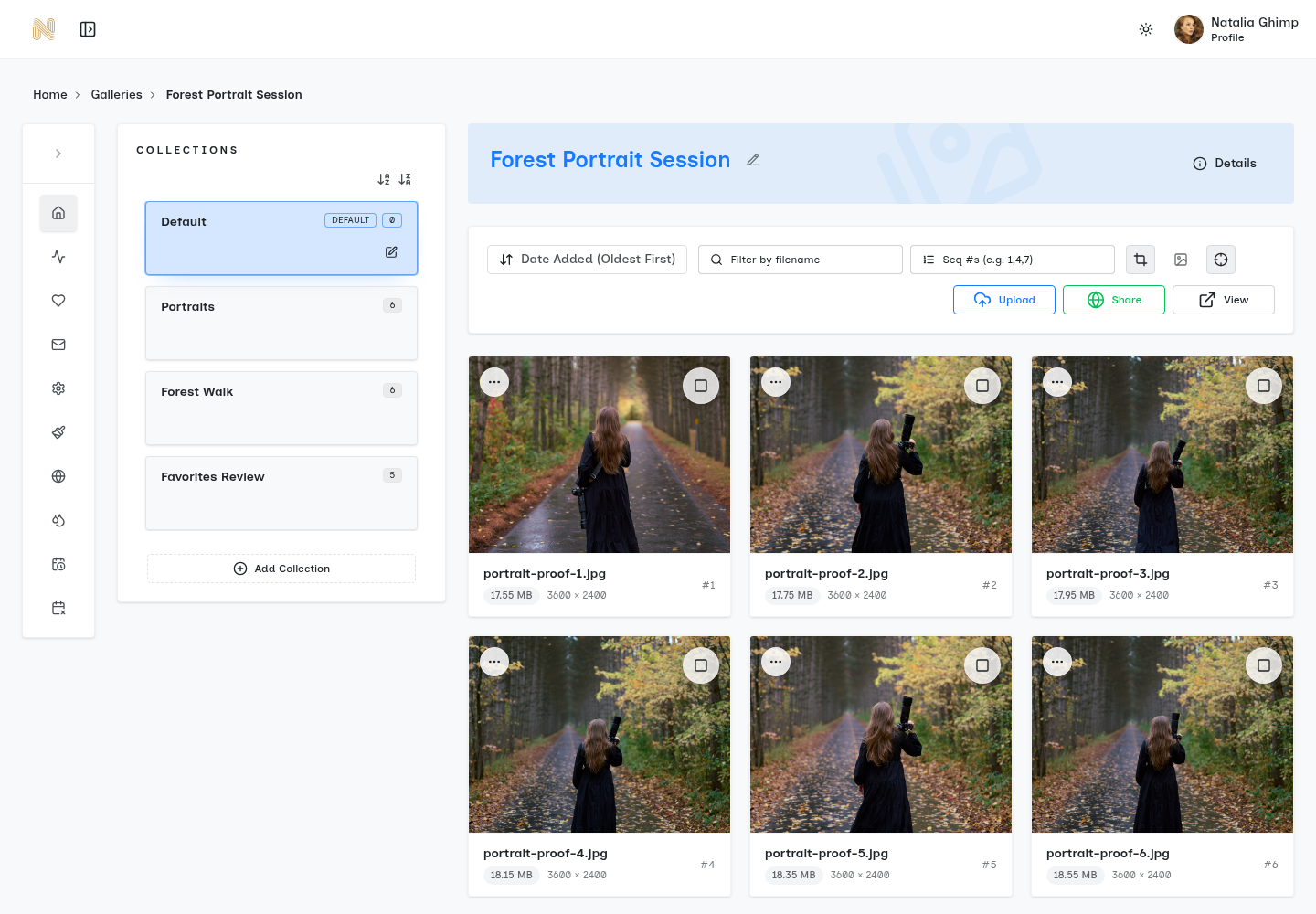
Check the management interface as well as the client view. Can you find the right gallery, recognize the intended collection and change settings without confusing a proof set with finals? Retain independent originals and a record of what was delivered; a client gallery is not a substitute for that archive.
Feature checklist
| Feature area | What to look for | Why it matters |
|---|---|---|
| Presentation | Clean layouts, mobile-ready viewing, branding options | Check readability on the devices your clients use; no universal device guarantee. |
| Proofing | Favorites, selections, comments, comparison tools | Verify the specific review tools you need; favorites are not formal approval. |
| Downloads | Full-gallery or single-image control, staged delivery options, high-resolution support | Check the delivered file type and settings; dedicated final exports may still be needed. |
| Security | Passwords, watermarks, expiration settings, download permissions | Controls access and downloads; cannot prevent all copying or substitute for licensing. |
| Organization | Folders, collections, batch edits, searchable structure | Assess repeated setup work in your own workflow. |
| Scalability | Fast uploads, stable handling of large galleries, support for mixed media where needed | Check capacity, processing limits and support; reliability is not established by a screenshot. |
How to Choose the Right Platform for Your Studio
A long feature list is not a fit assessment. List the tasks your existing tools already handle, then identify the gap in client delivery. This avoids buying a broader suite solely because it has more functions.
Compare a delivery-focused gallery with a broader suite. As a documented category example, Pixieset’s own product overview lists Client Gallery, Website, Studio Manager and Store, including booking and payment software. That describes scope, not an independent ranking or a guarantee that every feature is included in one plan. Compare current terms and costs for the functions you actually need.
Choose based on where delivery sits in the business
A wedding studio with repeated high-volume handoffs often needs speed, simple review, and strong guest-facing delivery. A portrait photographer may care more about favorites, proofing clarity, and controlled final downloads. A commercial studio may need straightforward approvals and clean access for multiple stakeholders.
That means the best fit usually falls into one of these patterns:
- Delivery-first fit: Best when the studio already has a website, booking process, and invoicing workflow. The gallery only needs to handle handoff, review, and access control well.
- Bundle fit: Useful when the studio wants one vendor for site, client management, and payments, and accepts some trade-offs in specialization.
- Hybrid fit: Good for studios that run separate front-end business systems but still need a polished gallery layer for clients.
SendPhoto is a delivery-focused option: named collections, visitor favorites, an optional gallery password, photo watermark settings, share expiration and download controls. The screenshots illustrate the management and client sides. They are existing interface captures, not a new hands-on comparison or proof of performance. Check current SendPhoto plans and domain availability before relying on a particular plan or setup.
A simple platform fit test
This table suggests a starting category for investigation, not a scored verdict or a vendor recommendation for every studio.
| Studio situation | Better fit |
|---|---|
| Existing CRM, invoices, and website already work | Delivery-first gallery |
| Client handoff is the main friction point | Delivery-first gallery |
| One vendor is preferred for many business functions | Bundle platform |
| Teams need proofing plus broader client tracking | Bundle or hybrid |
| Large events need clean, repeatable delivery | Delivery-first or hybrid |
Check which broader functions would replace a working tool and which would add setup you do not need. A bundle can be worthwhile when it replaces real costs; a separate gallery can be worthwhile when it leaves your working booking and invoicing process intact.
Compare cost and capacity with your own numbers
Record current plan price, storage and upload limits, renewal terms, custom-domain availability, required add-ons and how you export or remove your files. Distinguish a trial from an ongoing free plan; the linked free-hosting article does not establish that SendPhoto has a permanent free tier. This checklist does not quote live vendor prices.
| Planning input | Hypothetical calculation | Check before buying |
|---|---|---|
| 20 delivered sets, 800 JPEGs per set, 12 MB per JPEG | 20 × 800 × 12 = 192,000 MB, or 192 GB using decimal units | Use your own exported file sizes; include videos and duplicates separately. |
| Retention period | Keeping two such batches would be 384 GB before other files | Stored files and client access dates are different; determine what remains stored after sharing stops. |
| Service cost | Required subscription + add-ons + any relevant sales or transfer charges | Compare current terms and renewal periods; no costs are assumed here. |
These are planning arithmetic and questions, not measured gallery usage or a statement of SendPhoto’s storage allowance.
Your Gallery Launch Checklist and Best Practices
A gallery usually fails at the same moment. The client gets the link, opens it on a phone between meetings, and can't tell what to do next. If downloads are unclear, folders read like internal job codes, or the login flow feels clumsy, the handoff creates more email instead of closing the job cleanly.
Before your own paid handoff, preview the intended client route rather than relying on the owner’s management screen. Use a non-sensitive sample set if you evaluate controls. The checklist below is a proposed reader workflow, not a test carried out for this article.
Launch checklist
- Check the viewing flow: A client should know where to click, what is downloadable, and how to move through the set without instructions.
- Test on mobile first: Many clients open the link on a phone before they ever see it on a desktop.
- Confirm permissions: Password, downloads, watermark and gallery sharing must match the intended audience; do not assume collections have separate passwords.
- Review expiration policy: State when sharing ends and separately agree storage retention. Expired access does not remove downloaded copies.
- Inspect branding details: Check the available logo, cover and configured domain; branding alone does not make a gallery private.
- Preview the client route: Use a non-sensitive sample when you evaluate the handoff; confirm what the intended viewer can see.
Naming matters more than photographers like to admit.
Gallery structure should match the way clients remember the shoot. Folder names like “Getting Ready,” “Ceremony,” “Portraits,” or “Final Selects” work better than internal production labels. Clients should not have to decode your ingest or culling system to find their images.
Give the client a concise handoff message: gallery name, review or final-delivery stage, files or selections required, date access ends, permitted uses and where to ask questions. Decide how to communicate any password to the intended audience. State that sharing ends at the access deadline; do not imply automatic deletion or retrieval of downloaded copies.
A proposed proof-to-final handoff
- Create a clearly named proof gallery or collection and upload the exported review files.
- Choose its gallery password, sharing deadline, photo watermark and download settings for the agreed audience.
- Ask the client to mark a specific number of favorites and confirm the selected filenames in the agreed channel.
- Confirm approval and usage permission separately; a heart icon is not either.
- Export final files and place them in the intended final collection or separately controlled gallery; configure final downloads and watermark settings.
- Give the client the download deadline and retain independent source and final-file backups.
If proofs and finals have different audiences, a collection label is insufficient access separation. Use separate gallery controls and check the current setup before sharing.
For photographers still sorting out the difference between file hosting and true client delivery, this best free photo hosting for photographers guide is a useful comparison. The practical question is simple. Does the tool just hold files, or does it make handoff easier for the client and lighter for the studio?
A gallery should answer the client's next question before they ask it.
The galleries that hold up under real client use do three things well. They present the work clearly, control access without confusion, and cut down the admin that usually follows delivery.
Consider SendPhoto when you need the delivery tasks described here and already have suitable tools for your other studio work. Compare your required controls, current plan terms and export arrangements before committing. The useful result is a gallery that fits your handoff, not the largest feature list or an unsupported “best” label.