
A photo delivery service gives clients a place to browse a finished job, choose images when needed, and download the files you have made available. The buying question is whether its controls and presentation fit your handoff.
A clearly named cloud folder can be enough for a paid job. A client gallery may be useful when you need visual browsing, collections, favorites or repeated proof-to-final deliveries. Neither category guarantees privacy, approval, payment or an independent backup.
This guide covers the delivery decisions to make before choosing a service, a proposed eight-step workflow, and questions to compare against each provider's current terms. It is a selection guide, not a ranked product comparison or a report of a performed trial.
Table of Contents
- When a Handoff Needs a Client Gallery
- Beyond Simple File Sharing
- What changes when delivery is client-facing
- What it isn't
- When a Dedicated Delivery Platform Helps
- Where the value shows up
- What doesn't work well
- Secure Photo Delivery for Clients: What Actually Matters
- Essential Features for a Smooth Client Experience
- Branding and presentation
- Access and lifecycle control
- Client usability
- Delivery management and automation
- A Sample Workflow from Shoot to Delivery
- Step-by-step delivery flow
- Basic Handoff vs Planned Gallery Delivery
- What the client sees
- Your Buyer's Checklist for a Photo Delivery Service
- Questions worth asking before paying
- A practical evaluation frame
- Common Questions About Photo Delivery Services
- Can these platforms handle more than JPEG delivery
- How are they different from website galleries
- What security features actually matter
- Is a generic transfer tool ever enough
- What should a photographer test first during a trial
When a Handoff Needs a Client Gallery
Choose around the recipient's task: receive a known set, browse a large shoot, select proofs, or collect approved commercial assets. A retoucher may prefer a folder; a couple may prefer a visual gallery. An event audience may need discovery tools. Confirm any specialized feature, its privacy implications and its availability before choosing it.
General storage can have substantial access controls. For example, Google Drive's sharing documentation describes viewer, commenter and editor roles, restricted or link access, and download settings. Expiration is limited to eligible work or school accounts. A gallery purchase should solve an actual delivery need rather than assume every transfer tool lacks permissions.
- Presentation: identify the job and studio clearly.
- Client clarity: make the intended action and file versions understandable.
- After-delivery control: record who should have access, which downloads are allowed and when access should close.
Public display and client handoff may share a tool but serve different purposes. See the website photo-gallery guide when planning the public portfolio alongside private delivery.
Beyond Simple File Sharing
Visual browsing matters when the client is choosing among photographs rather than retrieving known filenames. A gallery can organize that decision, while a folder can remain useful for production collaboration. Compare the actual setup you would use.
What changes when delivery is client-facing
For weddings, organize moments the couple recognizes. For portraits, identify the proof set and selection deadline. For commercial work, separate approved exports from working versions. These are workflow choices; availability varies by service.
The following examples compare two possible setups, not measured results or universal product differences.
| Decision | Basic file handoff example | Planned gallery example |
|---|---|---|
| Visual presentation | Named folder and preview thumbnails | Cover, title and image grid |
| Client navigation | Named subfolders and files | Named collections and visual browsing |
| Studio identity | Studio name in the message | Configured logo and gallery title, if supported |
| Review process | Filename-based reply or shared document | Favorites for preferences, then explicit approval |
| Final handoff | Clearly labeled final export folder | Approved files in a collection with configured downloads |
For mixed-media work, verify accepted file formats, preview support, processing and download rules separately. A JPEG screenshot does not demonstrate RAW previews or video playback.
What it isn't
A delivery gallery is not automatically a long-term archive, rights-management system or payment gate. Keep independent masters and agreed delivery records. A public portfolio promotes work; a delivery setup handles a particular recipient and purpose. Some tools do both.
Compare the alternatives in how to share photos online before adding another service.
When a Dedicated Delivery Platform Helps
A dedicated platform may help when repeated handoffs require the same gallery structure, permissions and follow-up. It may add little when your existing folder workflow already meets the client agreement.
Compare the subscription and preparation time with the tasks it would replace. Better presentation alone does not establish higher sales, fewer support requests or a return on investment. Private portraits and unreleased campaigns also need deliberate audience and retention decisions, whichever tool you choose.
Where the value shows up
Time: a repeatable title, collection structure, message and access checklist can reduce repeated decisions. Some automation may help; confirm its scope rather than assume a preset handles every job.
Presentation: recognizable studio and project labels can make the handoff coherent. Review whether branding options fit your needs and plan.
Client comfort: consider whether the recipient needs an account, understands the labels and knows how to request help. A required login may be appropriate for controlled team delivery even if a casual client prefers a link.
What doesn't work well
Multiple tools can work if each has a clear role: an editor for production, a gallery for delivery and an independent archive for masters. Problems arise when nobody owns the approval record, access deadline or backup. Combining the client handoff does not remove the need for the archive.
- Less explanation: state the action and file version clearly.
- Less backtracking: keep a record of current deliveries and closing dates.
- Follow-through: confirm selection, final delivery and access closure as separate steps.
Secure Photo Delivery for Clients: What Actually Matters
Start with the intended audience and sensitivity of the photographs. A shared password limits entry to people who possess it; it does not verify a person's identity or prevent forwarding. If access must be individual, evaluate a provider's specific authentication and permission model.
- Password protection: use a unique password and send it through a separate agreed channel.
- Share expiry: close future gallery entry after an agreed window; do not promise recall of downloaded or cached copies.
- Watermarks: identify proofs and discourage casual reuse; they do not prevent screenshots or create approval.
- Download controls: decide which files can be obtained and at what version or size.
- Activity visibility: determine what a recorded view or download means; it does not prove a person reviewed, saved or approved the job.
- Cleanup: treat gallery deletion and independent retention as separate decisions from share expiry.
For proofing, identify the review set, deadline and permitted downloads. For finals, label the deliverables and access window. For different commercial audiences, use a supported access boundary; a collection name alone does not establish separate password protection.
Essential Features for a Smooth Client Experience
Evaluate four areas together: presentation, access, recipient actions and the work you must do after delivery. The checklist below describes buying criteria, not features guaranteed by every service.
Branding and presentation
A recognizable title, suitable cover and clear studio identity should support the task. Verify logo, styling and domain options against the provider's current plan, rather than infer them from another gallery.
- Studio identity: the client can recognize who sent the job.
- Phone presentation: the layout and actions suit the devices your recipients use.
- Account requirements: understand whether viewing needs a login and whether that fits the audience.
- Next step: make review, selection or download explicit.
Access and lifecycle control
Check what each setting actually changes. Your photo organization system can help name and track deliveries, but an organized folder or collection is not an access rule.
| Control | Meaning and limit |
|---|---|
| Password protection | People possessing the link and password can enter; credentials can be forwarded. |
| Share expiry | Ends future gallery entry through the share; does not delete masters or recall prior copies. |
| Watermarking | Labels previews; verify whether permitted downloads also contain the mark. |
| Download controls | Separate viewing from enabled downloads; viewable content can still be captured. |
| Cleanup schedule | A separate gallery-deletion setting, if offered. Agree retention and back up required files first. |
In SendPhoto, share expiry disables sharing. The self-delete schedule is a separate option. Neither provides a guarantee that all cached assets or recipient copies disappear at the access deadline.
Client usability
Clients should be able to distinguish proofs from final exports. Names such as “Proofs: choose five” and “Approved JPEGs” describe the job more clearly than an internal export-batch code.
- Browsing that fits the intended phones and computers
- Favorites or a clear alternative for recording preferences
- Plain-language download instructions
- Collections that match the client task
- An explicit statement of what is a proof, downloadable or approved
Favorites are preferences. Obtain explicit approval of filenames and version before final delivery; do not treat a heart icon as payment, licensing consent or formal sign-off.
Delivery management and automation
Separate software automation from your reusable procedure. A saved email template may standardize communication without automatically deciding who should receive which files. Ask which settings persist, which notifications are available and which dates you must set for each job.
SendPhoto provides bulk uploads, named collections, a filename filter, favorites, optional gallery passwords, watermark and download settings, share expiry and a separate self-delete schedule. Its client gallery can be entered without creating an account when shared appropriately. Configure the controls for the job; they do not establish approval or an independent archive.
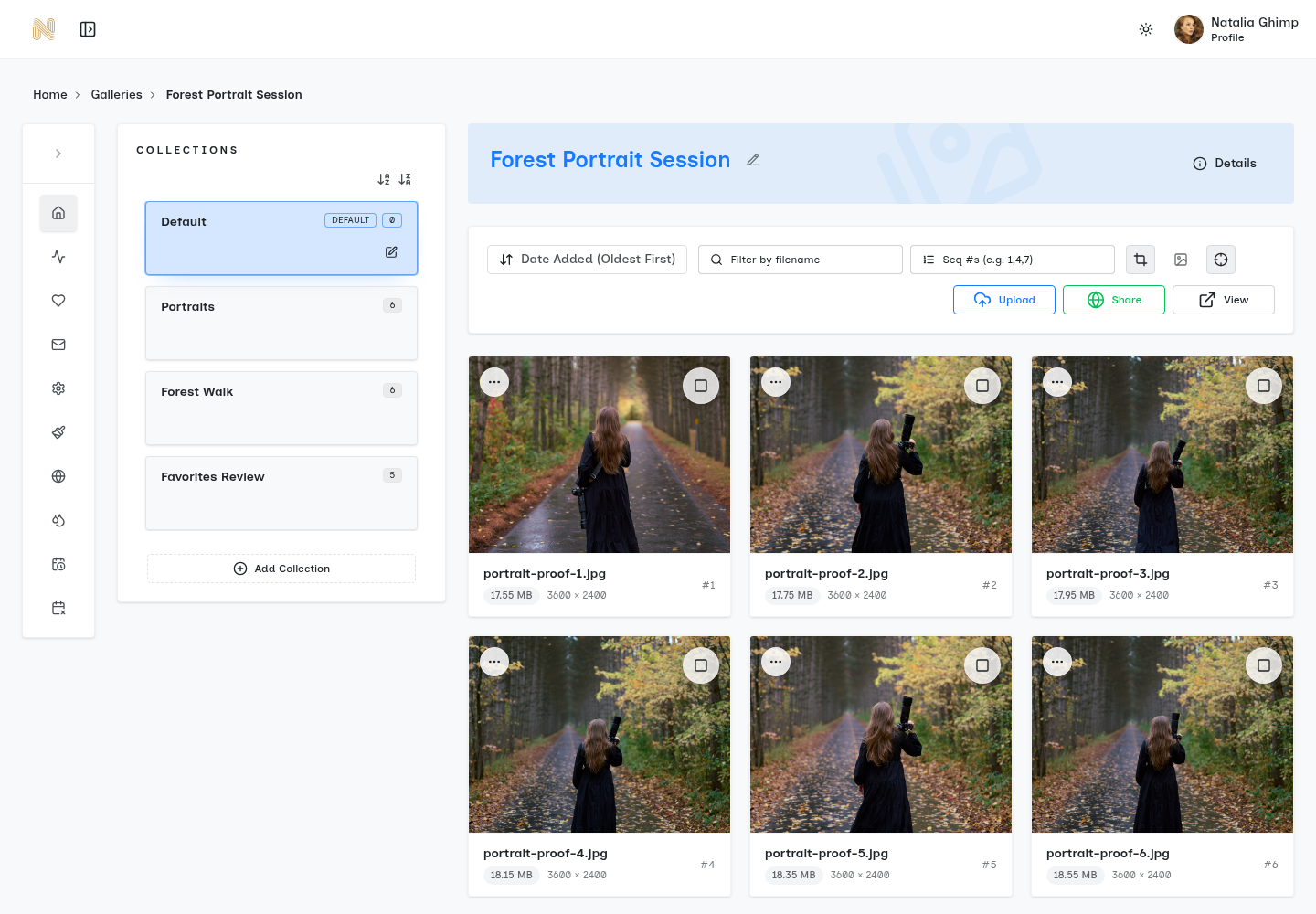
A Sample Workflow from Shoot to Delivery
The following sequence is a proposed workflow to adapt to your agreement. It is not a report of a performed upload, client trial or measured reduction in administration.
Step-by-step delivery flow
- Upload the edited set. Keep masters and working files independently; upload the intended proofs or final exports.
- Name the gallery. Use the project name the client recognizes.
- Organize for the client. Use clear collections such as portraits, ceremony or approved assets. Do not rely on a name to hide content from another audience.
- Set access and download rules. Configure the password, watermark, permitted downloads and share deadline. Use separate galleries when audiences require separate access.
- Send a clear invitation. State the action, deadline and help contact. Deliver any password through a separate agreed channel.
- Collect selections. Use favorites as a starting point, then record explicit approval of filenames and versions through your agreed communication channel.
- Deliver approved exports. Label final files and enable only the intended downloads. Verify the watermark and size policy before describing the output.
- Close access and manage retention. Apply the agreed share deadline. Decide separately whether and when to delete the gallery, retaining required masters independently.
Basic Handoff vs Planned Gallery Delivery
Both approaches require ownership of the decisions. This table compares possible procedures rather than claiming a gallery automates approval or every after-delivery task.
| Stage | Basic handoff procedure | Planned gallery procedure |
|---|---|---|
| Structure | Named folders and stable filenames | Client-facing collections and stable filenames |
| Permissions | Set sharing rules before sending | Set gallery access, download and expiry rules before sending |
| Notification | Send a clear message for this job | Adapt a reusable invitation to this job |
| Review | Collect filename feedback in the agreed channel | Collect preferences, then explicitly confirm filenames and versions |
| After delivery | Close access and manage retention on agreed dates | Configure supported share expiry; decide gallery deletion and independent retention separately |
What the client sees
Describe the view, collections, selection instructions and downloadable file versions in the invitation. Share with the agreed audience; do not invite unrestricted forwarding just because a team can use the same URL.
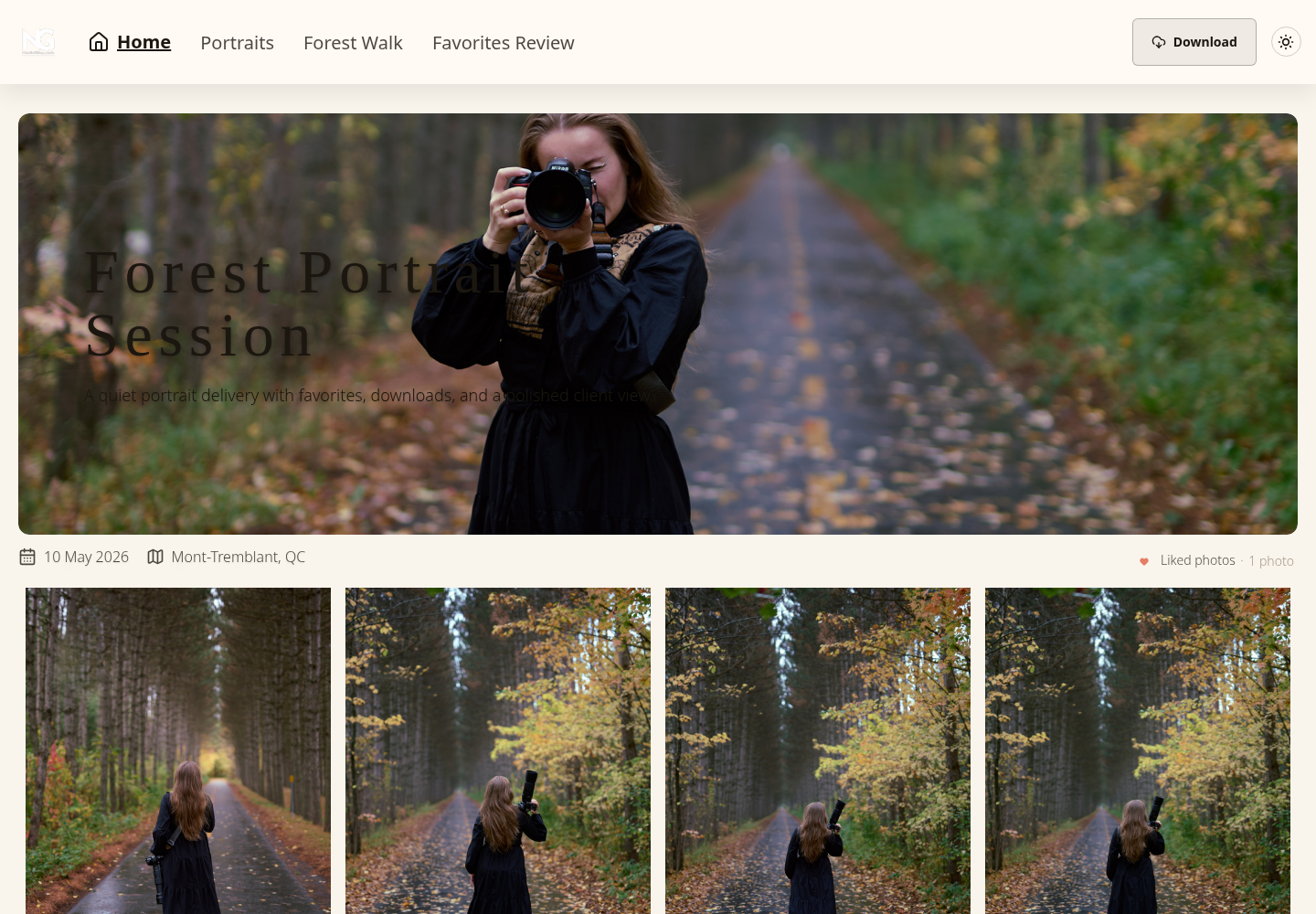
In SendPhoto, downloads depend on global and collection permissions. Photo download quality has Original and Scaled down options. Original with a watermark can use a generated marked image, while Scaled down uses a generated version; do not promise every download is byte-identical to the upload. ZIP downloads include permitted collections. Video processing can replace the uploaded file with a stored optimized MP4. Keep independent photo and video masters.
A photo organization workflow helps keep naming and version records consistent. Agree the gallery access window separately from your studio's retention policy.
Your Buyer's Checklist for a Photo Delivery Service
Use non-sensitive sample exports to evaluate a candidate before sending private client work. Check your intended recipient tasks and inspect the provider's current format, storage, access and deletion terms. The recipe below is for your own evaluation, not a claim that these services were tested for this article.
Questions worth asking before paying
Start with the recipient's task.
- Can the intended client enter? Check account or password requirements on the devices they use.
- Is account creation required? Decide whether that is appropriate for this audience.
- Are downloads clear? Identify proof, web-size and final exports, including watermark behavior.
- Does presentation fit the job? Look at the actual gallery, not only promotional images.
- Is the next action clear? State viewing, selection or download and its deadline.
Then check what happens after you send.
- Which controls apply? Check passwords, sharing, downloads, watermarks and separate deletion settings.
- Can rules change? Understand later permission changes and limits on already obtained copies.
- Who manages old projects? Record access closure and retention dates.
- Can audiences be separated? Determine whether separate galleries or individually authenticated access are required.
- What does activity establish? Distinguish recorded events from human identity, review and approval.
Decide which of these would be a disqualifier for your particular work:
- An account requirement your intended recipients cannot meet
- Unclear download versions or labels
- No workable separation of proofs and finals
- Permissions insufficient for the job sensitivity or audience
- No acceptable way to manage access deadlines and retention
- A structure that clients cannot navigate without extensive explanation
Also check any required contracts, payments, print sales, integrations or backup service separately. A gallery screenshot or feature category does not establish those capabilities.
A practical evaluation frame
For weddings and portraits, prioritize browsing, selection and final-download clarity. For commercial work, emphasize audience separation, version approval and retention. For high-volume events, consider repeatable preparation, upload requirements and agreed distribution. Priorities depend on your actual jobs; a manual reminder may be acceptable at low volume.
| Buying question | Evidence to obtain |
|---|---|
| Pricing | Current storage and delivery limits, billing, renewal and upgrade terms |
| Setup | The steps needed to create and configure your typical job |
| Client usability | A clear viewing, selection and download procedure for the intended devices |
| Access control | Actual authentication, expiry, download scope and later-change behavior |
| Branding | The customization included in the chosen plan |
| Lifecycle | Separate share closure, gallery deletion and independent-master retention |
| Capacity | File sizes, formats, processing and job volume within current limits |
| Support | Published help channels and service terms; do not assume a response time |
Record a decision for one representative job: audience, proof/final versions, review method, download settings, access closing date and independent retention. That record makes the comparison actionable without requiring every provider to have the same features.
Common Questions About Photo Delivery Services
These distinctions help avoid choosing a service on the strength of an ambiguous feature label.
Can these platforms handle more than JPEG delivery
Check the exact accepted formats, preview support, file limits and processing policy. RAW support means specific supported camera formats, not every RAW file or a native browser preview. Video hosting may involve conversion. In SendPhoto, video processing can replace the upload with a stored optimized MP4; keep an independent master when the original bytes matter.
How are they different from website galleries
A public portfolio presents work to potential clients. A delivery setup serves a particular audience with review and download instructions. A website tool may support both; compare its actual permissions and delivery controls rather than relying on the category name.
What security features actually matter
Match authentication to the audience and sensitivity, then define permitted downloads, watermark policy, access window and retention. A shared password can be forwarded; a disabled download button cannot prevent capture of visible images. Expiring access is different from deleting stored files or recalling copies. Use explicit filename/version approval where required.
Is a generic transfer tool ever enough
Yes, including for paid client work when its presentation, permissions, file handling and access window meet the agreement. A dedicated gallery is useful when it solves an additional need such as visual browsing, organized selections or repeatable delivery. It is not automatically the safer choice.
What should a photographer test first during a trial
With non-sensitive sample files, check the actual recipient task: enter, find the right version, select if needed and obtain the intended export. Then examine permission changes, format processing and access closure. A colleague's feedback may identify confusing labels, but one trial does not establish performance on every device.
If this workflow fits your needs, explore SendPhoto and its current plans. Compare collections, favorites, optional gallery passwords, download and watermark settings, share expiry and the separate self-delete option with your delivery agreement. Keep independent masters and explicit approval records.