
Consider a delivery scenario: edits are approved, a photographer sends a password-protected gallery, and the client forwards the invitation. The password controls entry for people who know it; it does not establish who those people are or stop them from sharing credentials. A password protected gallery for photographers needs an audience, a download policy and an access deadline as well as a password.
This guide focuses on the credential and access lifecycle: who receives the link, how proofs become finals, and what to do when access changes. It uses genuine existing SendPhoto interface captures and documented controls, not a newly performed account test. Email verification, named-user permissions and audit logs discussed below are provider-selection questions unless a specific provider is identified.
Table of Contents
- Why Photographers Stop Using Email Attachments
- What a Password Protected Gallery Actually Is
- The Layers of Access Control That Matter
- Feature Checklist Before You Choose a Gallery Platform
- How Different Photography Workflows Use These Controls
- Security Habits to Include in Each Handoff
- Choosing a Gallery Platform That Fits Your Studio
- Putting It All Together on Your Next Delivery
Why Photographers Stop Using Email Attachments
As a hypothetical example, a wedding photographer tries to email a large export set and runs into attachment limits or recipient filtering. A gallery invitation avoids attaching the whole set, but its address and credentials still need careful handling.
That workflow creates three recurring problems:
- Attachment limits: Large collections can fail before the client sees anything.
- File changes: Check the export and sending method. Ordinary ZIP compression preserves file bytes; image resizing or lossy recompression is a separate action.
- Inbox filtering: Multi-image archives and large file packages can trigger security checks or quarantine rules.
The business cost isn't limited to technical inconvenience. Clients wait for a second message, photographers re-export or re-upload files, and a shared link can end up in the wrong email thread. A client may also download an incomplete package and assume the photographer missed images.
Practical rule: Delivery should remove technical friction from the client without removing control from the photographer.
A gallery presents images for browsing and can provide configured download or review controls. A transfer service may also offer previews or restricted access, so compare the actual controls rather than assuming its category decides privacy. Neither presentation proves backup durability or prevents all copying.
Email remains useful for the invitation, the access deadline and the next client action. Confirm the recipient before sending. The message does not have to contain the image collection or every credential needed to enter it.
Use a gallery when its viewing, selection and delivery flow fits the job. A protected gallery adds an entry control, while download settings, audience decisions and your independent archive policy remain separate.
What a Password Protected Gallery Actually Is
A password protected gallery requires a password at its gallery entry point. Check what the service protects beyond that page: previews, file endpoints and download requests can have different lifetimes. Password protection does not automatically imply end-to-end encryption, verified recipient identity or protection for every previously obtained image URL.
Distinguish discoverability from entry control. A public portfolio can intentionally display photographs; an unlisted URL is harder to discover but can still be forwarded. A cloud folder can require named-account access. Choose the required audience boundary rather than treating “public,” “gallery” or “cloud” as a complete security rating.
Think of the shared password as a reusable entry credential. Anyone who receives both the gallery address and password may be able to use it. Named-account access is a different model and requires its own provider and plan checks.
What the password does and doesn't protect
The password generally protects the gallery access page, not every possible copy of the underlying files. Once a permitted viewer can see an image, that viewer may still be able to capture a screen, photograph a display, or share credentials. A password also doesn't automatically decide who can download originals, how long access remains available, or whether a visitor's identity is recorded.
SmugMug’s photo privacy page distinguishes public visibility, direct-link visibility and private access, with password or specific-person controls. Those are SmugMug’s documented options, not a statement that every service or SendPhoto plan implements the same model.
That distinction matters. The password is the entry requirement. It isn't the complete privacy model.
The Layers of Access Control That Matter
A password protected gallery works best when the password is treated as the first layer in a stack rather than the final security decision. Each control addresses a different way that private images can escape the intended workflow.
The password blocks casual entry
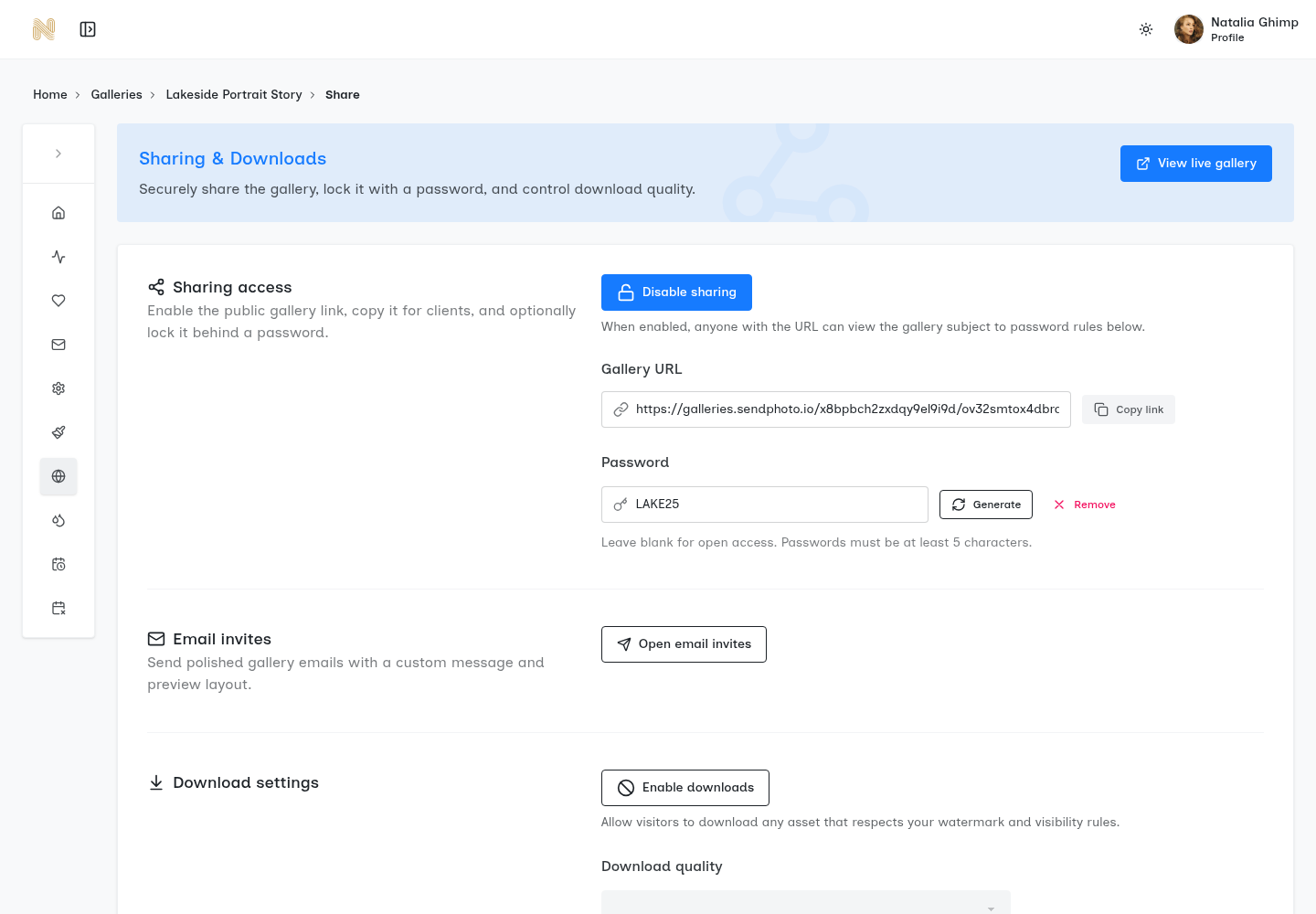
Use a long, unpredictable credential within the service’s supported limits, and do not reuse a studio login password for a client gallery. In SendPhoto, leaving the optional gallery password blank permits password-free entry when sharing is otherwise allowed. Do not confuse the field’s minimum length with a recommendation for a strong credential.
The password doesn't identify every person who uses it. If several guests share one credential, the photographer may know that the gallery was opened but not necessarily which guest entered. That limitation is why identity-based controls become more valuable when the images are sensitive or the stakeholder list is large.
Expiring links limit the exposure window
Set the access deadline to the agreed delivery window, and define who can extend it. In SendPhoto, sharing expiry turns sharing off; deletion is a separate setting. Expiry does not retrieve downloads, clear every viewer’s cache or guarantee previously obtained asset links stop working at exactly that moment. Do not describe it as automatic file deletion.
Download permissions separate viewing from saving
A viewer may need to review proofs without receiving the finished export. Check the scope of the available download control: account, gallery, collection, image or named recipient. SendPhoto has a gallery download switch and collection download controls; enabling downloads does not independently approve an image or confirm payment.
Disabling the provided download action does not make an image impossible to save from a browser or screen. Separate the intended download workflow from the usage permission and approval recorded in your client agreement.
Watermarks discourage casual reuse
A visible watermark labels a proof or attribution. It can remain visible in a copied preview, but it does not prevent a screenshot, guarantee a mark cannot be removed, or replace access control. SendPhoto’s photo watermark and collection settings govern generated display or download files. Do not assume video receives the same treatment, or that an “Original” photo download must be an unmarked source file.
Check What Email Access and Activity Records Identify
A verified-email challenge, an invitation link associated with an email address and a named-user login are different mechanisms. Merely collecting an address does not verify it, and a personalized link can be forwarded. Ask which mechanism the provider actually enforces and what its activity records identify.
PhotoDeck’s access-control documentation describes gallery passwords and login-based permissions for individual clients or client groups. Its guest-password versus couple-login example illustrates a provider-specific way to separate audiences. It is not proof of email verification, download logging or equivalent SendPhoto capabilities.
Use each control for its actual purpose: entry, access duration, offered downloads, proof labeling or recipient association. None of those alone guarantees that a permitted viewer will not pass an image or credential to someone else.
Feature Checklist Before You Choose a Gallery Platform
A polished interface can make a platform feel professional, but the useful test is what happens when a client forwards the link, requests a different file size, or needs access removed. The platform should support the photographer's actual delivery decisions instead of forcing every client into the same permission model.
Start with access controls
Record the access model the job needs. A shared password may fit a family handoff; an assignment requiring individual identity or separate permissions needs a provider that demonstrably supports those controls. Treat one-time links, recipient logins, IP restrictions and view limits as optional requirements to verify, not default gallery features or promises made by this SendPhoto guide.
When identity matters, ask whether a viewer must prove control of an email address or account, whether a credential is reusable, and how access is revoked. An invitation addressed to one person does not make a reusable link non-transferable.
Separate viewing from downloading
Match the available control to your audience. Download switches can govern the offered files without separating who can see photographs. In SendPhoto, a named collection is organization, not a separate gallery password. Use separately controlled galleries when a client and guest group should see different photographs.
Photographers comparing delivery systems should examine download-control options closely. The important question is whether the setting matches the job's approval process, not whether the feature appears in a pricing table.
Protect the files and the presentation
Check the actual upload formats, browser previews and delivered files separately. RAW upload support does not mean clients view RAW files directly, and a video viewer does not establish that the uploaded master is retained unchanged. Keep independent originals and prepared finals, and inspect the intended export sizes before promising print or video delivery.
Branding also matters, but it comes after access control. A custom domain, logo, colors, and clean layout can make the gallery feel like part of the studio's service. They can't compensate for missing expiry settings, weak download controls, or absent access records.
Before committing, verify:
- Password enforcement: What length limits and entry checks apply? Do not assume the provider rejects every weak or reused password.
- Link lifecycle: Can access expire automatically or be revoked manually?
- Download settings: Can you limit the offered downloads at the required scope, and what can a viewer still copy from a preview?
- Watermark behavior: Can previews and downloads receive different treatment?
- File support: Can the system handle the studio's photo and video formats?
- Activity records: Which events are actually recorded, what identifies the visitor, and how can you review or export those records?
- Storage terms: What processing, retention, cancellation and export rules apply? A gallery is not your only backup.
Assess the cost of the controls you need and the repeated setup work they require. A lower price or longer feature list does not establish suitability for a confidential assignment. Verify current terms and provider documentation before relying on a named control.
How Different Photography Workflows Use These Controls
The same gallery platform can serve several photography businesses, but each business needs a different access policy. A wedding photographer may want a welcoming experience for a couple and selected family members. A commercial studio may need tighter control over versions, approvals, and downloads. The platform stays consistent while the rules change.
Wedding delivery
Agree how long the couple needs access and whether guests receive the same photographs. If the guest set is smaller, use a separately controlled gallery rather than a collection name alone. During proofing, choose the photo watermark and download settings intentionally; release finals after approval is confirmed in your agreed channel.
Portrait and family sessions
Agree who in the household receives the gallery and whether they may forward it. Use a unique gallery password and an agreed proofing window. Favorites can record choices, but they do not prove purchase, payment or final approval. Keep a record of the selected filenames and the client’s explicit next decision.
Commercial assignments
For confidential work, decide which reviewers may see each version before uploading. Place unapproved or audience-restricted variations in separately controlled galleries. If the assignment requires named-user authorization or audit records, verify those controls with the provider; a shared password and collection labels do not supply them automatically.
Sports and events
Separate the intended athlete, parent, team and event audiences. A short reusable credential is still shareable; do not assume a “PIN” label supplies individual identity or prevents forwarding. Offer only the agreed proof or final set, and configure downloads after the selection or order stage is confirmed.
Access policy should follow the job. Keep audience, access deadline, offered downloads and approval requirements in a short delivery record, and check that the selected service actually supports them.
Security Habits to Include in Each Handoff
A shared password feels simple because it solves the first visible problem. It doesn't solve what happens when the client forwards the message, when a second shooter keeps old credentials, or when a gallery remains online after the commercial relationship has ended.
Sending a link and password through separate agreed channels reduces what one forwarded message contains. It does not prevent someone from forwarding both, prove the recipient’s identity or protect a compromised device. Verify the destination before sharing and choose a handoff suited to the assignment.
Small habits prevent predictable gaps
- Separate the messages: Use agreed channels for the link and credential, check the recipient, and avoid placing both in a widely shared thread.
- Create unique credentials: Use an unpredictable credential for each gallery within the service’s supported limits; keep it separate from account passwords and avoid client names or session dates.
- Set an end point: Add an expiry date before sending the gallery, and schedule a review when the project moves from proofing to final delivery.
- Rotate when access changes: Review the audience after proofing or final approval and change the credential when it is exposed or the audience changes. Do not promise this recalls copies already obtained.
- Remove old collaborators: Revoke available account, invitation or personal-link access when a role ends, and review shared credentials too. A gallery password change does not remove a separate staff account.
- Secure the administrator account: Turn on two-factor authentication and login alerts wherever the platform provides them.
- Review access: Inspect whatever visitor or download records the service actually supplies, and check what their identities mean. Do not infer a person’s identity from a shared credential alone.
The NCSC account-security guidance recommends unique, non-guessable account passwords, password managers and two-step verification where available. Apply that advice to the studio’s accounts and email; a client gallery password is a separate credential, not administrator authentication. For the wider delivery process, see photo-sharing security.
For sensitive photographs, match the chosen access model to the agreed audience and confidentiality requirements. If the provider cannot demonstrate a required control, choose a suitable alternative or change the delivery arrangement before sending the files.
Choosing a Gallery Platform That Fits Your Studio
Platform selection works better as a weighted scorecard than as a hunt for the longest feature list. A portrait photographer delivering a small set of hero images has different storage and bandwidth needs from a wedding studio delivering a large collection or a commercial team handling video selects.
Start by documenting the studio's normal job profile. Record the typical gallery size, number of active clients, file formats, review stages, collaborators, and required access window. Then compare platforms against the controls that affect delivery every day.
| Criterion | Why It Matters | What to Verify |
|---|---|---|
| Storage and gallery capacity | Large photo and video jobs can expose account limits quickly | Storage per gallery, total account cap, and overage terms |
| Client and gallery limits | Repeat work becomes difficult if the platform restricts active projects | Maximum galleries, client count, and archive behavior |
| Branding control | The gallery should feel connected to the studio | Custom domain, logo, colors, and branding removal |
| File support | Some assignments require more than compressed JPEG previews | RAW handling, video support, file-size limits, and delivery quality |
| Security stack | A password alone doesn't manage the full lifecycle | Verify required expiry, download scope, photo watermark behavior, recipient authentication and available records; distinguish optional controls from included features |
Data terms deserve equal attention. The contract should explain where files are stored, whether the photographer can export them on demand, how deletion works, and what happens after cancellation. A visually attractive gallery isn't a backup strategy.
SendPhoto provides named collections, an optional gallery password, photo watermarks, gallery and collection download controls, and sharing expiry. Its email invitations and personal links can associate a visit with a customer record; possession of a forwarded link is not proof of that person’s identity. The screenshots show existing interfaces, not a newly tested handoff.
Supported RAW formats and video have separate processing paths. Video processing can replace the upload with a stored optimized MP4, and photo watermark or scaled-download settings can produce generated files. Keep independent unmarked photo originals and video masters. Check current plan terms, supported formats and domain setup rather than assuming every capability or file type is included. For broader options, see client photo delivery platforms.
A multi-shooter agency may need administrator roles, single sign-on, regional hosting, or more formal audit controls. A solo photographer may prioritize fast upload, clear permissions, and a gallery that clients can open without creating an account. The right platform matches the studio's risk, scale, and client experience.
Putting It All Together on Your Next Delivery
The following is a proposed handoff for a password-protected gallery, not an account test performed for this article. Adapt the deadline and controls to your actual agreement:
- Create the gallery and set the agreed sharing deadline. A 14-day window is an example only if it fits the client agreement, not a default or universal safe period.
- Set an unpredictable, unique gallery password within supported limits.
- Configure the offered downloads for proofs; do not rely on a disabled button to prevent all copying.
- Apply the intended photo watermark and confirm which export stage the files represent.
- Send the link and password through the agreed channels, with the deadline and next client action.
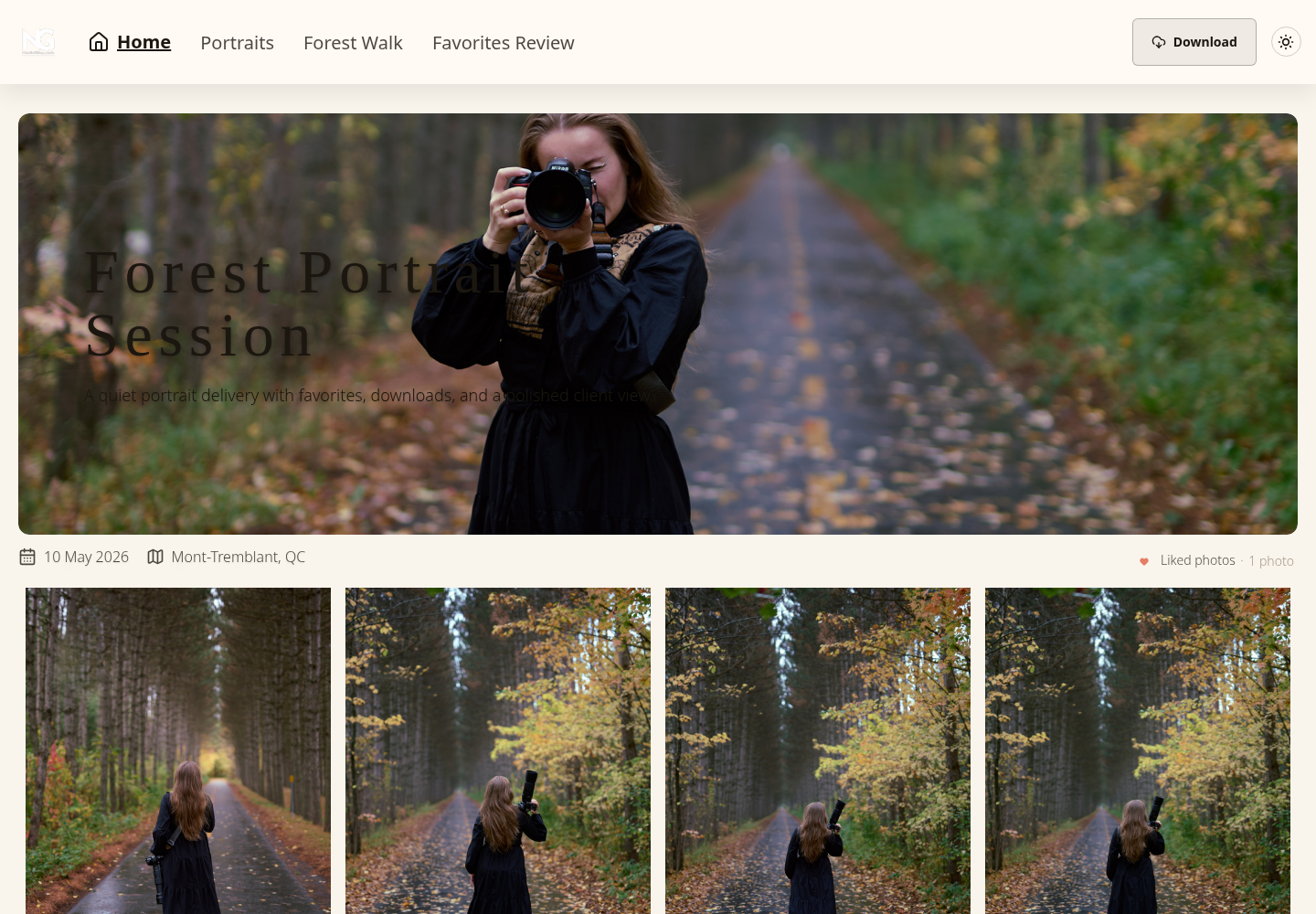
Before your own handoff, compare the sharing deadline with the agreement and make sure the intended audience and download settings match. A management preview is different from a visitor view; these screenshots do not establish your current entry rules. Keep a separate record of approval and the final filenames.
A proposed proof-to-final access record
| Stage | Example decision | Limit to state |
|---|---|---|
| Proofs | Household viewers, marked review photos, downloads disabled, agreed review deadline. | Viewing still permits screen capture; favorites are not approval. |
| Finals | Approved filenames, intended final exports and permitted downloads; separate gallery if the audience changes. | Downloads do not establish payment or usage permission. |
| Close access | Turn sharing off or let the agreed expiry run; review storage retention separately. | No recall of saved copies or guarantee that every previously issued asset URL stops immediately. |
For a forwarded invitation, first confirm the intended audience with the client, turn sharing off if necessary, and replace the exposed password before reopening to the agreed audience. In SendPhoto, the gallery password participates in subsequent authentication checks; changing it is not a promise to erase already loaded or downloaded images.
Your [session] gallery is ready at [link]. I’ll send the password through [agreed channel]. Please confirm [selection or approval action] by [date]; download [permitted final exports] by [sharing deadline]. Sharing ends at that deadline, while storage retention follows [separate agreement]. Contact [studio] if you need help.
This is an adaptable message template, not a message sent for this guide. Replace the bracketed fields with your actual delivery terms.
Repeat the same decisions for each delivery: audience, credential, offered files, approval and access deadline. Revisit them when the audience or delivery stage changes, while retaining independent masters and the agreed delivery record.
Use SendPhoto’s gallery password protection alongside its sharing, photo watermark and download controls when those controls fit the handoff. Keep the client’s next action and deadline clear, and verify any additional identity or audit requirements before relying on them.