
Imagine a photographer sending a behind-the-scenes phone image from a private venue. The visible flowers and camera bag may look harmless, while embedded location and capture-time fields could disclose more than intended. This is a hypothetical example, not a reported client incident.
That kind of mistake can happen during a rushed gallery delivery, a studio update, a phone snapshot, or a RAW upload. Photo sharing security isn't only about hiding a gallery behind a password. It also concerns what a recipient can do with the files, what information remains inside them, and which email, storage, notification, or delivery services handle the handoff.
Clients need convenient access, while photographers need a deliberate policy for recipients, downloadable versions and file information. Choose controls for the assignment’s sensitivity. A password, watermark or short sharing window addresses only part of that policy.
Table of Contents
- The Moment a Shared Photo Says Too Much
- What Photo Sharing Security Actually Means
- The Threats Photographers Actually Face
- How EXIF and Hidden Metadata Leak Your Shoots
- A Secure Gallery Checklist That Actually Fits Your Studio
- Building a Secure Delivery Workflow
- Putting It All Together in 30 Days
- Questions Photographers Still Ask After Reading the Guide
The Moment a Shared Photo Says Too Much
EXIF metadata can contain camera settings, capture time and GPS coordinates when recorded. A 2015 metadata study examined 612 freshly captured smartphone photographs: 86.4% contained camera metadata under its make/model-based definition, while 15% contained geolocation. Those are historical sample results, not today’s prevalence or the percentage of client photos exposing GPS.
For a wedding photographer, location data may identify a venue, home, workplace, or travel route. A portrait photographer sending a phone image from a family session could reveal a private residence. A commercial photographer might expose a client facility in a behind-the-scenes frame, while a studio export could show when a confidential campaign was photographed.
Practical rule: A photo can be safe to look at and unsafe to share.
The same risk follows the delivery link. A client can forward a wedding gallery to relatives, paste it into a group chat, or leave an old browser tab open on a shared computer. View-only access limits some downloads, yet it cannot prevent screenshots, a camera aimed at the screen, or access by anyone who receives the password.
Security therefore belongs in the handoff itself. Before sending a gallery, preview, RAW upload, behind-the-scenes post, or personal image, decide what the file reveals, who may reach it, and what happens after forwarding. Metadata cleanup addresses the file, access settings protect the entry point, and expiration rules limit how long the link remains useful. Email, storage, notification, and gallery vendors add another layer because each service handles part of the delivery.
Start with the file you intend to share, the people who should receive it and the copies they may retain. Keep the required source archive independent of the delivery gallery. The sections below turn those decisions into an export, access and closure routine.
What Photo Sharing Security Actually Means
A useful definition starts with the delivery flow rather than the software. Photo sharing security has three connected layers: access control, content control, and trust control. Each answers a different question, and a gallery can perform well in one layer while failing in another.
Access control answers who can open the gallery
A public or unpassworded link can be opened by someone who obtains it. An optional shared password adds a barrier, but both the link and password can be forwarded. An access deadline limits future sharing through the gallery; it does not recall downloads or establish recipient identity.
Send the link and password through separate channels when practical, such as the link by email and the password through an independently protected message. This avoids placing both in one ordinary handoff message, but it does not stop forwarding or compromise of both accounts. Set the sharing deadline separately from any deletion schedule.
Content control answers what happens after entry
A final-delivery client may need downloadable exports, while a proofing client may only need to suggest favorites. Configure the versions and download permissions for that stage. Watermarks can label or deter reuse; they do not prevent copying or establish publication rights. In SendPhoto, favorites express preferences rather than final approval.
Trust control answers what the platform does
The gallery provider may process thumbnails, retain uploaded files, send notifications through another service, or preserve metadata during transformation. Photographers should check the platform's metadata policy, cleanup behavior, account security, and vendor disclosures before treating a polished interface as a complete security system.
The Threats Photographers Actually Face
Ordinary handoffs can introduce exposure: a forwarded link, a phone image with location data, a public preview or recipient details passed to an email provider. Identify which information crosses each boundary instead of assuming every risk is solved by the gallery password.
A forwarded link changes the audience
A couple may forward a gallery to relatives. Anyone receiving an unpassworded link, or both a shared link and its password, may gain access under the configured rules. A unique URL is not authenticated identity. If audiences need different content, use separate galleries or a system with verified individual access; SendPhoto collection names do not isolate audiences.
Metadata travels with routine files
Phone images may carry location and time information; edited exports can preserve selected camera, copyright or contact fields. Treat each outgoing file as inspectable by its recipient. Adobe’s export documentation describes Lightroom Classic’s metadata options, including Remove Location Info. A smaller image size alone does not imply that metadata was removed.
Previews can weaken the protection around originals
A photographer may protect a full gallery but post an unredacted preview on a website, social account, or client message. A screenshot of an editing screen can reveal folder names, filenames, client names, or location details. A low-resolution file can still expose metadata and confidential content.
Vendors create another trust boundary
Email, notifications and storage can involve providers beyond the gallery application. In Flickr’s notice about a February 5, 2026 email-provider vulnerability, the company said the flaw may have allowed unauthorized access to member information, including names, email addresses and other account-related details. It said passwords and payment card numbers were not affected. This describes potential exposure reported in that notice, not confirmed access to every listed field or a finding about SendPhoto.
Ask what each provider handles, which recipient details are necessary and how account access, retention and incident communications are managed. Encryption at one stage does not resolve an unintended public preview, excess export metadata or a forwardable shared password.
How EXIF and Hidden Metadata Leak Your Shoots
EXIF is information written into an image file by a camera or phone. It can include the camera model, timestamp, settings, and GPS coordinates. Photographers may also encounter IPTC fields containing copyright, creator, caption, or contact information. Those fields help organize professional libraries, but they can become a privacy problem when a file leaves the studio.
The leak often starts before the gallery
A phone photograph taken at a private residence may record its location automatically. A RAW file can carry capture details into a client proofing workflow. A Lightroom or Capture One export may preserve selected metadata unless the export settings remove it. Even a screenshot of an editing workspace can expose filenames, folder paths, or visible client information.
The important distinction is between what the image shows and what the file contains. A cropped portrait may no longer display the home exterior, yet its metadata could still identify where and when the original capture occurred. Anyone who can download the file may be able to inspect those fields.
A clean-looking frame isn't necessarily a clean file.
A practical sanitizing routine
Create a separate client-facing export and decide which metadata is needed. For a documented Lightroom Classic JPEG example, Adobe offers Copyright Only and a Remove Location Info option; its documentation says these options are unavailable for DNG. This is documentation-based guidance, not an export performed for this article. Check the exported file’s actual fields rather than assuming a preset name proves the result.
For a proposed workflow review, use non-sensitive files you are allowed to share: a phone image, a JPEG export, a behind-the-scenes frame and a supported RAW file only if RAW delivery is required. Inspect the outgoing file and the exact client-download version separately. Record location, time, creator/contact fields and visible identifying content. The metadata management guide expands on that review; no upload/download test was performed for this article.
Do not assume every preview and download has the same metadata. SendPhoto’s image-processing path can leave RAW and special-format files unchanged; an Original download without watermarking can use the stored upload. Generated previews or marked/scaled output are separate versions. Prepare sensitive exports before upload, preserve independent masters and assess the exact delivered file instead of claiming universal metadata removal.
A Secure Gallery Checklist That Actually Fits Your Studio
Evaluate controls against the file’s sensitivity and the client’s task. A shared-password gallery can suit some ordinary deliveries; individually authenticated access or a formal approval record may require a different system. The following table is a proposed operating checklist by workload, not a claim that SendPhoto includes staff roles, verified identities or automatic metadata audits.
Compare the controls before comparing the interface
| Feature | Solo Freelance | Growing Studio | High-Volume Event |
|---|---|---|---|
| Password protection | Use an optional shared password when appropriate; explain forwarding limits | Agree on project-specific password handling and who may change access | Apply the policy consistently; shared passwords do not identify recipients |
| Expiring access | Record an agreed sharing deadline | Assign a closure owner and handle exceptions | Review sharing windows without assuming instant deletion |
| Download controls | Permit the agreed export versions | Separate proof and final permissions | Do not promise screenshot, clipboard or print prevention |
| Metadata handling | Inspect the exact outgoing file and download version | Record the outcome for each required format and setting | Review exceptions when software or file formats change |
| Watermarks | Label previews or deter casual reuse; not copy prevention | Distinguish marked proofs from agreed finals | Keep independent approved masters; mark does not grant rights |
| Custom domain and branding | Use for recognition, not access security | Keep recipient instructions consistent | Branded addresses do not authenticate the audience |
| Cleanup and retention | Close sharing and decide deletion separately | Assign retention ownership and preserve required copies | Use supported schedules without promising recall or instant erasure |
Set sharing deadlines from the agreement, sensitivity and the recipient’s retrieval needs. There is no universal photography rule requiring 7–14 days or 48–72 hours. Record the chosen date, responsible person and exception process. Gallery expiry, file retention and deletion need separate decisions.
Match access to the stage of the project
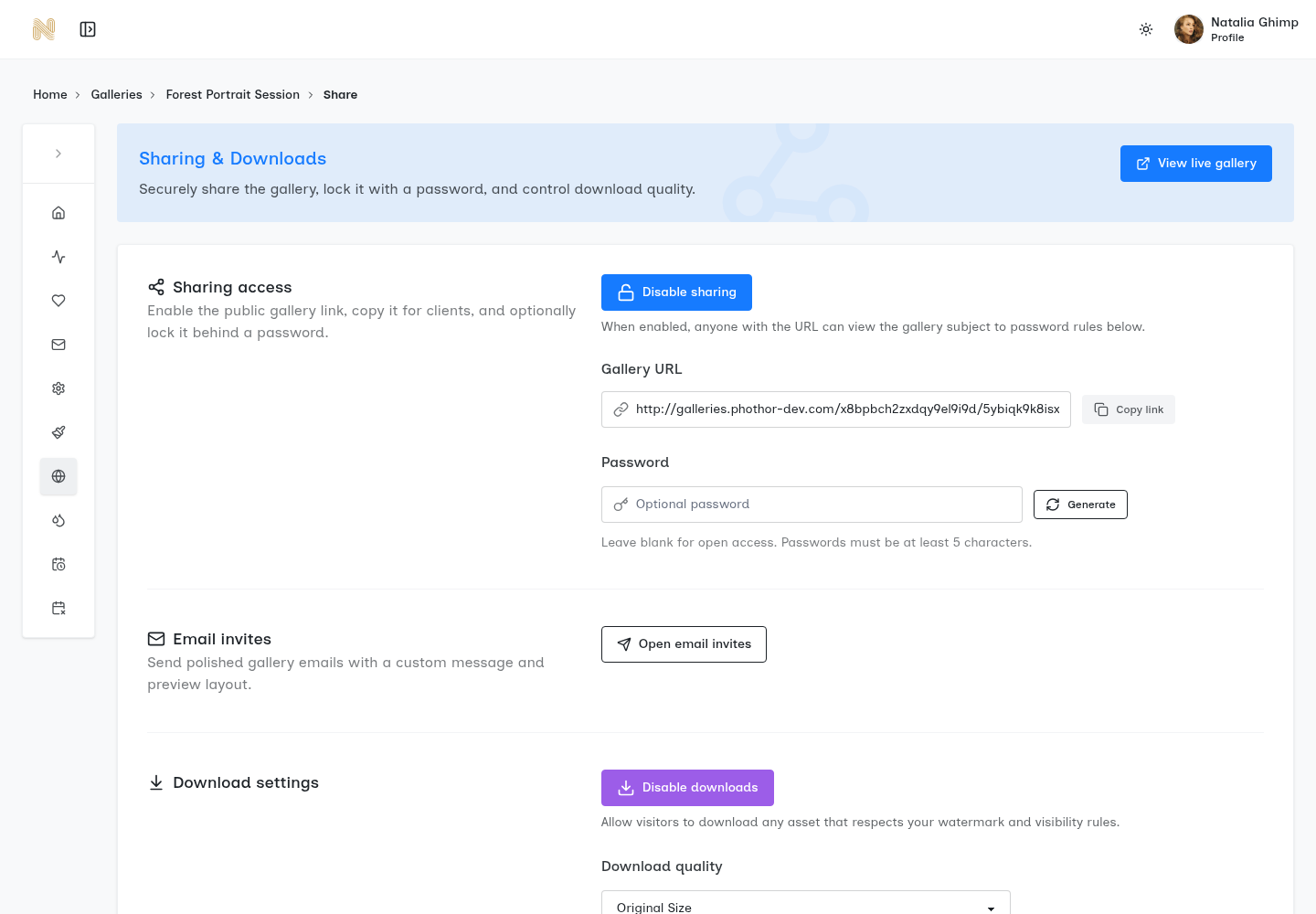
Proofs and finals can require different download permissions. The password protection guide explains shared-access limits. In SendPhoto, global and collection settings affect downloads, but collection names do not create different audiences or passwords. Use separate galleries when the intended sets or recipients must be separated.
Do not interpret disabled downloads as clipboard or browser-print blocking. SendPhoto’s download controls govern the permitted download path; they do not promise to prevent screenshots, screen photography or every form of copying. Keep material requiring stronger restrictions out of that handoff.
Building a Secure Delivery Workflow
Security becomes easier to maintain when it follows the existing path from camera to archive. The photographer doesn't need a separate security project for every gallery. The workflow needs sensible defaults at the points where files change hands.
Capture and export
For phone and behind-the-scenes images, review visible details as well as embedded information before publication. Create client exports with the metadata needed for that job. Decide on RAW delivery separately: supported RAW files can retain original capture details, and Lightroom’s JPEG metadata choices do not establish how a DNG or camera RAW file will be handled.
File naming also matters operationally. A studio should avoid placing unnecessary personal details in filenames, especially when files may appear in download folders, browser tabs, or support tickets. A consistent project identifier can help staff work efficiently without exposing a client's full name everywhere.
Upload and share
Upload only the intended review or delivery set and configure sharing, the optional password and download permissions deliberately. A gallery with sharing enabled and no password is open to people who obtain its link. The secure file-sharing workflow covers the handoff. Keep confidential masters outside the client set and retain your independent archive.
Use separate channels for the link and password when practical, and explain the forwarding policy to the recipient. This separates the ordinary handoff messages; it does not guarantee that either item stays secret. Request explicit confirmation of filenames, versions and intended uses when approval is required, rather than treating favorites as authorization.
Expire, respond, and archive
Choose the access window for the assignment. If unintended forwarding occurs, disable sharing while reviewing the exposure, then decide whether to change the password and resume sharing. In SendPhoto, password changes affect later gallery authentication checks; they do not erase loaded content, cached material or downloads. Do not assume changing a password generates a new gallery URL.
Record recipients, permitted versions, sharing deadline, closure owner and retention policy. SendPhoto sharing expiry turns sharing off; its self-deletion schedule is separate. Neither recalls delivered copies or guarantees immediate erasure from every cache or backup. Confirm required independent copies before deleting gallery material.
Proposed Handoff Record
Use these fields for your own delivery. They are a blank planning template, not results from a tested or approved client gallery.
| Field | Record before sharing | Limit to remember |
|---|---|---|
| Audience and forwarding | Intended recipients and whether onward sharing is permitted | A shared password is not verified individual identity |
| Export and metadata | Filenames, versions, required fields and inspection outcome | A preview does not prove the original download is sanitized |
| Downloads and approval | Permitted versions and the separate approval record | A favorite does not grant publication rights |
| Sharing deadline | Agreed date, time and closure owner | Closing access does not recall existing copies |
| Retention and deletion | Independent archive locations and deletion decision | Deletion is separate from expiry and cache removal |
Putting It All Together in 30 Days
The four-week sequence below is a proposed adoption schedule, not a security certification or a requirement to finish in 30 days. Prioritize exposure already present in active handoffs before adjusting routine settings.
Week one focuses on the obvious gaps
Review active galleries, public previews, download permissions, optional passwords, sharing deadlines and the accounts handling the job. Enable multi-factor authentication where the chosen services provide it; do not assume every gallery product does. Close access no longer required and record any unresolved metadata or recipient-policy issue.
Week two changes the file path
Save appropriate client export presets, separate proofs from finals and adopt filenames that avoid unnecessary personal details. Use a permitted, non-sensitive sample to assess the exact export and download versions when establishing your own workflow. Record the format and settings; the result of one JPEG path does not prove the RAW or video path.
Week three turns settings into studio policy
Document password creation and handling, the forwarding policy, the sharing deadline and who may change access. Assign ownership for closure and separate deletion decisions. Record exceptions and required independent archives in a protected operations document rather than relying on memory.
Week four checks the experience
As a proposed check for your studio, follow the intended recipient instructions and confirm that the configured versions and metadata match the delivery brief. Record exceptions before sharing sensitive client material. This article reports no new product-functionality test. Client instructions should explain that shared passwords are forwardable, favorites are preferences and sharing access may end at the agreed time.
Saved presets and a written handoff record can reduce repeated decisions, but they still need review when software, file formats or client requirements change. The objective is a repeatable routine with a named owner for exceptions, rather than an assumption that automation makes every delivery safe.
Questions Photographers Still Ask After Reading the Guide
What happens if a client forwards a password-protected gallery?
A shared password does not verify the original recipient. Someone receiving both the link and password may enter. For SendPhoto, disable sharing while assessing the exposure and change the password if appropriate; later access checks use the current password. Loaded content, screenshots and existing downloads cannot be recalled by that change.
Can search engines index a shared gallery?
A unique URL is not proof of privacy. SendPhoto’s customer-gallery app uses noindex directives, crawler blocking and a disallowing robots.txt; those are not a user-controlled privacy toggle or authentication. Google explains that a crawler must be able to read noindex for it to act on the directive, and a blocked URL can still appear in search results. Protect sensitive access separately; do not promise that every URL can never be indexed.
What does view-only actually prevent?
The restrictions depend on the product. In SendPhoto, disabling downloads does not establish clipboard or browser-print blocking, and it does not prevent screenshots or screen photography. Treat it as a delivery setting, not full copy protection or a publication license.
How should studios think about AI processing and vendor breaches?
Review the actual provider’s terms for image analysis, training, facial recognition, retention and subprocessors; this guide does not certify those practices for SendPhoto or another vendor. Ask which services handle recipient information and how incidents are communicated. Distinguish a notice of possible exposure from a confirmed finding about which data was accessed.
Deliver supported RAW files only when the job requires them and assess their actual metadata separately. Keep independent originals in controlled storage. For video, SendPhoto processing can replace the upload with a stored optimized MP4; retain the independent master rather than assuming the gallery download is the camera-original file.
SendPhoto publishes this guide. If optional shared passwords, configurable downloads, watermarked output and sharing deadlines fit your delivery, explore SendPhoto. Original downloads with watermarking can use generated marked images, Scaled uses generated output, and ZIP downloads include permitted collections. Self-deletion is a separate setting; no gallery control recalls files already delivered. Keep sensitive exports and independent masters under a deliberate studio policy.