
What Is a Photo Gallery Website?
A photo gallery website is a web page or online gallery built to show photos in a visual layout. It can be public, private, or somewhere in between.
For photographers, there are usually three different meanings:
| Type | Main job | Typical audience |
|---|---|---|
| Portfolio gallery | Show selected work and attract inquiries | Future clients |
| Blog or story gallery | Publish a session, wedding, event, or project story | Future clients and readers |
| Client delivery gallery | Deliver finished work privately or semi-privately | Existing clients |
This guide focuses on client delivery: help recipients browse the agreed set, find sections, record selections and obtain permitted files. For public portfolio setup, see the website photo-gallery guide. A delivery gallery is useful when its actual controls match the audience and agreement; it does not have to replace your public website.
Photo Gallery Website vs Client Gallery
The terms overlap, but they are not exactly the same.
A photo gallery website can be any web-based gallery. It may be a page on your main website, a portfolio grid, a public slideshow, or a private delivery page. A client gallery is a more specific workflow for delivering finished work to a client.
For client delivery, identify which of the following functions your job needs. Their availability varies by service; a feature label alone does not establish suitability:
- Password protection.
- Private or unlisted access.
- Collections or sections.
- Download controls.
- Watermark options.
- Mobile-friendly browsing.
- Branded gallery presentation.
- Video support when the job includes motion.
- A clear way to share one link with the client.
For a fuller definition of client delivery galleries, see the client gallery guide.
What a Client-Facing Photo Gallery Website Should Include
The exact layout can vary by photographer, but the core experience should be predictable.
1. A Clear Gallery Title
Use a title the client recognizes: session, event or project name, or an agreed client name where appropriate. Avoid exposing sensitive names or internal details in titles or public URLs.
Examples:
- "Parker Family Session"
- "Lakeside Portrait Story"
- "North Hall Product Launch"
- "Mia and Daniel Wedding Preview"
A clear title helps clients know they opened the right gallery, especially when they receive multiple links over time.
2. Strong First Impression
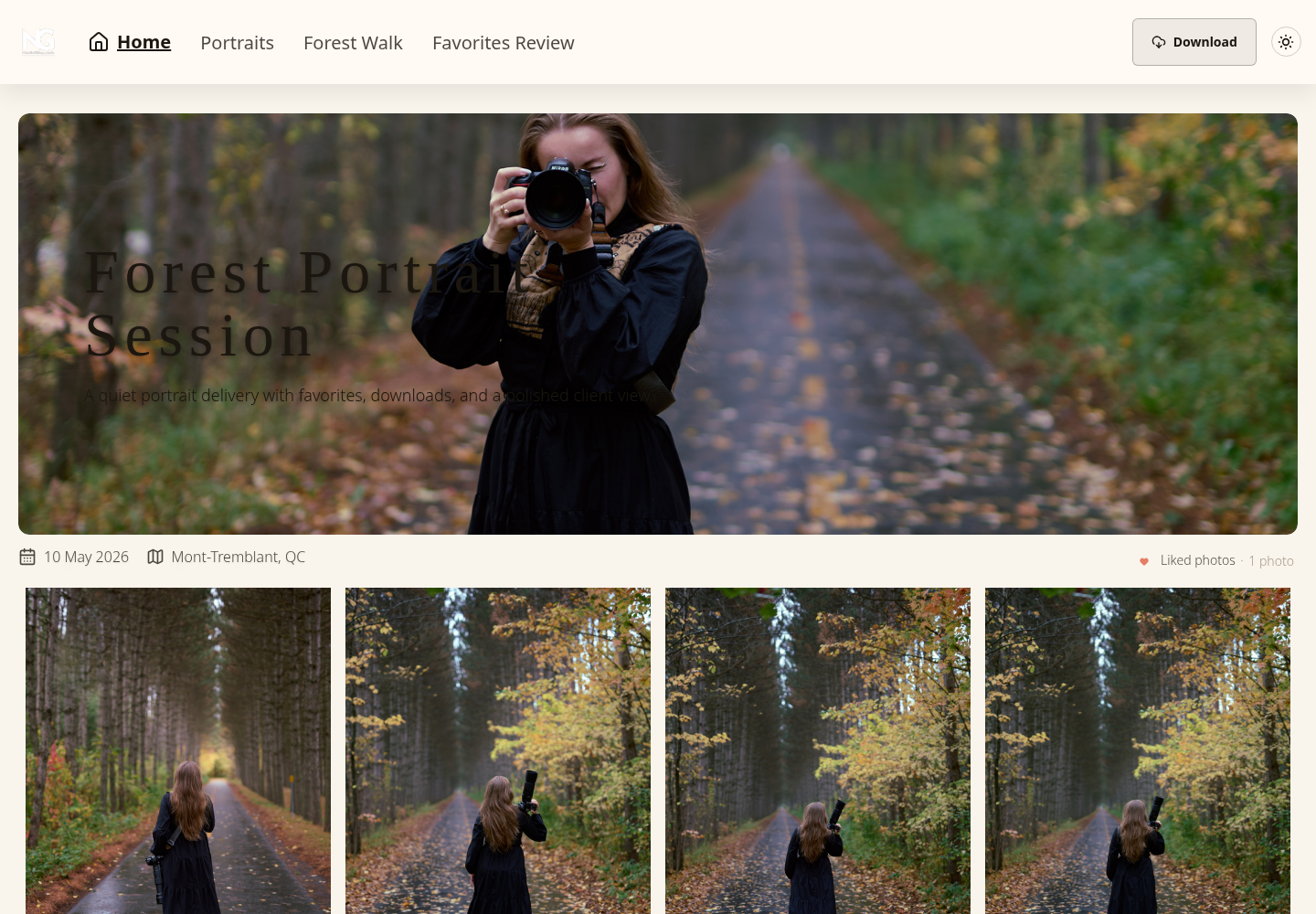
The top of the gallery should immediately show the work. A large cover image, clean gallery name, and simple navigation usually do more than a long intro paragraph.
Use the cover, title and visible actions to identify the job and next step. State whether this is a proof set or final delivery; an attractive cover is not evidence that every file is approved or ready for download.
3. Mobile-Friendly Viewing
Recipients may use phones, tablets or computers. Make viewing and the intended actions clear for their devices instead of assuming every client starts on a phone.
A mobile-friendly photo gallery website should have:
- Large enough thumbnails.
- Tap-friendly controls.
- Fast, simple navigation.
- A lightbox or full-view mode.
- Download controls that are easy to find.
- Text that does not cover the images.
SendPhoto's mobile optimization page covers this from the product side.
4. Organized Collections
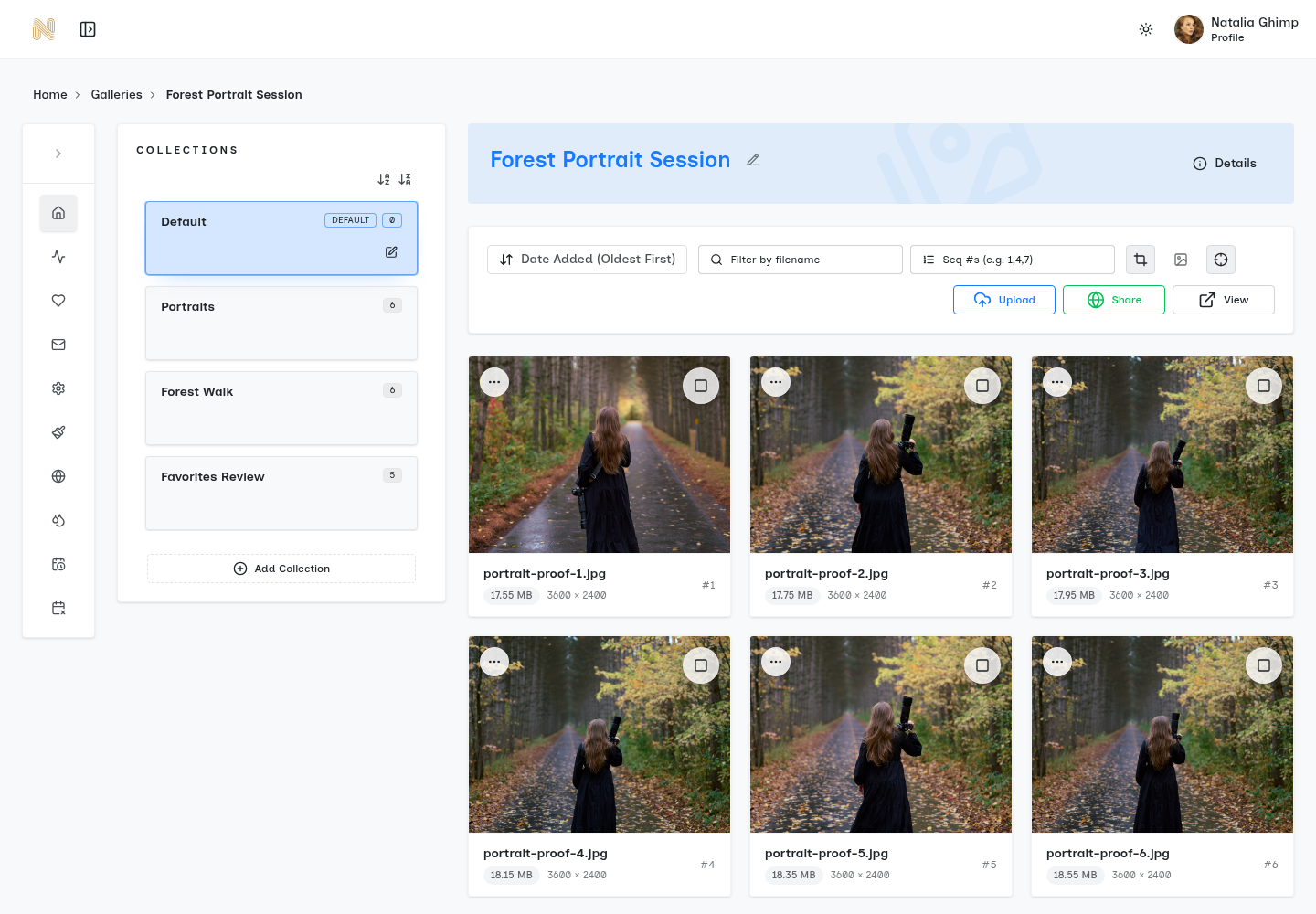
Collections help clients understand the structure of a shoot. They are especially useful when a delivery contains many images.
Common collection examples:
- Wedding: getting ready, ceremony, portraits, reception, details.
- Portrait session: favorites, full gallery, black and white edits.
- Family session: full family, children, parents, candid moments.
- Commercial shoot: product hero shots, details, team photos, social crops.
- Event: speakers, guests, venue, sponsors, awards.
Collections can give a long set useful landmarks. Choose names tied to the recipient’s task and distinguish proofs from finals. A collection label is organization, not permission for a different audience.
5. Privacy Controls
Not every gallery should be public. Weddings, family sessions, boudoir, commercial launches, private events, and unreleased brand work can all need some level of privacy.
Choose access and presentation separately. These options describe different decisions, rather than equivalent levels of protection:
- Public enough to share freely.
- Private link only.
- Password protected.
- Watermarked preview only.
An optional shared password can limit entry to people who possess it and the link, but recipients can forward both. An unlisted link is not identity-based authentication, and watermarking does not make a gallery private. Viewing permits screenshots or other capture even when downloads are disabled. See SendPhoto’s password protection, and choose stronger audience authentication when the assignment requires it.
6. Download Controls
Downloads are where many gallery workflows become messy. The client may need original files, resized images, a few selections, a full ZIP, or no downloads until payment or approval is complete.
Useful download controls answer these questions:
- Can the client download at all?
- Can they download one image, a collection, or the full gallery?
- Are downloads original size or scaled down?
- Should files be watermarked?
- Does the gallery need to stay view-only for now?
Describe the intended download rather than relying only on a quality label. In SendPhoto, downloads depend on global and collection permissions; ZIP downloads include permitted collections. Photo settings include Original and Scaled down. Original with watermarking can use a generated marked image, so it does not always mean byte-identical, unmarked upload data. Review download control against the agreed deliverable.
7. Branding and Domain Fit
A photo gallery website should feel like it belongs to your studio. This does not mean the gallery needs heavy design. Often, the best delivery experience is restrained: your name, your visual style, clean typography, and a link that does not feel random.
Branding can include:
- Studio name or logo.
- Gallery cover style.
- A custom domain.
- Consistent colors.
- Simple contact details.
- A client-facing URL that feels trustworthy.
SendPhoto supports a custom gallery domain through its domain setup. Follow the current connection instructions for the exact domain you intend to use; branding a URL does not replace authentication or keep recipients from forwarding it. See the custom-domain feature guide.
8. A Simple Sharing Flow
Give clients the link and a clear task: view, choose proofs or obtain finals. Explain who may receive the link and any access deadline. A short instruction is useful when it prevents confusion about file versions or audience.
Prepare the gallery, configure access and downloads, then send the invitation. Deliver any password through a separate agreed channel. Sharing expiry closes gallery sharing; a self-delete schedule is a separate retention decision and cannot recall recipient copies. Keep independent originals and final exports.
Common Mistakes With Photo Gallery Websites
The most common mistake is using a gallery page that looks fine but does not support the delivery workflow.
Mistake: Treating a Portfolio Like a Delivery Gallery
A portfolio is curated for marketing. A delivery gallery is organized for the client. Trying to make one page do both jobs can create confusion.
Your portfolio can show your best work publicly. Your client gallery can hold the full delivered set privately.
Mistake: Choosing Access That Does Not Fit the Audience
Account-based access may be appropriate for sensitive collaboration or an authenticated audience. A shared-link gallery may suit another job. Choose deliberately rather than assuming either account creation or account-free entry is always preferable.
Where a shared link and optional password meet the agreement, explain the audience and forwarding limits. Use a different access workflow when identifying each viewer is required.
Mistake: Hiding Downloads
If downloads are included, clients should know where they are. If downloads are not included yet, that should also be clear. Hidden or confusing download controls create support work.
Mistake: Uploading One Long Unstructured Set
A long set can be easier to navigate with useful sections. There is no universal image-count threshold for confusion; choose structure around the job and the client’s task.
Mistake: Forgetting Video
If the agreed job includes clips or other video, confirm accepted inputs, processing and the downloadable version. SendPhoto offers photo and video delivery, but video processing can replace an uploaded file with a stored optimized MP4. Keep an independent master when the original bytes matter.
A Practical Photo Gallery Website Checklist
Use these questions to prepare your own handoff. They are proposed checks, not a report of tests performed for this article:
- Does the gallery title make sense?
- Does the cover image feel polished?
- Can the client browse on mobile?
- Are images grouped into useful collections?
- Is private access set correctly?
- Are watermarks on or off for the right reason?
- Are downloads enabled only where they should be?
- Can the client download the right file size?
- Does the link feel connected to your brand?
- Are photo and video files handled in the same delivery flow?
- Is there one clear link to send?
Record unresolved requirements before delivery. A clear gallery still needs explicit filename and version approval where required; favorites are preferences, not payment, approval or publication permission.
Sample Gallery Delivery Brief
Illustrative portrait job, not a real client record or an account test. Replace the decisions with your agreement; these are not SendPhoto plan limits or automatic settings.
| Decision | Proposed record |
|---|---|
| Purpose | Client selects five proofs for retouching |
| Audience | Client only; request permission before forwarding |
| Structure | Proofs for selection; final exports delivered after explicit approval |
| Downloads | Proof downloads disabled; permitted final JPEGs labeled separately |
| Dates | Agree a review deadline and gallery access-closing date; decide deletion separately |
| Studio record | Keep originals, exports and the approved filenames/version independently |
Collection names do not enforce this audience or proof/final distinction. Configure actual download controls and use separate galleries when different audiences need separate access.
Sample Invitation
Proposed wording for that brief:
Your portrait proofs are ready at the gallery link we agreed. Please mark five favorites, then send the selected filenames so we can confirm the retouching set. These are previews; final downloads follow the agreed approval. Please keep the link within the agreed audience. I will send the password separately and confirm the review deadline with you.
Replace the task and dates before sending. A favorite list starts the selection process; explicit confirmation establishes what you are agreeing to deliver.
Where SendPhoto Fits
SendPhoto is our product and one option for client delivery. It supports named collections, favorites, optional gallery passwords, watermark and scoped download settings, sharing expiry and a separate self-delete schedule. Compare these with the audience, file versions and retention your job requires.
It is not trying to replace every part of a photographer's public website. You can still keep a portfolio site for discovery and use SendPhoto for private galleries, delivery, and client handoff.
That split is often cleaner:
- Public website: attract new clients and show selected work.
- Client gallery website: deliver finished work privately and professionally.
For a product overview, start with gallery delivery.
Related Reading
- Learn the broader delivery workflow in the client gallery guide.
- Compare storage and gallery presentation in online photo gallery hosting.
- Review password protection, watermarks, and download control.
FAQ
What is a photo gallery website?
A photo gallery website is a web-based place to present photos. For photographers, it may be a public portfolio, a session story, or a private client delivery gallery.
Do photographers need a separate client gallery if they already have a website?
Only if the existing website does not meet the job’s viewing, selection, access and download requirements. A site can support public presentation and client delivery with appropriate controls; separate tools or galleries can also work. Choose around the actual workflow.
What should a photo gallery website include for clients?
It should include a clear gallery title, strong image presentation, mobile-friendly browsing, organized collections, privacy controls, download settings, and simple sharing.
Should a client photo gallery be public?
Make public access and publication permission explicit for the job. An unlisted link can be forwarded, while a shared password limits entry without identifying the viewer. Neither should be described as copy prevention. Use access suited to the content and intended audience.
Is a photo gallery website the same as photo hosting?
Not exactly. Photo hosting stores and serves images. A client-facing gallery also handles presentation, privacy, organization, downloads, and the delivery experience.