
Plan a social preview and a client delivery as related outputs from a shoot. The public post explains a small, permitted part of the work; the client gallery delivers the agreed set. They can share an edit and visual style while having different crops, captions, access settings and publication permissions.
This guide follows that handoff: choose destinations before capture, create separate exports, write context, keep a sustainable schedule, and distinguish platform attention from inquiries. A social post is optional; completing client delivery does not automatically authorize publication.
Table of Contents
- Why Social Media Changes the Photography Job
- Platform-Native Sizing, Formats, and Aspect Ratios
- Shoot Once, Repurpose Across Every Format
- Captions, Hashtags, and Community Engagement
- Posting Cadence and Smart Repurposing
- Authenticity Versus the Algorithm
- Measuring Success Beyond Likes and Followers
- Protecting Client Work From Capture to Gallery
Why Social Media Changes the Photography Job
A finished photograph may serve several jobs: a client record, a public portfolio example, a social post or a paid advertisement. Write down which uses are agreed and who will receive each version. A private-gallery link and a public promotional post should not be treated as equivalent audiences.
A useful photograph can go unnoticed, but posting consistently does not guarantee bookings. Service fit, location, timing, availability and the inquiry path also matter. Start with a specific job for the post, such as showing a portrait style or explaining a product brief, then choose an action that fits that job.
Use the social media photography tips guide for individual capture ideas. Here, the emphasis is on planning the public asset and client handoff together, including export versions, permission and measurement.
Mobile sharing changes what counts as visible
A photograph appears in several contexts: a small feed preview, an opened post, a profile grid or an image beside a caption. Check whether the subject and essential wording remain clear in the intended context. A preview is one presentation of the work, not a complete test of its artistic value.
Practical check: identify what should be visible in the preview, then decide whether opening the post adds useful detail or context.
Choose a small set of public images and the separate client exports before posting. List the intended crops, caption facts, visible people, locations and permitted uses. Preserve the source files so a later crop does not require working from an already compressed social download.
A public post may introduce your style or explain a session; a client gallery may contain a fuller agreed set. Give each a clear destination. Do not place an access-controlled gallery link in a public caption unless that wider distribution is intended.
Platform-Native Sizing, Formats, and Aspect Ratios
Image requirements belong to a named placement and publishing route. Organic posts, image ads, video Reels, cover images and profile photos can have different specifications. A still frame for a video is not a complete video export. Check the platform’s current documentation and composer for the exact destination; file dimensions alone do not guarantee the displayed crop or quality.
Export to the slot, not the camera file
Capture enough space for the planned crops, select and edit a source, then export a separate copy for each destination. A crop changes framing before resizing changes pixel dimensions. Avoid enlarging a small crop simply to match a target without checking its remaining detail. Preserve the full client source or master independently.
The following four examples were checked against primary documentation on October 5, 2026. The Instagram rows describe Meta’s Awareness image-ad design recommendations, not general organic-photo limits or Reel-video specifications. The LinkedIn rows describe personal-profile images, not company-page images. Recheck these pages before publishing or buying ads.
| Placement | Aspect Ratio | Pixel Target | Format |
|---|---|---|---|
| Instagram Feed image ad (Awareness) | 4:5 | 1440×1800 recommended | JPG or PNG; ≤30MB |
| Instagram Stories image ad (Awareness) | 9:16 | 1440×2560 recommended | JPG or PNG; ≤30MB |
| LinkedIn personal-profile cover | 4:1 | 1584×396 recommended | JPG or PNG; <8MB |
| LinkedIn personal-profile photo | Square export example | 400×400 at published lower pixel bound | JPG or PNG; ≤8MB |
Sources: Meta’s Instagram Feed image-ad guide, Meta’s Instagram Stories image-ad guide, LinkedIn’s personal-cover guide and LinkedIn’s profile-photo specifications. Meta’s Stories guide recommends leaving roughly 14% at the top, 35% at the bottom and 6% at each side free of key text or logos. These are placement design recommendations; they are not a universal safe area for every organic Story or video.
Use the actual placement preview before publication, especially for edge text and profile-image overlap. The LinkedIn guide notes that cover appearance changes with browser and screen size. The table does not claim that these files were uploaded or campaign results measured for this article.
Build presets once, then stop guessing
For the named placements in the table, the official pages accept JPG or PNG. JPEG is commonly useful for photographs; PNG can be useful for graphics or text, but compare the actual export rather than assuming one format always looks better or is smaller. Use a color-managed export, commonly sRGB for ordinary web photography, and check the destination’s requirements. A color profile does not make every screen look identical.
Keep an independent master, a named destination crop and an export preset whose settings and check date are recorded.
Use the photo resolution guide when one source also needs a client or print export. Social pixel targets do not establish suitability for a lab, and a small social copy should not silently replace the agreed client file.
Shoot Once, Repurpose Across Every Format
Capture planning makes reuse easier, but one frame cannot always survive every crop. A product session might include a flat lay, an angled view, a front view and a separate vertical composition. Treat these as options for the brief; the platform does not make a 45-degree viewpoint universally best.
Build the shot list around reuse
For a product or styled scene, consider these four framing roles and keep only those that serve the brief:
- The Core Shot: a composition that establishes the subject or product clearly, such as a flat lay when appropriate.
- The Ad Crop: a separately considered crop or angled view for the ad brief, not a universally preferred 45-degree viewpoint.
- The Marketplace View: a clear view that meets the particular listing and brand requirements.
- The Story Format: a separately checked vertical composition with room for the placement’s interface or wording.
A crop cannot turn a flat lay into a genuinely different camera viewpoint. Capture the angled or front view separately if the brief needs it. Check any marketplace’s actual image rules and the client’s brand requirements; these examples are not mandatory Instagram, TikTok or marketplace angles.
Design for fast scanning, not slow studying
Look at the intended crop and preview while selecting. A clear subject, useful contrast and deliberate edges can make a small image easier to read. Detailed work can still reward opening a post; do not discard it merely because every feature is not obvious at thumbnail size.
Capture check: decide which crops tell the intended story and capture another composition when an important subject or detail would be lost.
For a proposed session, make the core composition first, then capture any useful angled, front and vertical views. Compare them with the brief and intended destinations before selection. This is a planning sequence, not a promise that four images will produce more reach or sales.
If a brief calls for a short animation, see the Photoshop animation guide. Check the destination’s video format, duration and playback requirements separately; an animated image and a Reel are not interchangeable exports.
A Documented Crop Example
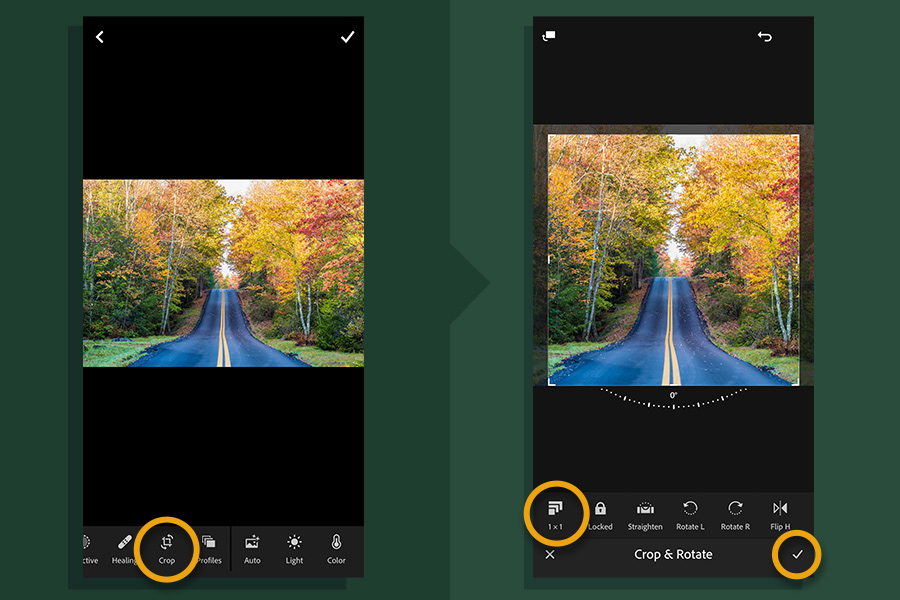
A square may suit a specific creative choice, but it is not the same shape as the 4:5 and 9:16 ad examples above. Choose a composition for the placement and move the crop to preserve the intended subject. If the necessary detail is lost, select another frame or capture a separate composition.
For a hypothetical 6000×4000 landscape source, a full-height 4:5 crop is 3200×4000; a 9:16 crop is 2250×4000. They retain about 53.3% and 37.5% of the source pixel count respectively, before resizing. Those are geometry calculations, not proof that a particular photograph survives the crop. The source, selected crop and smaller export remain separate files.
Captions, Hashtags, and Community Engagement
A caption can add facts that the photograph cannot show: the brief, a lighting decision, the intended use or an agreed credit. Keep those facts accurate. Avoid invented client reactions, private details or claims about a result that was not measured.
Write captions that add what the photo can't say
Answer one useful question behind the image. What was the intended look? Which detail mattered to the client? Why was this composition chosen? Use only information you can publish, and distinguish an actual session from a hypothetical writing example.
A practical caption structure can be as simple as:
- Scene: name the moment or subject in plain language.
- Context: add one line about the setup, brief, or emotion.
- Prompt: invite a reply, save, or question without sounding forced.
For a fictional still-life example, a caption could read: “A side-lit watch study, framed to keep the dial clear against a dark background. The vertical version leaves space for the planned headline. Which detail would you show next?” This is invented sample copy, not an actual client brief or performance result. Adapt the structure to real facts, and omit an interaction prompt when it adds nothing.
Treat hashtags and replies as discovery tools
Use relevant hashtags and account mentions where the destination supports them. Do not promise that broad, niche or branded tags will expand reach. Limits and discovery behavior vary by platform and posting route; the ad specifications above are not a universal hashtag rule.
Reply to genuine questions and join relevant local or genre conversations when useful. Obtain permission before tagging clients or identifying private locations. Thoughtful participation can help people understand your work, but comment activity alone does not establish qualified demand or bookings.
Reserve a manageable block for publication and replies, then review whether it serves your audience and workload. A quiet week during client delivery is preferable to publishing an unapproved image or a rushed misleading caption.
Posting Cadence and Smart Repurposing
Build a routine that fits shooting and editing capacity. Batch approved assets where useful, schedule supported post types with tools you trust, and leave time to answer questions. Scheduling availability depends on the account, platform and format; record which tool will publish each asset.
Build the week around assets, not pressure
Select and edit public assets alongside client work only when publication is agreed. Keep the social export and caption review separate from the private delivery set. Before scheduling, confirm the asset, crop, caption, rights and destination, then check for changed timing or permissions.
A sustainable posting rhythm can include:
- Batch Shooting: create multiple social-ready images in a few sessions each month, instead of chasing a post every day.
- Edit in Blocks: keep editing days focused so delivery and social exports don't collide.
- Schedule Smartly: Queue approved social posts with a native scheduler or a tool such as SchedPilot, which offers a content calendar for planning and scheduling posts across social channels. Check support for your account and post format, and respect client permissions and release dates.
- Repurpose, Don't Repeat: bring back strong posts after a gap, especially when newer followers haven't seen them.
Tie posts to client milestones
A permitted delivery milestone may provide a useful story: a wedding preview, a portrait selection or a product reveal. Confirm any embargo, client approval or launch date before publication. A scheduled gallery delivery does not imply permission to post a teaser beforehand.
Reuse an image when it serves a current purpose and its permissions still apply. Update the context honestly, check credits and restrictions, and distinguish a past session from work completed now.
Planning habit: publish permitted work with a clear purpose, then reuse it only when the context and permissions still fit.
For a proposed weekly routine, separate selection, export, scheduling and replies into short blocks. The particular weekdays and post count are choices for your workload, not platform requirements. Recheck any queued post if the client changes a publication instruction.
Authenticity Versus the Algorithm
A UF/IFAS study of stock and natural photos gives a limited example, not an algorithm rule. Researchers collected 115 Facebook posts from one agricultural outreach organization in 2019; the findings report 58 stock-photo posts and 53 natural-photo posts, with mean engagement rates of 0.06 and 0.21 respectively. The authors caution against generalizing from that single page. The posts were not deliberately created for this comparison, so these observations do not establish that using candid client work will cause a photographer’s bookings or engagement to triple.
Where realism helps and where polish still matters
A permitted behind-the-scenes frame or candid moment can add specific context to your work. Describe what it actually shows rather than calling candid imagery inherently more trustworthy or more successful. Technical polish and honest context can coexist.
Commercial product work may require controlled composition, accurate color and retouching agreed in the brief. Authenticity does not mean leaving every capture flaw. Avoid presenting a composite, generated setting or substantially altered product feature as an unedited record.
Choose an edit that serves the agreed purpose and represents people or products appropriately. Weddings, events and portraits may need a different presentation from a technical product image. Neither a polished finish nor a casual appearance guarantees attention.
Edit for intention, not perfection
Review tone, color, skin texture and edges at the intended viewing size as well as a larger inspection view. Heavy smoothing or saturation may be a creative choice, but it can also obscure texture or alter important colors. Make that decision deliberately, and keep the source for later use.
Ask whether the crop, caption and sequence communicate what you intend. A small-screen preview is useful for that presentation check; it cannot certify every viewer’s device, the platform’s processing or the final engagement result.
Maintain separate public and client exports with clear filenames and recorded uses. Metadata, watermarks and access settings serve different functions; none replaces a publication agreement. A cohesive visual style can help recipients recognize the work without making public posts and access-controlled galleries equivalent.
Measuring Success Beyond Likes and Followers
Choose a success measure that matches the post’s job. A tutorial might seek useful questions; a service post might seek suitable inquiries. Reach or engagement can be useful observations, but they do not by themselves establish revenue or client intent.
Watch the metrics that connect to business
Where available, record saves, shares, profile visits, link taps and DMs alongside likes. Use the platform’s definitions and a consistent date range. A save may reflect inspiration, a DM may be unrelated to buying, and a link tap is not a confirmed inquiry. Keep inquiries, bookings and paid revenue as separate records.
Make the inquiry path understandable, then use these sources of evidence together:
- UTM links: use consistent source, medium, campaign and optional creative labels on a permitted inquiry destination; tags describe a referral, not proof of a sale.
- Question stickers or direct questions: ask where an inquiry came from when appropriate, and record self-reported answers separately from tracked clicks.
- Specific landing pages: direct a wedding, portrait or product post to the matching service information; separate URLs alone do not establish a causal result.
Review a comparable period and record how many posts and inquiries are involved. Note seasonality, service availability, promotions and changes in platform definitions. A small observational sample can suggest what to try next; it does not prove one visual choice caused a booking.
Useful distinction: platform engagement, a qualified inquiry, a confirmed booking and payment are different events.
Compare the creative purpose, audience and inquiry path before deciding what to repeat. A post with no immediate inquiries may still serve education or recognition. Use evidence for the job it measures and verify permission for every asset before reuse.
Keep a Simple Post Record
Use a record like this for a proposed post; it is a blank workflow template, not campaign evidence.
| Record | Decision or evidence |
|---|---|
| Purpose and destination | Service inquiry, explanation or portfolio context; exact placement and publishing route |
| Asset and permission | Source, approved public crop, credit, embargo and intended audience |
| Export and caption | Dimensions, format, preset check date and confirmed caption facts |
| Referral observation | Consistent UTM labels and available platform events in a defined period |
| Business record | Self-reported source, qualified inquiry, booking and payment recorded separately |
Google’s campaign-URL guidance explains source, medium, campaign and content parameters. For example, use source=instagram, medium=organic_social, campaign=portrait_autumn and content=vertical_preview as a proposed naming scheme. Keep names consistent and exclude personal data or private-gallery passwords from URLs. Analytics also depend on correct configuration and applicable consent; missing tracking is not evidence that no one saw or acted on the post.
Protecting Client Work From Capture to Gallery
Treat the public export and client gallery as different access decisions. Before posting, inspect visible clues and file metadata: a location can be revealed by a recognizable building as well as a GPS field. Keep an independent source and create a public copy appropriate for its audience.
Metadata may include capture time, location, camera information and copyright or contact fields. In a documented Lightroom Classic JPEG workflow, Adobe’s export guidance describes Copyright Only and Remove Location Info; those options are unavailable for DNG. Choose what to retain and inspect the exported copy. Do not assume every social platform strips the same fields, or that removing metadata hides a visible address, filename or identifying caption.
Protect the preview, then control the handoff
A watermark can identify a preview, and a gallery password can restrict entry to people who know it. Neither prevents every copy or forwarding. Use access and download controls for the intended recipient group; consider separate galleries if groups must not share the same set. Publication rights remain a separate question.
SendPhoto publishes this guide and offers gallery delivery with optional passwords, watermarks, collections and download settings. Its current Free plan includes 5GB storage, one gallery and 10GB lifetime upload credits. Credits are separate from stored capacity. Paid plans remove SendPhoto branding from the public home page and gallery invite emails. Collections organize a gallery; they are not separate audience permissions.
Check the asset’s source, licence or agreement and any applicable restrictions. A reverse-image search or automated detector cannot establish ownership, permission or the rights of people shown. The U.S. Copyright Office’s guidance for photographers explains U.S. copyright protection and ownership, including work-for-hire exceptions. Copyright and permission to publish a person’s image are different questions; requirements also depend on jurisdiction and use.
Keep a simple consent checklist
Before posting, record the agreed social use, any embargo, approved credits and whether people or sensitive locations should be identified. For minors or unresolved restrictions, follow the applicable agreement and requirements rather than treating cropping or blur as automatic permission. Check again when the proposed audience or use changes.
If the client handoff fits your workflow, consider SendPhoto for the agreed delivery set. Choose the intended download output and retain your own masters: watermarking can make Original-mode photos generated marked copies, while Scaled uses generated output. Gallery and collection settings govern available downloads. Expiring sharing stops later access through that control; it does not recall downloaded files or mean the gallery was deleted. Keep the public social asset, permitted client delivery and independent backup clearly identified.