
Pic-Time and Pixieset both deliver client galleries and sell prints. The useful choice is between specific review, selling, storage and business-management workflows. A blanket “Pic-Time for sales, Pixieset for simple delivery” rule overlooks Pixieset's store and Pic-Time's entry plans.
This comparison is based on official product and help documentation checked October 5, 2026. SendPhoto publishes it and offers a narrower delivery product. It is not a hands-on speed test or proof that either platform will increase sales. Confirm account-specific pricing, regional fulfillment and required features before purchasing.
| Decision factor | Pic-Time | Pixieset |
|---|---|---|
| Presentation | Basic versus Premium design tools vary by plan; compare the actual gallery settings | Gallery covers/layouts; custom branding and domains are paid Client Gallery features |
| Sales workflow | Integrated print store and campaign automations; commission depends on plan and payment collection | Integrated store with automatic or self-fulfillment, coupons and campaigns; paid gallery plans remove platform commission |
| Free entry | Permanent Free plus a 30-day Advanced trial; introductory photo allowance reduces later | Permanent Free: 3GB photos, unlimited galleries and a store with 15% commission |
| Video handling | Included GB allowance per core plan; optional additional video storage | Paid Client Gallery video capacity is measured in time; Basic includes 30 minutes HD |
| Migration | Published paid service from Pixieset, with important exclusions and eligibility checks | For a move into Pixieset, confirm the transfer method and scope; do not infer a matching paid service |
Table of Contents
- Why Gallery Platform Choice Matters for Professional Delivery
- Platform Positioning and Core Philosophy
- Gallery Presentation and Client Experience
- Sales Automation and Commerce Capabilities
- Pricing Structure and Total Cost Analysis
- Migration Considerations and Platform Switching
- Choosing the Right Platform for Your Photography Business
Why Gallery Platform Choice Matters for Professional Delivery
Start with the handoff you sell: finished downloads, retouching selections, album review, print orders, or a combination. A gallery that looks right can still omit a needed review step or require a separate business subscription. Keep your original files and client records independently of either gallery service.
The cost of friction shows up after delivery
List repeat tasks before ranking interface simplicity: creating a gallery, setting download sizes, collecting selected filenames, handling an order and answering access questions. Identify which tasks are supported by the exact subscription. Claims about saved minutes or lower support load require your own observation; this article does not assign either product a measured advantage.
Decision rule: choose the plan that covers the required client actions and business structure, then compare its complete operating cost.
Different studios feel the trade-off differently
A wedding studio may need guest access, album choices and prints; a portrait studio may need a defined number of retouching selections; a commercial job may need notes, specific file formats and a clear approval record. These are example requirements, not rules that one photography genre belongs on one platform.
For several photographers, verify seats and simultaneous logins. A brand, a gallery and a user account are different things. Pic-Time's unlimited-storage policy says teams and agencies need custom plans. Ask each provider for an account configuration that fits the people doing the work.
Platform Positioning and Core Philosophy
Compare product boundaries rather than company revenue estimates. An investment, employee count or generic company profile does not establish whether a particular gallery plan supports your workflow.
What each platform seems optimized to do
Pic-Time groups client galleries, print selling and automations in its Client Delivery Suite. Pixieset offers Client Gallery alongside separate Website and Studio Manager products. Its subscription guide explains that Suite bundles Client Gallery, Website and Studio Manager; buying Client Gallery alone does not automatically buy the paid versions of the other products.
Use the Pic-Time plan matrix and Pixieset Client Gallery plans to compare a defined bundle. Check album proofing, client selections, custom design, branding and the business tools you need, rather than treating “all-in-one” as an exact feature list.
Why maturity matters for studio buyers
For long-lived archives, ask about account support, cancellation, storage reductions, export formats and migration scope. Current documentation and a written answer about your account are more useful purchase evidence than unsupported estimates of a vendor's revenue or team size. A gallery subscription is not your only backup.
Gallery Presentation and Client Experience
Compare the client actions as well as the cover image. Can a client distinguish a favorite from a final selection, understand the download format and reach the required print products? Branding choices do not prove that those steps are complete.
Layout, branding, and mobile behavior
Pixieset's paid Basic gallery tier adds custom branding and a custom domain. Pic-Time lists logo/watermark branding from Beginner and Premium design tools on Professional and Advanced. Check the live plan details and sample galleries for the layout you want. Neither a promotional screenshot nor the adjective “premium” proves that one is easier for your clients.
If clients commonly open links on a phone, include that device in your own purchasing evaluation. This documentary comparison makes no measured mobile-performance or usability ranking.
Access, downloads, and proofing behavior
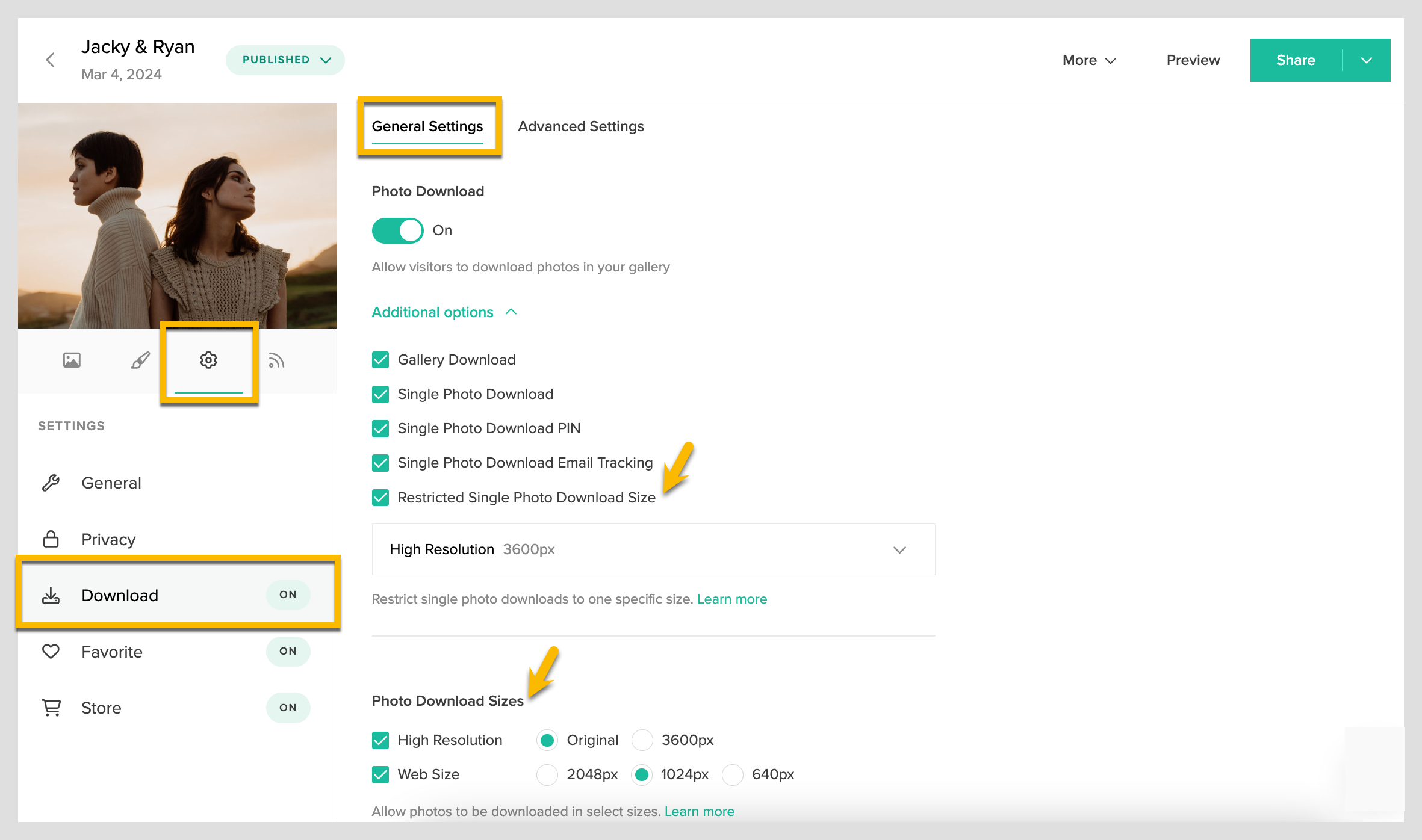
Pixieset's download documentation distinguishes web sizes from High Resolution at 3600px or Original Size; Original Size is available on upgraded accounts. Its settings can separate gallery and single-photo downloads and add a download PIN. A gallery password, download permission and watermark perform different jobs; none guarantees a saved copy cannot be forwarded.
For retouching, Pixieset proofing includes favorites lists, notes on selected photos and exportable filenames/CSV. Pic-Time 2.0 Selection Requests on Professional and Advanced can set a required count or range, deadline, participants and comments. Pixieset also offers preset favorite lists with a maximum selection. A maximum cap differs from a required exact count and deadline; compare the completion rules your workflow needs. Neither should be assumed to create a contract approval or payment record.
- For viewing: define which visitors should see which gallery or media.
- For review: define the selection count, feedback method and what counts as completion.
- For delivery: define the permitted files and sizes separately from review.
Sales Automation and Commerce Capabilities
Both services combine galleries with selling. Compare the actual products, lab availability, payment handling, campaign behavior and fees. A store can be useful without an aggressive sales campaign; automation also needs appropriate client communication and business policies.
Pic-Time leans into sales workflow
Pic-Time's published suite includes print fulfillment and automated campaigns. Its commission schedule lists 15% on Free and Beginner, 8% on Professional and 6% on Advanced when Pic-Time collects payments, calculated on profit/markup. Professional and Advanced can avoid that platform commission by collecting payment themselves; Free and Beginner cannot. Recurring gallery-backup products have an exception. Confirm the payment route and other costs instead of labeling every paid plan commission-free.
Pixieset stays closer to straightforward delivery
Pixieset can support a straightforward delivery workflow, but its integrated Store also sells prints and digital downloads, with automatic lab fulfillment or your own fulfillment. It offers coupons, gift cards and sales banners. The platform commission is 15% for Free and 0% for upgraded gallery accounts. That does not eliminate production, shipping, payment processing or tax costs.
Paid gallery plans also include email-campaign allowances. Treat those tools as choices for your sales process, rather than assuming Pixieset has no commerce or follow-up capability. Website and Studio Manager remain separate product decisions unless included in your chosen bundle.
What the commerce gap means in practice
Choose a representative print product and check its lab, destination country, size, delivery options and final order economics. Then compare a required campaign: who receives it, what triggers it and whether it needs manual work. This is a proposed purchasing exercise, not a completed checkout or revenue experiment.
If a workflow improvement is expected to offset a higher subscription, record the assumption separately from the quoted cost. More campaign tools do not guarantee more orders. The Pic-Time pricing breakdown covers its detailed cost inputs; this article focuses on the two products' different jobs.
Pricing Structure and Total Cost Analysis
Budget photo storage, video storage, required features, people, selling and transfer separately. Prices below are USD headline figures checked on October 5. “Annual equivalent” means the advertised monthly equivalent with annual billing, which may be rounded; verify the actual checkout total, tax, promotions and renewal price.
The entry tiers look simple, but the usage pattern changes the math
| Client Gallery plan | Photo capacity | Included video | Monthly / annual equivalent |
|---|---|---|---|
| Pic-Time Free | 10GB initially; 3GB after the introductory window | 1GB | US$0 |
| Pic-Time Beginner | 20GB | 5GB | US$8 / US$7 |
| Pic-Time Professional | 100GB | 30GB | US$25 / US$21 |
| Pic-Time Advanced | Unlimited photos, subject to terms | 60GB | US$50 / US$42 |
| Pixieset Free | 3GB | No included paid-plan video allowance | US$0 |
| Pixieset Basic | 10GB | 30 minutes HD | US$10 / US$8 |
| Pixieset Plus | 100GB | Check the current tier's time/quality allowance | US$20 / US$16 |
| Pixieset Pro | 1TB | Check the current tier's time/quality allowance | US$30 / US$24 |
| Pixieset Ultimate | Unlimited photos; RAW cap applies | Check the current tier's time/quality allowance | US$50 / US$40 |
Sources: Pic-Time core pricing and Pixieset gallery pricing. Pixieset lists up to 1,000GB of RAW photos for Ultimate; “unlimited” does not mean every file category is unrestricted. Pic-Time's individual-photographer fair-use terms and custom agency eligibility also apply.
Pic-Time's Free-plan explanation says its introductory three-month photo window starts at account creation and includes the 30-day trial. The trial and permanent Free plan are different. Free storage does not become 20GB; that is Beginner's paid photo capacity. Preserve independent files before reducing storage because over-limit galleries can be purged.
Pic-Time's additional video options are 100GB at US$10 annual equivalent/US$16 monthly, 1TB at US$25/US$42, 2.5TB at US$40/US$66 and 5TB at US$60/US$100. These require an active plan and should be considered after its included video pool. Confirm the resulting allowance and renewal charge; do not apply a promotional discount twice.
Pixieset measures video allowance in time, while Pic-Time prices GB pools. A duration estimate is not a fixed GB conversion. Pixieset's file-format guidance says video downloads are high-quality MP4 at a size governed by source and plan, rather than promising the untouched uploaded video file. Keep editing and camera masters independently.
Migration cost changes the decision for established studios
The Pic-Time gallery-migration page describes the assisted transfer service. Its displayed rates are US$1 per gallery on yearly plans and US$2 on monthly plans, with a two-year discount. However, the page also says “Offer ended on November 30th.” Obtain current eligibility and a written quote before counting any rate or promotion as payable today.
A simple cost lens for different studios
Here is a fictional capacity comparison: a portrait photographer keeps 8GB of photos plus 20 minutes of HD video, with video files totaling 2GB. Pic-Time Beginner fits the stated 20GB photo/5GB video pools; Pixieset Basic fits the stated 10GB photo/30-minute HD pools. Their regular monthly headline prices are US$8 and US$10 respectively. This is not a finding that the features, output or checkout costs are equivalent.
Now change the job to “client must choose exactly ten proofs by a deadline.” Capacity alone no longer settles the purchase: compare Pic-Time's structured Selection Request with Pixieset's preset favorite-list maximum, notes and completion workflow. Price the plan or manual process needed to meet that requirement. A team or RAW/video-heavy library needs its own scoped comparison.
Migration Considerations and Platform Switching
Migration changes more than storage. Before switching, inventory source files, gallery structure, client contacts, favorites, old URLs, access codes, orders and videos. Assign each item a destination or a separate retained record. Do not cancel the old account just because photos appear in the new one.
Pic-Time's migration pricing makes the archive visible
The paid migration FAQ applies to Pixieset galleries moving into Pic-Time. It lists a minimum of 20 galleries and requires a paid account with enough storage. Videos and favorites lists do not transfer. Client emails and scenes can transfer, but user roles, covers and access credentials can change; exact old URLs are not guaranteed. These exclusions can matter more than the per-gallery fee.
Its displayed rates are 50¢ per gallery with two years, US$1 with one year and US$2 for monthly plans. Because the landing page carries an expired-offer notice, treat them as published reference rates until the migration team confirms your quote. For a fictional 100-gallery move, 100 × US$1 = US$100 at that assumed rate, before subscription or other work. That is arithmetic, not an active offer or migration receipt.
Old links, new habits, and staff training
Create a written cutover checklist: destination gallery, permitted viewers, download sizes, preserved selection records and the client's new link. Keep the old source records until the required items are accounted for. A custom domain change does not recreate gallery data or guarantee old paths will resolve.
Train staff on the changed actions, not a predicted learning curve. Ask them to explain how a favorite becomes an editing list and how a download is enabled. If client notification is required, plan appropriate messages and timing; migrating contacts alone does not establish permission for a marketing campaign.
Which studios feel switching pain most sharply
A wedding archive may contain guest contacts and orders; portrait galleries may contain retouching selections; commercial work may include video and approval records. Those are different migration risks. Identify them before choosing a transfer service. The photo-hosting selection guide adds retention and exit questions to the purchasing decision.
Choosing the Right Platform for Your Photography Business
Choose the workflow you can describe and the costs you can confirm. Both providers can deliver images and sell prints. Pic-Time's structured selection and automation tools may suit one process; Pixieset's gallery/store plus separately selectable business products may suit another. Neither “premium” nor “simple” is a measured result here.
A practical decision matrix
- Consider Pic-Time for a defined gallery-sales or selection workflow. Verify the required tools on the actual tier, the payment route and individual-versus-team eligibility.
- Consider Pixieset for its gallery/store and product mix. Budget paid branding, Original downloads and video correctly; compare Website and Studio Manager separately or through Suite.
- Compare both for a mixed business. Write one must-have action per client type and check each against the proposed plan.
- Check migration before signing. Get a confirmed transfer quote, identify exclusions and preserve source records and client access commitments.
To make the decision concrete, use a proposed six-row comparison sheet: required client action; minimum plan; photo/video capacity; complete quoted cost; missing manual step; exit or migration condition. Fill it from documentation and your own authorized evaluation. Record unknowns rather than marking them as passed. No upload, download or paid-order test is reported here.
If your only missing job is finished photo/video delivery, SendPhoto is a narrower option with optional passwords, image watermarks, favorites and download controls. Favorites are selections to review, not a formal approval workflow. It has no native print store or CRM; compare its storage tiers and current terms rather than treating it as an equivalent replacement for either broader platform.
Keep print commerce, business administration and finished-file delivery as separate requirements. Choose the product combination that meets those requirements and has an acceptable confirmed cost, with an exit plan for your files and records.