
Good product photos show the item clearly and consistently. This product photography guide walks through a practical workflow for planning the shot list, choosing light, controlling backgrounds, showing scale, editing accurately, and delivering final files without confusion.
Start with a repeatable setup, then inspect focus, reflections, color and the intended crop. This guide includes a real credited bottle photograph and links to Jody Dole’s published lighting comparisons. The six-shot plan and export brief are proposed examples, not a product shoot or upload test we performed.
Start With the Product Goal
Before setting up lights, decide what the photo needs to do. A marketplace listing, website product page, catalog image, campaign image, packaging mockup, and social post all need different crops and levels of context.
Ask these questions before the shoot:
- Where will the images be used?
- Does the product need a clean cutout, lifestyle context, or both?
- Which details need to show construction, dimensions, texture or function?
- Should the final set include vertical and horizontal versions?
- Who needs to review and download the final files?
Confirm the destination’s current image rules and the client’s required aspect ratios before shooting. A store grid, marketplace main image and campaign advertisement can have different requirements; a white background is not a universal rule. Agree what retouching is allowed and who signs off the selected filenames.
Build a Repeatable Product Shot List
A consistent shot list matters more than taking dozens of random frames. For most products, capture a set that helps a customer understand shape, scale, material, and use.
| Shot Type | What It Shows | Example |
|---|---|---|
| Front hero | Main product identity | Bottle, bag, shoe, candle, print, or package facing camera |
| Side or angle | Shape and depth | Three-quarter view of a box, jar, or wearable item |
| Detail | Texture, finish, label, stitching, or mechanism | Close view of fabric, clasp, print quality, or ingredient label |
| Scale | Context for size | Product in hand, on a table, beside a common object, or worn by a model |
| Use case | How the product fits into life | Mug on a desk, jewelry worn, skincare in bathroom setting |
| Group | Variants or bundles | Colors, sizes, kit contents, or matching items |
Keep the order similar for comparable products, but adapt it to the item. Record the SKU, view and variant in a shot log. A hand or table offers context, not an exact measurement; include verified dimensions in the listing and use a measured reference when the brief needs it.
A six-shot bottle plan to try
For a hypothetical glass bottle with SKU GLA001, plan these six roles. They are intended captures, not six pictures made for this article. Substitute a different product or skip irrelevant views with the client’s agreement.
- Front: show the complete bottle and label, with room for the agreed square crop.
- Three-quarter: show depth and the cap; keep the angle repeatable for similar bottles.
- Detail: show the label, closure or glass texture, checking the required area at magnification.
- Scale: include a measured reference or an agreed hand-held view, without presenting hand size as a measurement.
- Use: show the bottle in its intended context; arrange props so they do not imply included accessories.
- Group: show only the actual variants or bundle contents supplied, and identify what is included.
Keep one baseline light and camera position, then change one view at a time. Review labels, edges and focus before putting the item away.
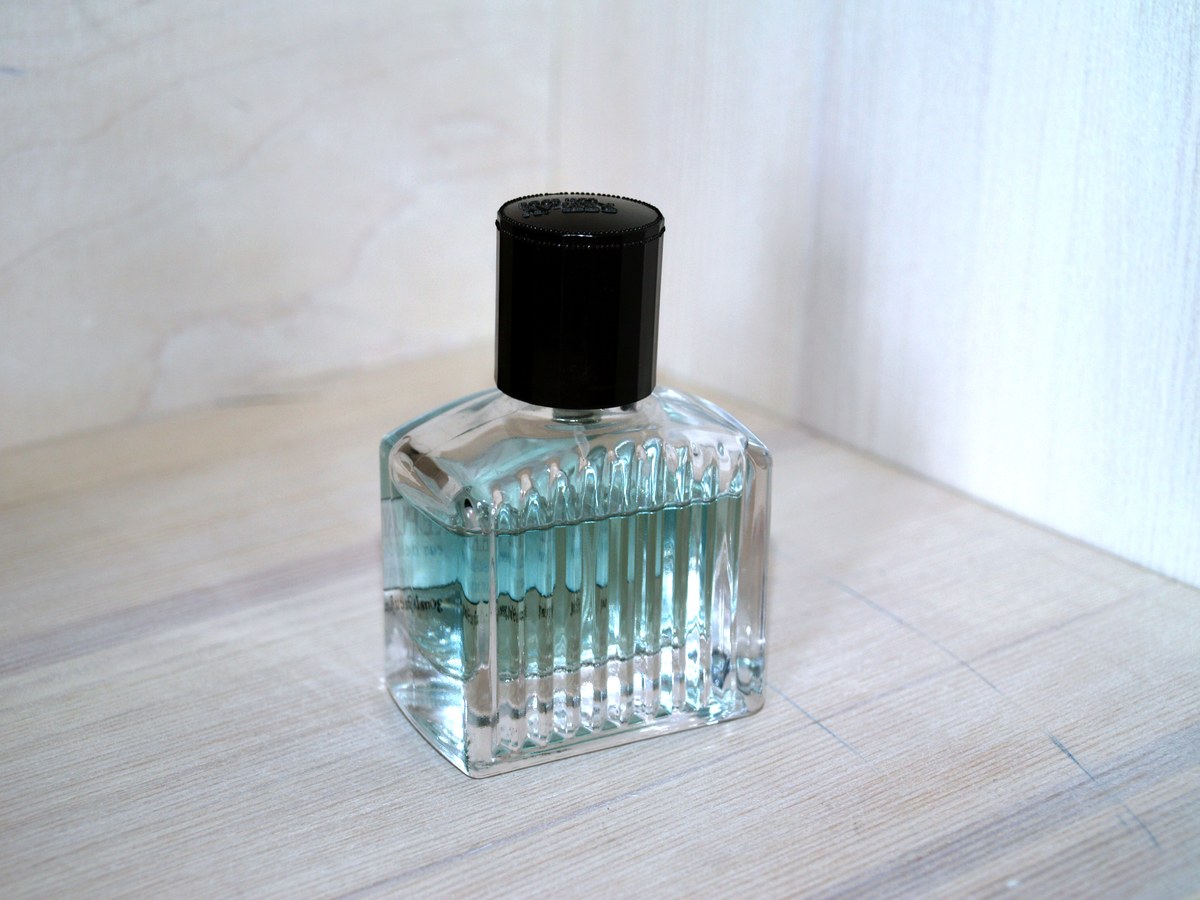

Read this example critically: the ribs, cap and base show shape, but the cap’s front is dark, the glass has strong reflections and the tabletop adds texture. It can illustrate an object in context; it is not proof of an approved white-background listing, accurate color or a six-view delivery set. The lighting equipment is not visible in the frame.
Use Clean, Controllable Light
Lighting should reveal the product, not distract from it. A broad diffused source is a manageable starting point for many items, but reflective, transparent and textured surfaces need different treatment. Soft light does not automatically remove reflections or reveal every edge.
Simple lighting options:
- Window light with a white board or reflector opposite the window.
- A light tent for small reflective objects.
- One large softbox placed slightly above and in front of the product.
- Two soft lights for a flatter white-background look.
- Backlight or side light for glass, texture, or shape when used carefully.
Watch for glare, blocked labels, and shadows that hide important edges. Reflective products such as jewelry, bottles, electronics and glossy packaging show the light sources and surroundings in their surfaces. Move the light, diffusion or a white or black card while checking what changes. For clear glass, edge definition may matter more than making every reflection disappear.
Read a real lighting comparison
Jody Dole’s Nikon jewelry walkthrough includes actual light-tent setups, a bracelet photographed with diffused and direct flash, a bead detail and a coordinated group. In the bracelet pair, compare shadow edges and highlights: the direct-flash version has more distinct shadows. The published exposures also differ, so it is not a perfectly controlled one-variable experiment.
Use the setup photographs to understand where diffusion sits relative to the jewelry, then study the detail and group pictures for coverage. These are Dole’s examples of different pieces, not our six-shot set. A product may need a visible highlight to describe its finish; inspect whether that highlight obscures the label or shape rather than assuming every bright area is a defect.
For your own comparison, keep the camera and product still, make a baseline, change one light or card position and review the result. This is a suggested exercise. Do not infer a universal light power or camera recipe from someone else’s finished image.
Choose the Background for the Job
White or neutral backgrounds are useful when the product needs to be compared quickly. Lifestyle backgrounds are useful when the buyer needs context, mood, or scale.
Use a clean background when:
- The product shape or color must be easy to inspect.
- You are photographing many SKUs in one session.
- The images need to sit together on a product grid.
- The client wants flexible assets for web and catalog use.
Use a lifestyle background when:
- The product needs a mood or setting.
- Scale is hard to understand on its own.
- The brand sells a feeling as much as the object.
- The product is worn, held, consumed, decorated, or used in a room.
If you mix both, keep the lighting and color treatment consistent so the set still feels like one project.
Stabilize the Camera and Product
Small changes in camera height, product angle, or crop can make a product set feel uneven. Use a tripod when possible, especially for batches.
Helpful setup habits:
- Mark the table position with tape.
- Keep the camera height consistent for similar products.
- Use a remote trigger or timer to reduce camera shake.
- Clean the product before every angle.
- Use secure product supports only when suitable for the object; check that adhesives or clamps will not damage its surface.
- Take one test frame and zoom in before shooting the full set.
For flat lays, keep the sensor plane parallel to the surface when an even overhead view is wanted. For upright items, check camera height and tilt and leave room for perspective correction; a level camera does not remove lens distortion. Secure overhead equipment and keep hands and people clear of unstable supports.
For a stationary tabletop item in continuous light, low ISO and f/8 can be illustrative starting choices; set shutter speed for exposure with the camera stabilized. Check the near and far details at magnification. Close work can still have shallow depth of field. A smaller aperture adds depth but costs light and can reduce fine detail through diffraction; compare results instead of always choosing the highest f-number. Subject movement needs a suitable shutter speed, and flash must respect the camera’s actual sync and shutter-mode limits. These are proposed settings, not the bottle photograph’s measured exposure.
Show Shape, Scale, and Detail
Product photos fail when they show only a pretty front view but leave basic questions unanswered. The viewer should understand what the product is, how large it is, what it is made from, and what details matter.
Detail shots can show:
- Fabric weave, stitching, engraving, or finish.
- Label information and packaging details.
- Zippers, clasps, closures, buttons, or moving parts.
- Texture on food, ceramics, candles, prints, or skincare products.
- Color variation across a collection.
Scale shots are especially useful for products that look similar online but feel different in person. A hand, model, tabletop, room or common object can provide context, but perspective and unfamiliar reference sizes can mislead. Keep verified dimensions separate from the photograph and do not enlarge an item in a composite to suggest a different size. For wearable products, agree the model’s participation and image-use permissions.
Keep Color Accuracy in Mind
Product color should be handled carefully. Strong color casts, mixed lighting, heavy filters, or inconsistent editing can make a product look different from one image to the next.
Basic color habits:
- Reduce competing light sources when they create unwanted color casts; do not assume one white balance fixes separately lit areas.
- Set white balance consistently.
- Photograph similar products under the same light.
- Compare the edit against the actual item when possible.
- Avoid heavy presets that shift brand colors or materials.
For color-critical work, agree a viewing and approval process. Monitor appearance and camera white balance alone do not prove that a product color is accurate.
Record a color reference
Calibrite’s photographic-target guide shows a real 24-patch chart and separate neutral white-balance and gray-balance targets. They serve different purposes; an arbitrary white sheet is not necessarily neutral.
- Keep the intended product lighting stable and photograph a suitable neutral or color target at the product position, evenly lit and without glare or clipped patches.
- Use the neutral reference for white balance; if using a color-chart camera profile, follow the current target and software instructions for that camera and lighting.
- Apply the same baseline only to frames made under the same conditions. Record another reference when lighting changes.
- Review on a calibrated, profiled display with controlled viewing light and compare the physical item where practical. Agree any remaining material or finish differences with the client.
This is a proposed reference workflow, not a color-accuracy test or a promise that every customer’s screen will match. Metallic, fluorescent or translucent materials can remain difficult to represent.
Edit Product Photos Cleanly
Editing should make the product clear and consistent. It should not change what the product is.
A simple product editing order:
- Select the sharpest frames.
- Straighten and crop.
- Correct exposure and white balance.
- Remove handling dust, lint and fingerprints when agreed; retain real product features and disclose defects where relevant.
- Match brightness and color across the set.
- Export versions for the final use.
Avoid texture removal, aggressive sharpening or color changes that misrepresent the item. Retouching handling dust is different from hiding a manufacturing defect, changing the label or making a finish appear smoother than it is. If you are new to editing, start with the basics in how to edit photos for beginners.
Prepare Files for Review and Delivery
Product photography often involves several people: the photographer, business owner, marketing manager, designer, marketplace assistant, or web developer. Clear delivery saves time.
Before sending the final set, organize files by:
- Product name or SKU.
- Angle or use case.
- Final edited images.
- Web-size exports.
- Full-resolution exports when needed.
- Optional selects or alternate crops.
Avoid sending final product work through scattered message threads. A client should be able to find the right product, download the correct files, and share the gallery with the right team members.
Use SendPhoto gallery delivery to organize review and final files into collections. Download settings control the offered delivery options, and a gallery password adds a shared-password access gate. A recipient can forward the password with the link; it does not guarantee embargo confidentiality or stop screenshots. Settings cannot recall an already saved file. Favorites communicate preferences, not final approval: confirm the selected SKU, view and filename separately.
A Shopify export brief example
Shopify’s product-media requirements, checked October 5, 2026, allow product and collection images up to 5000 × 5000 px or 25 megapixels, with file size smaller than 20 MB. The page suggests 2048 × 2048 px for square product images and explains that theme display varies. These product-image rules are not the rules for every other Shopify upload or marketplace.
For the hypothetical GLA001 brief, agree six square JPEGs at 2048 × 2048 px with an embedded sRGB profile, a consistent margin and a white background for the three listing views. Use the agreed contextual background for scale and use views; confirm the bundle view separately. This is an example client specification, not a Shopify mandate or proof that the bottle image above meets it.
- Names:
GLA001_front_web_v01.jpg,GLA001_angle_web_v01.jpg,GLA001_detail_web_v01.jpg, plus scale, use and group files using the same pattern. - Size check: 2048 × 2048 is 4,194,304 pixels, about 4.19 MP. Check actual encoded bytes separately; pixel count does not establish file size.
- Compression: choose JPEG quality after inspecting label text, gradients and edges; there is no universal quality number that guarantees readability or a file-size target.
- Masters: retain capture files and edited masters separately. Supply larger or print-specific exports only when agreed; web delivery is not a master-file backup.
- Handoff: include a manifest with SKU, variant, view, filename, dimensions, profile and version. Have the store owner review the actual theme crop and destination rules before publication.
The embedded profile defines how a compatible viewer interprets the file; it does not guarantee accurate color on every screen. Recheck platform requirements for a later delivery, and distinguish the final export from any gallery preview or resized download.
Product Photography Checklist
Before the shoot:
- Confirm the final use and crop needs.
- Build a shot list.
- Clean every product.
- Prepare background options.
- Set up consistent light.
- Charge batteries and prepare enough storage. Reuse or clear media only after verifying independent backups and completing any agreed retention needs.
During the shoot:
- Take a test frame.
- Check focus and reflections.
- Capture front, angle, detail, scale, and use-case shots.
- Keep camera height consistent.
- Review labels, edges, and product condition.
- Photograph variants in the same order and record a new reference if lighting changes.
After the shoot:
- Cull for sharpness and accuracy.
- Edit consistently.
- Export the right versions.
- Name files clearly.
- Organize products into folders or collections.
- Deliver files in a gallery the client can revisit.
Common Product Photography Mistakes
Avoid these problems when possible:
- Using mixed light that creates strange color.
- Cropping too tightly and cutting off product edges.
- Forgetting scale or detail shots.
- Leaving handling dust or fingerprints; hiding required labels or real defects through retouching.
- Editing one item differently from the rest of the collection.
- Sending files without clear names or folders.
These checks can catch avoidable issues before handoff. Clean the product, stabilize the setup, review the test frame, and keep the final files organized.
Related Guides
- Browse the SendPhoto photography blog
- How to edit photos for beginners
- Gallery delivery for photographers
- Download control for client galleries
- Password-protected client galleries
FAQ
What is the easiest product photography setup for beginners?
Start with one product, a clean table, soft window light, a neutral background, and a reflector or white board. Use a tripod if possible and take a test frame before shooting every angle.
Do product photos need a white background?
Not always. Check the destination’s current rules and the agreed brief. A product grid can benefit from consistent backgrounds and aspect ratios; contextual images can show use or scale. Do not assume one platform’s main-image rule applies to every photograph.
How many product photos should I deliver?
Deliver enough images to show the product clearly: front, angle, detail, scale, and use-case shots where relevant. The exact number depends on the product and client brief.
How should I send product photos to a client?
Organize final images by product, angle, and export type. Use a clear file manifest and the agreed delivery channel. A gallery can organize collections and preferences, but confirm final filenames separately. Passwords can be forwarded and do not guarantee confidentiality for an unreleased product.