
A gallery link is an access route, not a promise that photographs will stay private. In a hypothetical wedding delivery, the couple forwards both the link and password to relatives. A relative saves a photograph and reposts it. Adding a password or closing the gallery later cannot recall that saved copy. Agree the audience and permitted uses before delivery, then configure the access controls that support those decisions.
This workflow separates preparation, passwords, expiry, downloads, watermarks and retention. It uses an existing SendPhoto demonstration screenshot and documented controls; it is not a penetration test, compliance assessment or report of a real client incident. For confidential commercial material, follow the client's approved transfer requirements rather than assuming a gallery is suitable.
Table of Contents
- Why Your Current Sharing Method Might Be Exposing Client Photos
- Preparing Your Gallery Before You Share Anything
- Access Controls That Actually Protect Client Galleries
- Watermarking and Encryption for Different Shoot Types
- Balancing Client Experience With Security Requirements
- Post-Delivery Cleanup and Gallery Retention Policies
- Your Gallery Security Checklist Before Every Delivery
Why Your Current Sharing Method Might Be Exposing Client Photos
A working upload does not answer who should receive the photographs, which exports they should get or how long the delivery should remain available. Those questions apply to a client gallery and a storage-folder link alike. Services and plans offer different controls, so compare the actual settings instead of assuming every storage service lacks access restrictions.
In the hypothetical wedding above, the problem is a mismatch between the intended audience and what recipients do with access. If family sharing is part of the agreement, supply a suitable family set. If getting-ready photographs should remain private to the couple, exclude them from that set. A request not to forward a link is useful communication, but it is not a technical barrier to forwarding.
The weak point is usually the workflow
Before choosing settings, identify the jobs each control can do:
- Forwarding resistance: A password adds a requirement beyond knowing the URL. Someone can still forward both. A personal invitation link does not by itself prove that the named person is the viewer.
- Time limits: Expiry reduces future access through an old gallery link once the configured expiry takes effect. It does not remove copies already saved.
- Download governance: Enabling or disabling gallery downloads changes the offered download action. A visible photograph can still be captured or copied in other ways.
- Visual protection: A watermark can identify a proof and discourage casual reuse. It does not establish payment, approval or usage permission, and it can be cropped or altered.
- Revocation: Disabling sharing closes future gallery access through that route. It cannot retrieve downloaded files or remove photographs from someone else's device.
For a low-friction recipient route, see sharing photos without an account. Decide whether that access model fits the assignment; convenience is not evidence of recipient identity.
Preparing Your Gallery Before You Share Anything
Keep a studio working set separate from the set intended for delivery. Remove test frames, duplicates, unfinished exports and photographs outside the agreed audience. Retain source files and independent backups outside the delivery gallery.
For a wedding, an organizational starting point is:
- Ceremony: Finished ceremony photographs, without duplicate exports or test frames.
- Portraits: Couple and family portraits; put private getting-ready photographs in a separately configured gallery if they need a different audience.
- Details and reception: Rings, décor, speeches and dancing, grouped so recipients can find them.
- Selections or proofs: Clearly labeled review exports, kept distinct from the agreed final deliverables.
These are navigation groups, not automatic permission boundaries.
Build permissions into the folder structure
Organize the local exports around who may receive them. A corporate headshot client may need finished portraits without behind-the-scenes material. A couple may need a private set as well as photographs they can share with family. Prepare those sets separately before uploading; do not rely on a folder name such as “Private” to restrict access.
In SendPhoto, collections organize a gallery. They do not provide a separate access boundary for every collection or recipient. Use separately configured galleries when audiences need different access, and verify the contents of each set. The photo organization guide covers naming and grouping, rather than replacing the access decision.
Export for the actual purpose
Proofs and final deliverables may need different sizes, watermarks and download settings. Choose exports for the agreed use rather than assuming the delivery service will create the correct print file, social crop or clean master automatically. Use stable filenames so a client can identify a selection or correction unambiguously.
Before uploading, ask:
- Is each file ready for this stage? A proof should be labeled as a proof; a final should meet the agreed delivery specification.
- Is the audience boundary correct? Check which actual gallery contains each file, not just which folder label appears above it.
- Can the client understand the set? Explain the collection names, available actions and how to return selections or request a correction.
Access Controls That Actually Protect Client Galleries
Configure each control for its purpose. A password, an expiry date and a download switch do not collectively prove encryption quality, a named person's identity or compliance with a client's security policy.
The August 2020 NIST bulletin on protecting file exchanges addresses enterprise file exchange. It discusses weak or missing encryption and the trust placed in third-party services. Where organizations use cryptography to protect confidentiality and integrity, it recommends NIST-approved algorithms implemented in FIPS-validated modules. This is a scoped recommendation, not a certification of a gallery service or a requirement that every external gallery recipient use an email-verified token. Ask for evidence relevant to your client's requirements before describing a platform as compliant.
Password protection
A gallery password can keep the URL alone from being sufficient for access. Choose a long, unique password that fits the product's permitted length; do not reuse a client name, wedding date or studio-wide password. Send it through a separately agreed channel to reduce accidental disclosure in a single forwarded message. This does not stop a recipient forwarding both messages.
The UK's NCSC guidance on three random words recommends long passwords and avoiding predictable personal information or common patterns. A password manager can help create and store unique credentials. Ease of typing is not a reason to substitute a short, guessable phrase.
SendPhoto's current sharing form permits up to 20 characters. Its minimum accepted length should not be treated as a strength recommendation. See the password-protection guide for the control's scope, and choose a different approved delivery method if the client's requirements exceed what the gallery supports.
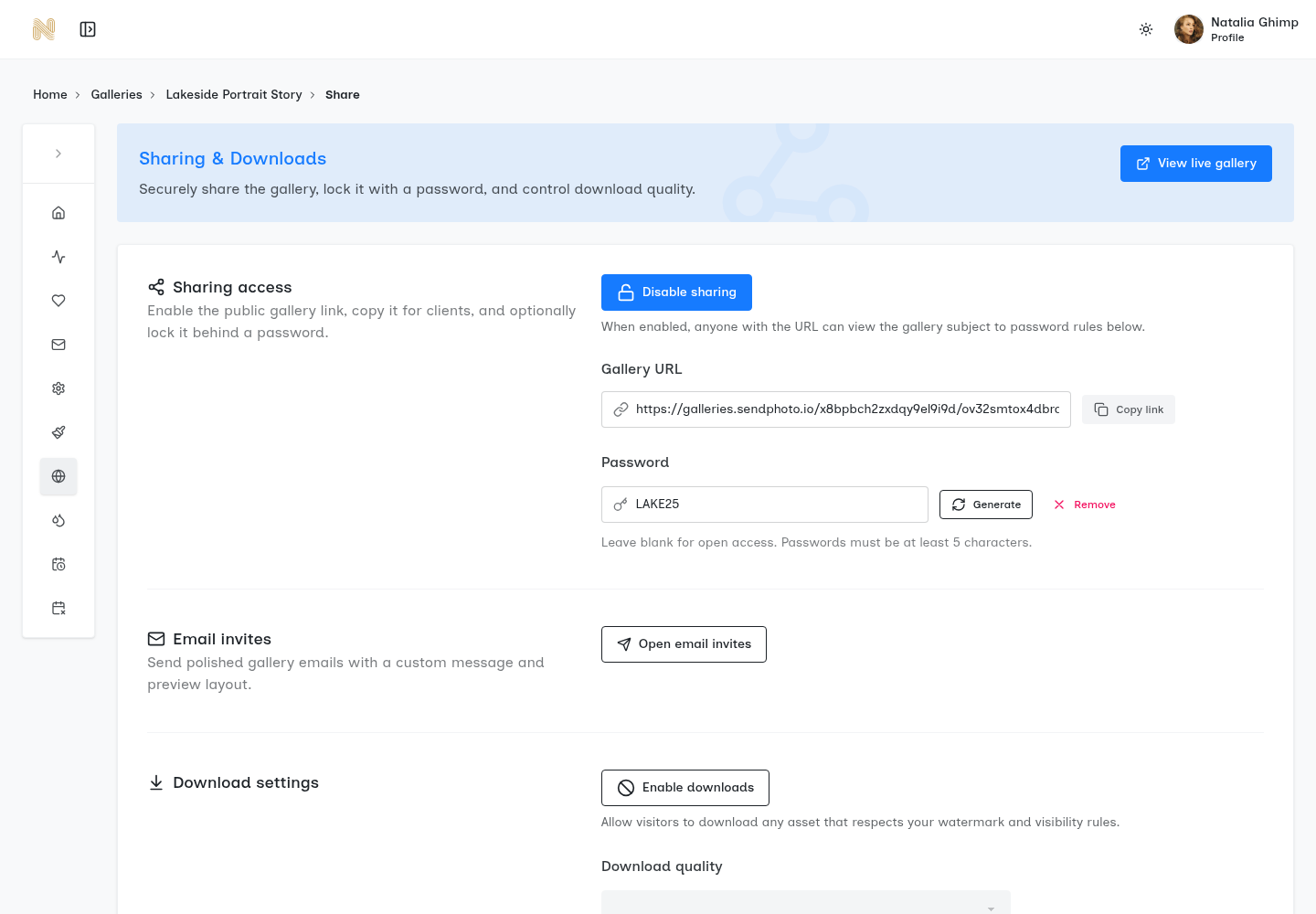
Existing SendPhoto demonstration screenshot. The visible controls include sharing, password generation/removal, invitations and a download switch, shown off. The visible demonstration password is not a recommended credential: do not reuse it or its pattern. This screenshot does not demonstrate identity verification, expiry, encryption, payment, client approval or a completed delivery.
Expiration dates
Agree the access window before sending the link. A wedding review may need a different window from a small portrait selection or an ongoing corporate assignment. State the date and time zone, explain how an extension can be requested, and leave enough time for the agreed actions.
Treat expiry as an access setting. SendPhoto's expiry process disables gallery sharing; it is not evidence that the gallery or its files have been deleted from storage. Do not promise deletion at the expiry time or instant revocation at an exact second. Keep a separate record of any storage-deletion commitment and the process required to carry it out.
Download restrictions and access identity
For a review-only stage, disable gallery downloads if that matches the agreement. For final delivery, enable the agreed download options and confirm which files those options provide. Neither state is a print-rights decision or a promise that visible photographs cannot be copied.
In SendPhoto, favorites record preferences; they do not establish contractual approval, an order or payment. Confirm the final filenames and authorization separately before changing the delivery settings. A personal gallery invitation or a shared password is also not proof that the viewer is the intended human recipient.
For a client requiring individually authenticated users, multi-factor authentication or specific access logs, assess those requirements explicitly. Do not infer them from an email invitation button. Download control describes the gallery action; it does not replace usage permission or a more demanding security policy.
Watermarking and Encryption for Different Shoot Types
A watermark changes what a visible image looks like. Encryption concerns who can read data under particular storage or transfer conditions. They solve different problems, and neither replaces a clear agreement about the recipient's permitted use.
Match the watermark to the delivery stage
For proofs, use a visible mark that identifies the review stage without obscuring expressions or retouching details. Check it against both light and dark photographs. A small corner mark may be easy to crop; a large overlay may make review harder. Choose the compromise for the actual brief rather than promising copy prevention.
For paid final files, follow the agreed specification. If it calls for clean assets, confirm the delivered files are clean rather than assuming the word “Original” guarantees an unwatermarked download. In SendPhoto, an applicable image watermark can cause an Original-quality download to use a watermarked derivative; collection watermark settings also affect this behavior. Configure the intended final set accordingly. This image behavior should not be described as watermarking every video download.
Payment, approval and publication rights need their own confirmation. Removing a watermark does not grant additional rights, and leaving one visible does not prove that a file is unpaid or unauthorized.
Understand what encryption covers
Encryption in transit concerns data moving over a connection. Encryption at rest concerns stored data. End-to-end encryption is a separate architectural claim about which parties can decrypt it. A padlock, password field or watermark is not evidence that the service provider cannot read uploaded files.
For sensitive work, ask the provider about transport, storage, provider access, retention and any required security documentation. Check the scope and date of the answer. This article does not establish SendPhoto as end-to-end encrypted, zero-knowledge or FIPS validated. If the client requires an approved transfer system, use that system even when a gallery would be more convenient.
Balancing Client Experience With Security Requirements
Give recipients a short set of actions they can follow. Identify the project, distinguish proofs from finals and explain where the password arrives. Avoid offering an unprotected replacement link merely because the first instructions were confusing.
Reduce friction without removing control
The handoff message should answer five questions:
- What is this link for? Name the assignment and whether the set is for review or final delivery.
- Where is the password? Name the separately agreed channel, without including the credential beside the link.
- What can I do? State whether viewing, favorites and downloads are available, and how selections become confirmed final filenames.
- When does access end? Give the actual date, time zone and extension contact.
- Who may receive it? Describe the agreed audience and ask recipients not to post access details publicly.
Keep the password strong and the instructions simple. If an account or authentication step is required by the assignment, explain it rather than silently removing it.
Design for real handoffs
Here is an adaptable fictional review message, not a report of a SendPhoto transaction: “Your portrait proofs are ready in the agreed private gallery. The password will arrive through our agreed separate channel. View the proofs and mark your preferences; downloads are off at this stage. Send me the chosen filenames so we can confirm the final set. Access ends on the date and time zone stated in our agreement. Please contact me before then if you need an extension, and keep the access details within the agreed audience.”
Replace the generic deadline with the real date before sending. For final delivery, rewrite the actions to match the enabled downloads and agreed uses. Do not tell the client a proof-selection preference automatically starts retouching, approves a purchase or records payment.
Consider the recipient's actual route: phone or computer, agreed browser, separate password message and instructions near the relevant actions. An owner preview can bypass an access check, so it does not represent a signed-out recipient.
Post-Delivery Cleanup and Gallery Retention Policies
Define three separate dates or decisions where relevant: the review deadline, the end of online access and the storage-retention/deletion policy. Closing a link is not the same operation as deleting stored photographs. Deleting the online gallery is not a substitute for maintaining the studio's required backups.
Agree retention with the client before delivery. Consider the assignment's contract, required records, source-file policy and available storage rather than presenting a universal retention period as a legal rule. Review the selected plan's current storage and gallery limits before promising continuing online availability.
Use a repeatable closeout workflow
- Set the access window before delivery. Configure the intended sharing end date and record any separate deletion policy.
- Tell the client the deadline. State the date and time zone, the available actions and how extension requests will be handled.
- Review outstanding work. Resolve pending selections, corrections or agreed downloads before closure; do not infer client approval from gallery activity.
- Keep the required source material. Maintain independent, verified backups according to the studio's policy and agreement. Confirm them before deleting a delivery copy.
- Close sharing and handle deletion separately. Disable access as agreed, then carry out any deliberate storage deletion through the applicable process. Do not describe link expiry as automatic file cleanup.
For a re-access request, verify the requester through the agreed contact route, check the contract and provide only the necessary set. If the audience has changed, prepare a separately configured gallery instead of assuming a collection has its own permissions. Set and communicate the renewed access window. Previously saved copies remain outside the gallery's revocation controls.
Your Gallery Security Checklist Before Every Delivery
Use this checklist to catch a wrong destination, wrong audience or misleading message. It complements the service's technical controls; it does not certify the service's security.
- Correct destination: Confirm the link names the intended assignment and delivery stage, not another client or an unfinished set.
- Right audience: Check the actual files in that gallery. Collection labels alone do not restrict access to their contents.
- Separate credentials: Use a unique, sufficiently long password within the supported limit and the separately agreed channel. Avoid the demonstration screenshot's credential.
- Agreed downloads: Match the offered download action to proofs or finals. Record print and publication rights separately; a switch cannot recall saved copies.
- Watermark accuracy: Confirm the intended preview and download treatment, especially whether final files must be clean. Do not assume Original quality means no watermark.
- Expiry configured: Set and communicate the access window. Keep any storage-deletion deadline separate, with a backup and deletion process.
- Recipient route: Explain the browser, password and selection/download steps for the client's actual device. Do not treat an authenticated owner preview as recipient access.
- Revocation available: Know how to disable sharing if the audience changes, while recognizing that the recipient may already have saved files.
For SendPhoto, use gallery delivery, password protection and the configured download controls to support the agreed handoff. Keep source backups, approval records and usage permissions separately. The aim is a clear delivery to the intended audience, with access and retention promises that the settings actually support.