
The best photo gallery software depends on what happens after you upload the photographs. Delivering a finished session, collecting client selections, selling prints and maintaining a searchable image library are different jobs. A platform that fits one may add unnecessary cost or leave gaps in another.
This guide compares ten services by those jobs, with the plan restrictions that can change your choice. SendPhoto publishes this article and is one of the products included. The comparison is based on official product pages and documentation checked on September 27, 2026, plus SendPhoto's documented workflow. It is not a hands-on benchmark of all ten platforms; no upload-speed, usability or sales results are implied. Recommendations below are our interpretation of the documented features.
Choose a shortlist by the job
- Deliver finished photographs: consider SendPhoto for a gallery-and-download workflow, or Pixieset and CloudSpot when their additional client tools match your brief.
- Sell prints from client galleries: compare Pic-Time, PASS, Pixieset and ShootProof around the lab, products and sales controls you will actually use.
- Combine a website with galleries: compare Pixpa, SmugMug and Zenfolio; Pixieset also offers a broader Suite, separately from Client Gallery alone.
- Organize a searchable professional library: consider PhotoShelter for Photographers for metadata and licensing workflows, or SmugMug for its JPEG storage offering. Keep an independent backup whichever delivery service you choose.
These are overlapping options, not an overall ranking. Start with two or three candidates. Compare the complete cost of the required plan, storage, payment processing, lab fulfillment and any booking or archive add-ons. Introductory discounts and annual-equivalent prices can hide a different renewal bill, so the provider links below are the place to check your actual billing term and currency.
1. SendPhoto: galleries for finished-photo delivery
SendPhoto is a candidate when your main task is to organize photographs into a gallery, set access and download options, and send the client a link. Collections help divide a session into groups. Password protection and watermark settings are available when your delivery brief calls for them; they do not prevent a recipient from copying an image already visible on their screen.
The Free plan currently includes 5 GB of storage, one gallery and 10 GB of lifetime uploads. That last allowance is cumulative, not a monthly transfer quota: deleting files does not reset it. Compare those limits with your expected session size before treating Free as an ongoing delivery plan. See SendPhoto's current plans.
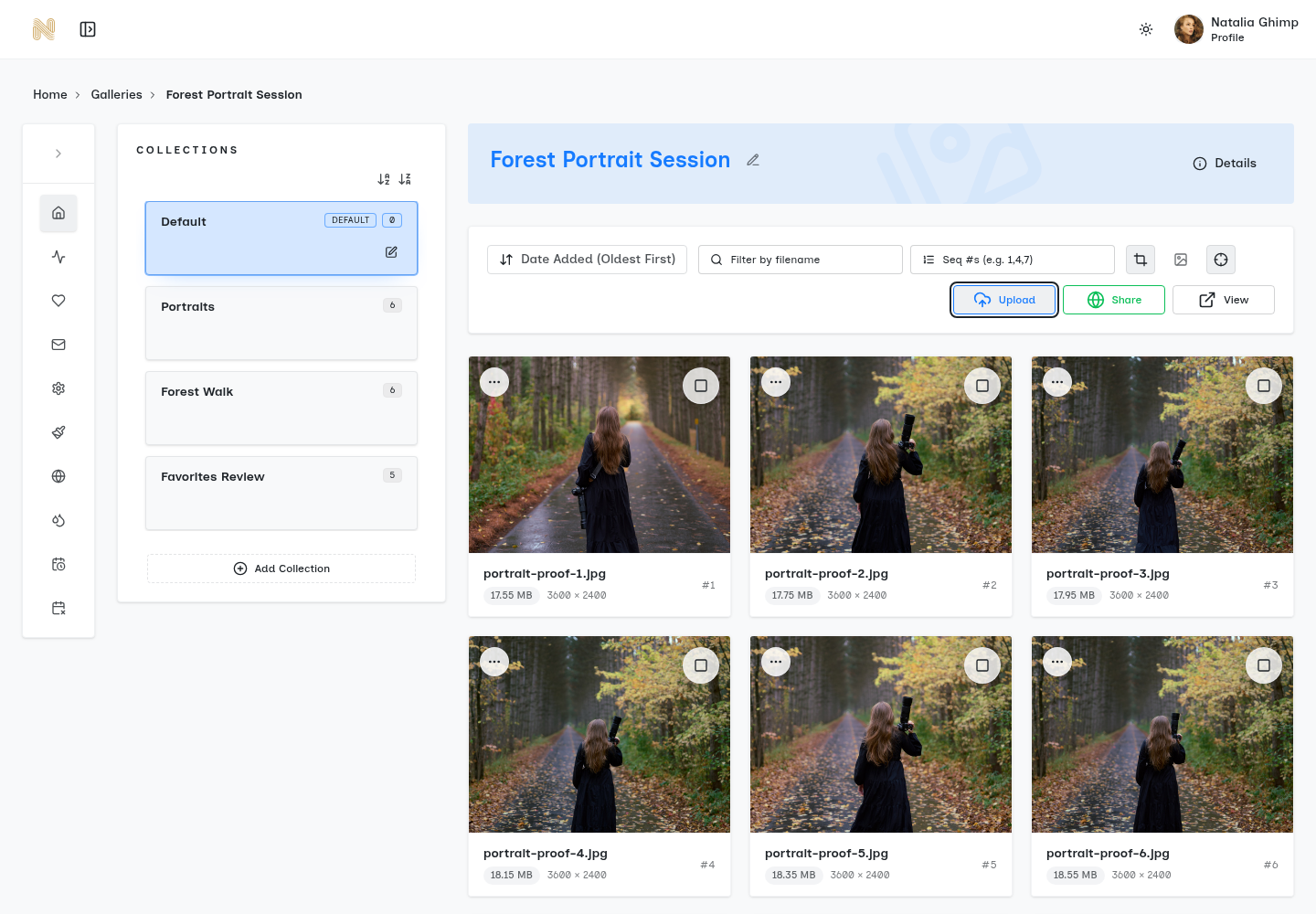
Existing SendPhoto workspace screenshot: the highlighted Upload control sits beside Share and View. The collection names shown are examples. Open the full-size workspace screenshot.
Choose it for: a focused delivery workflow. If the requirement is print-lab fulfillment, contracts or client selection proofing, compare the relevant services below rather than assuming those tools are included. The SendPhoto getting-started guide shows the actual setup sequence.
2. Pixieset: client galleries with an optional wider suite
Pixieset is worth considering if you want client delivery and a gallery store, with the option to add its website and studio tools. Client Gallery, Website and Studio Manager are distinct products; buying Client Gallery does not mean you have purchased the whole Suite. Compare both standalone and bundled plans against what you already use.
Client Gallery Free currently provides 3 GB and a Store with a 15% platform commission on sales. Payment and fulfillment costs are separate considerations. A particularly important delivery distinction is that original-resolution collection downloads require an upgraded Client Gallery or Suite plan. Store digital-download settings have their own rules. See Pixieset's plan comparison and its download-resolution documentation.
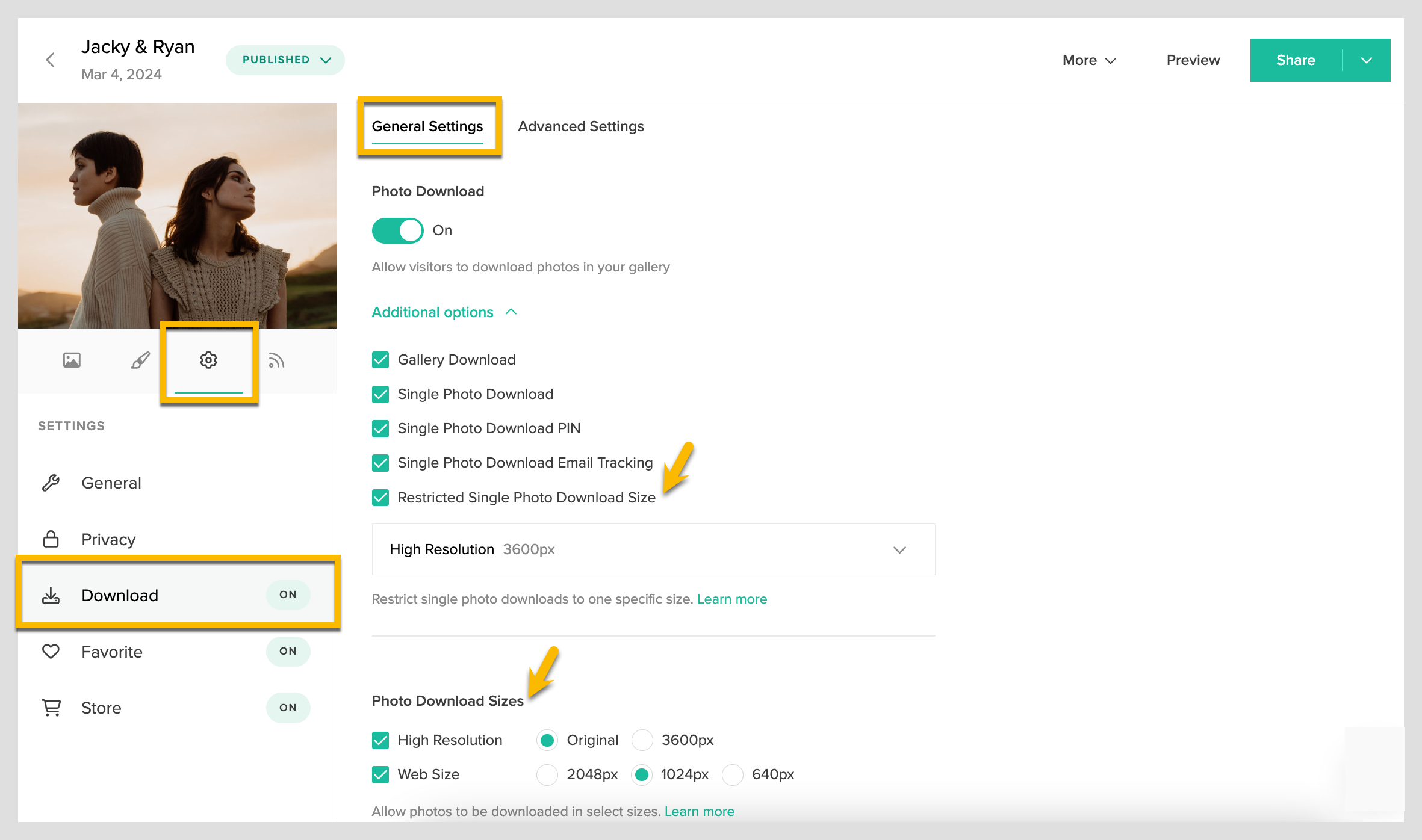
Screenshot credit: Pixieset Help Center. The example distinguishes a restricted single-photo download size from gallery download sizes. An Original option in a screenshot is not a promise that every plan includes it. Open the full-size Pixieset example.
Choose it for: galleries and a store that can sit alongside other Pixieset products. Check the exact delivery resolution and the combined subscription cost before choosing a bundle.
3. Pic-Time: print sales and gallery marketing
Pic-Time's Client Delivery Suite combines client galleries with a print store, lab fulfillment and sales automation. It is a relevant shortlist choice when the gallery will continue selling after the initial delivery. That feature set can support a print-selling process; it does not establish how much your particular clients will buy.
Its current comparison separates photo and video storage. Free photo storage starts at 10 GB and reduces to 3 GB after three months; Beginner lists 20 GB and Professional 100 GB of photo storage. Check the separate video allowance if you deliver mixed sessions. Premium client selections, album proofing, blogs and slideshows also depend on the tier. See the current Pic-Time plan comparison.
Choose it for: a gallery store with planned promotions and print fulfillment. Before subscribing, compare your preferred lab, shipping destination, product costs and the tier containing your proofing tools. Published automation features are not a substitute for choosing suitable products and margins.
4. ShootProof: galleries alongside contracts and invoicing
ShootProof combines photo galleries and print selling with business tools such as contracts and invoices. It deserves a look when you want those tasks connected rather than managed in separate subscriptions. Its advertised commission-free sales still need to be budgeted alongside payment processing, print production and shipping.
Read the ShootProof plan comparison as a complete package. Online client booking is listed as an add-on, so do not assume a gallery subscription includes it. Photo and video allowances, archiving and associated charges also deserve separate attention. The cheapest headline subscription may not be the cheapest configuration for a studio keeping years of sessions online.
Choose it for: client galleries with contract and invoice administration. Make a list of the business tools you would actually replace, then compare the combined bill. If you only need to deliver final JPEGs, those extra tools may not be decisive.
5. CloudSpot: gallery-only plans or a studio suite
CloudSpot offers both gallery-focused plans and a wider studio suite. That makes it useful to compare at two levels: client delivery on its own, and delivery together with contracts, forms, invoicing and scheduling. Avoid comparing the full suite's feature list against the price of a gallery-only tier.
The current Free plan lists 5 GB and up to three galleries; Entry lists 15 GB and up to 15 galleries. Lite moves to 100 GB with unlimited galleries. Free and Entry list JPEG-only uploads, so file-type support is another reason to read the individual column. CloudSpot also states that invoicing and online payments are available only in the US. See CloudSpot's current plans.
Choose it for: gallery delivery with a possible path into studio administration. Check your country, file types and required gallery count before pricing that path. “Unlimited galleries” on one tier does not remove its storage limit or extend the same allowance to every paid tier.
6. SmugMug: a photo website with JPEG storage headroom
SmugMug is relevant when you want a public photography website alongside galleries and substantial JPEG storage. Its plans advertise unlimited full-resolution JPEG storage. RAW storage is a separate paid SmugMug Source offering, so an unlimited-photo headline should not be read as unlimited storage for every camera file and project asset.
The SmugMug plan page separates its website and selling options. Compare the plan containing the pricing and commerce controls you need, rather than assuming that every subscription provides the same storefront. A gallery used only for delivery has different requirements from a website expected to sell work year-round.
Choose it for: a website and a large JPEG library. If retaining RAW files is part of the brief, include the separate storage cost. Keep your own backup and a clear export plan; a delivery website should not be your only copy of completed work.
7. Zenfolio: websites, galleries and volume workflows
Zenfolio combines a photography website, client galleries and selling tools. Its sports and event workflow is a reason to investigate it when photographs must be associated with many subjects. QR-based volume tools are more specific than a general promise that any gallery platform is suitable for schools or teams.
The current Basic, Professional and Advanced plans have different storage and workflow allowances. Professional includes five Volume Wizard uses, while Advanced lists unlimited uses. The pricing FAQ also states that RAW files are not stored. Read Zenfolio's current plan details and its sports and event workflow together; older Classic-plan advice may describe a different offering.
Choose it for: a website and client galleries where the documented volume workflow matches your event. Include commerce charges and any booking add-on in the budget, and check how a wizard use is counted before planning a season of jobs.
8. PhotoShelter for Photographers: a searchable image library
PhotoShelter for Photographers combines a website and galleries with keyword and metadata search, delivery, and sales of prints, downloads and licenses. That makes it relevant for photographers who revisit and license an existing library, not just deliver a new session once.
Use the PhotoShelter for Photographers page, rather than the separate PhotoShelter for Brands DAM product. The individual plans currently list 4 GB, 100 GB and 500 GB for Basic, Standard and Pro. The client proofing tool is included in Standard and Pro, not Basic. Additional storage, sales transaction fees and possible delivery-bandwidth charges belong in the cost comparison.
Choose it for: metadata-based organization and image licensing alongside delivery. Match the subscription to the library you need online, and check proofing requirements separately. Features advertised for a multi-user business DAM should not be assumed to exist in the individual-photographer subscription.
9. PASS Gallery: a gallery store with fulfillment controls
PASS combines gallery delivery with a Smart Store. Its documentation describes choosing products, setting prices, assigning a price list to a gallery, and using a supported lab or self-fulfillment. Order holds offer a way to review an order before it goes to print. These are concrete workflow choices, rather than evidence that a store will run profitably without attention.
Compare current PASS plans with the Smart Store workflow. Some help text uses older plan names, so use the current pricing page to confirm your subscription's commission and feature conditions. Check processing charges, payout terms, lab availability and shipping for the destination where you sell.
Choose it for: client galleries where print products are part of the delivery business. Decide whether a connected lab or self-fulfillment fits your product range, and understand order holds before relying on automatic fulfillment. International suitability depends on that fulfillment choice, not simply where the photographer lives.
10. Pixpa: a portfolio website, store and client galleries
Pixpa combines a website builder, blog, store and client galleries. Its published gallery features include proofing, favorites, comments and ratings. It is a useful candidate when replacing the public website is part of the project, rather than an unwanted extra task.
The Pixpa plan comparison distinguishes unlimited client gallery albums from original-file storage: Basic, Creator, Professional and Advanced currently list 3 GB, 5 GB, 25 GB and 100 GB respectively. Website display images are counted separately. Its standalone Gallery Links also have a 250-image limit per link. Unlimited albums therefore does not mean unlimited original uploads.
Pixpa advertises zero platform commission on sales; payment-provider, print and shipping costs still belong in your calculation. Choose it for: one subscription covering a portfolio website and client galleries. Compare the storage and renewal term you need, rather than choosing it solely because an introductory rate appears low.
Make the final choice with four concrete checks
1. Describe one real delivery. Write down image count, total storage, file types, required download resolution and whether clients must submit selections. A gallery that displays photographs well may still lack the proofing or original-download option your contract requires. Our client photo delivery guide helps define that handoff.
2. Price a full year at the required tier. Add subscriptions, extra storage, booking or archive add-ons, payment fees and any platform commission. For print work, add production and shipping. A zero-commission claim answers only one line of that calculation.
3. Separate access from retention. Check passwords and download settings, but also ask how long galleries remain available, what happens when you downgrade, and how you export the files you need. A watermark is a visible mark, not a guarantee against copying. Keep an independent backup.
4. Choose the smallest useful bundle. Shortlist SendPhoto, Pixieset or CloudSpot around a delivery brief; Pic-Time or PASS around a print-sales brief; ShootProof around contracts and invoices; Pixpa, SmugMug or Zenfolio around a website brief; and PhotoShelter around a searchable licensing library. These are starting points, not exclusive capabilities.
If your immediate requirement is a SendPhoto delivery gallery, follow the getting-started guide, review the current plan limits, and create an account when the workflow fits. If the brief depends on another provider's store, proofing or website tools, choose the plan that explicitly includes them.