
The best way to send photos without losing quality is to send the intended file through a download link or file transfer that preserves it, then have the recipient download that file. A gallery preview, a screenshot and a resized social-media copy are different deliverables, even when they look similar on a phone.
For a client shoot, a private gallery makes browsing and downloading convenient. For a collaborator who needs camera originals or a folder of production files, a direct file-transfer link or shared folder can be a better fit. For a few nearby files, a compatible device transfer may be enough. Choose the method around the files and recipient, then check the result.
About this guide: SendPhoto publishes this article and is one of the services discussed. Provider documentation and plan terms were checked on September 27, 2026. This is a delivery guide and documentation-based comparison, not a seven-service laboratory test or a claim that every service preserves every file type.
Check the delivered file first
Use this short procedure whenever the recipient needs an unchanged copy. It also helps diagnose a download that seems blurry or smaller than expected.
- Choose the reference file. This is the exact file you intend to deliver: perhaps the camera original, or an approved edited JPEG. Keep it unchanged in a separate folder. Do not compare a finished JPEG with its RAW source and expect them to match.
- Record its properties. Note the filename, format, pixel dimensions and exact byte size in your file manager or image application. Record the embedded color profile and any metadata you intend to retain, such as copyright information.
- Upload or copy that file. Choose the original-file download option where available. A setting called “high resolution” may still resize an image; confirm what the provider means.
- Download through the recipient link. Use the download button and the intended size, rather than saving the displayed preview. If the download is a ZIP, extract the image before comparing it with the source image.
- Compare the result. Check format, dimensions and exact byte size, then open the downloaded file. For stronger confirmation of an unchanged copy, compare SHA-256 file hashes. Matching hashes are strong evidence that the file contents are identical.
- Check usability as well as identity. Confirm the recipient can open the format and see the intended edit. A perfectly preserved RAW file is not useful to someone who only has an application that cannot open it.
On Windows, Microsoft's Get-FileHash documentation explains how to calculate a SHA-256 fingerprint. Calculate it for the reference file and the extracted download using the same algorithm. Filenames can differ while the hashes still match; identical dimensions and file sizes alone do not prove identical contents.
If the hash differs: first check whether you downloaded a preview, selected a smaller size, converted the format or deliberately removed metadata. A changed hash means the file changed; it does not, by itself, identify visible damage. Compare the intended properties and repeat the delivery using the correct settings. If the requirement is an unchanged file, the mismatch still needs resolving.
Original file, full resolution and good-looking export
These terms answer different questions:
- Original file: the file you uploaded or copied, preserved as supplied. An original download of an edited JPEG means that JPEG, not the camera RAW file from which it was made.
- Full resolution: the pixel dimensions are retained. A JPEG can keep those dimensions while being recompressed or having metadata changed.
- Visually acceptable export: the result looks suitable for its intended use. It may be resized or compressed and therefore is not an unchanged original.
Export and transport are separate steps. JPEG export uses lossy compression, as Adobe's Lightroom export documentation explains. Sending the resulting JPEG unchanged preserves that exported file; it cannot restore information already discarded during editing or export.
There is no universal JPEG quality number or guaranteed percentage saving that fits every photograph, encoder and destination. For print delivery, follow the lab or client's requirements for dimensions, color profile and format. For a small screen preview, make a clearly labeled separate export and inspect fine detail, gradients and edges at the intended viewing size. Keep the final delivery files separate so that a preview does not accidentally become the only version the client receives.
For editing handoffs, agree whether the recipient needs RAW files, sidecar settings, layered files or finished TIFFs. HEIC can be useful where supported, but converting it for compatibility changes the file. Neither a format name nor a large file size guarantees the right result for the job.
Choose a delivery method
A gallery for a client shoot
Use a gallery when recipients need to browse a set and download selected files or a complete collection. Set the intended download size and permissions before sharing. Tell clients to use Download rather than taking screenshots or saving the displayed image. Gallery presentation is useful, but it is not evidence that its preview and original download are the same file.
A transfer link or shared folder for files
Use a transfer link for a finished one-off batch, or a shared folder for continuing collaboration. Confirm supported formats, file-size limits, storage allowance, recipient access and link lifetime. Keep a separate backup; a delivery link can expire or its contents can change. If a folder contains several versions, put the approved files in an unmistakably named delivery folder.
A ZIP can keep a batch together without changing the contained image files. Compare the extracted images, not the ZIP archive, against your originals. Already compressed photographs may not become much smaller inside a ZIP, so use a link if the batch is too large for email.
Nearby transfer or physical media
A local device transfer or copied USB drive can avoid uploading a large batch. Check that the destination has enough space and can read the storage format. Keep the source until the recipient has opened and checked the copy.
On iPhone, the sharing options matter. Apple's photo-sharing guide distinguishes Current, which prevents format conversion, from Most Compatible, which may convert files to JPEG or MOV. All Photos Data includes the original with edit history and metadata and is available with AirDrop. Decide whether location metadata should be included before sharing. A deliberate privacy edit changes the reference file you should compare.
Email for a small attachment
Attach the actual file rather than relying on an inline preview. If it exceeds the sending limit, share a download link instead of reducing quality solely to fit the message.
- Personal Gmail: Google documents a 25 MB total attachment limit; larger attachments become a Drive link. Work and school limits are controlled by the Workspace administrator. See Gmail attachment rules.
- Outlook.com: Microsoft lists a 25 MB file-attachment limit. This is the web service's rule, not a universal limit for every Outlook desktop configuration or connected mailbox. See Outlook.com sending limits.
- Apple Mail Drop: Apple supports attachments up to 5 GB, with 30 days for recipients to download them. This is a temporary download service, not the ordinary attachment limit or permanent storage. See Mail Drop limits.
The receiving mailbox can impose its own restrictions. Check access permissions on any cloud link created by the email application.
Seven gallery services: what to check before delivery
All seven options from this comparison can serve photography workflows, but their plan names and presentation features are less important here than the actual download settings. The notes below identify the decision each service needs you to make. For a broader feature comparison, see photo gallery software.
- SendPhoto: a browser gallery with controlled downloads.
- Pixieset: distinguish Original from its smaller download sizes.
- Pic-Time: match the gallery plan and recipient permissions.
- ShootProof: check download controls and current GB storage.
- CloudSpot: check file-format support as well as space.
- SmugMug: separate JPEG delivery from optional RAW storage.
- PhotoShelter: choose the photographer product and permitted delivery size.
1. SendPhoto
SendPhoto fits photographers who want clients to open a browser gallery without creating a client account. Collections organize a shoot, and sharing and download settings determine access. Follow the getting-started guide to create a gallery, upload files and configure the handoff.
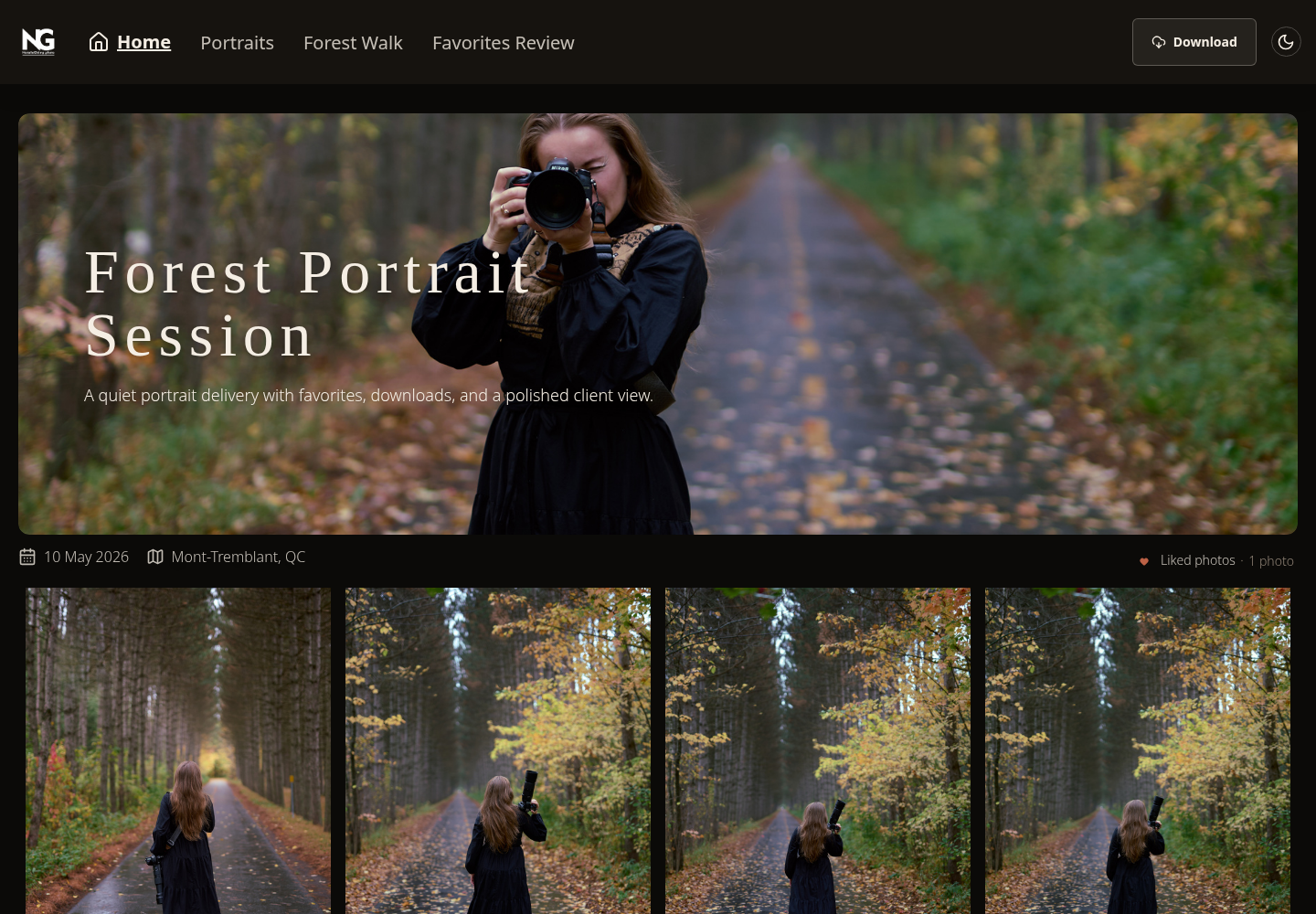
Existing SendPhoto gallery screenshot: the Download button and collection navigation show where a client starts. This interface example is not a file-integrity measurement. Collection names describe this example gallery. View the gallery screenshot at full size.
Control without adding client friction
Use the intended sharing link, optional password and gallery or collection download controls. Check the selected download quality before delivery. A watermark can distinguish a preview, but it cannot prevent someone from capturing what appears on screen; it is not a substitute for deciding which files may be downloaded.
The Free plan provides 5 GB storage and one gallery, with 10 GB of lifetime upload credits. Storage and upload credits are different limits; deleting files does not reset lifetime credits. See SendPhoto pricing for current plan terms. Choose based on the delivered file types and volume you actually need, rather than assuming every camera format is supported.
2. Pixieset
Pixieset's download terminology is a useful example of why “high resolution” needs a closer look. Its documented options include web sizes, a 3600px long-edge version and Original. Original-resolution downloads from a collection require an upgraded Client Gallery or Suite plan. Store downloads have separate settings and should not be confused with collection downloads.
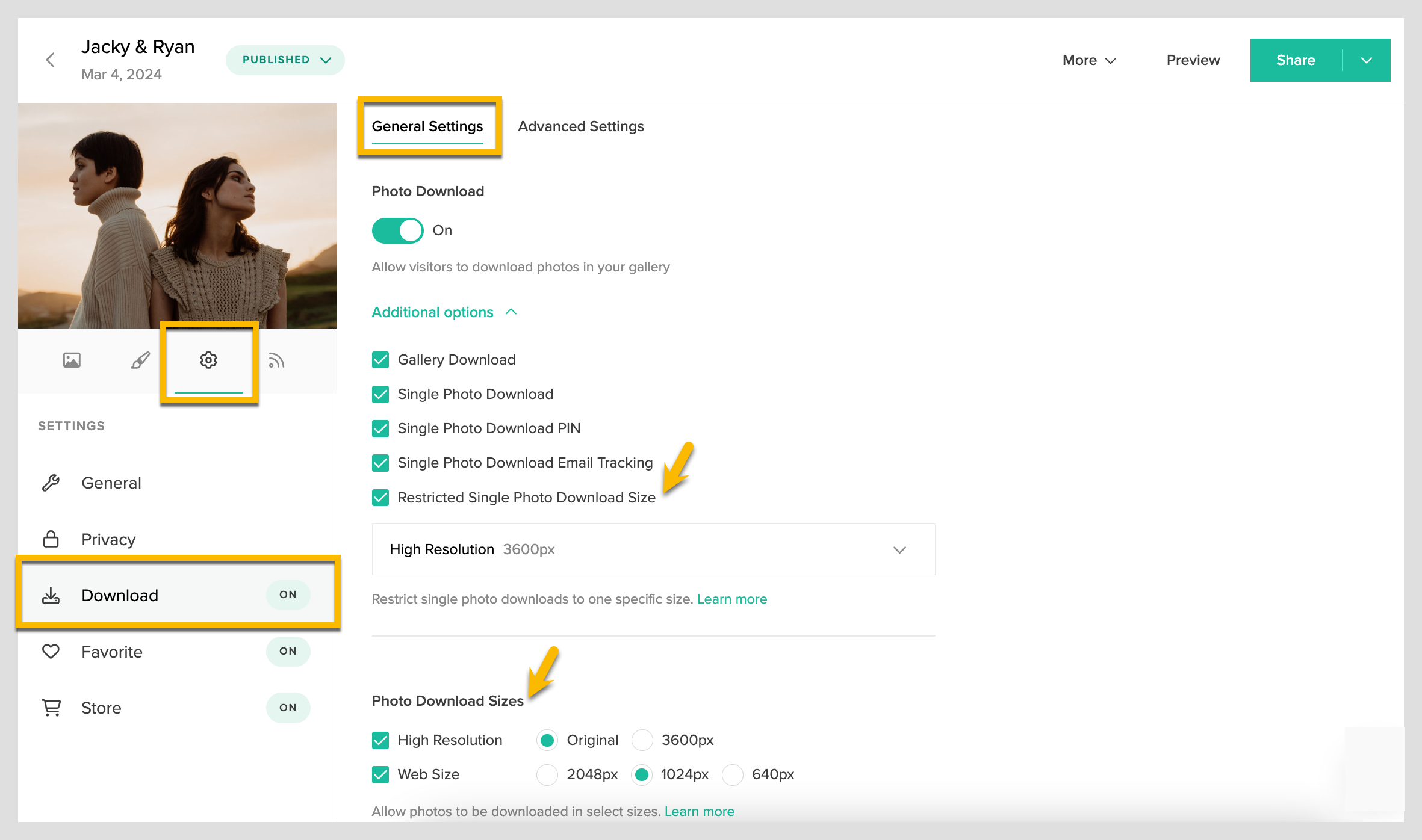
Screenshot credited to Pixieset's download-size documentation. The separate Original option matters when the uploaded file is larger than the resized choices. This is a settings example, not a measured comparison. View the Pixieset settings at full size.
Pixieset also suits studios that want gallery sales and print fulfillment. Check the current Client Gallery plans and enabled download choices before promising original-file delivery to a client. A website or business-management subscription is a different product decision.
3. Pic-Time
Pic-Time is worth considering when a client gallery also supports print sales, slideshows and marketing workflows. Its Client Delivery Suite plans separate storage allowances and features by tier, including photo and video allocations. Do not treat a plan's gallery presentation or video capability as evidence about an individual photo download.
Strong marketing, more planning
Set the intended audience and download permissions before delivering to multiple people. A couple, planner and commercial collaborator may need different files or access. Choose the plan around those needs, then confirm which version the recipient downloads. Automated sales features are an optional business benefit, not a quality-preservation mechanism.
4. ShootProof
ShootProof combines galleries with contracts, invoices and sales tools. Its current plans use GB-based photo and video storage; displayed photo counts are capacity estimates rather than the old plan limits. Paid plans include video, so older comparisons that describe it only as a photo-count service are outdated.
For this task, check the gallery's digital download controls and the delivered file, then budget for storage and any applicable archive charges. Contracts and a storefront can simplify studio administration, but neither establishes that the chosen download is the same file you uploaded.
5. CloudSpot
CloudSpot offers client galleries with downloads and optional sales features. Its pricing and format table distinguishes Free and Entry JPEG-only plans from tiers supporting additional file types. Choose the actual format allowance you need; paying for more space alone is not a reason to assume arbitrary production files are accepted.
For a finished JPEG shoot, configure the download option and give clear saving instructions. For TIFF, PSD, PDF or other production deliverables, verify the current eligible tier and upload requirements first. A mobile-friendly gallery can make access easier, but it does not change the file requirements.
6. SmugMug
SmugMug's plans combine photo hosting with portfolio and commerce features that vary by tier. Unlimited full-resolution JPEG storage is distinct from the optional SmugMug Source RAW storage add-on. Budget for those separately if the job requires both finished JPEG delivery and camera-original storage.
Decide whether you need an ongoing portfolio/archive or only a temporary delivery batch. Check the intended download permissions and resolution, and keep another backup of the work. Hosting an online JPEG gallery does not replace a complete backup of your camera files and edits.
7. PhotoShelter
Use PhotoShelter for Photographers when evaluating an individual photographer's website, archive and selling workflow. PhotoShelter's organizational asset-management product is a separate offering; features should not be mixed between them.
For editorial or commercial delivery, establish who may view and download the files and which size they are permitted to receive. Confirm the plan's storage and proofing features if you need them. Rights, captions and copyright metadata may matter as much as pixel dimensions, so include those in the delivery requirements and file check.
Choose the workflow that protects the original
For a simple file handoff, a suitable transfer link or shared folder is enough. Add a gallery when browsing a shoot and controlling client downloads are part of the job. Use nearby transfer or physical media where the devices and file volume make that more practical. Email works for a small file, but its size limit should not dictate the quality of a final photograph.
Send a short instruction with the link: “Use Download to save the final files. The gallery images are previews. Keep a copy of the downloaded folder; contact me if you need a different format.” If access expires, give the actual deadline. Do not imply that expiry deletes copies the recipient has already saved.
Keep the reference delivery files and a separate backup. For each handoff, the useful question is whether the recipient received the agreed file in a usable form, not whether the preview looked sharp on one screen.
If a browser gallery fits your delivery workflow, explore SendPhoto's plans and follow the first-gallery tutorial.