
Camera settings for beginners become much easier once you stop trying to memorize every menu and focus on the few controls that change every photo: aperture, shutter speed, ISO, focus, metering, and white balance.
If you are leaving full auto for the first time, start with aperture priority or shutter priority instead of jumping straight into full manual. You will learn how one setting changes the image while the camera helps with the rest. Once the exposure triangle makes sense, manual mode becomes a tool rather than a test.
The Exposure Triangle in Plain English
Aperture and shutter speed determine how much light reaches the sensor. ISO influences how that capture is recorded and rendered as image brightness; raising ISO does not add light. The three settings work together, but they are not interchangeable.
- Aperture. Controls brightness by: Changing the lens opening; Creative effect: Depth of field and background blur; Beginner reminder: Lower f-number means blurrier background.
- Shutter speed. Controls brightness by: Changing how long light hits the sensor; Creative effect: Motion blur or frozen action; Beginner reminder: Faster shutter freezes movement.
- ISO. Controls brightness by: Changing the camera’s ISO setting, not the amount of light captured; Creative effect: Noise and low-light flexibility; Beginner reminder: Raise ISO when needed to keep the chosen shutter speed and aperture.
The goal is not always a technically perfect number. The goal is choosing the tradeoff that fits the image.
Aperture: Background Blur and Depth
Aperture is written as an f-number, such as f/1.8, f/2.8, f/4, or f/8. With the same lens, framing and focus distance, a lower f-number opens the aperture wider, admits more light and reduces depth of field. A higher f-number narrows the opening and increases depth of field. Subject distance, focal length and the distance to the background also affect how much blur you see.
Use wider apertures for portraits when you want separation from the background. Use narrower apertures for groups, landscapes, products, and scenes where details across the frame matter.
Beginner examples:
- Portrait with blurred background: f/1.8 to f/2.8.
- Couple or small group: f/4 to f/5.6.
- Large group: f/5.6 to f/8.
- Landscape or interior: try f/8, then check near and distant detail.
These are starting points, not guaranteed settings. Use an aperture your lens supports. If faces in a group are not all sharp, close the aperture a little and make sure people are on a similar plane. Very small apertures can soften fine detail through diffraction, so f/22 is not automatically sharper than f/8.
Shutter Speed: Motion and Sharpness
Shutter speed controls how long the camera records light. It also controls how movement appears. A slow shutter can blur motion. A fast shutter can freeze it.
Beginner starting points:
- Still subject. Starting shutter speed: 1/125s.
- Walking person. Starting shutter speed: 1/250s.
- Kids or casual action. Starting shutter speed: 1/500s.
- Sports or fast movement. Starting shutter speed: 1/1000s or faster.
- Intentional motion blur. Starting shutter speed: 1/30s or slower with care.
Treat these speeds as starting points: focal length, subject speed, shooting distance, camera support and stabilization change what you need. Stabilization helps with camera movement; it does not freeze a moving subject. If your images look soft, zoom in and distinguish missed focus from motion blur before changing several settings at once.
ISO: Low Light Tradeoffs
Once you have chosen an aperture and shutter speed for the picture, ISO helps set the resulting brightness. It does not increase the light captured at those settings. Low-light images can show more noise, especially when dark areas are brightened; do not assume that lowering ISO alone will make the same underexposed capture clean.
Use the lowest ISO that still lets you choose the aperture and shutter speed you need. In bright outdoor light, ISO 100 or 200 is common. Indoors, ISO may need to rise. In low light, a higher ISO is often better than a blurry photo.
Auto ISO can be useful. Where your camera offers them, choose a maximum ISO and a minimum-shutter preference suitable for the subject. Check the actual shutter speed: some cameras can go below that preference when the ISO ceiling is reached, as the Nikon Z 7/Z 6 manual explains. In manual mode with Auto ISO, you choose aperture and shutter while the camera varies ISO within its limits. Consult your camera manual; Nikon’s Auto ISO guide explains the basic approach for its cameras.
For more low-light examples, read the low light photography guide.
Shooting Modes Beginners Should Learn
You do not need to use manual mode all the time.
- Aperture priority. Use it when: Portraits, travel, everyday shooting; What you control: Aperture and usually ISO.
- Shutter priority. Use it when: Sports, kids, motion, panning; What you control: Shutter speed and usually ISO.
- Manual with auto ISO. Use it when: Changing light with consistent aperture and shutter needs; What you control: Aperture and shutter.
- Full manual. Use it when: Studio light, tricky scenes, repeatable setups; What you control: Aperture, shutter, and ISO.
Start with aperture priority (often A or Av) for portraits and general photography. Switch to shutter priority (often S or Tv) when movement matters more than background blur. Watch for a blinking or out-of-range exposure value: the camera cannot always compensate for your choice within the lens and ISO limits.
Autofocus Settings That Matter
Autofocus can be more confusing than exposure because menu names vary by camera. Think in terms of subject behavior.
- Still portrait. Focus approach: Single autofocus or single-shot AF.
- Moving person. Focus approach: Continuous autofocus.
- Eye or face visible. Focus approach: Face or eye detection if your camera offers it.
- Precise detail. Focus approach: Single focus point.
- Unpredictable action. Focus approach: Tracking or wider AF area.
Focus mode and focus area are separate choices: continuous AF controls whether focus keeps updating, while a point, zone or subject-detection mode controls where the camera looks. For portraits, check that focus lands on the intended eye. For groups, avoid focusing on the background between people. For action, use continuous autofocus and a faster shutter speed.
Metering and Exposure Compensation
Metering is how the camera judges brightness. Most beginners can start with evaluative or matrix metering. It evaluates several areas of the scene, but it can still choose a brightness you do not want.
Use exposure compensation when the camera is technically doing its job but the image looks wrong. Snow, white walls, dark clothing, backlight, and stage lighting can fool the meter.
- If the image is too dark, add positive exposure compensation.
- If the image is too bright, add negative exposure compensation.
- If important highlights are clipping, reduce exposure and check the result. Brightening shadows later may reveal noise; it cannot restore detail that was never captured.
Exposure compensation changes the camera’s automatic exposure target. In full manual with fixed ISO, the dial may only change the meter reference; adjust aperture, shutter or ISO yourself. With Auto ISO, compensation behavior depends on the camera. Check its manual and the resulting image.
White Balance and File Format
White balance adjusts how the camera renders the color of the light, including warm/cool balance and tint. Auto white balance works for many scenes, but it can shift between frames. If consistent color matters, choose a preset or custom white balance.
RAW files preserve more editing latitude than JPEG files. JPEG files are smaller and easier to share immediately, but they leave less room for major exposure or color corrections. If you plan to edit, RAW or RAW plus JPEG gives you more flexibility. Neither format can guarantee recovery of severely clipped highlights or fix missed focus. Mixed light sources may need lighting changes as well as white-balance adjustments.
For delivery decisions after editing, the photo resolution guide explains image size and output quality.
Starter Camera Settings Recipes
Use these for available-light practice, not as rules or flash settings. Your lens may not open as wide as a listed aperture. Take a frame, inspect it, then adjust for your subject and camera.
- Outdoor portrait. Mode: Aperture priority; Aperture: f/2.8 to f/4; Shutter: Camera-selected, watch for at least 1/250s; ISO: Auto ISO.
- Indoor portrait near window. Mode: Aperture priority; Aperture: f/2 to f/3.5; Shutter: At least 1/125s; ISO: Auto ISO with sensible max.
- Kids running. Mode: Shutter priority; Aperture: Camera-selected; Shutter: 1/500s to 1/1000s; ISO: Auto ISO.
- Event indoors. Mode: Manual with auto ISO; Aperture: f/2.8 to f/4; Shutter: 1/200s; ISO: Auto ISO.
- Landscape. Mode: Aperture priority; Aperture: f/8; Shutter: Camera-selected, tripod if slow; ISO: Low ISO.
If you photograph people, the portrait photography masterclass goes deeper on posing and light. If you photograph parties or live moments, the event photography guide builds on these settings in real event conditions.
Read a Real Photo’s Settings
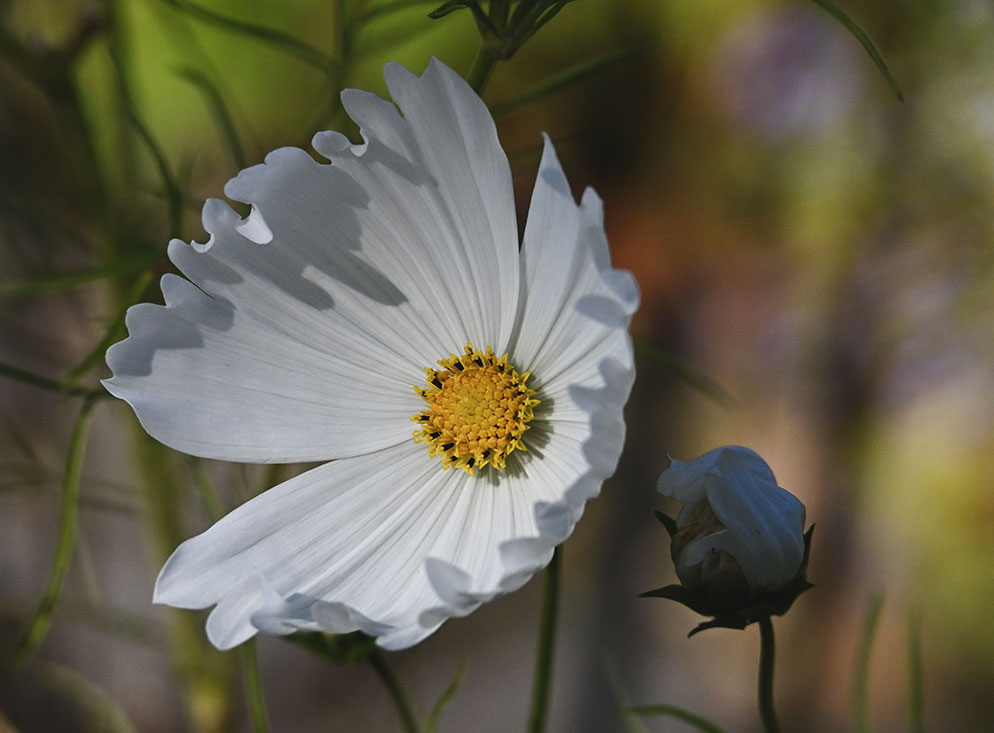
Read the settings alongside what is visible:
- f/8: the flower is distinct from its soft background. A high f-number does not guarantee that every distance will look sharp; framing and distances matter too.
- 1/4000 second: this is a very short capture time. It is a recorded setting, not a minimum speed you must use for flowers.
- ISO 1600: a bright outdoor scene does not require ISO 100 in every photograph. Evaluate ISO together with aperture and shutter speed.
This is a credited manufacturer example, not our camera test or a controlled comparison. Nikon identifies aperture priority, but does not say whether Auto ISO was enabled or why this combination was chosen.
Beginner Mistakes to Watch For
- Using a shutter speed that is too slow for moving people.
- Shooting groups at a very wide aperture.
- Letting ISO stay high in bright light.
- Focusing on the background instead of the subject.
- Forgetting to reset exposure compensation.
- Using auto white balance across mixed lighting and expecting every frame to match.
- Reviewing only the back-screen preview instead of zooming in to check focus.
After you edit a set, a gallery delivery workflow helps present the final images cleanly to clients. For beginner photographers building a portfolio, organized delivery can make a simple session feel more professional. If you are still sending finished images as temporary transfer links, compare that workflow with the WeTransfer alternative for professional photographers guide.
Quick Field Checklist
Before pressing the shutter, ask:
- Is my shutter fast enough for the subject?
- Is my aperture giving enough depth of field?
- Is ISO as low as practical for the light?
- Is focus on the right person or detail?
- Is the color acceptable for this lighting?
- Are highlights safe?
- Did I reset any unusual settings from the last shoot?
FAQ
What camera settings should a beginner learn first?
Learn aperture, shutter speed, ISO, autofocus mode, metering, and white balance. Those settings affect nearly every photo.
Should beginners use manual mode?
Manual mode is useful, but beginners do not need to start there. Aperture priority and shutter priority are better learning modes because they isolate one creative decision at a time.
What is the best aperture for portraits?
For a single portrait, f/1.8 to f/2.8 can create strong background blur. For couples or groups, use a narrower aperture such as f/4 to f/8 depending on how people are arranged.
Why are my photos blurry?
Common causes are slow shutter speed, missed focus, camera shake, subject movement, or too little depth of field. Check shutter speed and focus point first.
Should I shoot RAW or JPEG?
Shoot RAW if you plan to edit exposure and color. Use JPEG when you need smaller files or quick sharing. RAW plus JPEG can be a good learning setup.