
A strong portrait is built from light, comfort, direction, and timing. This portrait photography masterclass gives you a practical session workflow: plan the look, choose flattering light, control the background, guide the pose, coach expression, review the images, and deliver the finished set clearly.
Use the workflow to make deliberate choices, then adapt them with the person you are photographing. The examples below include a licensed workshop portrait and linked comparisons by photographer Gary Small; they are not SendPhoto client sessions or results from our own shoot.
Plan the Portrait Before Picking Up the Camera
Start with the purpose of the portrait. A professional headshot, musician promo image, family portrait, dating profile image, editorial portrait, and senior session all need different choices.
Ask:
- Where will the photo be used?
- Should it feel polished, relaxed, dramatic, warm, formal, or playful?
- Is the final image mostly for web, print, social, or a private gallery?
- Does the subject need direction with wardrobe or grooming?
- Are there privacy expectations around where the images will be delivered?
Agree on framing, delivery and permission to publish separately. Booking a session does not by itself give you permission to use a portrait in your portfolio. Ask about preferred names, comfortable positions, accessibility and breaks without making assumptions about the person’s body or confidence.
Choose Light That Fits the Face and Mood
Start with direction, apparent source size, exposure and color. A large source close to the face generally makes a softer shadow edge than a small distant source. A window receiving direct sun can still create hard light; choose indirect light or a curtain that diffuses it. Open shade can contain uneven patches of sun or light reflected from colored walls.
| Lighting Choice | Best For | Watch Out For |
|---|---|---|
| Window light | Natural portraits, headshots, calm indoor sessions | Mixed indoor light can affect color. |
| Open shade | Soft outdoor portraits | Backgrounds can become too bright. |
| Side light | Shape, texture, drama | Deep shadows may need fill. |
| Backlight | Glow, separation, romantic feel | Faces can become underexposed. |
| On-camera flash | Events and quick coverage | Small direct flash can create hard shadows; a tiny diffuser alone does not guarantee soft light. |
| Off-camera flash | Control over light direction and output | Check stands, modifier size and camera/flash sync limits before the session. |
For a first setup, use indirect window light or even open shade. Start with light slightly above eye level and off to one side, then ask the subject to turn a little toward it. Inspect catchlights, shadows and comfort rather than trying to force one pattern onto every face. A reflector can lift shadows if it actually receives light; keep it stable and avoid shining uncomfortable glare into someone’s eyes.
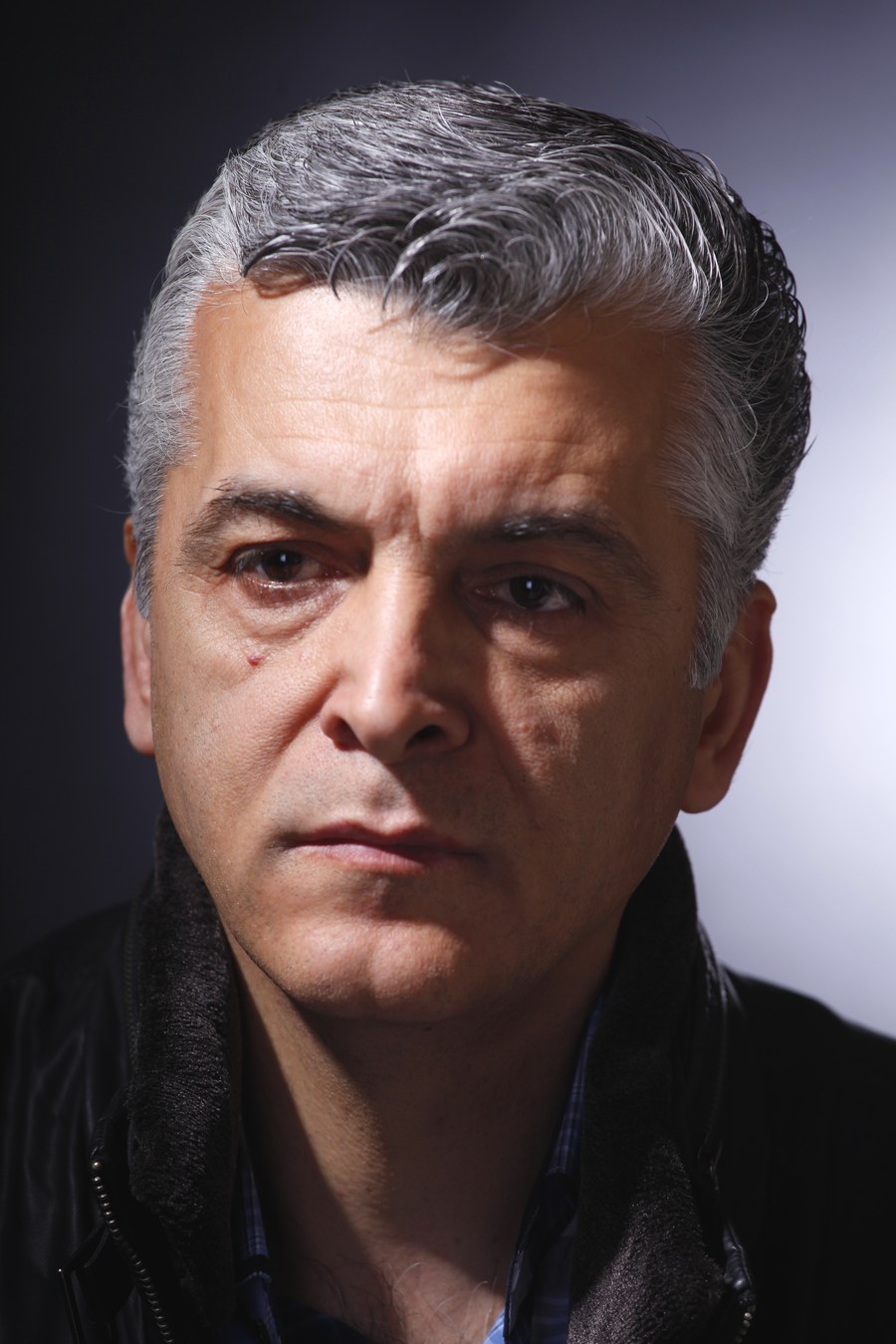

Read the result: the image-left cheek is brighter, while the image-right cheek has a small light patch below the eye. That is the visible Rembrandt-style pattern. The author identifies this as a portrait-lighting workshop photograph; the image does not establish the light’s exact position, modifier or power. To explore a similar pattern, move your light or the subject’s face gradually and watch where the nose shadow meets the cheek shadow. Treat the photograph as a lighting reference, not a universal pose or an exposure recipe.
Compare real fill-light results in Gary Small’s Nikon portrait examples: his sun-and-shadow pair uses a D800 at 1/250 sec., f/4 and ISO 100, with an SB-900 added for the fill-flash frame. Compare the facial shadows; those published settings describe that example, not the workshop portrait above or every outdoor session.
For difficult lighting, the low-light photography guide can help with exposure choices.
Pick Lens and Distance With Intention
Camera position determines perspective: photographing a face from very close makes nearer features appear larger relative to more distant features. A longer lens can let you keep similar framing while standing farther away. Changing focal length from the same position mainly changes framing; it does not by itself recreate the perspective of stepping back. Choose the distance first, then a focal length that frames the portrait on your sensor.
You do not need one perfect portrait lens, but you do need to watch distance:
- For headshots, avoid standing too close with a wide lens.
- For environmental portraits, include enough room to show the setting without losing the person.
- For full-body portraits, leave enough working distance and check camera height and tilt. A level camera can reduce converging verticals, but it does not remove all perspective effects.
- For detail portraits, focus on hands, eyes, clothing, tools, or personal objects that tell the story.
Try a distance comparison with a willing subject: make a close portrait, then step back and use a longer focal length to keep similar framing. Keep light and head angle as consistent as possible. Compare nose-to-ear proportions and background coverage; this is a suggested exercise, not a controlled test reported here. If you are still learning exposure and lens behavior, review camera settings for beginners.
Build the Pose From the Ground Up
Posing becomes easier when you direct one thing at a time. Start with feet and body angle, then hands, shoulders, chin, and eyes.
Offer a posing flow as options, with a seated or supported version when preferred:
- Ask whether a slight body turn feels comfortable; a front-facing portrait can also fit the brief.
- For standing poses, try a comfortable weight shift if wanted. For seated poses, support the feet and use a stable chair; do not require a weight shift.
- Invite the subject to release shoulder tension without forcing a position.
- Give hands a job, such as holding a jacket, touching a lapel, resting on a chair, or crossing loosely.
- Try a small chin adjustment if comfortable, then check the result rather than pushing the neck into an extreme angle.
- Direct the eyes toward the lens, past the lens, or toward another person.
Demonstrate an option yourself and ask before touching the person, clothing, hair or mobility equipment. A declined pose is useful information, not a problem to overcome. Avoid judging body size or calling one angle universally flattering. In Gary Small’s published pose and composition comparisons, the brick-wall pair changes body angle, crop and camera settings together. It shows alternatives, not a controlled test proving that turning alone improves every portrait.
Coach Expression Instead of Waiting for It
Expression is often the difference between a technically correct portrait and a portrait someone loves. The subject may be nervous, tired, unsure what to do with their face, or worried about how they look.
Use prompts that create a real reaction:
- "Look just past my shoulder like you recognized someone."
- "Take a breath, drop your shoulders, and give me a smaller smile."
- "Turn to the window, then bring only your eyes back to me."
- "Think of the person who makes you laugh the fastest."
- "Give me the version you would use for LinkedIn, then the version your closest friend would recognize."
Ask whether the subject prefers conversation, short instructions or quiet pauses. Offer prompts one at a time, allow processing time and skip personal questions they do not want to answer. Check in with “Would you like to try another expression or take a break?” A smile is an option, not the required outcome.
Control the Background
Backgrounds should support the face, not compete with it. Before shooting, scan behind the subject for bright signs, clutter, poles, strong lines, and color distractions.
Ways to improve background separation:
- Move the subject farther from the background.
- Use a wider aperture when appropriate.
- Change your angle to remove clutter.
- Choose a background color that complements clothing.
- Place the subject where light hits them more strongly than the background.
For environmental portraits, the background can stay visible, but it should still have a purpose. A chef in a kitchen, artist in a studio, or founder in a workspace can make sense when the setting adds meaning.
Review During the Session
Review a small set before moving on: magnify the intended focus area, inspect motion blur and clipping, and check expression, clothing and background. Use eye detection if your camera supports it, but verify the result. A wide aperture can leave one eye or a second person outside the focus plane; stop down or adjust the arrangement when needed.
Ask whether the subject wants to see a preview. If they do, show one or two representative frames and ask what feels right. Do not present an unedited camera preview as the promised final color or retouching result. Adjust the next frame in response to their feedback.
Review checklist:
- Eyes are sharp.
- Skin tone looks natural.
- Hands do not look tense.
- Clothing sits cleanly.
- Background has no major distractions.
- Expression matches the goal of the portrait.
A portrait session sequence to try
This is a proposed practice sequence, not an account of a shoot we performed. Keep the subject’s comfort and the agreed brief ahead of completing every step.
- Agree the baseline: confirm use and crop, choose standing or seated, and ask whether previews are welcome.
- Build one light setup: use even shade or indirect window light. Remove distracting background edges and make a test frame.
- Set exposure and focus: for a still single-person natural-light portrait, f/4 and 1/250 sec. can be initial choices; set ISO to suit the actual light. These are illustrative, not measured results or guaranteed settings. Use faster shutter speeds for movement, a smaller aperture for more depth, and check the image.
- Change one direction: offer a small body or face turn while keeping framing similar. Check the shadow pattern and ask which position feels better.
- Change one expression: offer a neutral look, small smile or look away. Pause rather than demanding an emotion.
- Review and complete the brief: check focus at magnification, show a preview if wanted, then make the required vertical, horizontal or environmental version.
Handle Privacy and Delivery Professionally
Portraits can be personal. Some clients are comfortable sharing widely. Others need privacy for family images, personal branding, or sensitive sessions.
Set expectations before delivery:
- Which images are final?
- Can the client download all images or only selected files?
- Should the gallery be password-protected?
- Are watermarked previews needed?
- How should collections be organized?
SendPhoto supports client galleries, collections, password protection, watermarks and download settings. Use password protection to add a shared-password access gate, and gallery delivery to present the agreed files. Someone who receives both the link and password can forward them; this does not verify each viewer’s identity or prevent screenshots and onward sharing. Download limits cannot recall a file already saved. Share expiry ends link access, not storage retention or deletion.
Choose and check the intended collection and download settings before sharing. A watermarked preview is not proof that every permitted download is marked: an allowed unwatermarked Original photo download uses the uploaded source; watermarked downloads use generated versions. Agree which filenames are final and what retouching is included. Favorites communicate preferences, not a purchase order, model release or final acceptance.
Portrait Session Checklist
Before the session:
- Confirm purpose and final use.
- Choose two or three location options.
- Discuss wardrobe and grooming.
- Pack backup batteries and cards.
- Check weather and light timing.
During the session:
- Start with easy poses.
- Keep directions specific.
- Watch hands and shoulders.
- Check background edges.
- Review focus and expression.
- Capture vertical and horizontal versions.
After the session:
- Cull for expression and sharpness.
- Edit consistently.
- Organize final images into clear sets.
- Protect private galleries when needed.
- Deliver files with clear download options.
Related Guides
- Browse the SendPhoto photography blog
- How to pose couples for photography
- Camera settings for beginners
- Low-light photography guide
- Gallery delivery for photographers
- Password-protected client galleries
FAQ
What makes a portrait look professional?
Professional portraits usually have intentional light, sharp focus on the subject, a controlled background, natural expression, and consistent editing. The subject should look comfortable and the image should match its intended use.
What is the best light for beginner portraits?
Indirect window light or even open shade is a manageable starting point. Avoid patches of direct sun, check the face and background separately, and change the angle or add controlled fill if the shadows do not fit the brief. No one light is best for every face or mood.
How do I pose someone who feels awkward?
Offer small, optional actions and demonstrate them. Ask what is comfortable, allow seated or supported positions and quiet pauses, and use the expression the subject wants. Do not touch or reposition them without permission.
Should portrait galleries be private?
Agree access and publication permissions with the client. A password adds an access gate but can be forwarded with the link; it does not guarantee confidentiality or prevent copying. Share only the agreed review or final files and discuss the limits before delivering sensitive portraits.