
Double exposure photography combines two images into one frame. The strongest results usually pair a clear subject, often a silhouette or simple portrait, with a second image that adds texture, place, memory, or mood.
The technique can be created in camera when your camera supports multiple exposures, or in editing software by blending two image layers. Either way, the creative decisions are the same: choose a strong base image, choose an overlay with useful shape, control contrast, and keep the final image readable.
What Makes a Double Exposure Work?
A double exposure works when the viewer can understand both images without visual clutter. One image usually carries the structure, while the other carries atmosphere.
- Base image: Choose a clean silhouette, profile or simple portrait with a recognizable outline. Busy backgrounds make that outline harder to read.
- Overlay image: Use trees, a skyline, waves or another texture with lines that support the subject. Random detail can compete with the base.
- Contrast: A dark subject on a light background is a useful starting point for a Screen blend; a midtone subject on a midtone background often needs more masking.
- Negative space: Give the composition an uncluttered sky, wall or backdrop rather than filling every area with detail.
- Alignment: Move the texture so its lines follow the face, hair, shoulders or object. Keep distracting edges away from important features.
Start With the Concept
Start with a sentence that explains the image. Use photographs you own or are licensed to combine and publish; agree any sensitive portrait treatment with the subject or client.
Examples:
- A portrait filled with pine trees to suggest quiet and solitude.
- A dancer layered with stage lights to show movement and performance.
- A city skyline inside a profile to suggest memory of a place.
- Ocean texture over hands to suggest distance, travel, or calm.
- Flowers inside a maternity portrait to create a soft, symbolic image.
This concept does not need to be literal, but it should guide your choices. If the overlay does not support the idea, the final image may look decorative rather than intentional.
Choose the Base Image
The base image is the frame that gives your double exposure its form. It needs clean edges and enough empty space for the overlay to breathe.
Use Silhouettes and Profiles
Silhouettes are a useful starting point for a Screen blend because texture can remain visible across the darker shape while a white background stays white. A side profile, a full-body outline, hands, or a couple standing against bright sky can all work well.
For portraits, place the subject against a light background and make a test frame with a clear outline. Check the histogram and keep a normally exposed portrait too. A dark face can suit an artistic blend, but there is no single exposure setting that works for every scene or blending method.
Keep the Background Simple
Plain walls, bright windows, open sky, fog, snow, or clean studio backdrops are easier to blend than detailed rooms. If the base image already has trees, signs, furniture, and people in the background, the overlay has to fight for attention.
Leave Room for the Overlay
Think about where the second exposure will live. Hair, shoulders, clothing, empty sky, and the space around the subject can all hold texture. If the base frame is tightly cropped with no breathing room, the image can feel cramped.
Choose the Overlay Image
The overlay image gives the double exposure its emotion. Look for shape, pattern, and tonal separation.
Natural Textures
Trees, branches, flowers, clouds, waves, mountains, and grass are common overlays because they have organic lines. They work especially well in portraits, engagement images, maternity sessions, and fine-art edits.
Urban Textures
Skylines, windows, bridges, street lights, staircases, and architecture can give a graphic, modern result. These overlays often work well with musicians, dancers, brands, city engagement sessions, and editorial portraits.
Light and Motion
Blurred lights, neon signs, smoke, fabric, reflections, and long-exposure motion can add energy. Use these carefully. If every part of the overlay is bright and busy, the subject may disappear.
In-Camera Double Exposure Workflow
Some cameras include a multiple-exposure mode that combines frames as you shoot. Use your model's manual: the number of frames, available modes, file formats and handling of the originals differ. A camera blend is not necessarily equivalent to Photoshop Screen.
For example, the Nikon Z6III multiple-exposure instructions distinguish Add, Average, Lighten and Darken. Add combines exposures without gain adjustment; Average adjusts gain for the number of frames. Lighten and Darken select brighter or darker pixels. This is a documented camera example, not a camera test performed for this article.
- Enable the camera's multiple-exposure mode and select two frames. Choose whether individual images are retained, if that option is available.
- Choose the blend mode deliberately and photograph a simple base subject.
- Use an overlay preview if supported to position the second frame's texture.
- Review the composite and histogram. Adjust the next attempt's exposures or blend mode based on the result; do not assume a fixed compensation value suits every mode.
- Try a different angle or texture scale, then turn multiple exposure off before returning to ordinary photographs.
In-camera work can encourage spontaneous combinations. Layers are more flexible when a client needs precise revisions or you want to revisit the blend later. Keep ordinary portraits alongside the experiments.
Editing-Layer Workflow
Editing gives you more control over opacity, alignment, masks, and color. You can refine the composition without needing both frames to line up perfectly in camera.
Adobe describes Screen as a lightening blend: black leaves the other image unchanged and white produces white. It does not cut out a silhouette automatically. Midtone backgrounds may still show unwanted texture, which is why masks matter. Here, “overlay image” means the upper photograph, not Photoshop's separate Overlay blend mode.
A Real Screen-and-Mask Example
In Erica Larson's Adobe demonstration, a snowy landscape sits above a bison photograph. The first figure shows the base, a thumbnail of the overlay and the blended result. The visible settings are Screen, 76% opacity. The second figure shows how a mask restores detail around the animal's face. These are Adobe's tutorial images, not our own shoot or software test.
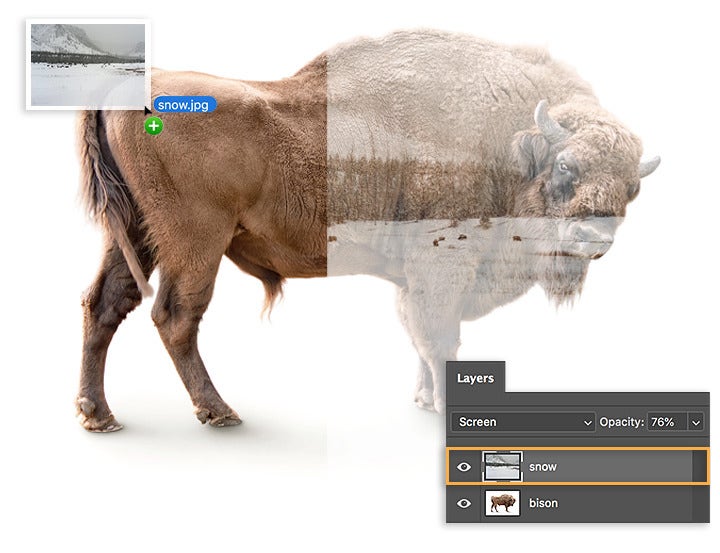
Open the blend example at full size.
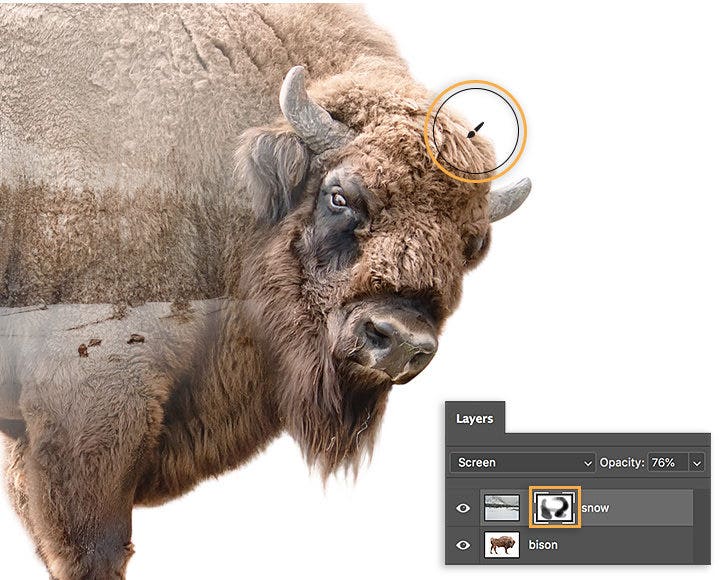
Open the masked example at full size. Adobe labels its downloadable project files for practice only; use your own or appropriately licensed photographs for client work. The tutorial does not provide the original capture exposures, and 76% is an example setting rather than a universal recipe.
Basic Layer Steps
- Open the base image.
- Add the overlay image as a second layer.
- Start with Screen for the lightening effect described below; compare the result with the overlay hidden.
- Adjust opacity until the subject and overlay both remain readable.
- Add a layer mask to the overlay. Paint black on the mask to hide distracting texture from eyes, mouth, hands or important edges; paint white to restore it. Keep the image pixels intact.
- Use curves or levels to increase separation.
- Finish with restrained color grading, save a layered master, then export a separate viewing copy.
If you are still building editing fundamentals, start with the beginner guide to editing photos clearly and consistently, then move into more stylized color choices with cinematic photo editing techniques.
Composition Ideas for Double Exposure Photography
Portrait Filled With Landscape
Place trees, mountains, ocean, or sky inside a profile or head-and-shoulders silhouette. Keep the face edge clean so the portrait shape remains recognizable.
Couple Silhouette With Shared Place
Use a couple holding hands or standing close as the base shape, then blend in a location that matters to them: a skyline, forest path, beach, or wedding venue detail. Keep the concept honest. A composite should be presented as creative art, not as a documentary record of a moment.
Hands With Texture
Hands can hold flowers, city lights, water, handwritten notes, or fabric. This is a strong option for albums, gallery dividers, and editorial details.
Full-Body Motion
A dancer, athlete, or musician can be layered with stage lights, fabric movement, or architectural lines. Leave enough empty space around the body to show the gesture.
Object and Place
Double exposure does not have to be a portrait. A camera, bouquet, guitar, chair, or pair of shoes can hold a second image when the shape is simple enough.
Common Mistakes to Avoid
Using Two Busy Images
If both images compete for attention, simplify one of them. A clean base image plus a detailed overlay usually works better than two detailed frames.
Losing the Face
When editing portraits, be careful around eyes, mouth, and the edge of the face. Masking a little detail back in can keep the image human.
Ignoring Tonal Separation
Double exposures need contrast. If everything sits in the same midtone range, the result looks muddy. Use curves, levels, or local adjustments to separate light and dark areas.
Choosing Texture With No Meaning
Texture should support the story. A random forest overlay on every portrait can start to feel repetitive. Match the overlay to the subject, location, or feeling of the session.
Overprocessing the Color
Color can unify the image, but heavy grading can make the blend look artificial. Start with contrast and composition, then make color decisions.
Pre-Shoot Checklist
- Decide the concept in one sentence.
- Choose whether the final image will be in-camera, edited, or both.
- Photograph a clean base silhouette or simple portrait.
- Capture multiple overlay options with different textures.
- Leave negative space around the subject.
- Shoot bright and dark variations.
- Keep a normal version of the portrait for the client gallery.
- Label creative composites clearly in your workflow and delivery message.
- Confirm permission to use both source photographs for the intended delivery.
Presenting Double Exposure Images to Clients
Double exposure images often work best as a small creative set within a larger gallery. Deliver the standard portraits, details, and documentary frames first, then include a separate creative collection for the experimental edits.
In SendPhoto, use collections to separate "Portraits," "Details," and "Creative Edits" in your client gallery. Review the optional password and download settings before sharing. These control access and available downloads; they do not explain usage rights or prevent an authorized viewer from copying an image. State which export is intended for printing and keep the layered master separately.
A delivery note can be simple: "The Creative Edits collection contains artistic composites made from separate photographs. The Portraits collection contains the standard edits. Please use the final print exports for the album." Adapt that wording to the actual files you supply.
FAQ
What is double exposure photography?
Double exposure photography combines two exposures or images into one final frame. It can be made in camera with a multiple-exposure feature or during editing by blending image layers.
What photos work best for double exposure?
Clean silhouettes, profiles, simple portraits, hands, and objects with strong shapes work especially well. The second image should have texture or lines that support the subject without hiding it.
Is double exposure better in camera or in editing?
In-camera double exposure is more spontaneous, while editing gives more control. For paid work, editing is usually easier to refine. For personal work, in-camera experiments can create surprising results.
Can double exposure be used in client galleries?
Yes, but it should be presented as creative artwork. Do not present a composite as a documentary photo if it changes what happened in the scene.