
Photography gets easier when you learn a repeatable order: find good light, decide what the subject is, choose settings that protect sharpness, compose the frame, focus carefully, edit lightly, and share the finished images clearly.
You do not need to master every camera menu at once. Use this as a first-month learning plan: four short assignments, a record of what changed, and a weekly review. The good-photo guide is a companion for troubleshooting individual frames; this guide helps you build a practice routine with the camera or phone you already have.
Start With the Subject
Before changing settings, decide what the photo is about.
Ask:
- What should the viewer notice first?
- Is anything distracting from that subject?
- Would moving closer help?
- Would a lower, higher, or side angle make the image clearer?
- Does the background support the subject?
Many beginner photos fail because the subject is unclear. A technically perfect image can still feel weak if the viewer does not know where to look.
Learn Light Before Gear
Light changes the mood, color, texture, and sharpness of a photo. Beginners often buy gear before learning to see light, but better light can improve every camera.
Easy light to practice with:
- Window light for portraits, food, products, and pets.
- Open shade for softer outdoor portraits.
- Cloudy days for even light and less squinting.
- Late-day light for warmer outdoor scenes.
- Side light for texture and shape.
Hard midday sun can work, but it creates strong shadows. If that is not the look you want, compare open shade, a different angle to the sun, or bounced light. Do not look into the sun through an optical viewfinder. For a light exercise, keep the subject and framing as similar as practical and note when automatic exposure or white balance changes; otherwise you cannot attribute every difference to light direction.
For more composition and light basics, read how to take good photos.
Understand Exposure Without Getting Lost
For this guide, distinguish incoming light from the brightness of the finished image. Aperture and shutter duration control light reaching the sensor. Digital ISO affects how the captured signal is rendered; it does not open the lens or extend the capture time. Automatic camera processing can also change the result.
| Setting | What it controls | Creative effect |
|---|---|---|
| Aperture | How much light enters through the lens | Background blur and depth of field |
| Shutter speed | How long the camera records light | Freezing or blurring motion |
| ISO | Digital image brightness/gain settings, not additional incoming light | Brightness and noise tradeoffs, especially when less light is captured |
Aperture
A wider aperture (lower f-number) can reduce depth of field and blur the background. A narrower aperture (higher f-number) can increase depth of field, but focus distance, focal length and subject distances also matter. Neither guarantees that a whole group is sharp; check each important face, and avoid assuming the smallest aperture always gives the best detail.
Shutter Speed
Choose shutter duration for the movement you want to show. A faster shutter can reduce subject-motion blur and camera shake; a slower one can deliberately show movement. A stable camera helps a still background stay sharp, but it does not freeze a moving child or pet. Stabilization is not a substitute for a suitable shutter speed.
ISO
Raise ISO when you need a brighter rendering while retaining the shutter speed and aperture required for the picture. Noise depends on the light captured, camera and processing as well as the ISO choice. Do not slow the shutter until the subject blurs merely to keep a low ISO. Nikon’s ISO guide describes the practical shutter-speed/ISO tradeoff; its camera-specific ranges are not universal limits.
You can learn these decisions in automatic or priority modes before using manual exposure. Check your camera’s manual for control names and limits; many phones do not offer a directly adjustable lens aperture in the standard photo mode.
Start With Phone Controls
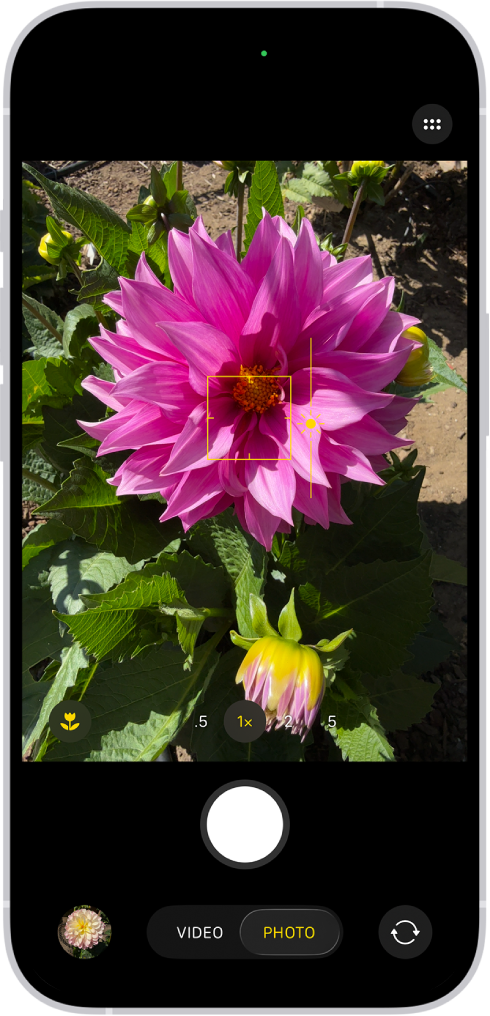
For a documented iPhone example, Apple’s iOS 26 camera guide explains tapping the subject to move the focus area and dragging the adjacent exposure control to adjust brightness. Touch and hold until AE/AF Lock appears to lock those settings; tap to unlock. Refocus if the subject distance changes. On other phones, use the manufacturer’s instructions for the equivalent controls.
Start With Camera Priority Modes
Nikon’s D3500 mode guide provides a concrete example: A lets you choose aperture while the camera chooses shutter speed; S lets you choose shutter speed while it chooses aperture. These controls are model-specific. Start with a still subject in aperture priority to compare depth of field, then use shutter priority to explore movement. Review the camera’s resulting settings and any exposure warning, rather than assuming automatic adjustment can compensate for every scene.
Keep your position, subject distance and framing similar during an aperture comparison. In shutter priority, aperture or Auto ISO may change, so record the resulting settings before comparing brightness or background blur. You are learning one decision at a time, not copying a universal settings recipe.
Focus Carefully
Focus tells the camera what should be sharp. Beginners often let the camera choose, then wonder why the background is sharp instead of the person.
Focus tips:
- For a close portrait, use the nearer eye as a starting focus target; check both eyes if both need to be sharp.
- For groups, arrange people at similar distances where practical, choose enough depth of field, and inspect every important row.
- For products and details, focus on the most important edge or label.
- For moving subjects, use a focus mode designed for tracking when available.
- Review important images at full size, not only as small previews.
If focus keeps missing, slow down and use one focus point. Put it where sharpness matters most.
Compose With Intention
Composition is how you arrange the photo. You can improve composition without buying anything.
Beginner composition habits:
- Move closer when the subject is too small.
- Keep horizons level unless the tilt is intentional.
- Watch the edges for cut-off hands, feet, signs, or bright distractions.
- Leave space in the direction a person is looking or moving.
- Use doorways, windows, paths, and lines to guide attention.
- Simplify the background.
Do not treat rules as laws. The rule of thirds, symmetry, framing, and leading lines are tools. The goal is to make the image easier to understand.
Practice With Small Assignments
Use the four assignments below as proposed exercises. Keep a few comparison frames and write what changed and what you would try next. They are practice instructions, not completed assignment results.
Assignment 1: Same Subject, Different Light
Photograph a consenting person or a still object near a window, in open shade, in direct sun, and under indoor light. Do not force a person to face harsh sunlight. Record the light direction, visible shadow edge and color; keep position and framing similar where possible. Note camera settings or automatic adjustments, because changing several variables limits the comparison.
Assignment 2: One Scene, Five Angles
Take one scene from eye level, low angle, high angle, close-up, and farther away, from safe accessible positions. Choose the frame with the clearest subject and explain which background or edge distraction improved. A closer frame may change perspective and depth of field as well as composition.
Assignment 3: Freeze and Blur Motion
From a safe position, photograph a gently moving hand or a willing person walking with different shutter speeds. Use shutter priority if available, or the phone’s documented motion controls. Compare subject blur separately from background sharpness; do not step into traffic or direct people or pets into hazards for a motion exercise.
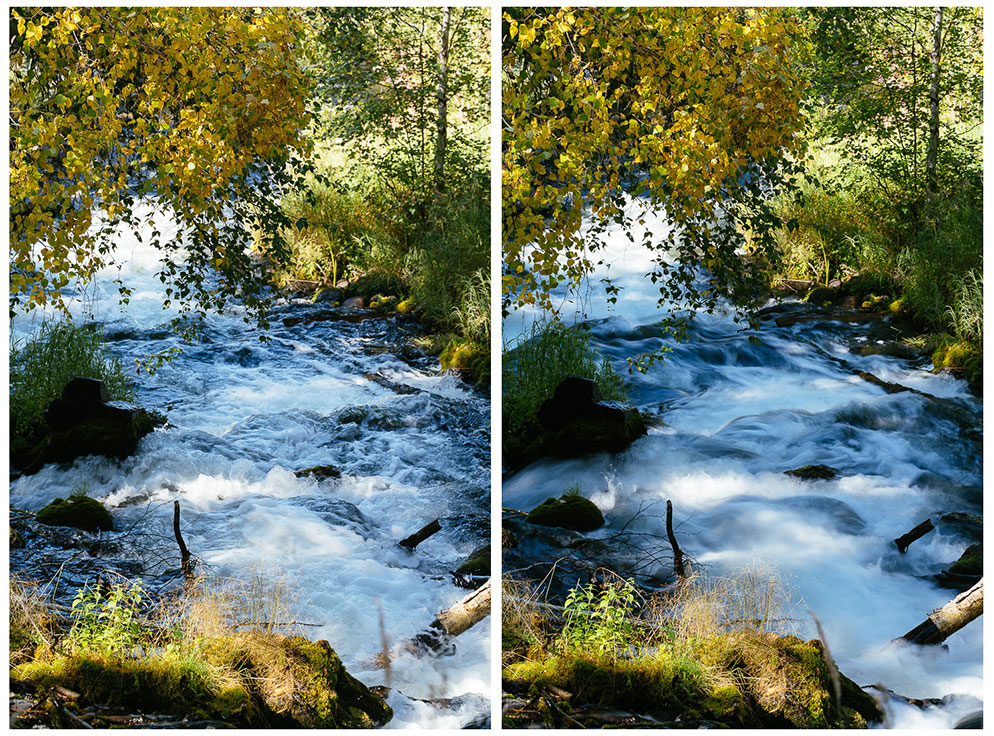
Read the comparison as a creative choice: more texture or smoother movement. The rocks and framing provide a reference, while the water changes during each exposure. Do not infer an unreported ISO, filter, or brightness measurement from this pair.
Assignment 4: Background Cleanup
Take a portrait or product photo, then change your position to simplify the background. Compare the edges as well as the area behind the subject. Your new angle may also change light and subject distance, so describe those changes rather than treating the pair as proof that only the background mattered.
Record a Small Practice Log
Use this blank record for each exercise. It is a proposed template; no shoot or camera test results are supplied.
| Record | What to write |
|---|---|
| Subject and aim | What should be clear, sharp, or intentionally blurred? |
| Changed variable | Light position, camera angle, shutter duration, or background |
| Other changes | Aperture, ISO, focus distance, automatic processing, or scene movement |
| Observation | What is actually visible at matching magnification? |
| Next attempt | One decision to change or repeat |
Edit Simply at First
Editing can improve tone, color and presentation, but it cannot reliably recover detail that was never captured, remove every kind of blur or fix an unsuitable viewpoint. Keep a source copy and compare the edit at the intended viewing size.
Beginner editing order:
- Crop and straighten.
- Adjust exposure.
- Correct white balance.
- Reduce bright highlights where the source retains useful detail; fully clipped detail may be unavailable.
- Lift shadows only where useful.
- Add modest contrast.
- Remove small distractions.
- Sharpen lightly.
- Export for the final use.
Avoid heavy filters on every image. If skin turns orange, grass turns neon, or shadows lose all detail, pull the edit back.
For the next step, read how to edit photos for beginners.
Handle Files Before They Become a Mess
Beginners often wait too long to organize photos. Build a simple habit early.
File workflow:
- Import photos into folders named by date and project.
- Confirm the imported files and an independent backup before deleting unwanted frames or clearing the source card.
- Keep originals separate from edited exports.
- Keep independent backup copies of important shoots and confirm that representative files can be opened or restored.
- Export final images into clearly named folders.
- Do not rely on one phone, card, or laptop as the only copy.
This matters even for hobby work. It matters more if you start photographing families, events, products, or paid sessions.
Share Finished Photos Clearly
When you share images, match the method to the viewer.
For casual sharing, a small set of web-sized images may be enough. For family, events, or client work, a gallery is easier to browse than a long message thread or mixed folder.
SendPhoto publishes this guide and offers client photo-gallery delivery. If you begin sending finished work to families or clients, gallery delivery can organize a set into collections with optional password and download controls. Collections are organizational groups, not separate audience permissions; anyone who receives a link and any password may pass them on. Confirm consent or other permission before sharing people’s photographs publicly.
Choose the agreed export for the recipient and keep your own masters. SendPhoto’s Original mode can deliver generated marked images when watermarking is active; Scaled uses generated smaller output. Download availability also depends on gallery and collection settings. A watermark or disabled download control does not prevent every copy. Under the current plan terms, paid plans remove SendPhoto branding from the public home page and gallery invite emails; that is a specific branding scope, not an editing or learning feature.
Beginner Mistakes to Avoid
- Buying new gear before learning light.
- Cropping too much because you stood too far away.
- Letting the camera focus on the background.
- Editing every photo with the same strong filter.
- Ignoring file backup.
- Posting or delivering too many near-duplicates.
- Shooting everything from standing eye level.
- Using a shutter speed too slow for moving subjects.
First Month Practice Plan
| Week | Focus | Practice goal |
|---|---|---|
| 1 | Light and subject | Make ten intentional frames using window light or open shade; keep two comparisons and describe shadows and subject clarity |
| 2 | Focus and sharpness | Compare a still subject and gentle movement; identify focus error, camera shake or subject blur before choosing the next setting |
| 3 | Composition | Shoot one subject from five safe angles; explain the clearest background and frame edges |
| 4 | Editing and sharing | Edit a small selected set; retain sources and backups, then explain the intended viewing/export use |
At the end of the month, review your practice log and choose one repeated problem to work on next. Extend a week if useful; completing a calendar does not certify a skill level. The aim is to recognize what changed and make a more deliberate next attempt.
Beginner Photography Checklist
- Decide the subject first.
- Look for better light before changing settings.
- Choose shutter speed for movement.
- Focus where sharpness matters.
- Compose before pressing the shutter.
- Take fewer duplicates and review carefully.
- Edit lightly and consistently.
- Back up originals.
- Share finished images in a clear, organized way.
Photography is a skill built through attention. Learn what light is doing, make one clear decision at a time, and review your results honestly. The camera becomes easier to use when your eye knows what it wants.