
Good photos usually come from a few repeatable habits: use better light, simplify the frame, focus carefully, hold the camera steady, watch the background, and take more than one version of important moments. You do not need expensive gear to start improving. You need clearer decisions before you press the shutter.
This guide focuses on decisions you can use with a phone or camera: what the photograph is about, how the light shapes it, and what needs to be sharp. Use the checklists for a clean documentary result, then adapt them when blur, darkness or a busy scene serves your idea.
Start With Better Light
Light affects every photo. If the light is harsh, dim, mixed, or coming from an awkward direction, the photo becomes harder to rescue later.
Look for soft, directional light. Window light, open shade, early morning, late afternoon, and cloudy conditions are often easier than direct overhead sun. Indoors, move the subject closer to a window or turn off lights that create strange color mixes.
Quick light checks:
- Is the subject brighter than the background?
- Are there harsh shadows across the face?
- Is the light coming from a useful direction?
- Are bright areas distracting from the subject?
- Can you move one step left, right, forward, or back for better light?
Try a simple practice comparison: photograph a stationary subject, move it closer to a window or into open shade, and take a second frame. Compare the shadows and brightness on the subject, keeping the framing as similar as possible. Let the result guide your choice; this is an exercise for your own scene, not a performed lighting test.
Soft light is a useful starting point, not a requirement. Backlight can create a silhouette, and direct sun can make graphic shadows. Choose deliberately rather than treating every dark face or strong shadow as an error.
When the light is low, steadiness matters more. The low-light photography guide covers that situation in more detail.
Clean Up the Background
A busy background can make a sharp, well-lit photo feel messy. Before shooting, scan behind the subject.
Watch for:
- Poles, trees, or signs behind heads.
- Bright objects near the frame edge.
- Clutter on tables and floors.
- Uneven horizons.
- People walking through the background.
- Reflections that reveal unwanted objects.
Often the fix is simple: move the subject, change your angle, shoot closer, or wait a few seconds. For practice, take a first frame, move one step sideways, and take another. Compare whether a pole or bright patch now separates from the subject. Keep objects that explain the story; a clean background does not have to be empty.
Compose With One Clear Subject
A good photo tells the viewer where to look. If everything in the frame competes for attention, the image feels weak.
Use composition to make the subject obvious:
- Move closer.
- Leave out unnecessary space.
- Place the subject away from distracting edges.
- Use lines, doorways, paths, or shadows to guide the eye.
- Try vertical and horizontal versions.
- Keep the horizon level unless a tilt is intentional.
Rules like thirds, symmetry, and leading lines can help, but they are tools, not requirements. The real question is whether the frame supports what you want the viewer to notice. For example, in the Adobe lighthouse photograph below, the walkway creates a visible route toward the tower. That is a reading of the image, not a rule that every photograph needs a leading line.
Focus on the Most Important Detail
Sharpness starts with focus. For portraits, focus on the eyes. For products, focus on the detail that explains the object. For landscapes, choose a focus point that keeps important foreground and background detail usable.
Phone users can tap the intended subject when the app chooses the wrong area. On iPhone, Apple documents tapping to move the focus area, dragging the exposure control to change brightness, and touching and holding for AE/AF Lock in its camera-tools guide. Unlock and refocus when the distance changes. Other phones and camera apps have different controls.
Camera users should choose an autofocus mode and focus point that match the subject. Use the appropriate continuous or tracking mode for movement when available; a stationary subject may suit single-shot focus. Check your camera’s documentation for its terminology. With a shallow depth of field, recomposing after locking focus can move the important detail out of the sharp area.
Focus checklist:
- Tap or choose the subject intentionally.
- Refocus if the subject moves.
- Take an extra frame after recomposing.
- Check sharpness before leaving the location.
- Use more light if focus keeps hunting.
If photos often look soft after capture, read how to improve photo quality for blur and export diagnosis.
Hold the Camera Steady
Camera movement causes many disappointing photos. Even a good pose and good light can fail if the camera moves during the exposure.
Steady habits:
- Hold the phone or camera with two hands.
- Tuck elbows closer to your body.
- Lean against a wall, table, or post when needed.
- Press the shutter gently.
- Use a tripod for slow shutter speeds or repeated compositions.
- Shoot a short burst for important moments.
Steadiness helps with camera shake, especially at slow shutter speeds or longer focal lengths. A tripod does not freeze a person who moves during the exposure. For subject motion, use a sufficiently short exposure, improve the light when needed, or choose blur deliberately. Nikon’s motion guide shows why shutter speed depends on the action rather than one universal setting.
Watch the Edges of the Frame
Beginners often look only at the subject. Good photographers also check the borders.
Before taking the shot, scan all four edges:
- Is a hand, foot, or object cut off awkwardly?
- Is a bright object pulling attention away?
- Is there empty space that weakens the image?
- Is the horizon running through a head?
- Is anything entering the frame that should not be there?
A brief edge check can save an awkward crop later. Leave room for an intended print or social crop, but do not treat every cut-off object as a mistake; a close detail can be intentional.
Take Multiple Versions
One frame is rarely enough. People blink, hands move, expressions shift, and backgrounds change.
For important photos, shoot a small sequence:
- Wide frame for context.
- Medium frame for the subject.
- Close frame for expression or detail.
- Horizontal version.
- Vertical version.
- One extra after you think you have it.
This gives you choices in editing and makes it more likely that one frame has the best timing.
Use Simple Camera Settings
You do not need to master every setting at once. Focus on the settings that affect the visible result.
| Goal | Setting or habit to watch |
|---|---|
| Freeze movement | Use a sufficiently fast shutter speed for the action; more light may help you maintain it |
| Blur background | Try a wider aperture or more subject-background distance; supported phone portrait modes simulate blur and can misread edges |
| Keep scene sharp | Choose enough depth of field for the important distances and focus carefully; a narrower aperture can require a slower shutter or higher ISO |
| Avoid grainy images | Use suitable light and exposure, and avoid extreme shadow lifting; accept higher ISO when needed to prevent unwanted motion blur |
| Keep color natural | Watch white balance and mixed lighting |
For a deeper beginner explanation, read camera settings for beginners.
Take Better Portraits
Portraits improve quickly when you combine soft light, clean background, and relaxed direction.
Try this:
- Place the subject near window light or open shade.
- Turn them slightly instead of straight to camera.
- Keep the background simple.
- Focus on the eyes.
- Give a small action, such as looking away then back.
- Take several frames to catch a natural expression.
Avoid telling people to hold a smile for too long. Expression usually gets stiff. Give them something small to do.
Take Better Travel and Everyday Photos
Travel and everyday photos often fail because the scene is too busy. Choose what the photo is about before shooting.
Ask:
- Is this about the person, place, food, detail, or moment?
- Would moving closer make it stronger?
- Would waiting for fewer people help?
- Would a lower or higher angle reveal the subject better?
- Is the light better from another side?
The best everyday photos often come from patience: one cleaner background, one better expression, one better angle.
Edit Lightly After Capture
Editing should support the photo, not hide every decision. Start with crop and straightening, then adjust exposure, color, contrast, and detail.
Useful beginner edits:
- Straighten horizons.
- Crop distractions.
- Brighten the subject.
- Reduce bright skies or white clothing where the recorded file still contains detail.
- Correct color that is too warm or cool.
- Add modest contrast.
- Sharpen lightly after resizing or export.
Highlight recovery has limits. Reducing brightness does not restore texture that was never recorded in the source. Adobe’s tone and clipping documentation explains how clipping can lose detail and how remaining color-channel information can sometimes help. Check important bright areas at capture rather than relying on a later rescue.
Published example: Adobe’s basic lighting and color lesson starts with a lighthouse photograph with a dark foreground and bright sky. The later view shows brighter foreground detail and stronger sky color after several tonal and color adjustments. Compare the rocks, walkway and sunset rather than assuming that a brighter whole image is always better.
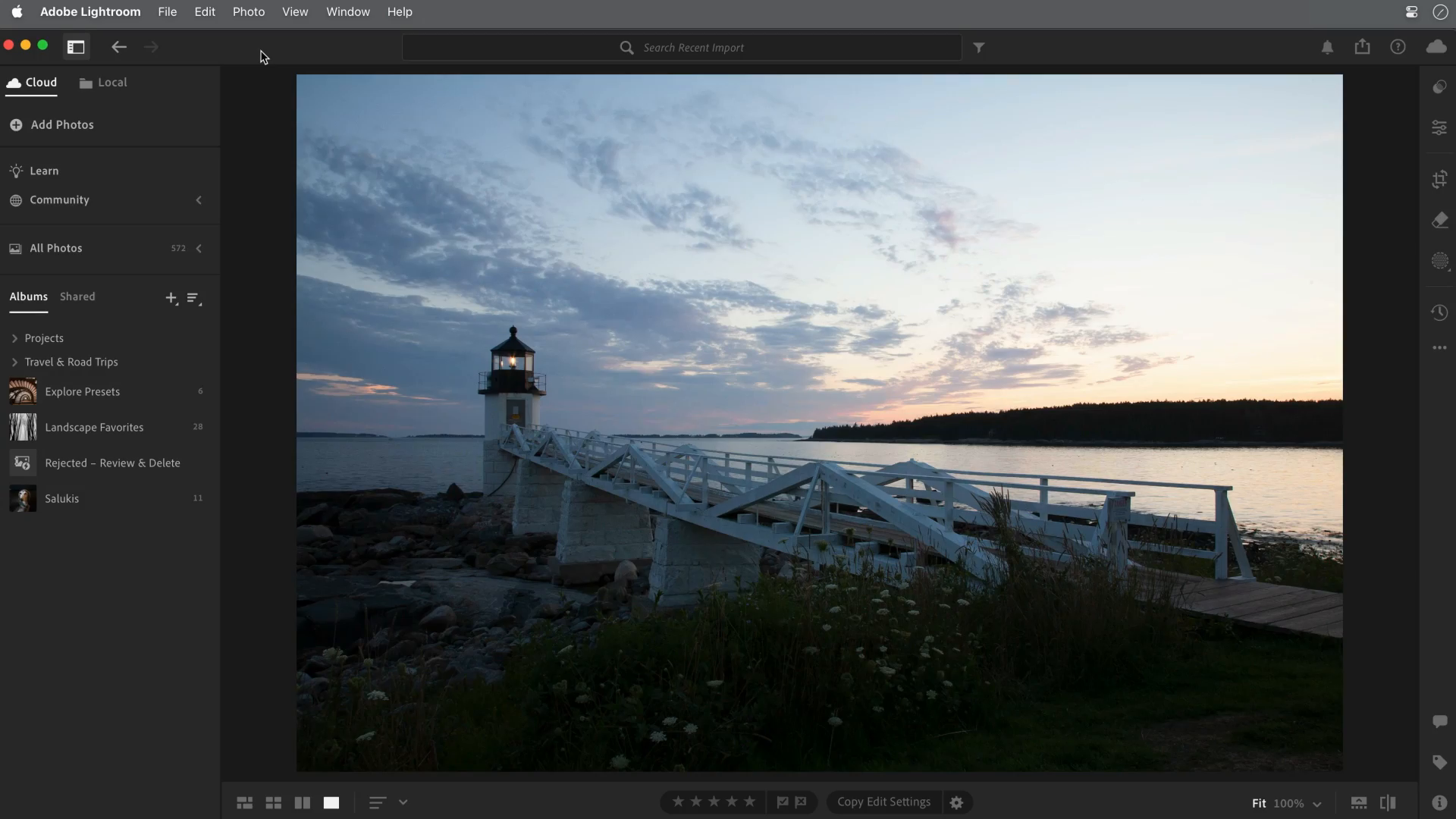
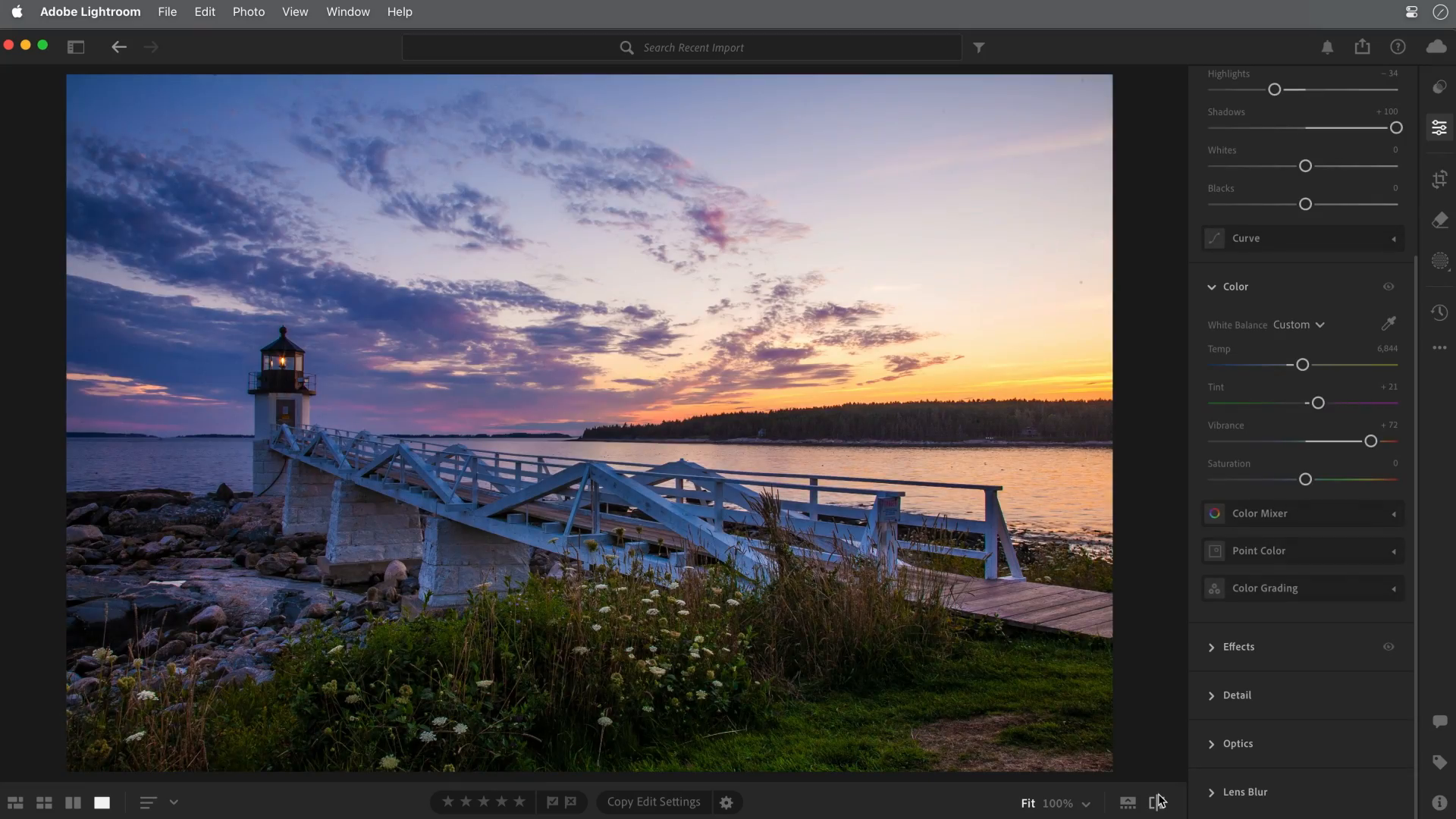
Use the pair to distinguish capture from editing. The tower and walkway were already present in the source; editing changes their visibility and color treatment. It does not change the camera position or demonstrate moving a subject to better light. For your own work, compare an edit with its original and keep the source file.
For the full editing sequence, use how to edit photos for beginners.
Share and Deliver Finished Photos
How you share photos affects how they are experienced. A compressed message, messy folder, or unorganized album can make good images feel less polished.
For casual sharing, choose a final export suited to the intended use and avoid unnecessary duplicates. For client delivery, organize the agreed images into clear collections and explain which files are ready for download.
SendPhoto’s gallery delivery includes collections, optional password protection and download controls. Configure access and download permissions deliberately. A forwarded link and password can grant access, and a watermark does not prevent copying. The photo download choices Original and Scaled down do not replace your decision about what export to supply. Keep an independent archive; a client gallery is not your only backup.
Quick Checklist Before You Shoot
- Is the light helping the subject?
- Is the background clean?
- Is the subject clear?
- Did you focus intentionally?
- Are the frame edges clean?
- Is the camera steady?
- Did you take more than one version?
- Did you check the photo before leaving?
Common Mistakes That Make Photos Look Worse
Shooting From Too Far Away
If the subject is small and surrounded by clutter, the viewer does not know where to look. Move closer or crop with intention.
Ignoring the Direction of Light
Light from above or behind can create shadows or a dark face. Turn the subject, change position or adjust exposure if that is not your intention. Keep the result when a silhouette or graphic shadow is the photograph you want.
Letting the Background Compete
Bright signs, clutter, and awkward lines steal attention. Change your position before shooting.
Taking Only One Frame
One frame leaves no backup for blink, blur, or bad timing. Take a short sequence for important moments.
Over-Editing Later
Heavy saturation, sharpening, and shadow lifting can make a weak photo look worse. Improve the capture first.
FAQ
What makes a photo good?
A good photo achieves its purpose: it may describe a person, preserve a moment, explain a product or create a feeling. Clear subjects, useful light and controlled focus help many photographs, but deliberate blur, darkness or clutter can also work. Technical cleanliness is a tool, not a universal definition of quality.
How can beginners take better photos immediately?
Move to better light, clean up the background, tap or choose focus carefully, hold the camera steady, and take more than one frame.
Do I need an expensive camera to take good photos?
No. Better light, composition, timing, and focus improve photos on both phones and cameras.
Why do my photos look blurry?
Common causes include missed focus, camera shake, subject movement, low light, or over-enlarging a small file.
Should I edit every photo?
No. Select the photographs that serve the purpose, then edit only where it helps. Some need a crop or exposure correction; others work as captured. Compare with the original and avoid replacing careful selection with heavy processing.