
Use these photography tips as a field checklist for one frame: check the light, stabilize the camera, choose the important detail, simplify the background and review the result. Make one deliberate change, take another frame and compare them before moving on.
The checklist works with a phone or a dedicated camera, although the available controls differ. For a longer learning routine, use the first-month beginner photography guide. Here the goal is a repeatable check you can use during today’s shoot, followed by simple editing and an organized handoff.
Start With Light Before Settings
Before changing a setting, inspect the light on the subject. Look for its direction, the transition between light and shadow, and important bright areas that may lose detail. A brighter image is not always a better exposure.
Open shade, window light and overcast conditions can give softer shadow edges than a small direct light source. A window can still create strong contrast, and hard light can suit the picture. Change position deliberately rather than assuming a particular time of day or lighting label guarantees a good result.
Use this quick light check before every shot:
| What to Check | What to Look For | Easy Fix |
|---|---|---|
| Direction | Is the light hitting the subject from the front, side, or back? | Turn the subject or move yourself until the light flatters the scene. |
| Contrast | Are shadows too harsh or highlights too bright? | Move into shade or use a reflector, wall, or white card to bounce light. |
| Color | Is mixed indoor light making skin or objects look strange? | Turn off one light source or move closer to natural window light. |
| Background | Is the background brighter than the subject? | Change angle or prioritize the important detail; check whether bright background detail is lost. |
Keep the Camera Stable
First distinguish the problem: camera shake can affect the whole frame, subject motion can leave a moving person or object soft, and missed focus can leave the wrong distance sharp. These are clues, not a diagnosis from every blurred thumbnail. Review at a useful magnification.
Hold the camera steadily with both hands and press the shutter smoothly. Brace a phone or camera against a stable support where practical. For a static subject in dim light, a tripod can reduce camera movement; it does not stop a person, animal or leaf from moving.
For a moving subject, a shorter exposure may help retain detail. Try a faster shutter speed where your camera permits it, then check brightness and noise as well as sharpness. A short burst gives you more frames to inspect but does not correct missed focus or an unsuitable exposure time.
Learn the Exposure Triangle Without Overcomplicating It
Aperture, shutter speed and ISO work together, but they do not all add incoming light. Aperture and exposure duration affect how much light reaches the sensor. ISO affects how the captured signal is rendered and can let you use a faster shutter speed for similar displayed brightness.
Aperture
On a camera with aperture control, a lower f-number admits more light at the same shutter time and generally reduces depth of field when the other conditions are comparable. A higher f-number can put more distances in acceptable focus, but subject distance, focal length and focus placement also matter. Check the whole group or product instead of assuming one aperture makes everything sharp.
Shutter Speed
A shorter exposure reduces the time over which motion is recorded; a longer one can show movement deliberately. If the whole handheld frame looks smeared, compare a supported frame or a faster shutter speed. If only the moving subject is soft, support alone may not solve it.
ISO
Higher ISO does not open the lens or keep the shutter open longer. Noise depends on the captured light, camera and processing, so there is no universal ISO ceiling. Prioritize the motion and focus needed for the picture, then inspect the result. Nikon’s ISO guide explains the shutter/aperture tradeoff; its older model examples should not be treated as limits for every current camera.
For a deeper beginner settings walkthrough, read the camera settings for beginners guide.
Compose Before You Shoot
Composition is not about memorizing rules. It is about deciding what the viewer should notice first.
Before taking a photo, ask three questions:
- What is the subject?
- What can I remove from the frame?
- Where should the subject sit in the image?
Change viewpoint when the frame needs it. A step sideways may remove a sign or separate a subject from a bright patch; a lower angle may simplify the background. Moving changes perspective and relationships in the scene, while zooming from the same position changes framing. Choose deliberately rather than treating either as a rule.
Useful composition habits:
- Leave space in the direction a person is looking or moving.
- Keep horizons level unless the tilt is intentional.
- Watch the edges of the frame for cut-off hands, feet, signs, or bright distractions.
- Use foreground elements carefully to add depth.
- Simplify the background when the subject needs attention.
Focus on One Main Subject
Many beginner photos feel weak because everything in the frame competes for attention. Decide what matters most and make the rest support it.
For a portrait, choose the eye that should be sharp. For a product, choose the detail the viewer needs to judge. For a landscape, check the important near and far elements rather than focusing only on the most obvious object. Review the actual frame; the chosen point alone does not prove enough depth of field.
Use face or eye detection if it identifies the intended subject. If it chooses the wrong person or object, use the focus controls available on that camera. A phone may let you tap a subject; a camera may offer a selectable point. Confirm the result rather than assuming the interface has locked focus correctly.
Use Backgrounds Intentionally
A background can be plain or detailed. The question is whether it supports the subject or competes with it. Scan the entire frame, including bright patches and reflections, before taking another picture.
You do not always need a studio backdrop. A plain wall, shaded doorway, curtain, table, pavement, or textured surface can work. What matters is whether the background helps the photo.
Check for:
- Bright areas pulling attention away from the subject.
- Lines that appear to run through a person's head.
- Clutter near the edges.
- Colors that clash with clothing or products.
- Reflections that reveal unwanted objects.
Try a different angle or more separation between subject and background, then compare the frame. A wider aperture can help where available, but check that important subject details remain sharp. Avoid relying on simulated phone background blur to solve every edge or detail problem.
Take a Test Frame and Review It
Take a test frame while there is still time to change the scene. Inspect the important detail at useful magnification, then return to the full frame to check the composition. Fix one visible problem and compare a second frame.
Review these details:
| Detail | Why It Matters |
|---|---|
| Focus | Confirms the important part of the image is sharp. |
| Exposure | Catches blown highlights, muddy shadows, or underexposed faces. |
| Background | Reveals distractions you missed while shooting. |
| Expression | Helps avoid awkward blinks or tense poses. |
| Edges | Finds accidental crops and objects entering the frame. |
A short review pause gives you a chance to explain the next adjustment to anyone being photographed. It does not establish that the session has succeeded; check the actual frames before promising a result.
One frame, one change
For a proposed practice check, photograph an object you may photograph near a window. First review the frame. If a bright background distracts, move sideways and make another frame; if the subject is soft, try support or different focus before changing everything at once. Compare the same important detail and the frame edges. Automatic exposure and white balance may also change, so note that rather than attributing every difference to your intended adjustment.
- Name the visible problem in the first frame.
- Choose one change: position, support, focus or a setting available on your camera.
- Make another frame and compare at the same viewing scale.
- Keep the useful change or try another; record anything else that changed.
This is an exercise for your next session, not a reported shoot or a measured improvement. It keeps the field checklist focused on an observable decision.
Edit for Clarity, Not Disguise
Work on an editable version and retain the original. Start with crop, exposure, white balance, contrast and local detail as needed. An edit can change the presentation of recorded detail; it cannot reliably recover a missed expression, severe motion blur or information that was not captured.
Compare with the original frequently. Look for clipped bright areas, distracting halos, unnatural skin or colors that no longer fit the brief. A strong stylized edit can be intentional; consistency and the intended use matter more than a blanket ban on filters.
Basic editing order:
- Choose the strongest frames.
- Crop and straighten.
- Correct exposure and white balance.
- Adjust contrast and color.
- Retouch only distractions that pull attention from the subject.
- Export in the right size and format for the final use.
A real published editing comparison
The two unchanged frames below come from Adobe’s lighting-and-color lesson, with instruction and photography by Seán Duggan. The first, at 00:32, shows the starting lighthouse image; the later frame, at 05:26, shows his adjusted version. They are a credited demonstration, not our photograph or our Lightroom edit.
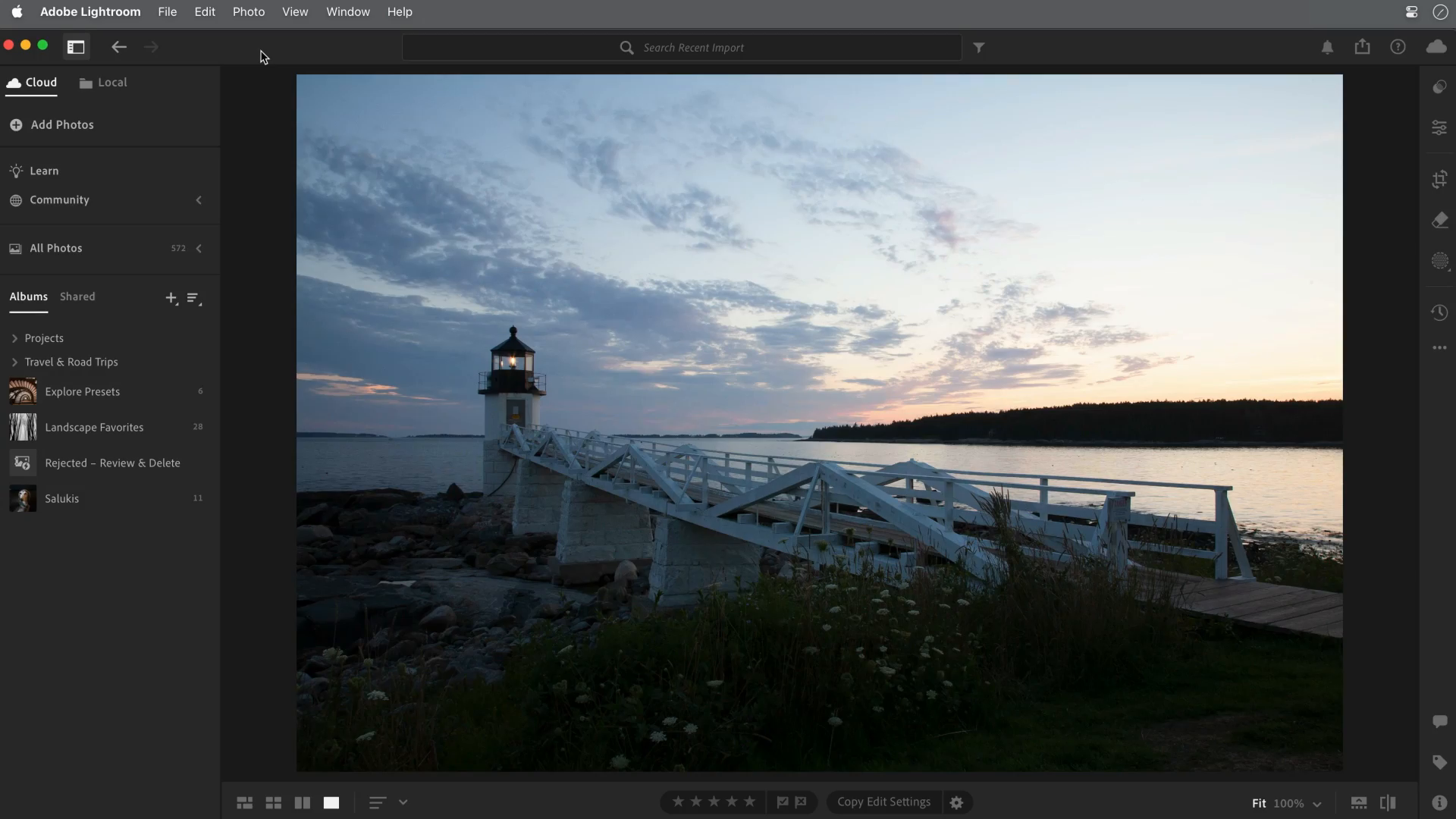
Starting frame: inspect the foreground and sky separately. View the full-size starting frame.
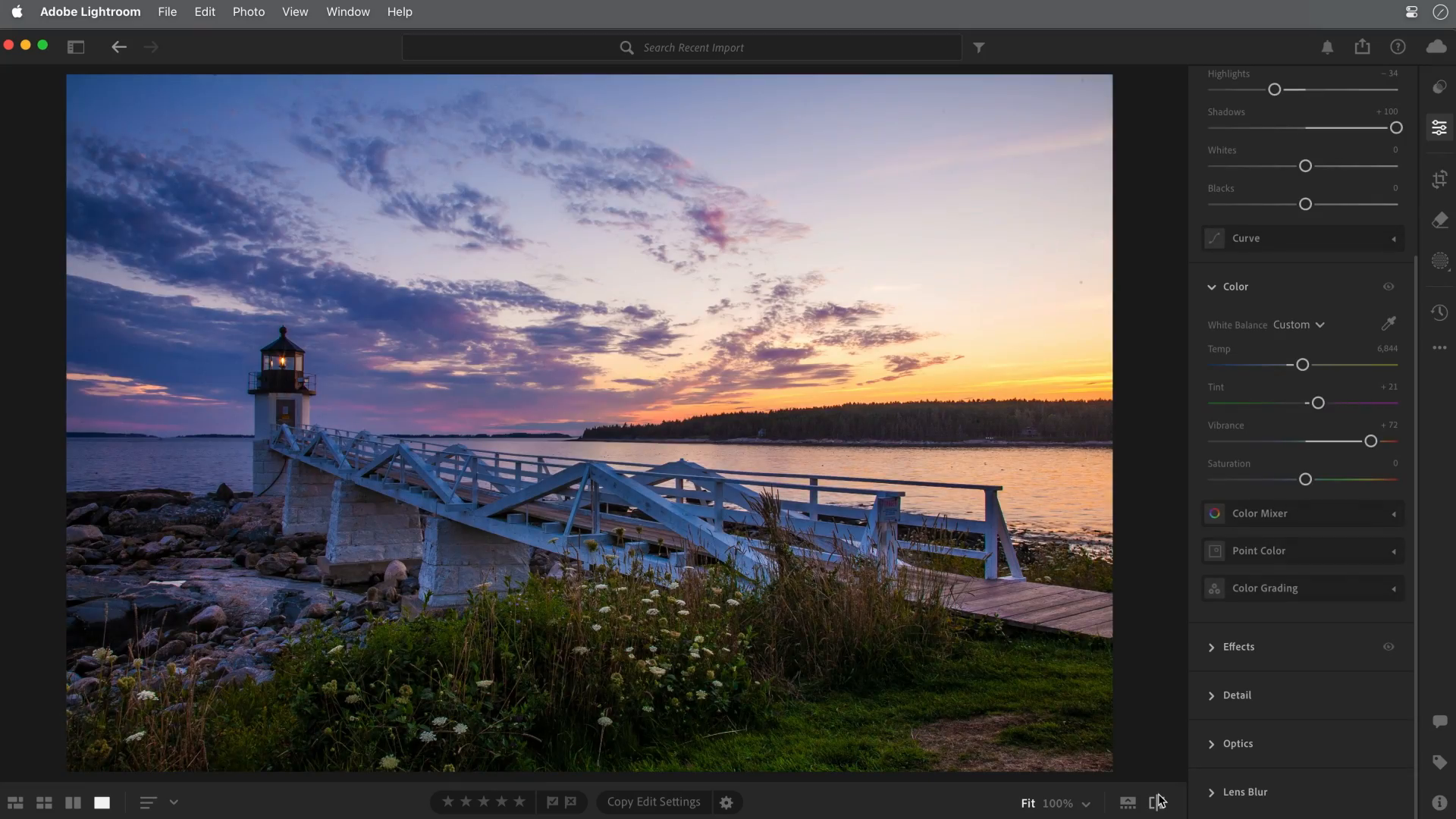
Later adjusted frame: brightness, contrast and color have changed together. It illustrates an editing result, not an isolated slider test or proof of recovering clipped data. View the full-size adjusted frame.
For more editing basics, read how to edit photos for beginners.
Build a Simple Shot Checklist
Use the shot list to cover the story, not to collect a fixed number of near-duplicates. Choose the views the subject and brief need, then inspect at least one frame from each.
For most beginner sessions, capture:
- Wide establishing shot.
- Medium subject shot.
- Close detail.
- Vertical and horizontal versions.
- Clean background version.
- Environmental version with context.
- A backup frame after correcting focus or exposure.
Adapt these roles to the project. A product detail, family expression and travel establishing view serve different purposes; you do not have to deliver every listed variation.
Protect and Deliver Finished Photos
Before sharing, identify the final version and the intended recipient. An organized folder can be enough for a personal project; a client may prefer a gallery. Explain which files are included, how to download them and what uses were agreed.
Keep the full-resolution originals and final exports in independent copies, and check that you can open or restore them before clearing a card or device. A second synchronized folder can copy deletions too, so do not assume synchronization alone is a recoverable backup. Sharing settings and a delivery link are separate from file retention.
SendPhoto, the publisher of this guide, offers photo gallery delivery, optional shared passwords and download controls. Collections organize the gallery; they do not create separate private audiences. A password can be forwarded, and disabling the offered download flow does not prevent capture or recall a saved copy. Keep an independent final-file backup.
Beginner Photography Checklist
Before the shoot:
- Charge batteries and confirm space; verify independent backups before deleting files or clearing a card.
- Clean the lens.
- Choose a simple location or background.
- Decide the main subject and goal.
- Check weather and light if shooting outside.
During the shoot:
- Find flattering light first.
- Stabilize the camera.
- Set focus carefully.
- Take a test frame.
- Review sharpness and exposure.
- Capture wide, medium, and detail shots.
After the shoot:
- Back up files and check a restore or independently opened copy.
- Select the strongest images.
- Edit consistently.
- Export for the intended use.
- Deliver in an organized gallery or folder.
Related Guides
- Browse the SendPhoto photography blog
- Camera settings for beginners
- How to edit photos for beginners
- Gallery delivery for photographers
- Password-protected client galleries
FAQ
What is the most important photography tip for beginners?
For a quick first check, inspect the light on the subject, then take a test frame. Moving to a different angle or softer shadow can help, but inspect exposure, focus and background too. There is no single change that fixes every photograph.
Do beginners need manual mode?
No. Use the controls that let you make the next useful decision: an automatic mode can handle exposure while you work on viewpoint, and aperture or shutter priority can help when depth or motion matters. Phone controls differ by model and app; manual mode is a tool rather than a quality requirement.
Why are my photos blurry?
Possible causes include camera shake, subject motion, missed focus, insufficient depth of field or a dirty lens. Check whether the whole frame or just the subject is soft, then compare a supported frame, shorter exposure or different focus placement as appropriate. Sharpening cannot reliably repair severe blur.
How many photos should I deliver to a client?
Agree the expected scope or number with the client, then deliver finished images that meet that brief. Exclude test shots and unnecessary duplicates. State any selection, download and usage instructions separately; a gallery visit or favorite is not by itself a contractual approval.