
The best Pic-Time alternative depends on what you need to replace: finished-file delivery, client selections, detailed revision approval, print sales or studio administration. Those jobs need different tools. Start with the missing step in your current handoff, then compare the plan that actually supplies it.
This guide compares seven platforms using current official plan information, rather than reporting a seven-vendor performance test. SendPhoto publishes this guide and is one of the options. The screenshot is an existing genuine SendPhoto gallery; the other vendors are assessed from their documentation.
Table of Contents
- 1. SendPhoto
- 2. Pixieset
- 3. ShootProof
- 4. CloudSpot
- 5. Zenfolio
- 6. PASS Gallery
- 7. Picflow
- PicTime Alternatives: 7-Service Comparison
- Make the Handoff Decision With a Test Gallery
1. SendPhoto
Choose SendPhoto when the missing piece is finished-file delivery. It provides client gallery links, collections and favorites, optional shared passwords, image watermarks and download controls. Visitors can view a shared gallery without creating a SendPhoto account; a password, when configured, is still required. Collections organize a gallery, rather than creating separate recipient permissions.
The SendPhoto plans start with Free: 5GB storage, one gallery and 10GB lifetime upload credits. Starter costs US$3 per month for 20GB, or US$30 per year. Paid tiers reach 1TB. Delivery controls and custom domain setup are available on Free; paid plans remove SendPhoto branding from the public home page and gallery invitation emails.
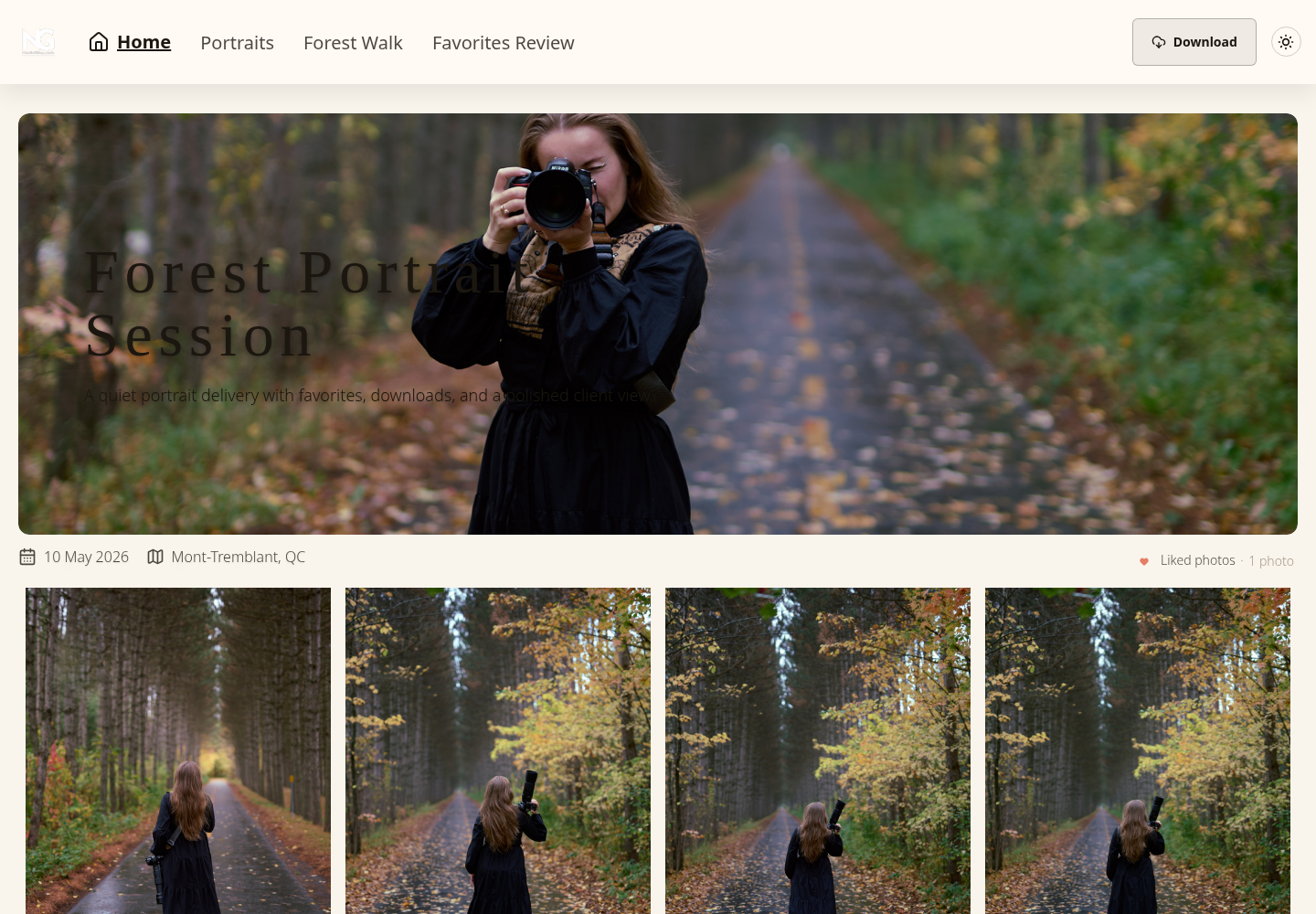
A shared password can be forwarded, and disabling downloads does not stop screenshots or copies already saved. Expiry closes gallery sharing; it is separate from deleting files. For images, an unwatermarked Original download uses the uploaded source, while watermarked and scaled downloads use generated images. Keep master files separately and choose the intended download settings.
Where SendPhoto fits best
A portrait photographer delivering finished JPEGs may need a clear collection structure and a simple download link more than a shop. A commercial photographer collecting marked-up revisions may need a different proofing tool. SendPhoto does not supply a native print store, contracts, invoices or booking CRM.
- Delivery: arrange the agreed deliverables into collections and explain which files the client should download.
- Selections: use favorites for a shortlist, then agree separately what selection or sign-off means.
- Access: decide whether the link should require a password and set a realistic sharing deadline.
Start with the SendPhoto comparison with Pixieset if choosing between focused delivery and a wider gallery ecosystem.
2. Pixieset
Shortlist Pixieset for client galleries connected to print sales. Its Client Gallery pricing lists Free with 3GB and a 15% store commission. Basic provides 10GB for US$10 per month on monthly billing, or US$8 per month billed annually, with commission-free store sales. Payment processing, print production and shipping costs are separate considerations.
Basic includes 30 minutes of HD video. RAW uploads appear on Pro, which is US$30 monthly with 1TB; do not assume the cheaper gallery tier supports the same files. Website and Studio Manager are separate products, also offered in suites. A Client Gallery subscription alone should not be budgeted as the entire studio stack.
The workflow trade-off
Compare a gallery subscription with a gallery subscription first, then add website or business tools only if needed. A store introduces decisions about products, lab fulfillment, margins, tax and customer support. Those can be useful capabilities, but their configuration belongs in the switch-over plan.
Before replacing an established shop, list which products clients actually buy and how unfinished orders will be fulfilled. Keep an independent record of orders and selection decisions. The Pixieset alternative guide covers that broader decision; this shortlist focuses on replacing a Pic-Time handoff.
3. ShootProof
Consider ShootProof when galleries, selling and client business records belong together. Its current plans page uses GB-based capacity. Free includes 3GB of photo storage and unlimited galleries. Starter is US$9.99 per month on monthly billing with 20GB for photos and video.
ShootProof advertises commission-free sales on every listed plan, including Free. That refers to platform commission, not zero payment-processing or fulfillment costs. Its paid offering combines galleries with contracts, invoicing and selling tools; check the chosen tier and any add-on charges before treating it as a complete replacement for other subscriptions.
Who should choose it
This may fit a photographer who wants to follow a client from the contract and invoice through gallery delivery and a print order. Someone who already has a reliable CRM should instead ask whether the gallery and store justify another subscription.
Compare actual storage requirements, video allowance, order handling and the tools you would retire. A vendor's approximate number of photos is an estimate based on file sizes, not a second hard limit unless its terms say so. Do not carry old photo-count plan labels into a current purchase decision.
4. CloudSpot
Compare CloudSpot for gallery delivery and, on suitable plans, studio administration. The current pricing table lists Free with 5GB, up to three galleries, JPEG-only files, a 2048px download limit and a 15% store commission. A free preview gallery therefore does not establish that full-resolution client delivery meets your needs.
Lite provides 100GB and unlimited galleries. The site's broader file-type list names JPEG, GIF, TIFF, PNG, PSD and PDF; it does not establish RAW or native video upload support. Adding YouTube or Vimeo links is different from storing video deliverables. Invoicing and online payments are listed as US-only.
Paid pricing currently includes introductory promotions. Confirm the selected billing term, renewal amount and included suite in checkout; this guide does not treat the US$3 introductory offer as a recurring plan price.
A capacity check before switching
Measure the library you intend to keep online rather than comparing a vendor's largest headline allowance. Include the current year's deliverables, older galleries promised to clients and any additional working files. Keep your independent archive outside the migration estimate.
Check whether the plan's file and download restrictions match the handoff: a JPEG presentation, a full-resolution download and a linked video are three different requirements. For the wider comparison, see Pixieset versus CloudSpot. A plan that fits today's upload still needs enough capacity for the promised retention period.
5. Zenfolio
Shortlist Zenfolio if the replacement must include a website and galleries. The US view of its plans and pricing lists Basic at US$9 per month with 15GB, Professional at US$23 with 150GB, and Advanced at US$40. These are monthly-billing rates, rather than the discounted figures shown alongside them.
Its storage table names JPEG, PNG, GIF and HEIC photos plus MP4 and MOV video. That list does not establish RAW delivery. Booking and scheduling are shown as a US$10-per-month add-on for Basic and Professional, included with Advanced. Choose the website, selling and business features you need before comparing its total cost with a gallery-only service.
The cost of a broad platform
Request the current selling-fee schedule for your plan, region, payment route and fulfillment method. Do not calculate a print margin from the subscription alone. Include lab costs, shipping, payment fees, discounts and any separate selling charge in the amount retained from an order.
A sports or school business should also evaluate its registration, product and high-volume requirements. A photographer delivering a few finished collections can make a simpler comparison. Scope the move to the parts of the business you actually intend to replace; website URLs and open sales orders require their own migration decisions.
6. PASS Gallery
Evaluate PASS Gallery when delivery is tied to selling prints. Its pricing page currently lists Basic with 20GB at a regular US$8 per month after an introductory US$1 first month. Standard has 100GB at a regular US$24 monthly after that introductory month. Annual subscriptions have different totals.
The page lists a 15% commission for the entry selling model and a 3% fee on orders where PASS processes payment in its higher-plan explanation. Check how the published fees apply to your chosen plan and payment route, rather than describing every sale as commission-free. Payment handling, lab fulfillment and your product margins need a separate calculation.
Commerce changes the comparison
A store is valuable when it supports a deliberate sales process: suitable products, understandable prices, a clear order deadline and someone responsible for questions. Education or sales assistance should be evaluated against your actual needs, rather than assumed to guarantee revenue.
Before moving, make a sample order-cost calculation with the vendor's current quote. Record who collects payment, who fulfills the order and who handles a return or remake. If clients already pay elsewhere and only need their finished files, compare delivery tools on that narrower job.
7. Picflow
Consider Picflow when revisions and approval status are the main problem. Its online proofing documentation describes comments, annotations, favorites and approval statuses attached to assets. Reviewers can participate through a link without creating an account. Verify the selected plan's permissions and media limits for the workflow you need.
The pricing comparison lists Free with 2GB and one creator seat, Plus with 100GB and one seat, and Pro with 1TB and two seats. Guest reviewers do not need creator licenses. Check the live paid price and any storage or seat add-ons; no unverified paid amount is included here.
Proofing versus commerce
Annotations answer “what should change here?” An approval status answers “which version is accepted?” A favorite answers “which image do I prefer?” They serve different purposes. Agree with the client which action represents a revision request or final sign-off.
For a commercial shoot, make the version and filename unambiguous before asking for feedback. If you also need a print shop or a CRM, assess that requirement separately rather than assuming proofing supplies it. See the SendPhoto comparison with Picflow for the delivery-versus-detailed-review decision. This guide does not report a measured upload-speed comparison or an independent trial of all seven vendors.
PicTime Alternatives: 7-Service Comparison
Plan facts checked October 5, 2026. These are example entry plans, not equivalent bundles or a cheapest-to-best ranking. Paid amounts below use monthly billing in US dollars; they exclude introductory reductions, taxes and separate charges. Free-plan limits are shown where useful. Confirm your region and checkout terms before purchase.
| Platform | Example plan | Monthly subscription | Storage and limits | Reason to shortlist | Check before switching |
|---|---|---|---|---|---|
| SendPhoto | Starter | US$3 | 20GB; Free has 5GB, one gallery and 10GB lifetime upload credits | Finished-file gallery delivery | Download quality, password and sharing deadline; no native store or CRM |
| Pixieset | Client Gallery Basic | US$10 | 10GB; 30 minutes HD video | Gallery plus print sales | Separate website/CRM cost; RAW requires a higher tier; sales costs beyond commission |
| ShootProof | Starter | US$9.99 | 20GB photo/video; Free is 3GB photo storage | Galleries with selling and paid business tools | GB capacity, exact suite/add-ons; commission-free does not remove processor or lab costs |
| CloudSpot | Free | US$0 | 5GB; three galleries; JPEG only; 2048px downloads | Limited gallery introduction before choosing a paid tier | 15% store commission; full-resolution/file support and paid renewal quote |
| Zenfolio | Basic | US$9 | 15GB photo/video | Website with client galleries | Selling fees, formats and US$10 booking add-on if required |
| PASS Gallery | Basic | US$8 regular rate | 20GB | Gallery-based print commerce | Introductory versus recurring cost, commission and payment-route fees |
| Picflow | Free | Free; verify paid quote | 2GB; one creator seat; guest reviewers unlicensed | Asset feedback and approval workflow | Required review controls, media allowance, creator seats and storage |
Follow the official plan links in each section for current terms. Compare the capacity and workflow you would actually purchase, not one provider's free tier against another's full suite. For selling, model a representative order after all fees and fulfillment costs. For delivery, include archive, migration and administration time in your decision.
Make the Handoff Decision With a Test Gallery
First identify what is wrong with the current Pic-Time workflow. If the issue is capacity, compare an appropriate current Pic-Time plan before moving. If it is missing revision feedback, print-order handling or business records, choose a candidate that addresses that specific job.
The following is a proposed reader evaluation, not a claim that we completed seven vendor trials. Use photographs you own or have permission to use, a controlled test recipient address and a draft gallery. Keep real client invitations, automated campaigns and real payments out of the exercise. Use a vendor's supported payment sandbox for any order exercise; otherwise mark payment handling as untested.
Start with a small representative set: portrait and landscape JPEGs, a large final image, and a RAW or video file only if that exact plan supports it. Record the actual output rather than relying on a homepage screenshot or an upload button. Opening a file, previewing it and downloading the required deliverable are separate checks.
- Access: record whether a visitor account, password or other entry step is required.
- Review: note whether the client can select, annotate or approve, and what the action means.
- Delivery: record available formats, filenames and download quality.
- Sales: if needed, document the product, payment route, fees and fulfillment owner.
Example record: “Draft gallery A; JPEGs only; password required; full-resolution download needed; print checkout not evaluated.” This is a fictional starting point, not a performance result. Leave unknown items visible before committing to a migration.
Migration checklist
- Inventory the existing work. List galleries, names, folders, captions, selection records, open orders and promised retention dates. Keep source files and business records independently.
- Separate file requirements. Count storage for photos, RAW files and videos; confirm supported formats and any per-file, video or download limits on the destination plan.
- Map permissions and client roles. Record who should view, select, download or purchase. Decide which jobs need separate galleries rather than relying on collection names as permissions.
- Upload a representative draft. Use authorized sample files and confirm that filenames and the intended collection structure survive. Do not assume favorites or historical approval records transfer automatically.
- Recreate necessary branding. Set the destination's supported logo, colors and domain. Plan domain and old-link changes separately; verify what branding the chosen tier removes.
- Review visitor access on intended devices. Use a controlled recipient and, where necessary, a signed-out view to distinguish the client's experience from the owner's session.
- Check the actual deliverable. Confirm permitted downloads, quality, filename and whether a watermark or conversion changes the supplied file. Keep masters outside the gallery.
- Agree the selection or approval step. Preserve relevant client decisions and document whether a favorite, comment or status counts as final sign-off.
- Prepare the handoff message. State the new link, entry instructions, download deadline and contact. Send only when the new workflow is ready; avoid duplicate automated invitations.
- Retire the old service last. Finish outstanding orders, retain required records and resolve old links before canceling or deleting anything. Link expiry does not recall a client's saved copies.
For access planning, use the secure file-sharing guide and password-protected gallery guide. A shared password controls entry, rather than proving who received the files.
Frequently asked questions
The plan and the client's required action matter more than a platform's broad category.
Can clients access a gallery without creating an account
SendPhoto supports shared-gallery viewing without a visitor account; an optional gallery password still applies. Picflow documents account-free reviewer participation. For any candidate, distinguish viewing from selection, purchasing and other actions: their requirements may differ. A link that opens for the gallery owner is not proof of the recipient's experience.
Should photographers choose storage-based or image-count pricing
Use the unit in the current plan. GB capacity depends on actual file sizes; a photo-count plan, where offered, limits the number of images under its terms. Current ShootProof plans in this comparison use GB. Approximate “number of photos” examples are estimates, so measure your library rather than treating them as guaranteed capacity.
Do all alternatives support RAW and video
No. Format support, preview support, video allowance and download quality can differ by plan. SendPhoto supports supported RAW formats and video delivery, but a gallery is not a substitute for master-file backup; optimized video can replace the uploaded source with a delivery MP4. Pixieset gates RAW uploads to higher tiers. CloudSpot's listed file types and linked-video feature do not establish RAW or native video storage. Confirm your camera format, clip requirements and final downloaded file before moving.
How long does migration take
There is no reliable universal duration. It depends on the library, connection, metadata, selection records, orders, domain changes and destination tools. Estimate from one representative draft and add time for manual work. Keep the old system available until promised client access and outstanding sales have been accounted for.
Which platforms support client proofing
Several offer favorites or selection tools; Picflow additionally documents annotations and approval statuses. Decide whether you need a shortlist, revisions marked on an image or version-specific approval. SendPhoto favorites support selections, rather than a contractual approval workflow. Confirm that the selected plan supports the action you will ask the client to take.
When is a commerce or studio suite more appropriate
Choose a commerce option when print products, payment handling and fulfillment are central to the job. Consider a business suite when booking, contracts and invoices also need replacing. Check region, plan and add-ons rather than assuming every gallery includes the whole suite.
For finished-file delivery, SendPhoto is a focused candidate. Review its current plan, arrange the files into collections and set the intended sharing and download controls. Choose a broader platform when the missing job is print commerce, business administration or detailed revision approval.