
A PicDrop alternative should replace the client actions you actually use. A download gallery, a retouching shortlist, on-image feedback and a print store solve different jobs. These seven options add different combinations of delivery, selling and business tools; they are not equivalent replacements for every PicDrop workflow.
Official plans and documentation were checked October 5, 2026. SendPhoto publishes this comparison and provides one of the delivery options. This is a documented comparison, not a hands-on speed test, revenue study or account migration report. Dollar prices below are US dollars; billing terms, tax, transaction costs and promotions need separate attention.
Start with the PicDrop baseline. Its Collaboration Mode documentation describes color markers, likes/voting, comments, on-image scribbles, selection exports to Lightroom/Capture One, client uploads and subfolders. Presentation Mode serves the finished-gallery handoff. Replacing these with a favorite list can leave an annotation or team-review step outside the new product.
The current PicDrop plans list Free with 1GB and three galleries. In EUR, Pro is €17.99 on monthly billing or €14.99 per month equivalent billed annually, before tax: 500GB, unlimited galleries and one hour of video conversion per month. Advanced is €47.99 monthly or €39.99 annual equivalent, with 1TB and two included users, expandable to four. The 14-day Advanced trial ends automatically; it does not automatically start a paid subscription. Compare conversion allowance, storage, seats and review tools, rather than just gallery count.
Table of Contents
- 1. SendPhoto
- 2. Pixieset
- 3. Pic-Time
- 4. ShootProof
- 5. CloudSpot
- 6. SmugMug
- 7. Pass Gallery
- Top 7 Picdrop Alternatives Comparison
- Choose the Platform That Matches the Handoff
1. SendPhoto
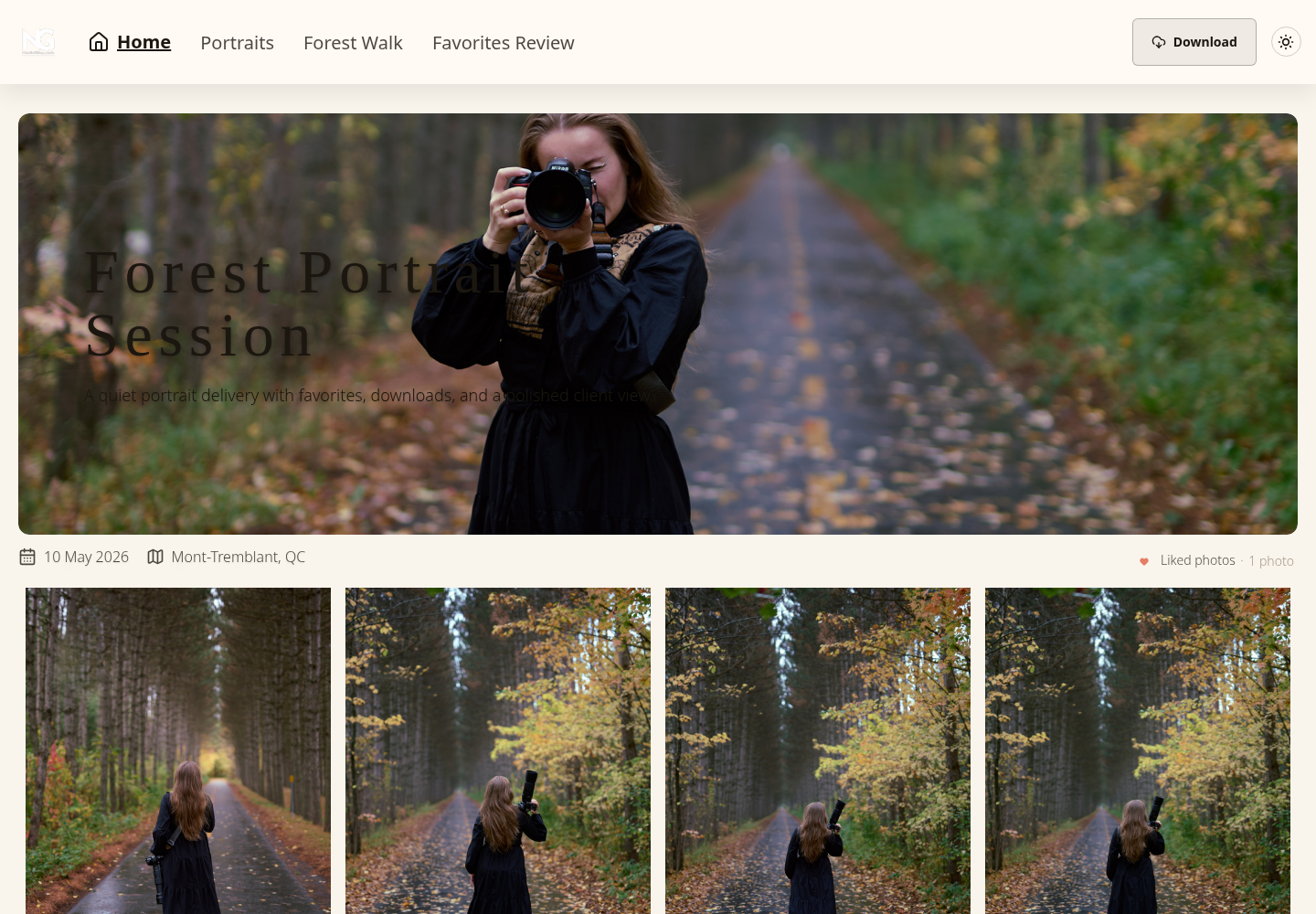
SendPhoto fits a finished-photo or video handoff that does not need a print shop or studio CRM. Shared gallery links contain collections and favorites, with optional passwords, image watermarks and download settings. Visitors can view a shared gallery without creating an account; a configured password is still required. Favorites identify selections for you to review, rather than constituting formal approval.
Security and review controls
A shared password can be forwarded. Disabling downloads does not prevent screenshots or revoke copies already saved. Collections organize files inside a gallery; they do not create distinct recipient permissions. Set the intended access and download options separately, as explained in our secure file-sharing guide.
Gallery expiry closes sharing; it does not automatically delete stored files. For images, an unwatermarked Original download uses the uploaded source, while scaled or watermarked downloads use generated images. RAW compatibility depends on the supported camera format. Processed video can be an optimized MP4, so keep video masters and independent backups rather than assuming every download preserves the source upload.
Pricing and fit
The SendPhoto storage tiers start with Free: 5GB, one gallery and 10GB lifetime upload credits. Storage and upload credits are different limits. Paid monthly tiers are Starter 20GB/US$3, Basic 50GB/US$6, Standard 200GB/US$10, Plus 400GB/US$18 and Pro 1TB/US$32. Starter is also US$30 per year; use the published annual totals when choosing annual billing.
Delivery controls and custom domain setup are available on Free. Paid plans remove SendPhoto branding from the public home page and gallery invitation emails. A custom domain, image watermark and branding removal are separate settings. This product does not replace contracts, invoicing, booking or native print commerce.
Advantages for this job
- Focused photo/video gallery delivery with collections.
- Favorites provide a shortlist for a separate editing decision.
- Optional passwords and download controls let you define the handoff.
- A free entry plan includes the core delivery controls.
- Storage tiers give a stated capacity and subscription cost.
Limits to account for
- No native print store, contracts, invoices or booking CRM.
- Favorites do not replace on-image markup, team voting or contractual sign-off.
- Free has one gallery and a lifetime upload-credit limit; expiry is not automatic cleanup.
2. Pixieset
Pixieset suits gallery delivery, favorite-based proofing and integrated print/download selling. Client Gallery pricing lists Free with 3GB and unlimited galleries, plus a store with 15% commission. Basic is US$10 monthly or US$8 per month equivalent billed annually: 10GB of photos, 30 minutes of HD video, custom branding/domain and full-resolution downloads. Paid gallery subscriptions remove the platform store commission; payment and fulfillment costs still apply.
Pixieset proofing uses favorites lists, selected-photo notes and exported filenames. You can create preset favorite lists with a maximum selection; that is a different constraint from PicDrop color markers, voting and on-image scribbles. Buying Client Gallery does not buy the paid Website and Studio Manager products; Pixieset Suite bundles those products.
Advantages for this job
- Unlimited galleries on Free, subject to its storage limit.
- Favorites, notes and filename exports support an editing shortlist.
- Integrated store and paid branding/domain options.
Limits to account for
- Free store commission and paid Original-size delivery affect cost.
- Website and business-management subscriptions need their own scope or Suite budget.
- Favorite-based proofing is not equivalent to every PicDrop annotation or multi-person workflow.
For another gallery-focused comparison, see Pixieset versus CloudSpot.
3. Pic-Time
Pic-Time is worth comparing when selections lead into print sales or sales automations. Its Client Delivery Suite plans include Free, Beginner, Professional and Advanced. Beginner is US$8 monthly or US$7 per month equivalent annually, with 20GB photo storage and 5GB video. Professional is US$25 monthly or US$21 annual equivalent, with 100GB photos and 30GB video. These are different capacities and billing terms, not promises of equal workflow value.
Sales and workflow depth
Pic-Time 2.0 Selection Requests on Professional and Advanced can specify a count or range, deadline, participants and comments. Compare that request with the exact PicDrop review tools you need, rather than assuming the presence of favorites proves the same approval process.
The commission schedule lists 15% for Free/Beginner, 8% for Professional and 6% for Advanced when Pic-Time collects payment; the commission is calculated on markup. Professional and Advanced can self-collect without that commission, with a recurring-backup-subscription exception for PayPal collections. Payment processing and lab costs remain distinct. The correct payment route can change the comparison more than the headline subscription.
Advantages for this job
- Galleries combine client delivery with a print store.
- Structured Selection Requests are available on the specified higher tiers.
- Sales automations can support a planned selling process.
- Included video capacity is stated in GB by plan.
Limits to account for
- Selection tools and design features vary by tier.
- Commission depends on plan, markup and payment collection.
- A sales platform does not prove more revenue or replace a separately needed studio CRM.
For the wider provider comparison, see Pic-Time alternatives.
4. ShootProof
ShootProof fits a business that wants galleries, selling, contracts and invoices together. Its current plans are GB-based: Free has 3GB of photo storage and unlimited galleries; Starter is US$9.99 monthly or US$8.33 per month equivalent annually, with 20GB for photos and video. Old photo-count plan descriptions are not the current storage limits.
ShootProof lists commission-free sales across its plans, including Free. That means platform commission, not zero payment-processing or fulfillment costs. Contracts, invoices and gallery/slideshow video belong to the paid offering; verify the selected tier and optional fees. The current top tier is Premium, with unlimited photo storage and a separate 150GB video allowance, rather than unlimited storage for every media type.
Advantages for this job
- Client galleries and print/download selling in one offering.
- Paid tools include contracts and invoices.
- Platform commission-free sales include Free.
- Published photo/video capacity helps budget the retained library.
Limits to account for
- Free is a photo-only entry tier and does not buy the full paid toolset.
- Booking and archiving can carry optional fees; Premium includes photo archiving, while video archiving is separately priced.
- A photo-count estimate depends on file size; use the GB limits.
5. CloudSpot
CloudSpot suits a favorite-based review followed by photo delivery, with business tools available in its broader suite. The pricing matrix lists Free with 5GB and up to three galleries; Entry has 15GB and up to 15; Lite has 100GB and unlimited galleries. Free and Entry are JPEG-only. The broader file list names JPEG, GIF, TIFF, PNG, PSD and PDF; it does not establish RAW or native-video upload support.
The Free plan documentation limits downloads to 2048px on the long edge and lists 15% store commission. Lite and higher are listed as platform commission-free. The regular Entry and Lite monthly amounts shown on the site are US$7 and US$17, separate from the current US$3 first-three-months promotion. Confirm renewal price, billing term and gallery-only versus full-suite scope. The pricing page lists invoicing and online payments as US-only.
A controlled review-to-delivery workflow
CloudSpot's documented proofing workflow keeps downloads disabled while the client picks favorites, then adds final images in another folder and enables the intended downloads. Selected filenames can be copied to Lightroom if they match. Favorites provide a shortlist and an Alert Photographer action, rather than PicDrop-style on-image annotation or a legal approval record.
Review and delivery settings remain separate: decide whether proofs stay visible, which folders can be downloaded and whether watermarks apply to display images or downloads. Embedding a YouTube or Vimeo link is not the same as hosting the video file for client download. Do not plan a RAW/video-heavy migration from the phrase “all file types.”
Advantages for this job
- Free offers a limited gallery starting point.
- Documented favorites-to-final-files workflow.
- Lite has 100GB and unlimited galleries, plus wider listed file types.
- Gallery selling and separately scoped studio tools can serve a broader business.
Limits to account for
- Free is JPEG-only with 2048px downloads and 15% store commission.
- RAW/native-video delivery is not established by the listed formats or video embeds.
- Promotional pricing, suite scope and US-only invoicing/payment availability require attention.
6. SmugMug
SmugMug fits a retained photo library with delivery and optional portfolio/selling tools. The current plans advertise unlimited full-resolution JPEG storage. Direct is US$20 per month equivalent billed annually, Portfolio US$23.50 and Pro US$37. These are annual-billing equivalents, not month-to-month prices. Portfolio adds print and digital selling; Pro adds client favoriting and download-limit tools.
RAW storage is a separate Source subscription: US$10 per month for up to 1TB, then US$6 for each additional TB. The Source documentation explicitly says visitors do not receive RAW files in gallery downloads. An owner RAW archive is therefore not a replacement for PicDrop client RAW delivery. RAW files are not sold through its store.
The video guide limits each video to 20 minutes and 3GB, stored at up to 1080p, and says the uploaded original is not retained. Keep masters elsewhere. An unlimited photo allowance does not remove video conversion limits or guarantee permanent retention after cancellation.
Advantages for this job
- Unlimited JPEG capacity for a retained photo library.
- Delivery, portfolio and commerce options are separated by tier.
- Source adds owner RAW storage where that is the required job.
Limits to account for
- RAW storage costs extra and visitors cannot download those RAWs.
- Pro is the tier advertised for client favoriting and download limits.
- Video length, file size and stored resolution have specific limits.
See the SmugMug pricing analysis for a separate cost breakdown.
7. Pass Gallery
PASS Gallery fits a gallery handoff tied to print commerce. Its current pricing cards list Basic with 20GB at US$8 monthly after a US$1 first month; Standard has 100GB at US$24 monthly after that introductory month. Annual renewal totals are US$72 and US$240 respectively, with the introductory month described separately. Introductory prices are not recurring subscription amounts.
The entry selling model lists 15% commission. Standard explicitly lists 3% commission fees; the higher-plan explanation says a 3% fee applies when PASS handles payment. It is incorrect to call every Standard-and-above sale commission-free. Confirm the chosen plan/payment route, lab fulfillment, processing costs and margin before comparing order economics.
Standard lists a custom domain, templates, campaigns, a custom watermark, album proofing and requested favorites. Those tools can support delivery and selling, but do not establish equivalent scribbles, RAW delivery or native-video capacity. Confirm any required media format and video add-on eligibility directly before moving those files.
Advantages for this job
- Gallery delivery and integrated print selling.
- Standard lists album proofing and requested favorites.
- Higher plans add selling tools and client support services.
Limits to account for
- Standard has the stated 3% payment/commission fee; fee scope needs confirmation.
- Basic/Standard storage and renewal prices differ from the introductory offer.
- Sales assistance and profit calculators do not prove your revenue or migration effort.
Top 7 Picdrop Alternatives Comparison
Use the table to narrow a workflow, then confirm the particular plan. Storage, video conversion, review tools and selling fees are different units; a larger capacity does not make a product a complete PicDrop replacement.
| Platform | Best-fit handoff | Entry / example plan | Review method | Selling / cost distinction | PicDrop gap to check |
|---|---|---|---|---|---|
| SendPhoto | Finished photo/video delivery | Free: 5GB, 1 gallery, 10GB lifetime upload credits; Starter 20GB/US$3 monthly | Favorites; agree sign-off separately | No native print store or CRM | On-image annotations and voting are not replaced by favorites |
| Pixieset | Galleries, shortlists and a store | Free: 3GB, unlimited galleries; Basic 10GB/US$10 monthly | Favorites, notes, preset maximum selection | Free 15% store fee; paid platform commission-free | Original downloads/branding and wider business products need paid scope |
| Pic-Time | Selections and gallery sales | Beginner: 20GB photos + 5GB video/US$8 monthly | Selection Requests on Professional/Advanced | Collection-route and tier-dependent commission | Price the required selection tool and payment route |
| ShootProof | Delivery plus client business records | Free: 3GB photos; Starter 20GB/US$9.99 monthly | Gallery proofing; confirm required review tools | Platform commission-free; paid contracts/invoices | Use GB-based capacity, media allowance and optional fees |
| CloudSpot | Photo selections to final downloads | Free: 5GB, 3 galleries; Lite 100GB/unlimited galleries | Favorites and selected filenames | Free/Entry 15%; Lite+ platform commission-free | Free 2048px downloads; RAW/native video not established |
| SmugMug | Retained JPEG library and delivery | Direct US$20/month equivalent annually; unlimited JPEG storage | Client favoriting advertised on Pro | Portfolio/Pro selling; RAW Source is extra | Visitor RAW downloads unavailable; video limits apply |
| PASS Gallery | Gallery delivery and print orders | Basic 20GB/US$8 regular monthly; Standard 100GB/US$24 | Standard album proofing/requested favorites | Standard 3% fee; confirm collection route | Required media and annotation workflow need confirmation |
Choose the Platform That Matches the Handoff
Choose from the missing step in your current PicDrop workflow. Keep PicDrop on the shortlist if its color markers, voting, scribbles, client uploads or RAW handoff are essential and the proposed replacement does not cover them. Moving to a favorite-based gallery may change the process rather than improve it.
- Finished downloads: consider SendPhoto when you already handle sales and administration elsewhere.
- Gallery shortlists and selling: compare Pixieset's store and favorite tools against the required paid delivery settings.
- Structured selections or gallery campaigns: scope Pic-Time's exact higher-tier review and payment options.
- Contracts and invoices alongside galleries: compare the paid ShootProof offering with the subscriptions it would replace.
- Photo favorites followed by finals: compare CloudSpot's folder/download process and its format and regional restrictions.
- A retained JPEG library: compare SmugMug, keeping client RAW delivery and video masters separate.
- Print-oriented delivery: compare PASS's actual subscription and payment fees, not predicted print profits.
A proposed permission-first migration: use this sequence for your own authorized evaluation. No upload, download, order or migration test is reported in this comparison.
- Inventory the source. Record galleries/subfolders, file formats and sizes, videos, comments, markers, favorites, client-uploaded references, old URLs, orders and client access commitments. Keep source files and an independent backup.
- Assign a destination to each item. Decide what the new service stores and what remains in a separate editing, CRM, commerce or approval record. A photo copy does not transfer all review history.
- Confirm transfer scope. Ask for a written method and quote. Pic-Time's published paid migration service applies to Pixieset galleries, not a promised PicDrop migration. It excludes videos and favorites. Do not assume any provider preserves old links or access codes.
- Recreate the permissions and presentation. Set branding, passwords, visible media, watermarks, expiry and download formats. Do not make proofs downloadable merely because the destination gallery is published.
- Evaluate one representative gallery. With files and recipients you are authorized to use, check the review action, intended visitor access and required download types before moving the rest. Record missing steps; a documented feature list is not your own passed test.
- Plan the cutover. Change your published links and notify affected clients only after the required handoff is confirmed. Preserve historical orders and review decisions, and keep the old account until access commitments are accounted for.
- Set a retention and exit policy. Separate the sharing deadline from storage deletion. Use the chosen provider's actual cancellation/retention terms and your backup policy; never assume expiry performs automatic cleanup.
If the job is a focused delivery gallery, SendPhoto is one option. Check its current capacity and upload-credit terms, then choose collections, access and downloads for the agreed deliverables. If PicDrop's detailed feedback tools are the essential part, choose a replacement only after those client actions have a confirmed destination.