
Private photo delivery starts with three decisions: which photographs the recipient should receive, what they may do with them, and what information travels inside the files. A gallery password cannot fix an accidentally included private frame or remove an address visible in the photograph. Prepare the delivery set first, then choose a service and settings that fit the assignment.
This guide focuses on private photo exports, platform-selection questions and the boundary between delivery and backup. For the detailed password, expiry and closeout workflow, see secure file sharing for photographers. Neither a polished gallery nor a security label is evidence of end-to-end encryption or a guarantee that an authorized viewer cannot copy an image.
Table of Contents
- What Secure Photo Sharing Means for Photographers
- Common Risks of Unsecured Photo Delivery
- Essential Security Controls Every Photographer Needs
- Your Secure Client Gallery Delivery Checklist
- How to Choose a Secure Photo Sharing Platform
- Beyond Delivery Security and Long-Term Archiving
What Secure Photo Sharing Means for Photographers
Secure sharing means choosing a suitable handoff for the actual material and recipient. A family gallery, confidential campaign and private portrait session can have different requirements. Write down the intended viewers, delivery stage, permitted uses, access window and any client-mandated transfer method before choosing a gallery.
Access controls can reduce unwanted access through the service. They cannot ensure that every person who receives the link follows the agreement. If an authorized viewer saves a photograph, closing the gallery later does not recall that copy. For highly sensitive work, use the client's approved system when the gallery cannot meet their requirements.
Professional service includes controlled delivery
Explain what is being delivered, how to access it and what use has been agreed. Keep permission to photograph, permission to deliver to a particular audience and permission to publish as separate decisions. A client opening a private gallery does not give the photographer permission to post that session publicly.
Choose controls in proportion to the assignment. Do not treat one highly sensitive session's requirements as a universal rule for all client work, or assume a storage-folder service lacks controls just because it is not a dedicated photo gallery. Check what the selected service and plan actually support.
Security is part of reputation
Clear promises are more useful than saying a link is “completely secure.” Tell the client the audience, available actions and access deadline, and explain any limitation relevant to the job. Do not promise identity verification, copy prevention or immediate permanent deletion unless there is evidence for that specific behavior.
Keep a record of the agreed set and uses so a later correction or re-access request refers to the right files. That record also separates the client's preferences from the studio's confirmed delivery decision.
Common Risks of Unsecured Photo Delivery
Think in concrete failure scenarios rather than assuming every gallery causes the same risk. A forwarded password, an extra private frame, location metadata or a misunderstood download option calls for a different response.
Unauthorized access
A recipient can forward a gallery link and its password. Someone using a shared computer may leave the gallery open for the next person. A personal invitation link is not, by itself, proof that the named recipient is the human viewing it.
Set the audience before upload and communicate it. If an agency reviewer should receive only selected headshots, send that set rather than a gallery containing the whole shoot. In SendPhoto, collections organize files inside a gallery; they do not give each collection its own recipient access boundary. Use separately configured galleries when audiences need different access.
Content misuse and image theft
A download button is not a license. A recipient may wrongly assume that every visible file is a purchased final or that saving it permits advertising or public posting. Label proofs and final deliverables clearly, and record the agreed uses separately.
Three situations deserve particular attention:
- Proofs become deliverables: A preview or favorite is mistaken for a confirmed final. In SendPhoto, favorites record preferences, not contractual approval, an order or payment.
- Team access spreads: A shared link reaches people outside the agreed reviewer group. Consider whether individual authentication is required rather than relying on a request not to forward.
- Private sessions need deliberate handling: Family, school, newborn and boudoir assignments can have different audience and publication requirements. Confirm the requirements for the specific job instead of inferring permission from a shared gallery.
Watermarks can identify proofs and discourage casual reuse, but they can be cropped or altered. Disabling gallery downloads does not prevent every capture of an image already visible on screen.
Metadata exposure
Photographs may contain GPS coordinates, capture times, captions, keywords and contact information. The presence and sensitivity of those fields depend on the file and export settings. Check the delivery copies rather than assuming every photograph contains a location or that the gallery removes it automatically.
Adobe's Lightroom Classic export documentation provides a concrete JPEG-export example: choose the Metadata options appropriate to the job. Copyright Only retains IPTC copyright information; Copyright & Contact Info Only also includes contact details. Remove Location Info removes GPS metadata from supported exports. These options are not available for DNG files, so do not apply the JPEG instructions to a RAW/DNG handoff unchanged.
For a hypothetical home portrait delivery, keep masters unchanged and export separate JPEG copies. Decide whether the recipient needs contact information; review the exported files for unwanted location, names and descriptive text. Also inspect filenames and the visible scene for an address, school badge or other identifying detail. Removing GPS does not anonymize the photograph or establish that every sensitive field has been removed. Keep any agreed copyright and licensing information rather than deleting all metadata indiscriminately.
Reputation damage and lost revenue
These are possible consequences to plan for, not measured incident rates or a promise that access settings eliminate them:
| Risk area | What it can look like in practice |
|---|---|
| Trust erosion | A client receives or sees photographs outside the agreed private audience |
| Licensing confusion | A proof or download is mistaken for permission to publish |
| Brand dilution | A preview is reposted with an unwanted crop or edit |
| Admin drag | Time is spent clarifying the set, requesting removal or resolving access confusion |
Preparation and clear agreements address some of these causes. Technical controls support that workflow within their documented limits.
Essential Security Controls Every Photographer Needs
Separate three questions: what the photographer account supports, what gallery visitors must do, and what the exported files contain. A feature for one layer does not prove a feature exists at another.
Start with access control
Use a unique, long gallery password within the permitted length, and send it through a separately agreed channel. A forwarded URL alone then may be insufficient, but the recipient can still forward both access details. SendPhoto's current sharing form permits up to 20 characters; an accepted minimum is not a password-strength target.
Expiry limits future gallery access once the configured expiry takes effect. SendPhoto's expiry process disables sharing; it does not demonstrate storage deletion, copy recall or revocation at an exact second. Agree the deadline and time zone before delivery.
Keep these four control jobs distinct:
- Unique gallery passwords: Do not reuse one short studio-wide credential for every client.
- Time-limited access: Match the access window to the review or delivery agreement; handle any deletion commitment separately.
- Restricted downloads: Choose the gallery's offered download action and export quality for the stage. Visible images can still be captured.
- Account protection: Protect the studio's email and storage accounts with unique credentials and two-step verification where the service supports it. Account protection is separate from visitor access to a gallery.
The NCSC's two-step verification guidance recommends protecting important accounts and checking the provider's supported options. This is general account advice, not a claim that SendPhoto gallery visitors receive MFA or that every SendPhoto account has a particular 2FA setting. See password-protecting files and galleries for the gallery control's scope.
Treat encryption like a locked case
Ask who can read the files and under which conditions. Encryption in transit concerns the connection; encryption at rest concerns stored data. Client-side encryption concerns where encryption happens. A claim of end-to-end or zero-knowledge protection needs evidence about keys, recipients, recovery and implementation, not just the presence of a password field.
The 2020 NIST file-exchange bulletin notes that cloud file-sharing providers may be able to access stored files and that their trustworthiness matters. A provider's ability to read content makes that provider part of the trust decision. This does not establish SendPhoto as end-to-end encrypted, zero-knowledge or certified to a particular security standard.
For confidential material, ask for the documentation required by the client. Do not call any architecture “technically impossible to access” without considering the implementation, key handling and recipient devices. Even protected transfer cannot prevent an authorized recipient from disclosing content after decrypting it.
Control what clients can take
Prepare proof and final sets deliberately. A smaller preview may suit review, but pixel dimensions do not enforce print or publication rights. A clean full-size final should meet the agreed specification rather than an assumed universal export rule.
Evaluate these four file-handling jobs:
- Preview resolution: Supply a useful review export without claiming it cannot be copied or printed.
- Per-gallery permissions: Configure the gallery for the intended audience and actions; collections are not separate access groups in SendPhoto.
- Watermark options: Choose the proof/final treatment. In SendPhoto, an applicable image watermark can make an Original-quality download a watermarked derivative; collection watermark settings affect this behavior. The photo rule does not mean every video download is watermarked.
- Cleanup and retention: Ask how sharing closure, file deletion and any retained copies differ. Do not assume an expiring link automatically removes stored files.
Standards also require implementation evidence. The JPEG committee's 2015 Privacy and Security overview describes an initiative concerning image information, metadata and policies. It does not demonstrate that an ordinary JPEG export or a named gallery implements hierarchical permissions or provenance protection. Ask what the actual service supports before treating a framework as a delivered feature.
Your Secure Client Gallery Delivery Checklist
Use a repeatable preparation and handoff record. For example, a studio could record the agreed proof set, recipient group, metadata choices, download state and access deadline for a private portrait assignment. This is a proposed organizational example, not a report of a client delivery.
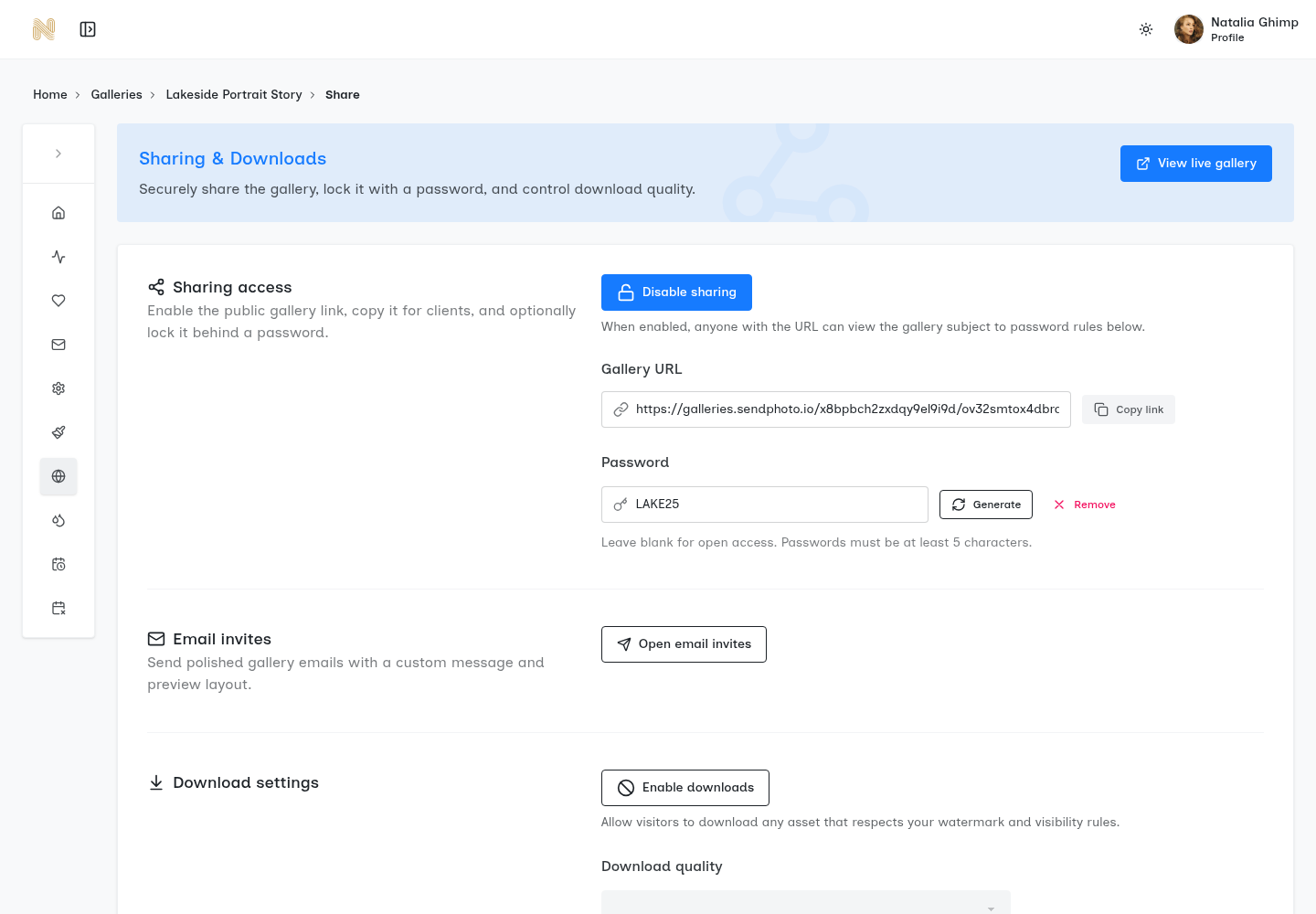
Existing genuine SendPhoto demonstration screenshot. It shows sharing, password generation/removal, invitation controls and a download switch, shown off. The short visible demonstration password is not a recommended credential; do not reuse it or its pattern. This is a settings illustration, not a gallery-delivery result or evidence of encryption, recipient identity or expiry.
Before upload
- Separate proofs from finals. Export the agreed review or final set, remove unrelated private frames and keep independent masters. A filename or folder label alone does not prevent access.
- Review unnecessary metadata. Examine separate delivery copies for location, personal text and contact information; preserve needed attribution and rights information. Review the visible photograph as well as its metadata.
- Name files clearly. Use stable, unambiguous filenames so a selected proof or correction can be matched to the confirmed final.
At the gallery setup stage
- Apply a unique password: Use a long credential within the supported limit and the separately agreed delivery channel.
- Set an expiration date: Match the communicated access window, including the time zone; do not describe this as a storage-deletion date.
- Choose downloads carefully: Configure the offered download action and quality for proofs or finals. Download availability does not grant print/publication permission.
- Add watermarks where appropriate: Match the agreement and verify the intended final-file treatment rather than assuming Original means clean.
If a viewer must not see a particular photograph, exclude it from their delivery set. A watermark or disabled download button is not a substitute for that audience decision.
Before sending the email
Give the recipient the information needed for the actual stage:
| What to include | Why it matters |
|---|---|
| Gallery link | Identifies the correct assignment and proof/final set |
| Password instructions | Names the separately agreed channel without including the credential beside the link |
| Expiration reminder | States the actual access deadline, time zone and extension procedure |
| Download rules | Explains available actions and the separately agreed uses |
| Support path | Provides a contact for a wrong file, access problem or correction |
Keep the instructions usable on the recipient's phone or computer. An owner preview can bypass an access check, so it is not evidence of a signed-out visitor's access. If both link and password are forwarded today, consider what the new viewer could see and whether that fits the assignment. Change the delivery method or audience set when the required boundary is stronger than the available controls.
How to Choose a Secure Photo Sharing Platform
Compare services against a specific job rather than a market forecast or the longest feature list. A familiar storage tool may meet one client's requirements; a gallery may make another client's review easier. Neither category guarantees privacy or suitability.
Use a triangle of trust
Assess encryption model, privacy policy and delivery controls together.
For the encryption model, ask how files are protected in transit and storage, who can decrypt them and what evidence supports any stronger claim. For the privacy policy, read the ownership, provider-use and retention terms and ask about deletion and backups. For delivery controls, distinguish confirmed gallery settings from capabilities that require another plan, individual authentication or a different service.
| Decision area | Useful evidence | Gap to resolve |
|---|---|---|
| Access control | Documented password, expiry and audience options that fit the assignment | A shared link is being treated as verified individual identity |
| File handling | Clear proof/final exports, download behavior and watermark treatment | No documented distinction between the displayed preview and delivered file |
| Privacy clarity | Readable ownership, provider-access and retention/deletion information | Broad claims without terms or implementation evidence |
Role-based access can matter for a team, but this table does not assert a SendPhoto role model. Collections are organization, not independently protected client groups. The client-delivery platform comparison can help frame further questions; verify the current requirements before committing to a service.
Questions worth asking before committing
- Who can technically access uploaded files? Ask about the provider, recipients and recovery process; avoid inferring an answer from “encrypted.”
- Can access expiry and downloads be configured for the job? Ask what happens when access closes and what saved copies remain.
- How does watermarking affect previews and downloads? Ask specifically about the final file and the chosen quality option.
- What happens after delivery? Separate gallery availability, deliberate deletion, retained provider copies and the studio's own archive.
- Can the recipient follow the required process? Assess the actual authentication and review steps without weakening the client's policy for convenience.
If an essential requirement has no supported answer, choose an approved alternative rather than filling the gap with a marketing claim.
Beyond Delivery Security and Long-Term Archiving
A gallery helps people access and review a chosen delivery set. An archive retains source material; a backup provides a way to recover it. Those jobs can use different systems and retention decisions.
Delivery and archive are different jobs
Keep organized masters and verified independent copies outside the delivery gallery. A lower-resolution proof, watermarked derivative or optimized delivery file should not silently become the only retained version. Decide what source files, edits and final exports the studio must keep under the agreement.
The NCSC's backup guidance describes copies in a separate safe location and checking that important files are present. It also advises disconnecting removable backup media when unused because malware can reach attached media. Plan recovery as well as storage; confirm a required file can be recovered before relying on the backup or deleting a delivery copy.
Set a review cycle for old galleries. Close sharing when access is no longer needed, then handle any storage deletion separately according to the agreement and policy. Do not promise that deleting an online copy removes the recipient's saved copies or every provider backup immediately. See managing photography storage for organizing that separate storage task.
Three principles that hold up over time
- Limit access on purpose. Identify who may receive the set, the access window and the actions supported by the chosen service. Shared credentials can be forwarded.
- Prepare delivery copies deliberately. Review contents, filenames, metadata, dimensions and watermark treatment without altering the only masters or discarding required rights information.
- Reduce unnecessary ongoing exposure. Review online access and storage retention separately, with verified backups and a deliberate deletion process.
SendPhoto's gallery delivery, password protection and download controls can support an agreed handoff. Keep approval, permitted uses, source backups and any stronger security requirement separately documented. Choose the delivery route for the real assignment, with promises the available controls can support.