
A sneak peek photoshoot gallery is a small, edited preview delivered before the full collection. Agree its image count, delivery date and permitted uses with the client. A promise such as “10–15 edited images within 72 hours” can be a package example; it is not an industry standard or a deadline that suits every shoot.
Build the preview around a manageable selection and a careful handoff. Preserve the complete shoot, review each selected image, and explain when the full gallery will follow. Early delivery may be welcome, but it does not guarantee social posts, referrals or additional bookings.
Table of Contents
- Why a Timely Sneak Peek Can Help Clients
- Planning and Shooting for a Quick Turnaround
- A Five-Step Culling and Editing Workflow
- Crafting a Clear Sneak Peek Delivery
- How to Share Your Sneak Peek Gallery Carefully
Why a Timely Sneak Peek Can Help Clients
A preview gives clients something finished to view while the larger collection is being prepared. Its value depends on whether the promised timing and contents meet their needs. Some clients want a few photographs promptly; others prefer to wait for the full set or avoid public sharing altogether.
A well-explained preview can serve two jobs:
- Reduce uncertainty. State what has been delivered, what remains and the expected full-gallery date, rather than leaving clients to guess whether this is the entire collection.
- Support optional sharing. Provide the agreed files and usage instructions for clients who want to share. Do not make publicity, tags or testimonials a condition of receiving their photographs.
Example Sneak Peek Delivery Plan
Choose a scope you can support alongside your existing workload. The following is an illustrative planning table, not a measured benchmark or a best-practice ranking.
| Metric | Example to discuss | What to agree |
|---|---|---|
| Delivery time | Within 72 hours of the session | A specific date and time, or a clearly defined window that allows for travel and workload |
| Image count | 10–15 edited photographs | The included count or range and whether these images will also appear in the final collection |
| Editing level | Consistent color, exposure and crop, with individual checks | Whether the preview uses finished edits or edits that may change, and any promised retouching |
| Delivery method | A gallery link with the agreed downloads | Intended recipients, access period, file purpose and the separate full-gallery schedule |
A smaller session may only need a handful of photographs. A multi-day event may require a different schedule or selection. If the example does not fit, change the agreement before the shoot rather than making an unrealistic promise.
Client Sharing and Word of Mouth
Public sharing is a client choice, not an automatic result of fast delivery. Ask which images can be shared and who may share them. A client's permission to receive photographs is separate from permission for the photographer to publish them in a portfolio or marketing post.
Keep private family moments, children, identifiable guests, confidential events and embargoed commercial work out of public promotion unless the relevant permissions and project terms allow it. If the answer is unclear, keep the preview within the agreed recipient group until it is resolved.
Provide an optional credit line or studio handle when appropriate. Respect a client who wants no tag, no public post or a different announcement date. A useful delivery message should still work for that client.
For the wider handoff, use the client photo delivery guide. Judge the preview first by the service it provides; treat any referrals as a possible outcome, not the financial justification for every package.
Planning and Shooting for a Quick Turnaround
Set the scope before the session. Record the preview count, delivery window, intended file use, access arrangements and full-gallery date in the package details or written agreement. Explain whether preview edits are final and whether these photographs are included in the eventual collection.
An illustrative agreement might say: “10–15 edited preview images delivered within 72 hours of the session; the full gallery follows on the agreed date.” That sentence still needs the actual full-gallery date, recipient and usage arrangements. It does not settle every question simply by naming a fast deadline.
Allow for travel, rest, other bookings, upload time and any approval needed for sensitive photographs. If the client needs a same-day announcement, discuss that as a specific requirement before accepting it. Avoid fitting an urgent preview into a schedule that cannot support it.
Create a Sneak Peek Shot List
Use a short list to notice promising moments during the shoot, while continuing to cover the full assignment. For a wedding, possible candidates include:
- The first kiss, if it is part of the ceremony and permitted to photograph.
- A quiet portrait of the couple.
- A wide view that establishes the venue.
- A candid moment of laughter during speeches.
These are ideas, not mandatory coverage or permission to interrupt a ceremony. Adjust them for the actual event and client preferences. For a portrait session, a clear main portrait, an environmental view and a candid variation may serve the same storytelling jobs.
If your camera supports ratings or markers, you can use them as reminders for later review. Do not assume a camera's protect setting is the same as an editing application's rating, or that the marker will transfer correctly. Most importantly, do not copy or preserve only marked photographs.
Review adjacent frames and the wider shoot after import. A marked image can contain missed focus, a closed eye or a private detail; another frame may be better. Keep the shortlist separate from decisions about deleting or excluding original files.
A Five-Step Culling and Editing Workflow
Work in stages so that a small preview stays separate from the full-gallery edit. This is a proposed workflow, not a timed demonstration or a promise that a shoot can be processed in 60 minutes. File volume, storage speed, lighting, retouching and review needs can change the time substantially.
- Preserve the complete shoot. Copy the full set of original files to your working storage and make an independent backup. Check that the expected files are present and that representative files open before reusing a card. The preview selection is not the backup.
- Make a shortlist. Review the shoot for the agreed moments and enough variety. Compare similar frames, remove duplicates from the shortlist, and check focus, expressions and sensitive details. Keep the other originals available for the full edit.
- Edit related photographs consistently. Group images with similar light, use an appropriate starting edit, and adjust each photograph. A preset is optional; it cannot replace judgment about skin tones, mixed light or exposure.
- Inspect and export the selected files. Check the actual edits and output settings, then open the exported files. Confirm the count, crop, orientation, filenames and any required watermark or metadata choices.
- Prepare the handoff. Upload only the agreed preview files, apply the intended sharing and download settings, and send a clear message with the preview and full-gallery dates. Keep a record of what was delivered.
In Lightroom Classic, Adobe's import-options guide documents Make A Second Copy To in the import window's File Handling panel when copying or moving photographs. It creates a one-time copy; Adobe also says photographs and the catalog still need regular backups. Choose the backup destination deliberately, rather than assuming another folder on the same drive protects against that drive failing.
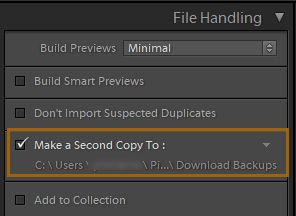
Adobe's documented Lightroom Classic import panel, reproduced from its import-options guide. It illustrates the second-copy control, not a completed backup of a SendPhoto shoot. Choose your own destination and verify the files.
Make Preview Edits Ready for Their Intended Use
A preview can be smaller than the final delivery while still meeting the promised quality. Check faces, focus, exposure, white balance, crop and distracting or private details in every selected image. If a correction essential to the agreed use cannot be completed yet, choose another frame or discuss the timing with the client.
Apply shared adjustments only to appropriate photographs. Adobe's Develop module instructions explain that Lightroom Classic can synchronize selected Develop settings from the current photograph to other selected photographs. In the Develop module, use Settings > Sync Settings, choose which settings to copy, and select Synchronize. Review the affected photographs afterwards; identical settings can produce different results under different light. Do not blindly copy a crop or local correction across unrelated frames.
Choose export settings for the promised purpose. A JPEG in sRGB can be a useful starting point for an ordinary web preview; a print deliverable needs its own agreed size and output requirements. Lightroom Classic's export guide documents File > Export, format/color-space choices, image sizing, metadata and watermark controls. Its Remove Location Info option removes GPS metadata on eligible exports. That does not remove a location identifiable within the photograph itself or settle every privacy concern.
Avoid telling clients that a smaller web preview is print-ready unless it meets the requested output. Keep masters separately and use filenames or folders that distinguish previews from final deliverables. Do not overwrite the original files with the exported set.
If you use automation, inspect its output and follow the project's handling requirements before sending files to another service. The AI photo editing guide covers tool choices; an automated adjustment is not evidence that the preview is ready to deliver.
Crafting a Clear Sneak Peek Delivery
The client should know what the link contains without guessing. A gallery can organize the preview, while a file-transfer link may be sufficient when the agreed task is simply receiving files. Choose the delivery method for the client's needs rather than treating one format as proof of premium service.
Use a clearly named preview gallery or delivery folder. Keep the working shortlist, sensitive rejected frames and unrelated sessions out of that handoff. Explain any changes expected between preview edits and the full collection so that early photographs are not mistaken for the finished assignment.
Your Delivery Email and Presentation
Keep the message personal and specific. Three presentation jobs matter:
- Identify the session. Use the client's name and a suitable reference to the shoot, while avoiding private details in a subject line or message likely to be forwarded.
- Explain the delivery. Name the preview set, included count, file purpose and whether downloads are enabled. State the full-gallery date separately.
- Use the agreed studio identity. Keep the sender, gallery name and studio branding recognizable. A custom domain is optional and depends on the service and plan; it does not by itself establish privacy or better service.
Here is a message template to adapt to the actual agreement:
Your preview gallery is ready, with the edited photographs included in our preview agreement. It is an early selection; the full gallery will follow on our agreed delivery date. Please use the files according to our sharing agreement. The access and download arrangements remain those we discussed. If a photograph raises a concern or you need a different handoff, reply before sharing it further.
Add the actual gallery link, count, full-gallery date, intended use and any access deadline before sending. Supply a password through a separate agreed channel when that is appropriate for the project. Do not include a made-up date or an access promise that differs from the gallery's settings.
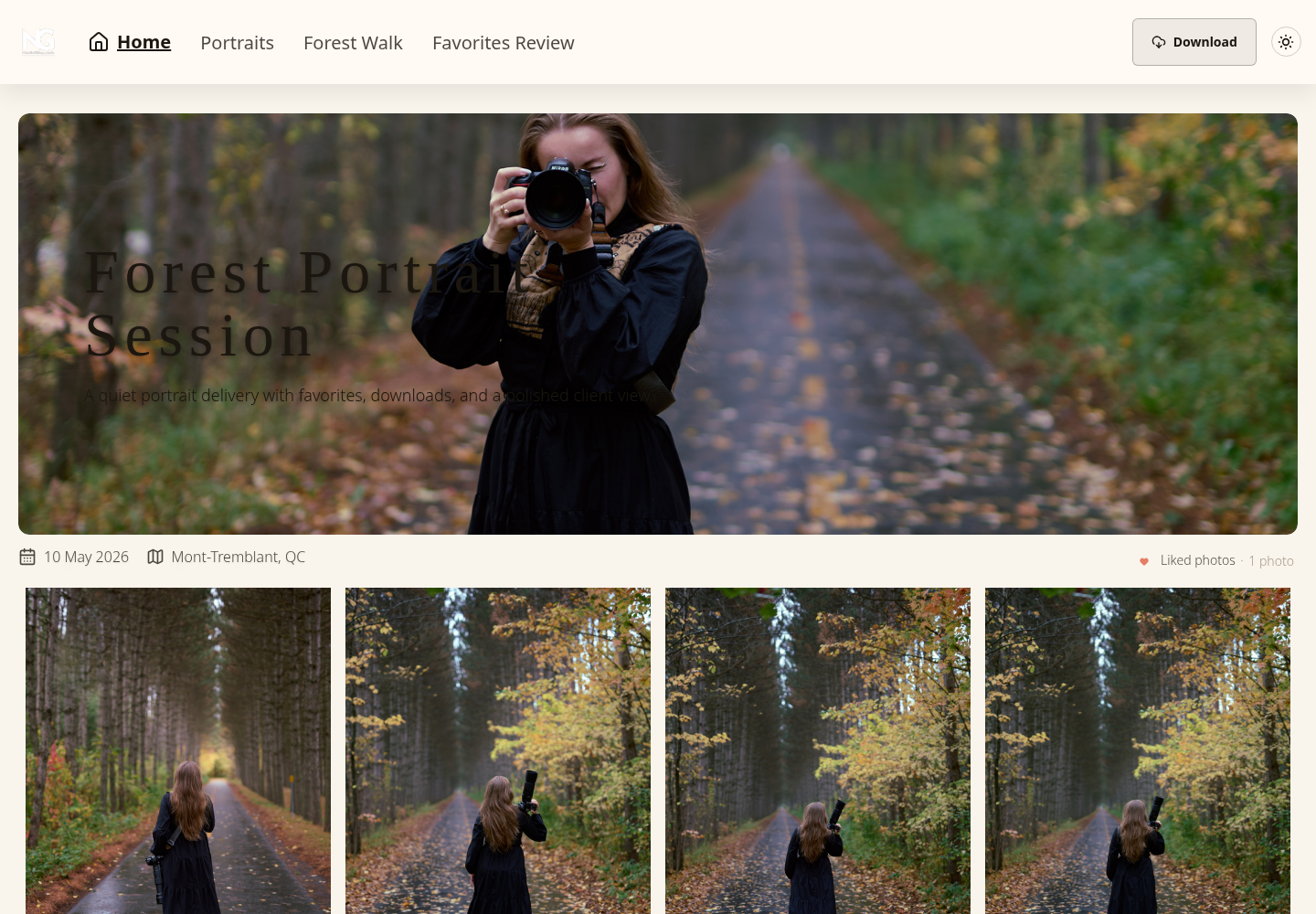
Existing SendPhoto gallery screenshot: “Forest Portrait Session,” with named collections, favorites navigation and a visible Download control. It illustrates gallery presentation, not a newly delivered sneak peek, confirmed client approval or a completed download.
Keep the full-gallery workflow moving after the preview is sent. Record the delivered filenames and any concerns raised, then complete the remaining culling and editing according to the original assignment. A preview should not quietly replace promised coverage or reset the final delivery deadline.
How to Share Your Sneak Peek Gallery Carefully
Separate three decisions: who may view, which files they may download, and what they may publish. Passwords and download controls address access; they do not establish model permissions, licensing or approval to publish an image.
For SendPhoto, use the gallery's Sharing controls to enable the public gallery link and apply an optional password. Configure the relevant gallery and collection download settings for the intended handoff. An allowed recipient normally opens a shared gallery without creating an account; a gallery password is still required when enabled.
Use a long, unique password within the application's supported length. Share it with the intended group through the agreed channel and avoid using client details as the password. Someone who has the link and password may pass them on, and visible images can still be captured or copied.
Watermarks and the Access Period
A visible watermark can identify the studio or mark an image as a preview. It cannot guarantee that every repost carries the credit or prevent cropping, removal or screenshots. Agree whether the client should receive marked previews, unmarked sharing files or both, rather than assuming a watermark is always desirable.
In SendPhoto, an Original image download can be a watermarked derivative when watermarking applies; collection-level exceptions can change that output. Image watermarking does not apply to videos. Keep an independent unmarked master and choose the output that matches the delivery agreement.
Set an access period because it fits the project, not to create artificial urgency. A seven- or fourteen-day period can be a discussed example, but it may be too short for clients travelling after an event or waiting for another decision-maker. State the actual date and how a client can request further access.
SendPhoto's sharing expiry disables sharing rather than deleting stored photographs. It cannot recall files already downloaded or copies posted elsewhere. Use a separate gallery when preview and final deliveries need different gallery access settings; collections organize navigation rather than providing independent access permissions.
The password-protected gallery guide explains the access controls in more detail. Treat them as part of a careful handoff, with independent masters and explicit usage arrangements, rather than a promise of complete privacy.
How Many Photos Should I Put in a Sneak Peek?
Use the count agreed for the session. 10–15 images is an optional planning example, not a minimum, maximum or evidence of what every client expects. A smaller collection can be appropriate if it covers the agreed purpose; a larger set requires more selection, editing and review work.
For variety, consider these four jobs:
- A main portrait or other clear image of the principal subjects.
- A candid moment that helps tell the story.
- A wider view of the venue or setting, when suitable to share.
- Details that convey the session's mood without exposing private information.
Avoid adding weak or sensitive frames just to reach a number. State whether the preview photographs count toward the final collection, and include only the variety that fits the actual brief.
Should I Charge Extra for a Fast Sneak Peek?
Choose a pricing arrangement the studio can sustain. You can include a preview in a package, offer it as an optional service, or decline an accelerated delivery that would compromise the assignment. Describe the count, deadline and edit scope clearly whichever option you choose.
Estimate the work: selection, editing, review, export, upload, communication and any rescheduling needed for urgency. A preview offered without a separate fee still consumes time. Possible publicity or referrals are uncertain and should not be treated as guaranteed compensation for that work.
If a client asks for a faster preview after booking, agree the revised scope and any fee before accepting the change. Keep the full-gallery commitment visible; rushing one deliverable should not silently reduce another.
Does the Delivery Window Have to Be 72 Hours?
No. Choose a realistic window that matches the agreed scope and your schedule. Same-day, 72-hour or one-week delivery can each be a proposed arrangement; none is a universal gold standard. Specify when the clock starts and what the client will receive.
If the original date becomes impractical, contact the client promptly with a revised date and explanation. Avoid treating a smaller set or a delayed full gallery as an automatic substitute for the original agreement. Reliability includes communicating a problem, not pretending that a deadline can always be met.
A useful sneak peek is a clearly scoped preview backed by preserved originals, careful edits and an understandable handoff. Explore SendPhoto's gallery delivery features if a client gallery fits that handoff, and check the current plans for the controls your studio needs.